
Angry Email Translator
Free instant helper that rewrites angry emails into calm, professional language.
Angry Email Translator is a niche, free tool that solves a common pain point for professionals who lose their cool in emails. It’s best used as a quick sanity check before hitting send, but don’t expect deep customization. It lacks integrations, tone controls, and grammar checking. If you need to protect relationships on the fly, it’s worth a try. For more comprehensive rewriting, consider tools like Grammarly's tone adjustments or a full AI writing assistant, but for a zero-cost, no-signup anger diffuser, this works.
Verified 2d ago · liveness 57/100 · cite: rightaichoice.com/tools/angry-email-translator
- Professionals who need to cool down angry work emails
- Customer service agents handling irate customers
- Anyone prone to emotional email drafts
- Managers wanting to maintain team harmony
- Long-form writing or creative content
- Users needing advanced grammar checks
- Non-English email translation (English only)
We scan live Reddit threads, YouTube comments, X posts, G2 reviews and other communities — and hand you an honest verdict in under a minute.
- Honest verdict, not marketing
- Real pros & cons from real users
- Attributed quotes with receipts
3 free scans · no card needed
Skip Angry Email Translator if you need a full-featured writing assistant with grammar checks, tone customization, or integrations with your email client, or if your drafts regularly exceed 150 characters.
It’s completely free, with no hidden costs or premium tiers. Unlike paid writing assistants like Grammarly Premium ($12/mo) or Jasper (starting $39/mo), Angry Email Translator costs nothing but also offers far fewer features. It’s best for individual users or small teams who just need an occasional anger diffuser.
In short
Angry Email Translator — Free instant helper that rewrites angry emails into calm, professional language. Best for Professionals who need to cool down angry work emails, Customer service agents handling irate customers, Anyone prone to emotional email drafts. Free to use.
What people actually say about Angry Email Translator — is it worth it?
We ran a structured research pass across product reviews, community discussions, and post-purchase forum threads to surface the patterns vendors won't publish themselves. Below: the recurring strengths, the hidden costs people mention most, and the cohort that consistently regrets adopting this tool.
9 mentions across 1 source (Product Hunt) · researched Sep 25, 2026.
Weighted by the 9 posts each of 1 source contributed.
- +Genuinely free with no signup, no account, and no usage cap
- +One-click anger-to-polite rewriting is fast and beginner-friendly
- +Hits a real, relatable pain point — sending emails you regret
- +Donation-funded model means no data harvesting or upsell pressure
- +Hall of Fame before/after examples make the value obvious instantly
- −150-character input cap rules out long, genuinely angry emails
- −Community says it's just a ChatGPT prompt wrapper with little added value
- −No Slack, Gmail, or browser-extension integrations despite user requests
- −English-only limits its usefulness in multilingual workplaces
- −No API, no team features, no way to embed it in existing workflows
- • None reported — it's genuinely free, funded by optional donations
Viability Score
How well maintained and how widely used is Angry Email Translator? Built from what the vendor actually publishes (docs, changelog, tutorials, integrations, pricing), whether the site is live, and how much real users discuss it. How we calculate this
Last calculated: September 2026
How we score →Key Features
- Angry-to-calm translation
- AI-powered tone detection
- No account required
- Unlimited use
- Web-based interface
- One-click rewriting
- Neutralize aggressive language
- Polite and constructive phrasing
- Input character limit of 150 characters
- Donation-supported free model
About Angry Email Translator
Angry Email Translator is a free, web-based tool that converts emotionally charged emails into professional, neutral, and safe language. Designed for professionals, customer service agents, and anyone who needs to maintain composure in written communication, it uses AI to detect aggressive tone and replace it with polite, constructive phrasing. Simply paste your draft (up to 150 characters), click translate, and receive a polished version ready to send. No sign-up required, unlimited use, and the service is entirely free, supported by donations. Unlike generic grammar checkers, it specifically targets anger and frustration, making it a unique solution for diffusing digital conflict. The website features a Hall of Fame with before-and-after examples illustrating its effectiveness. It supports English only and is best for short, explosive messages rather than lengthy rants. There are no integrations, no API, and no collaboration features—it’s a simple, standalone tool. For a quick sanity check before sending, especially when emotions run high, it’s a handy utility.
Behind the Verdict
Angry Email Translator is a refreshingly focused utility. It doesn’t try to be a full writing assistant; it targets one specific problem—emails written in the heat of anger—and solves it with a single click. The interface is minimal: paste your draft, hit translate, and get a calmer version. The 150-character limit means it’s best for short, explosive messages like a terse reply to a client or a frustrated note to a colleague. For longer rants, it won’t handle the entire email, but you can still translate key sentences. The tool’s simplicity is both its strength and weakness. On the plus side, it’s free, unlimited, and requires no sign-up—you can use it instantly on any device with a browser. The Hall of Fame provides concrete before-and-after examples, which builds trust and sets expectations. On the downside, you get no control over the tone: there are no sliders for politeness or formality, and the output might occasionally lose the underlying message nuances. It also doesn’t check grammar or spelling, so you may need to clean up other issues. For the target audience—customer service reps, managers, and anyone in high-pressure communication roles—it can be a genuine lifesaver for preventing an angry email from damaging a relationship. However, if you need a tool that integrates with Gmail or Outlook, offers tone adjustments, or handles document-length text, this isn’t it. For those cases, consider Grammarly’s tone adjustments or a broader AI writing assistant. For a zero-cost anger diffuser, it does the job well.
Researching Angry Email Translator? Get your full AI stack in 60 seconds.
Free, no signup — tell us your goal and get tools matched to your budget & existing stack.
Real-world workflow fit
Concrete scenarios for the personas Angry Email Translator actually fits — and what changes day-one when you adopt it.
A customer sends a rude email, and you draft a defensive response. Before hitting send, you paste your draft into Angry Email Translator and receive a professional, calm version that resolves the issue without escalating.
Outcome: You send a response that maintains professionalism and defuses the situation, keeping the customer relationship intact.
You receive an email from a direct report that makes you angry. You write a harsh reply but decide to run it through Angry Email Translator first.
Outcome: The tool provides a constructive, neutral version, allowing you to address the issue without damaging the employee's morale.
A client’s feedback is unreasonable, and you type a heated response. You use the tool to soften your email while still making your point.
Outcome: You send a polished email that asserts your perspective but in a way that preserves the working relationship.
Use Cases
Limitations
- Angry Email Translator is a web-based tool with no integrations with email platforms (Gmail, Outlook), no API, no collaboration features, and no customization of tone strength.
- It works only as a web tool where you paste text, limiting its workflow integration.
- It does not check grammar or spelling, and the rewriting may sometimes lose nuance.
- There is no history or version control.
as of 2026-08-28
Verification history
We have re-verified Angry Email Translator 19 times since . Each pass re-reads the vendor's own pages and re-checks every listed field against that evidence; passes where nothing had changed are marked as such.
- — re-checked, vendor evidence unchanged
- — re-checked, vendor evidence unchanged
- — re-checked, vendor evidence unchanged
- — re-checked, vendor evidence unchanged
- — re-checked, vendor evidence unchanged
- — re-verified summary, description, our verdict, our analysis, pricing model, pricing tiers, features, integrations, who it suits, who should skip it
Showing the 6 most recent of 19 verification passes.
Free to cite with attribution — this page re-verifies continuously.
12-month cost
Project the real annual outlay, including the implied monthly cost when only an annual tier is published.
Vendor list price only. Add-on usage, seat overages, and contract minimums are surfaced under Hidden costs & gotchas.
Plans compared
For each published Angry Email Translator tier: who it actually fits, and what it adds vs. the previous tier. Cross-reference the cost calculator above for projected annual outlay.
Free
$0/mo
Ideal for
Anyone who occasionally needs to cool down a short, angry email, such as a freelancer, customer service rep, or manager—no cost, no sign-up needed.
What this tier adds
Free entry point: unlimited use, AI-powered translation, web-based interface, no account required.
Where the pricing makes sense
The company stage and team size where Angry Email Translator's pricing actually pencils out — and where peers do it cheaper.
It’s completely free, with no hidden costs or premium tiers. Unlike paid writing assistants like Grammarly Premium ($12/mo) or Jasper (starting $39/mo), Angry Email Translator costs nothing but also offers far fewer features. It’s best for individual users or small teams who just need an occasional anger diffuser.
Setup time & first value
How long it actually takes to get something useful out of Angry Email Translator — broken out by persona, not the marketing-page minute.
You can start using it immediately—no account setup or learning curve. Open the website, paste your email (up to 150 characters), click translate, and you have your calmer version in seconds. It’s a true zero-friction tool.
Resources & Guides
Tutorials & Learning
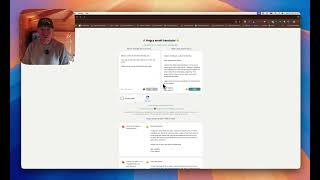
Angry Email Translator
Mersudin Forbes
email-angry email translator
Lazer Wealth
Angry Email Translator
MrKnow
YouTube returned 6 videos for “Angry Email Translator”, and we withheld 3: 3 did not mention Angry Email Translator. Showing the 3 we can prove are about Angry Email Translator.
Official links
Tools that pair well with Angry Email Translator
Common stack mates teams adopt alongside Angry Email Translator, with the specific reason each pairing earns its keep.

DeepL Write Pro
DeepL's paid writing assistant that rewrites for clarity and keeps a whole team on one brand voice in English, German, French, Spanish, and Swiss German.
Grammarly
Grammarly is AI writing assistance that proofreads, rewrites and adjusts tone inside the apps you already type in.

Glarity
Glarity is a free browser extension that summarizes YouTube videos, PDFs and webpages and translates any page side by side
Alternatives to Angry Email Translator
View all
DeepL Write Pro
DeepL's paid writing assistant that rewrites for clarity and keeps a whole team on one brand voice in English, German, French, Spanish, and Swiss German.

Frequently Asked Questions
Categories
Topics
Used Angry Email Translator? Help shape our editorial sentiment research.