
Attention Insight
AI heatmap tool that predicts where people look on your design or live page in seconds
If you iterate on visual hierarchy weekly and keep losing arguments to taste, this earns its keep — Percentage of Attention and the contrast map hand you a number to point at. The 96% accuracy is vendor-reported, so treat output as directional, not proof. Basic's 40 credits vanish fast; past a few hundred visuals a year, you're really shopping Pro.
Verified 1d ago · liveness 82/100 · cite: rightaichoice.com/tools/attention-insight
- UX designers who need hierarchy evidence before running a usability study
- Marketers optimizing ad creatives and landing pages for attention
- Agencies producing shareable predictive reports for client sign-off
- Product teams narrowing ten design iterations down to a testable few
- Teams that need real user behavior analytics rather than predicted attention
- Anyone expecting session recordings or qualitative interview feedback
- High-volume testers on a tight budget — Basic's 40 credits run out fast
We scan live Reddit threads, YouTube comments, X posts, G2 reviews and other communities — and hand you an honest verdict in under a minute.
- Honest verdict, not marketing
- Real pros & cons from real users
- Attributed quotes with receipts
3 free scans · no card needed
Skip Attention Insight if you need observed user behaviour — session recordings, interview feedback or real participant eye-tracking — rather than a model's prediction of where attention lands.
Basic exports carry an Attention Insight watermark, so client-facing work effectively forces an upgrade to Pro at $129/mo month-to-month or $98/mo billed annually as $1,180.
Basic at $31/mo month-to-month ($24/mo billed annually as $288) is the cheapest entry point and suits a solo designer testing a handful of visuals a month; Pro at $129/mo month-to-month ($98/mo billed annually as $1,180) is where API access, no watermark and Collaborate & Share begin. Agencies needing unlimited credits and 30-minute video land on Hero at $324/mo month-to-month ($250/mo billed annually as $2,999) — cheaper than a single lab eye-tracking study, but pricier than lighter
In short
Attention Insight — AI heatmap tool that predicts where people look on your design or live page in seconds. Best for UX designers who need hierarchy evidence before running a usability study, Marketers optimizing ad creatives and landing pages for attention, Agencies producing shareable predictive reports for client sign-off. Free to start; paid plans from $31/mo.
What's new in Attention Insight
Checked 6 days agoAcross the latest 5 updates: 5 news mentions.
Kevin Semanda on the Philosophy of Brand Design
Interview on how brand design philosophy impacts user attention, written for designers working with predictive attention metrics.
Ilaha Alieva on Curiosity, UX Research, and Better Design
Discussion of how curiosity drives UX research and improves design outcomes, framed around attention optimization.
How Savar Shandilya Uses AI to Scale Growth Without Replacing Human Creativity
Case study on using AI for growth while preserving human creativity, applicable to attention-driven design workflows.
Sofia Drankovich on UX, AI, and Conversion-Focused Design
Interview about integrating AI into UX for conversion optimization, relevant to attention analytics.
How Artur Tkachev Uses AI to Turn Life Science Marketing Into Commercial Growth
Case study on applying AI in life science marketing for commercial growth, showcasing Attention Insight's role.
What people actually say about Attention Insight — is it worth it?
We ran a structured research pass across product reviews, community discussions, and post-purchase forum threads to surface the patterns vendors won't publish themselves. Below: the recurring strengths, the hidden costs people mention most, and the cohort that consistently regrets adopting this tool.
40 mentions across 3 sources (YouTube, Product Hunt, Lemmy) · researched Aug 28, 2026.
Average across the 3 sources that answered — each source counts once, not each post.
- +Fast, instant attention heatmaps and clarity scores that save time.
- +Easy to use with intuitive UI, praised by Product Hunt users.
- +Cost-effective alternative to expensive eye-tracking studies.
- +Helpful for testing design variations and CTA visibility.
- +Impresses clients and boosts confidence in design decisions.
- −AI predictions may not match real eye-tracking accuracy for all designs.
- −Limited community feedback after 2022; long-term reliability unclear.
- −Not a substitute for actual usability testing with real users.
- −Video attention testing limited to 1 second on Pro plan.
- −Pricing model based on credits can get costly for heavy use.
- • Credits-based system could lead to additional costs for heavy usage beyond plan limits.
- • Higher tiers are significantly more expensive, and users may need to upgrade for full features.
Viability Score
How well maintained and how widely used is Attention Insight? Built from what the vendor actually publishes (docs, changelog, tutorials, integrations, pricing), whether the site is live, and how much real users discuss it. How we calculate this
Last calculated: October 2026
How we score →Key Features
- AI attention heatmaps from a model trained on millions of real eye-tracking fixations
- Clarity Score and Focus Score for visual hierarchy checks
- Percentage of Attention metric on individual design elements
- Contrast map to expose weak visual hierarchy
- Requestable AI recommendations on design improvements
- Side-by-side comparison of design variations
- Competitor visual benchmarking against your own design
- Video attention testing — 1-second clips on Pro, up to 30-minute clips on Hero
- Figma Visual Usability Checker plugin
- Chrome extension for testing live web pages
- Free Adobe Express add-on plus InDesign, Photoshop, and Sketch plugins
- API access on Pro and Hero (4 API transactions per credit)
- URL testing covering up to 3 page sections
- Instant reports and shareable analysis links
- Collaborate & Share workspace on Pro and above
About Attention Insight
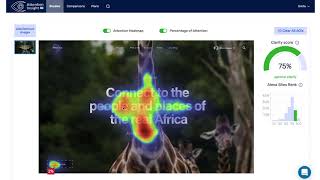
Attention Insight generates predictive attention heatmaps from a static image, a live URL, or a short video, using a convolutional neural network trained on millions of real eye-tracking fixations. The vendor claims up to 96% accuracy and reports 663,959 designs tested. No participant recruitment, no weeks-long study — upload a file or paste a URL and get metrics back in seconds. Each analysis returns an Attention Heatmap, Clarity Score, Focus Score, Percentage of Attention per element, a Contrast map, and a requestable AI Recommendation. Teams compare variations side by side and benchmark against a competitor page, which is how a stack of iterations narrows to the two worth putting in front of real users. It is built for people who ship visual work: UX designers defending hierarchy to stakeholders, marketers tuning ad creatives and landing pages, and agencies that want a shareable report instead of "I'm not feeling it." The workflow plugs into Figma via the Visual Usability Checker, plus a free Adobe Express add-on, plugins for InDesign, Photoshop, and Sketch, and a Chrome extension for live pages. Basic is $31/mo (or $24/mo billed annually) with 40 credits; Pro runs $129/mo ($98/mo annually) with 200 credits, 2 seats, and API access; Hero is $324/mo ($250/mo annually) with unlimited fair-use credits and 30-minute video testing. Position it as a pre-launch validation layer — it predicts what the average viewer notices first, not why a real user abandoned checkout.
Behind the Verdict
We'd reach for Attention Insight at a specific moment: late in the design process, when you have five variants of a landing page or ad and no budget for a real eye-tracking study. It gives you a defensible ranking of what gets noticed, in seconds, and the Figma plugin means you never leave the canvas. For agencies especially, a shareable report with a heatmap and percentage-of-attention figures closes client conversations that opinions can't. Where it bites is credit math. Basic's 40 credits sound generous until you're comparing every variant and benchmarking competitors — a single image test, a URL, an AI recommendation each burn one. Anyone doing serious volume should skip straight to Pro's 200 credits and API access. Pass on it if your question is behavioral — scroll depth, session recordings, why someone bounced — or if a study's credibility depends on observed participants rather than a prediction. It complements usability testing, it doesn't replace it. Closest alternative is the general-purpose UX research stack (or manual eye-tracking hardware), which costs more and moves slower. Attention Insight trades rigor for speed and repeatability. In practice, use it early to refine hierarchy, then validate the finalists with real users — that's exactly how the vendor's own case studies frame it.
Researching Attention Insight? Get your full AI stack in 60 seconds.
Free, no signup — tell us your goal and get tools matched to your budget & existing stack.
Real-world workflow fit
Concrete scenarios for the personas Attention Insight actually fits — and what changes day-one when you adopt it.
You have three competing homepage layouts and a stakeholder meeting on Thursday. You run each through the Figma Visual Usability Checker, compare the Percentage of Attention on the primary CTA, and pull the Clarity Score into a short slide.
Outcome: You walk in with a ranked shortlist and a contrast map showing why two layouts lose the headline, instead of arguing about taste.
You upload four ad banner variants, check which one puts the CTA inside the attention path, and test the winning banner's landing page URL (up to 3 sections) before the campaign goes live.
Outcome: You cut the losing creatives before spending media budget and have a reason to shift spend toward the variant with stronger attention on the offer.
You analyse the client's current page and a competitor's page side by side, then share the analysis link and heatmap through the Collaborate & Share workspace.
Outcome: The client signs off on the redesign direction in one meeting because the recommendation is backed by a shareable visual instead of opinion.
Use Cases
- Test a landing page design against two variants to see which CTA draws more attention.
- Upload an ad banner and check whether the call-to-action is missed in the first seconds.
- Analyze a product screenshot to confirm the main feature image wins visual priority.
- Compare a new homepage design with industry benchmarks using the Clarity Score.
- Use the Figma plugin to iterate on UI components without leaving your design tool.
- Generate a shareable report to walk a client through heatmap and clarity improvements.
- Test a live page via the Chrome extension before committing to a redesign.
- Run a 30-minute video test on Hero to see where viewers look in a product demo.
Models Under the Hood
as of 2026-10-16
Limitations
- Credit-based pricing limits volume on lower tiers: Basic includes 40 credits and Pro 200 credits, while Hero and Enterprise advertise unlimited credits but are subject to a fair-use cap of 30 minutes of video testing and 3,000 API transactions.
- Basic applies a watermark to reports, and video testing is capped at 1 second on Pro, so real video work starts at Hero.
- API access begins on Pro with 4 API transactions per credit (200 credits = 800 API transactions).
- Extra seats raise the true cost for teams (€39/mo on Pro; €99/mo on Hero and Enterprise).
- Predictions are AI-generated attention estimates from a model trained on eye-tracking fixations, so output should be treated as pre-launch validation rather than a replacement for human usability testing.
as of 2026-10-09
Verification history
We have re-verified Attention Insight 20 times since . Each pass re-reads the vendor's own pages and re-checks every listed field against that evidence; passes where nothing had changed are marked as such.
- — re-verified summary, description, our verdict, our analysis, pricing model, pricing tiers, features, integrations, who it suits, who should skip it
- — re-verified summary, description, our verdict, our analysis, pricing model, pricing tiers, features, integrations, who it suits, who should skip it
- — re-verified summary, description, our verdict, our analysis, pricing model, pricing tiers, features, integrations, who it suits, who should skip it
- — re-verified summary, description, our verdict, our analysis, pricing model, pricing tiers, features, integrations, who it suits, who should skip it
- — re-verified summary, description, our verdict, our analysis, pricing model, pricing tiers, features, integrations, who it suits, who should skip it
- — re-verified summary, description, our verdict, our analysis, pricing model, pricing tiers, features, integrations, who it suits, who should skip it
Showing the 6 most recent of 20 verification passes.
Free to cite with attribution — this page re-verifies continuously.
12-month cost
Project the real annual outlay, including the implied monthly cost when only an annual tier is published.
Vendor list price only. Add-on usage, seat overages, and contract minimums are surfaced under Hidden costs & gotchas.
Plans compared
For each published Attention Insight tier: who it actually fits, and what it adds vs. the previous tier. Cross-reference the cost calculator above for projected annual outlay.
Free Trial
$0
Basic
$31/mo
Ideal for
Solo designer, marketer or solopreneur testing a handful of images and URLs a month.
What this tier adds
Starting paid tier: 1 user seat and 40 credits, with an Attention Insight watermark on exports.
Pro
$129/mo
Ideal for
UX experts and marketers running regular design iteration who need clean client-ready output.
What this tier adds
Adds a second seat, 200 credits, no watermark, 1-second video testing, API access and Collaborate & Share.
Hero
$324/mo
Ideal for
Agencies testing all types of design materials, including video, at high volume.
What this tier adds
Moves to unlimited credits with a 30-minute video fair-use cap, 3,000 API transactions, expert design feedback and SSO.
Enterprise
Custom
Ideal for
Larger teams needing custom seat counts, procurement support and a formal service level agreement.
What this tier adds
Everything in Hero plus custom user seats, dedicated account manager, security review, procurement support and an SLA.
Where the pricing makes sense
The company stage and team size where Attention Insight's pricing actually pencils out — and where peers do it cheaper.
Basic at $31/mo month-to-month ($24/mo billed annually as $288) is the cheapest entry point and suits a solo designer testing a handful of visuals a month; Pro at $129/mo month-to-month ($98/mo billed annually as $1,180) is where API access, no watermark and Collaborate & Share begin. Agencies needing unlimited credits and 30-minute video land on Hero at $324/mo month-to-month ($250/mo billed annually as $2,999) — cheaper than a single lab eye-tracking study, but pricier than lighter
Setup time & first value
How long it actually takes to get something useful out of Attention Insight — broken out by persona, not the marketing-page minute.
Solo designer: minutes — sign up for the 14-day free trial (no credit card), upload an image and read the first heatmap the same session. Figma user: minutes more to install the Visual Usability Checker and run a check in-canvas. Agency or team: budget an hour to invite seats, set up the Collaborate & Share workspace on Pro, and agree naming conventions for saved analyses. Live-site testing via
Switching to or from Attention Insight
How to bring data in from common predecessors and how to get it back out — written for the switcher, not the buyer.
- →From manual heuristic reviews: upload the same screens you already critiqued and use Percentage of Attention and Clarity Score to replace opinion-based notes.
- →From a lab eye-tracking study: use Attention Insight to screen candidates first, then spend the study budget on the two or three surviving designs.
- →From screenshot annotations in Figma: install the Visual Usability Checker plugin and run the hierarchy check in-canvas instead of marking up exports.
- →From spreadsheets of A/B results: benchmark variants pre-launch with side-by-side comparison before you commit traffic.
- →From competitor teardown decks: use competitor visual benchmarking to put your design and theirs under the same heatmap.
- ↗To Maze: when you need unmoderated task-based testing with real participants rather than predicted attention.
- ↗To full session-recording and product analytics tools: when you need to see what real visitors actually did on the live page.
- ↗To a traditional eye-tracking lab study: when the deliverable requires observed participant fixations for credibility.
- ↗To lighter Figma-only attention plugins: when you test a handful of screens a quarter and the credit model does not pay off.
Integrations
Resources & Guides
- Tutorialattentioninsight.com
Tutorials
Step-by-step walkthrough from attentioninsight.com
- Resourceattentioninsight.com
Knowledge Base
Book a Demo
- Resourceattentioninsight.com
Website and Conversion Optimization Blog
Get the most of Attention Insight. Our blog covers case studies, product updates, design and conversion optimization tips, and much more.
- Resourceyoutube.com
Watch
Helpful link from youtube.com
Tutorials & Learning

Official links
Tools that pair well with Attention Insight
Common stack mates teams adopt alongside Attention Insight, with the specific reason each pairing earns its keep.

Figr
Figr's AI design agent maps your product's Visual Context Graph before it designs a screen.

Semrush Advertising Toolkit
Competitive ad intelligence plus AI-powered Google and Meta ad campaign launch, inside Semrush.

Creative Fast AID
Selfstorming (formerly Creative Fast Aid) turns a brief into framework-backed campaign strategy, research decks and naming options.
Featured Head-to-Head Comparisons
Attention Insight vs Mostly Ai
These tools serve completely different purposes. Choose Mostly AI if you need high-fidelity synthetic data for ML training or privacy-safe analytics; choose Attention Insight if you're a designer or marketer aiming to predict visual attention on designs. They are not competitors—your use case dictates the pick.
Attention Insight vs Formula Bot
If you need to analyze numbers and generate insights without coding, Formula Bot is the clear choice with its SQL generation and dashboard builder. Attention Insight is purpose-built for designers validating visual hierarchy—completely different tools for different jobs. Base your pick on whether your primary pain point is data analysis or design optimization.
Attention Insight vs Mineral Alphabet X
If you're a UX designer or marketer needing instant visual validation, Attention Insight is ready to use with a freemium model and proven accuracy. Mineral is no longer a standalone product—its technology now lives inside Driscoll's and John Deere, so it's only relevant if you partner with those companies. For most buyers, Attention Insight is the practical choice.
Attention Insight vs Penpot
Penpot is your pick if you need a free, open-source design platform with AI agent workflows and full data control. Attention Insight is better for quick, data-driven validation of visual hierarchy without running user tests. Choose Penpot for designing and prototyping; choose Attention Insight for analyzing attention on existing designs.
Alternatives to Attention Insight
View all
Figr
Figr's AI design agent maps your product's Visual Context Graph before it designs a screen.

Semrush Advertising Toolkit
Competitive ad intelligence plus AI-powered Google and Meta ad campaign launch, inside Semrush.

Creative Fast AID
Selfstorming (formerly Creative Fast Aid) turns a brief into framework-backed campaign strategy, research decks and naming options.
Frequently Asked Questions
Best-of guides
Used Attention Insight? Help shape our editorial sentiment research.