Brainy Docs is live · pricing not published · last verified 25 Oct 2026 · viability monitor

Brainy Docs
Upload a PDF and get an AI explainer video, slide deck, flashcards, notes, FAQs or a quiz — in the browser, no install.
Brainy Docs is worth a look if your bottleneck is one PDF and too many downstream formats — MP4 explainer, PowerPoint, blog post, flashcards, quiz and Feynman explanation all come off the same upload with no install. The site publishes 11K+ users, a 4.8/5 average rating and 2,300+ videos created, and voiceover in 70+ languages is a real differentiator against single-output converters. It is not the pick if you need frame-level video editing (output is template-driven) or shared project workspaces. Two caveats to resolve first: the vendor is migrating to BrainyCanvas.com, so confirm account and project continuity, and the pricing page shows only a loading spinner, so get plan and quota
Verdict generatedVerified 5d ago · liveness 58/100 · cite: rightaichoice.com/tools/brainy-docs
- Educators turning textbook chapters and course outlines into lesson explainer videos
- Students converting dense reading into videos, study notes, flashcards, and quizzes
- Content marketers repurposing whitepapers into blog posts and video explainers
- Corporate trainers who need a presentation or training video built from a report fast
- Teams that need real-time collaboration, comments, or shared project workspaces
- Anyone needing frame-level video editing or a timeline editor
- Brands with rigid video style guides that can't accept template-driven output
We scan live Reddit threads, YouTube comments, X posts, G2 reviews and other communities — and hand you an honest verdict in under a minute.
- Honest verdict, not marketing
- Real pros & cons from real users
- Attributed quotes with receipts
3 free scans · no card needed
Skip Brainy Docs if you need frame-level video editing, shared team workspaces, or a vendor whose pricing tiers and platform roadmap are settled — the site is mid-migration to BrainyCanvas.com and its pricing page currently shows a loading state.
Because the pricing page renders only a loading state, quota and seat limits aren't published — ask the vendor what happens when you exceed your plan's document or video allowance before you upload a batch.
Brainy Docs sells a free entry point with no credit card required, but the pricing page currently renders only a loading state, so no tier pricing can be quoted here — get plan and quota numbers from the vendor. Compare against single-output PDF-to-video tools, which typically cost less per month because they do one thing, and against full slide/video suites, which cost more but give you an editor.
In short
Brainy Docs — Upload a PDF and get an AI explainer video, slide deck, flashcards, notes, FAQs or a quiz — in the browser, no install. Best for Educators turning textbook chapters and course outlines into lesson explainer videos, Students converting dense reading into videos, study notes, flashcards, and quizzes, Content marketers repurposing whitepapers into blog posts and video explainers. Pricing not published.
What is Brainy Docs?
Brainy Docs — Upload a PDF and get an AI explainer video, slide deck, flashcards, notes, FAQs or a quiz — in the browser, no install. Best for Educators turning textbook chapters and course outlines into lesson explainer videos, Students converting dense reading into videos, study notes, flashcards, and quizzes, Content marketers repurposing whitepapers into blog posts and video explainers. Pricing not published.
Brainy Docs is a browser-based tool that turns a single PDF into a finished piece of content. You upload a research paper, textbook chapter, course outline, report or resume, then pick which of the extracted images and pages should appear in the output. From there the same source document can become an explainer video with voiceover, a slide presentation, a blog post, an FAQ set, study notes, flashcards, a quiz or a Feynman-style plain-language explanation. Voiceovers come in 70+ languages and accents, and you can nudge the reading level with prompts like "explain like I'm 5" or "explain to a college student." Finished explainers download as MP4 video, PDF or PowerPoint; themes and templates handle branding, and the vendor will build a custom template for an organization on request. The vendor publishes trust numbers of 11K+ users, a 4.8/5 average rating, 10,000+ documents converted, 2,300+ videos created and 1,700+ presentations created. It is aimed at educators building lesson explainers, students converting dense reading into revision material, marketers recycling whitepapers, and trainers who need a deck or training video the same day. Two things to verify yourself before you commit: the site announces a migration to BrainyCanvas.com, and the public pricing page currently renders a loading state instead of a tier list, so plan, quota and seat details are not visible there.
Key features
- PDF to AI explainer video with voiceover generated in minutes
- Select which extracted images and pages appear in the final output
- Voiceovers in 70+ languages and accents, with hundreds of voice options
- Download explainer output as MP4 video, PDF, or PowerPoint
- PDF to presentation with auto-generated slides
- PDF to blog post generator
- PDF to flashcards for memorization
- PDF to FAQs with extracted questions and answers
- PDF to study notes summarizer
- PDF to quizzes for knowledge testing
- PDF to Feynman technique simplified explanations
- Audience-targeted prompts like "explain like I'm 5" or "explain to a college student"
- Themes and templates for branding, with custom templates available on request
- Preview explainer slides before generating the final video
- Browser-based — nothing to download or install
Behind the verdict
Brainy Docs solves a narrow but real problem well: you have one document and you need several different deliverables from it. The three-step flow — select your PDF, customize the output by choosing which extracted images and pages to use, then generate — keeps the human in the loop on the part that matters (what goes in the video) while automating the tedious part (writing a script, recording a voiceover, laying out slides). The format list is long for a single-purpose tool: slides, video explainer, blog post, FAQs, study notes, flashcards, quizzes and Feynman explanations. For an educator with a textbook chapter or a student with 60 pages of dense reading, that breadth is the value — one upload, revision material and a lesson video both come out. The multilingual voiceover coverage (70+ languages and accents, with hundreds of voice options) is the feature hardest to replicate with a generic chatbot, and it is what makes the tool useful for non-profits and global training teams. The audience-targeting prompts are a small but genuinely useful touch: "explain like I'm 5" and "explain to a college student" are the two register shifts people actually want. Weaknesses are structural rather than hidden. The output is template-driven, so a brand with a rigid video style guide will find the themes and templates constraining — custom templates exist but have to be requested from the vendor. There's no frame-level or timeline editor mentioned anywhere on the site, so treat what you download as finished rather than as a first cut you'll refine. And the site itself carries a migration banner to BrainyCanvas.com, described as a better, more powerful platform; that is a good sign for the roadmap and a risk for anything you build into a long-lived library, so confirm what happens to accounts and existing projects. On pricing, the vendor's pricing page currently renders only a loading state rather than a list of tiers, so plan, quota and seat detail is something you have to ask about — this review will not guess at it. Practically: use it for one-off transformations where speed beats polish, keep your source PDFs, and don't move a whole content library onto it until the BrainyCanvas move is clarified.
Limitations
- The vendor's own site carries a banner announcing a migration to BrainyCanvas.com, described as a better, more powerful platform, so verify what happens to accounts and existing projects before you commit long-lived content.
- The public pricing page currently renders only a loading state rather than listing tiers, so plan, quota and seat details aren't visible there — ask the vendor directly.
- Output is template-driven: there's no timeline or frame-level video editor mentioned on the site, and no mention of collaborative editing or shared workspaces.
- No integrations are documented on the pages reviewed, so don't assume this slots into an existing content or LMS pipeline without asking.
as of 2026-10-09
Researching Brainy Docs? Get your full AI stack in 60 seconds.
Free, no signup — tell us your goal and get tools matched to your budget & existing stack.
Is Brainy Docs still active?
Brainy Docs is live · pricing not published · last verified 25 Oct 2026 · viability monitor.
Viability score
How well maintained and how widely used is Brainy Docs? Built from what the vendor actually publishes (docs, changelog, tutorials, integrations, pricing), whether the site is live, and how much real users discuss it. How we calculate this
Last calculated: October 2026
How we score →What do users say about Brainy Docs?
What people actually say about Brainy Docs — is it worth it?
We scanned public community sources for Brainy Docs on Oct 24, 2026 and could not establish that the discussion we found is about this tool rather than something else sharing its name. Only 0 of the posts we fetched could be positively tied to Brainy Docs. Rather than publish a sentiment score built on the wrong subject, we publish nothing here and re-run the scan.
How we verified this
Every listed fact about Brainy Docs— pricing, features, links, status — is re-read from the vendor's own pages by our verification pipeline and each change is logged with a date; the last pass ran on 25 Oct 2026. Pages mix model-assisted synthesis with human review; see how we verify.
Verification history
We have re-verified Brainy Docs 11 times since . Each pass re-reads the vendor's own pages and re-checks every listed field against that evidence; passes where nothing had changed are marked as such.
- — changed features, description, limitations, hidden costs, use cases, who should skip it, setup time, pricing fit, switching out, our verdict, summary, switching in
- — changed limitations
- — changed setup time, description, our verdict, features, hidden costs, limitations, switching in, switching out, who should skip it, pricing fit, who it suits, summary, use cases
- — changed who it suits, our verdict, features, description, summary, who should skip it, SSL certificate
- — changed limitations
- — changed domain expiry
Showing the 6 most recent of 11 verification passes.
Free to cite with attribution — this page re-verifies continuously.
How much does Brainy Docs cost in 2026?
Brainy Docs: Pricing not published. Pricing last verified 25 Oct 2026.
Where the pricing makes sense
The company stage and team size where Brainy Docs's pricing actually pencils out — and where peers do it cheaper.
Brainy Docs sells a free entry point with no credit card required, but the pricing page currently renders only a loading state, so no tier pricing can be quoted here — get plan and quota numbers from the vendor. Compare against single-output PDF-to-video tools, which typically cost less per month because they do one thing, and against full slide/video suites, which cost more but give you an editor.
Has Brainy Docs' pricing changed?
No plan price for Brainy Docs has moved since we began logging in Aug 2026; the pricing page is re-read on every verification pass.
Who should pick Brainy Docs?
Pick Brainy Docs if you are Educators turning textbook chapters and course outlines into lesson explainer videos, Students converting dense reading into videos, study notes, flashcards, and quizzes, Content marketers repurposing whitepapers into blog posts and video explainers, Corporate trainers who need a presentation or training video built from a report fast.
Look elsewhere if you are Teams that need real-time collaboration, comments, or shared project workspaces, Anyone needing frame-level video editing or a timeline editor, Brands with rigid video style guides that can't accept template-driven output, Long-term content libraries being built on a platform mid-migration to BrainyCanvas.com.
Skip it if Skip Brainy Docs if you need frame-level video editing, shared team workspaces, or a vendor whose pricing tiers and platform roadmap are settled — the site is mid-migration to BrainyCanvas.com and its pricing page currently shows a loading state.
GeneratedReal-world workflow fit
Concrete scenarios for the personas Brainy Docs actually fits — and what changes day-one when you adopt it.
Uploads a textbook chapter PDF, selects the diagrams and two key pages she wants on screen, picks an English voiceover and the "explain to a college student" prompt, previews the generated slides, then downloads the explainer as MP4 for the LMS and the auto-built deck as PowerPoint for class.
Outcome: A lecture explainer video and a slide deck off one upload, without recording a voiceover or building slides by hand.
Drops a dense journal article into Brainy Docs, then runs the same source through the flashcards, quiz, study notes and Feynman converters to build a revision pack in several formats.
Outcome: A revision set covering recall (flashcards, quiz) and understanding (notes, Feynman explanation) from reading she'd otherwise have summarized manually.
Takes a gated whitepaper, selects the charts she wants shown, and generates both a blog post and a summary presentation, then uses the multilingual voiceover to produce a second explainer for an APAC campaign.
Outcome: Three assets — blog post, deck and localized video — repurposed from one whitepaper without a scriptwriter or video editor in the loop.
Use cases
- Convert a research paper or journal article into a short explainer video for a conference talk
- Turn a textbook chapter or course outline into flashcards and quizzes for student review
- Repurpose a whitepaper into a blog post and a summary presentation from a single upload
- Create a multilingual training video from one PDF manual using the 70+ language voiceovers
- Generate a Feynman-style simplified explanation of a dense report for a non-expert audience
- Produce a video portfolio from a resume or project PDF
Setup time & first value
How long it actually takes to get something useful out of Brainy Docs — broken out by persona, not the marketing-page minute.
Educators and students: first explainer within one sitting — upload a PDF, pick pages and images, choose a voice, generate, then preview slides before exporting. Marketers and trainers: allow a little longer on the first run to pick a template that matches your brand, since custom templates are requested from the vendor rather than self-serve. Nothing to install either way.
Switching to or from Brainy Docs
How to bring data in from common predecessors and how to get it back out — written for the switcher, not the buyer.
- →From manual slide building: upload the source PDF and let the presentation generator produce the first-pass deck, then apply a theme.
- →From hand-recorded explainer videos: upload the document, pick the pages to show, and use a 70+ language voiceover instead of recording narration.
- →From a single-format PDF-to-video converter: upload once and additionally generate blog post, FAQs, notes, flashcards and quiz output from the same source.
- →From an LMS content workflow: generate the explainer as MP4 and the deck as PowerPoint, then upload both to your existing course shell.
- ↗To a timeline video editor: download the explainer as MP4 and re-cut it in your editor of choice for frame-level control.
- ↗To a slide suite (PowerPoint or Google Slides): download the generated presentation as PowerPoint and continue editing there.
- ↗To a dedicated flashcard app: export the generated flashcards and rebuild them in your spaced-repetition tool.
- ↗To BrainyCanvas.com: the vendor is migrating to this platform; confirm with them directly how accounts and existing projects transfer before you rebuild content.
Resources & guides
Tutorials & Learning
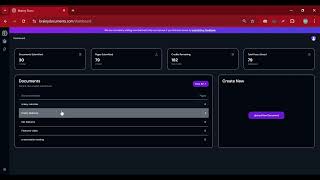
Discover how Brainy Docs effortlessly turns PDFs into polished blog posts! #brainydocuments #video
Brainy Apps

Elevate your content game with Brainy Docs 💡 Create engaging Q&A sessions in seconds! #video
Brainy Apps
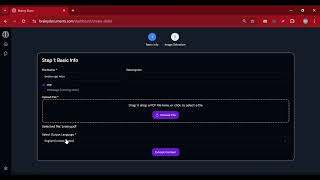
Discover how Brainy Docs transforms challenges into success stories! #BrainyDocuments #video
Brainy Apps
Official links
What are the best Brainy Docs alternatives?
The closest alternatives to Brainy Docs we list are Pictory, Invideo AI and Lumen5. Ranked by direct product-type match, not category overlap.
| Alternative | Pricing | Starts at | Last verified |
|---|---|---|---|
| Pictory | Paid | Pricing not published | — |
| Invideo AI | Paid | Pricing not published | — |
| Lumen5 | Freemium | Pricing not published | — |
Alternatives to Brainy Docs
View allPictory
Pictory turns scripts, URLs, decks and recordings into narrated, captioned AI videos with an agent that plans the scenes for you.

Invideo AI
Agentic video editor that applies one plain-language instruction across every shot on a real multitrack timeline.

Tools that pair well with Brainy Docs
Common stack mates teams adopt alongside Brainy Docs, with the specific reason each pairing earns its keep.
Pictory
Pictory turns scripts, URLs, decks and recordings into narrated, captioned AI videos with an agent that plans the scenes for you.

Invideo AI
Agentic video editor that applies one plain-language instruction across every shot on a real multitrack timeline.

Lumen5
Lumen5 turns blog posts, PDFs and bullet points into on-brand social videos with AI
Brainy Docs vs its closest rival
Brainy Docs's closest head-to-head is with Splice — Splice is the clear choice for music producers needing royalty-free samples and rent-to-own plugins, with a proven ecosystem and recent DAW plugin beta. Brainy Docs offers a novel PDF-to-video AI but lacks pricing transparency and integrations, making it a niche tool for educators or content repurposers. Unless you need to turn PDFs into videos, Splice delivers more value for creative work. Verdict generated
Head-to-head comparisons
Brainy Docs vs Splice
Splice is the clear choice for music producers needing royalty-free samples and rent-to-own plugins, with a proven ecosystem and recent DAW plugin beta. Brainy Docs offers a novel PDF-to-video AI but lacks pricing transparency and integrations, making it a niche tool for educators or content repurposers. Unless you need to turn PDFs into videos, Splice delivers more value for creative work.
GeneratedBrainy Docs vs Praktika
Praktika and Brainy Docs serve completely different needs. If you want to improve spoken language fluency through AI conversation practice with instant feedback, Praktika is your answer. If you need to transform PDF documents into videos, presentations, or study materials, choose Brainy Docs. They are not competitors; pick based on your primary task.
GeneratedFrequently asked questions
Best-of guides
Used Brainy Docs? Help shape our editorial sentiment research.