
BriefCatch
BriefCatch is an AI legal writing assistant that runs inside Microsoft Word with citation checking and authority verification built in.
For teams that live in Word and bill by the hour, BriefCatch earns its seat: RealityCheck verifies citations, quotations, and factual assertions against authoritative legal sources, and the whole thing runs inside the document with SOC 2 Type II compliance behind it. The September 2026 relaunch bundled editing, authority verification, training, and a rebuilt web experience into one platform, which makes the Learning Hub (up to 4 courses per user per month on Individual, full catalog on Pro) a real associate-training tool rather than a bolt-on. The catch is the credit model — RealityCheck typically uses ~70 AI credits to analyze a brief under 30 pages with fewer than 100 citations, and
Verified 5h ago · liveness 78/100 · cite: rightaichoice.com/tools/briefcatch
- Law firms drafting briefs, memos, and motions in Microsoft Word that want citation verification built in
- Litigators who need AI-assisted checking of quotes and factual assertions before filing
- Courts and government agencies that require privilege-protected editing inside existing tools
- Legal teams training associates through the Learning Hub and in-document feedback
- Teams that draft primarily in Google Docs — the Word Add-in is the core of the product
- Firms needing legal research, case prediction, or case-law analysis rather than writing improvement
- Organizations wanting full real-time multi-user co-editing beyond review and suggestion workflows
We scan live Reddit threads, YouTube comments, X posts, G2 reviews and other communities — and hand you an honest verdict in under a minute.
- Honest verdict, not marketing
- Real pros & cons from real users
- Attributed quotes with receipts
3 free scans · no card needed
Skip BriefCatch if you draft mostly in Google Docs rather than Word, or if your practice files briefs so often that 650–700 monthly AI credits per seat will not cover RealityCheck runs, since credits do not roll over.
RealityCheck typically burns about 70 AI credits per brief under 30 pages with fewer than 100 citations, so a high-volume filing month can exhaust 650 Individual credits fast.
BriefCatch sits in the premium tier of legal writing tools: Individual at $60/seat/mo billed annually and Pro at $75/seat/mo billed annually with a 5-seat minimum put it above generic AI writing subscriptions, which is defensible for firms where one caught bad citation outweighs a year of seats. Solo practitioners fit Individual; small firms with 5+ seats and Outlook or SSO needs should budget Pro; only 20+ seat organizations get shared credit pools and DMS integrations via custom Enterprise
In short
BriefCatch — BriefCatch is an AI legal writing assistant that runs inside Microsoft Word with citation checking and authority verification built in. Best for Law firms drafting briefs, memos, and motions in Microsoft Word that want citation verification built in, Litigators who need AI-assisted checking of quotes and factual assertions before filing, Courts and government agencies that require privilege-protected editing inside existing tools. Free to start; paid plans from $60/user/mo.
What's new in BriefCatch
Checked 7 days agoAcross the latest 5 updates: 1 launch and 4 community discussions.
BriefCatch relaunches as an all-in-one legal writing platform
New BriefCatch ships smarter editing, authority verification, legal-writing training, and a rebuilt online experience.
BriefCatch post surveys judicial requirements for AI-assisted filings
Walkthrough of what courts require on accuracy, disclosure, ethics, citations, and human review for AI-assisted filings.
BriefCatch examines hidden cost of poor legal writing at firms
Piece argues unclear drafts waste partner time, inflate client bills, weaken arguments, and cut firm profits.
BriefCatch publishes 90-day writing standard plan for lateral attorneys
Onboarding playbook covers models, feedback loops, review steps, and clear client work for new laterals.
BriefCatch compares building in-house legal writing training vs buying software
Cost, scale, quality, adoption, security, and long-term value weighed against building training internally.
Viability Score
How well maintained and how widely used is BriefCatch? Built from what the vendor actually publishes (docs, changelog, tutorials, integrations, pricing), whether the site is live, and how much real users discuss it. How we calculate this
Last calculated: September 2026
How we score →Key Features
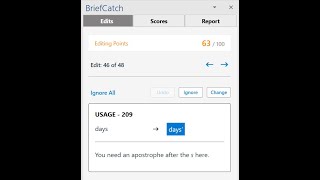
- BriefCatch Writing Assistant for clarity, persuasiveness, and professionalism edits
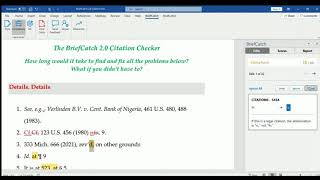
- CiteCheck reviews legal citations for formatting, accuracy, and consistency
- RealityCheck verifies citations, quotations, and factual assertions against authoritative legal sources
- BriefChat AI writing assistant for legal writing questions and drafting help
- Microsoft Word Add-in for native editing inside Word
- Web App browser-based editor — no Microsoft Word required
- Outlook Add-in for cleaner email drafting before sending
- Rule set derived from thousands of real filings and judicial opinions
- Documents never stored, shared, or used to train AI models
- SOC 2 Type II certification for security and confidentiality
- AI credit management with shared credit pools on Enterprise
- Online Learning Hub with expert-led courses taught by Ross Guberman
- Single sign-on, two-factor authentication, and Google authentication
- LMS integration via SCORM and SCIM provisioning on Enterprise
- 99.9% uptime SLA and 24/7 support with dedicated CSM on Enterprise
About BriefCatch
BriefCatch is a legal AI writing assistant for law firms, litigators, courts, and government agencies. It installs in minutes and runs natively inside Microsoft Word, so you review memos, briefs, motions, opinions, and contracts in the tool you already draft in. The product was founded in 2017 by Ross Guberman, author of Point Made and Point Taken, and its editing rules come from thousands of real filings and judicial opinions rather than scraped internet data. Core capabilities are the BriefCatch Writing Assistant (clarity, persuasiveness, and professionalism recommendations), CiteCheck for citation formatting, accuracy, and consistency, RealityCheck for AI-assisted verification of citations, quotations, and factual assertions against authoritative legal sources, and BriefChat for in-app drafting and brainstorming. A browser-based Web App and an Outlook Add-in extend coverage beyond Word, and the online Learning Hub delivers expert-led courses taught by Guberman. In September 2026 BriefCatch relaunched as an all-in-one legal writing platform with smarter editing, authority verification, legal-writing training, and a rebuilt online experience. Documents are never stored, shared, or used to train AI models, and the platform holds SOC 2 Type II certification. The vendor reports 300+ firms, 45+ Am Law 200 members, 80+ courts, and 100% customer retention. Pricing is seat-based: Individual at $60/seat/mo billed annually, Pro at $75/seat/mo billed annually with a 5-seat minimum, and custom Enterprise pricing at 20+ seats. Generic AI chatbots will draft a paragraph; BriefCatch is built for legal writing specifically and includes verification to catch fabricated or unsupported citations before a filing goes out.
Behind the Verdict
BriefCatch occupies a narrow, defensible spot: it is the legal writing assistant that installs in Word rather than asking you to paste privileged text into a chatbot tab. That design choice is the whole argument. No uploads, no servers holding your content, SOC 2 Type II certification, and a stated policy that documents are never stored, shared, or used to train AI models. For a litigator who cannot paste a draft brief into a consumer chatbot, that is the difference between usable and not. The rule set is the second differentiator. BriefCatch says its recommendations come from thousands of elite legal documents and judicial opinions, never scraped internet data, developed by Ross Guberman, author of Point Made and Point Taken. In practice that shows up as feedback phrased in legal-writing terms — clarity, persuasiveness, professionalism — rather than generic readability scores. CiteCheck handles citation formatting, accuracy, and consistency; RealityCheck goes further and verifies citations, quotations, and factual assertions against authoritative legal sources, which is the feature buyers cite most often when they describe catching fabricated or mismatched authorities before filing. Strengths: native Word workflow with a Web App fallback and Outlook Add-in on Pro; a genuine digital-writing-coach story for associate development, backed by the online Learning Hub (up to 4 courses per user per month on Individual, the full catalog on Pro, and LMS delivery via SCORM on Enterprise); governance controls that scale — two-factor and Google authentication and SSO on Pro, then SCIM provisioning, advanced role-based access management, DMS integrations, a 99.9% uptime SLA, and 24/7 support with a dedicated CSM on Enterprise. The September 2026 relaunch consolidated these into one platform rather than a bundle of separate tools. Weaknesses and where it does not fit: the Word Add-in is the core of the product, so a team drafting mainly in Google Docs gets a thinner experience. It is metered by AI credits — 650 per month on Individual, 700 per seat per month on Pro, custom on Enterprise — and included credits reset monthly and do not roll over, so a heavy appellate practice can outrun its tier. The vendor's own worked example is about 70 credits for a brief under 30 pages with fewer than 100 citations, which is the number to multiply against your filing volume. It is also not legal research software: it will not find you a case, predict an outcome, or analyze an area of law. It improves drafting, citation hygiene, and verification of what you have already written. Finally, collaboration is review and suggestion-based; if you need real-time multi-user co-editing, that is not what this is. Where it fits: firms and agencies standardizing legal writing across associates, litigators who file often enough that citation errors are an existential risk, courts and government offices that need privilege-protected editing inside existing tools, and associates or
Researching BriefCatch? Get your full AI stack in 60 seconds.
Free, no signup — tell us your goal and get tools matched to your budget & existing stack.
Real-world workflow fit
Concrete scenarios for the personas BriefCatch actually fits — and what changes day-one when you adopt it.
Draft a motion in Microsoft Word, run CiteCheck for citation formatting and consistency, then run RealityCheck on the quotations and factual assertions before sending to the partner.
Outcome: Citation and quote errors surface before partner review rather than after filing, and the associate sees the writing score improve across drafts.
Roll out Pro seats across a 6-person team, point associates at the full Learning Hub catalog, and use writing scores to benchmark progress in the training program.
Outcome: Firm-wide style and reasoning get reinforced through daily drafting instead of a one-off training session, with organization-level licensing and SSO in place.
Install the Word Add-in and edit opinions and internal memos inside the existing Microsoft environment, with documents never stored, shared, or used to train AI models.
Outcome: Privilege-protected editing stays inside existing systems under SOC 2 Type II controls, without uploading sensitive content to a chatbot.
Use Cases
- Polish a 30-page appellate brief with sentence-level clarity and persuasiveness suggestions.
- Run AI Bluebook citation corrections on an associate's draft before partner review.
- Verify quotations and factual assertions with RealityCheck before a filing goes out.
- Use writing scores to benchmark associate progress in a training program.
- Tighten a 10-page motion without losing substantive arguments.
- Generate narrative reports to analyze writing style for long-term improvement.
- Review a contract for clarity and consistency before sending to opposing counsel.
- Deliver documented legal-writing training through the Learning Hub or your LMS.
Models Under the Hood
as of 2026-09-15
Limitations
- BriefCatch installs as a Microsoft Word add-in and also runs as a browser-based web app, with Outlook add-in support on Pro and higher tiers.
- It is purpose-built for legal professionals drafting memos, briefs, motions, opinions, and contracts rather than general-purpose writing.
- Use is metered by AI credits — 650 per month on Individual, 700 per seat per month on Pro, custom on Enterprise — and included credits reset each month and do not roll over.
- RealityCheck typically uses ~70 AI credits to analyze a brief under 30 pages with fewer than 100 citations, so heavy filers should model usage before assuming Individual or Pro is enough.
- Pricing starts at $60/seat/month billed annually for Individual and $75/seat/month billed annually for Pro with a 5-seat minimum.
- Citation and RealityCheck verification is intended to catch fabricated or mismatched authorities before filing, but it complements rather than replaces human review.
as of 2026-09-29
Verification history
We have re-verified BriefCatch 21 times since . Each pass re-reads the vendor's own pages and re-checks every listed field against that evidence; passes where nothing had changed are marked as such.
- — re-verified summary, description, our verdict, our analysis, pricing model, pricing tiers, features, integrations, who it suits, who should skip it
- — re-verified summary, description, our verdict, our analysis, pricing model, pricing tiers, features, integrations, who it suits, who should skip it
- — re-verified summary, description, our verdict, our analysis, pricing model, pricing tiers, features, integrations, who it suits, who should skip it
- — re-checked, vendor evidence unchanged
- — re-verified summary, description, our verdict, our analysis, pricing model, pricing tiers, features, integrations, who it suits, who should skip it
- — re-checked, vendor evidence unchanged
Showing the 6 most recent of 21 verification passes.
Free to cite with attribution — this page re-verifies continuously.
12-month cost
Project the real annual outlay, including the implied monthly cost when only an annual tier is published.
Vendor list price only. Add-on usage, seat overages, and contract minimums are surfaced under Hidden costs & gotchas.
Plans compared
For each published BriefCatch tier: who it actually fits, and what it adds vs. the previous tier. Cross-reference the cost calculator above for projected annual outlay.
Free Trial
$0
Ideal for
Solo practitioners and small firms who want to test RealityCheck on a real brief before committing to a seat.
What this tier adds
Starting tier: 7-day free trial with no credit card required — start with email, Google, or Microsoft account.
Individual
$60/seat/mo billed annually
Ideal for
Solo practitioner or single-seat user drafting briefs and motions in Word who needs citation checking and a monthly credit allowance.
What this tier adds
Starting paid tier at $60/seat/month billed annually: 650 AI credits per month, BriefCatch Web App, RealityCheck, Word Add-in, Google Drive and OneDrive integration, SOC 2 Type II, and up to 4 Learning Hub courses per user per month.
Pro
$75/seat/mo billed annually
Ideal for
Small firms with 5 or more drafters that need Outlook coverage and full training access for associates.
What this tier adds
Adds the Outlook Add-in, full Learning Hub catalog access, 700 AI credits per seat per month, organization-level licensing, two-factor and Google authentication, and single sign-on at $75/seat/month billed annually with a 5-seat minimum.
Enterprise
Custom
Ideal for
Firms, courts, and agencies with 20+ seats that need shared credit pools, DMS and premium integrations, and formal support commitments.
What this tier adds
Adds custom credits with shared pools and AI resource management, premium and DMS integrations, advanced RBAC, SCIM provisioning, LMS delivery via SCORM, a 99.9% uptime SLA, and 24/7 support with a dedicated CSM at custom pricing.
Where the pricing makes sense
The company stage and team size where BriefCatch's pricing actually pencils out — and where peers do it cheaper.
BriefCatch sits in the premium tier of legal writing tools: Individual at $60/seat/mo billed annually and Pro at $75/seat/mo billed annually with a 5-seat minimum put it above generic AI writing subscriptions, which is defensible for firms where one caught bad citation outweighs a year of seats. Solo practitioners fit Individual; small firms with 5+ seats and Outlook or SSO needs should budget Pro; only 20+ seat organizations get shared credit pools and DMS integrations via custom Enterprise
Setup time & first value
How long it actually takes to get something useful out of BriefCatch — broken out by persona, not the marketing-page minute.
Individual: install the Word Add-in and you are editing in minutes, with first value on your next draft; the 7-day free trial needs no credit card. Teams: budget a short IT pass for SSO and user provisioning on Pro, and longer for SCIM, RBAC, and DMS integrations on Enterprise. Learning Hub onboarding adds a few hours if you are building a structured associate program.
Switching to or from BriefCatch
How to bring data in from common predecessors and how to get it back out — written for the switcher, not the buyer.
- →From generic AI chatbots: move drafting into the Word Add-in so privileged text stays in the Microsoft environment and RealityCheck verifies citations against legal sources.
- →From manual citation checking: replace Bluebook-by-hand passes with CiteCheck formatting and consistency review, then add RealityCheck for quote and assertion verification.
- ↗To legal research platforms: BriefCatch does not do case-law research or case prediction, so research work moves to a dedicated research tool while drafting stays here.
- ↗To generic AI writing tools: you would trade legal-specific rules from real filings and judicial opinions for general-purpose drafting with no built-in authority verification.
- ↗To Google Docs-native editing: the Word Add-in is the core of BriefCatch, so a Docs-first workflow means giving up the deepest part of the product.
Integrations
Resources & Guides
Tutorials & Learning
YouTube returned 6 videos for “BriefCatch”, and we withheld 4: 4 could not be judged, because “BriefCatch” is a single word that other videos use for other things. Showing the 2 we can prove are about BriefCatch.
Official links
Tools that pair well with BriefCatch
Common stack mates teams adopt alongside BriefCatch, with the specific reason each pairing earns its keep.

Spellbook
AI contract review and redlining that runs inside Microsoft Word, powered by GPT-5.

Aithor
Aithor is an AI essay writer that pulls citations from a 10M+ open academic source library instead of inventing them.

Textero AI Essay Writer
AI essay writer that generates citation-backed academic drafts from your own uploaded sources.
Alternatives to BriefCatch
View all
Spellbook
AI contract review and redlining that runs inside Microsoft Word, powered by GPT-5.

Aithor
Aithor is an AI essay writer that pulls citations from a 10M+ open academic source library instead of inventing them.

Textero AI Essay Writer
AI essay writer that generates citation-backed academic drafts from your own uploaded sources.
Frequently Asked Questions
Used BriefCatch? Help shape our editorial sentiment research.