Cboard is live · pricing from $79/yr · last verified 30 Oct 2026 · viability monitor

Cboard
Cboard is a free open-source AAC web app that speaks symbol boards and typed text in 46 languages.
If you're paying for AAC out of pocket, Cboard is where to start. The $0 tier is permanent — dark mode, custom image uploads, typing alongside symbols, screen locking and Chrome offline all included, not a crippled demo. The real gaps are eye-tracking hardware and HIPAA-grade hosting; clinical buyers who need those shouldn't try to force Cboard into that role. USD 8/mo (or USD 79/yr) buys the four Pro features that actually change daily use: neural voices, voice recording, board sharing and
Verdict generatedVerified 1h ago · liveness 65/100 · cite: rightaichoice.com/tools/cboard
- Non-verbal children and adults with autism or intellectual disabilities who need free symbol-based AAC
- Adults with intermittent non-verbal episodes who want typing alongside pictures
- Speech-language pathologists trialing AAC before recommending a paid option
- Multilingual families and classrooms needing one of 46 language boards
- Users whose primary access method is eye-tracking hardware — Cboard doesn't support it
- Clinics or hospitals that require a HIPAA-compliant hosted solution with a signed BAA
- People who need a fully native iOS or Android app rather than a browser-based one
We scan live Reddit threads, YouTube comments, X posts, G2 reviews and other communities — and hand you an honest verdict in under a minute.
- Honest verdict, not marketing
- Real pros & cons from real users
- Attributed quotes with receipts
3 free scans · no card needed
Skip Cboard if you need eye-tracking hardware access, a HIPAA-covered hosted deployment, or a native iOS/Android app — and if offline is a hard requirement, skip it unless you're on Chrome for desktop or Android.
The free tier includes ads; removing them means moving to Pro at USD 8/mo or USD 79/yr — a real cost if you're using Cboard with a child who shouldn't see ads.
Cboard's free tier is genuinely usable, which makes the closest comparison Proloquo2Go or Tobii Dynavox — those run several hundred dollars upfront for hardware or app plus clinical symbol libraries Cboard doesn't include. On the paid side, Pro Monthly at USD 8/mo or Pro Yearly at USD 79/yr undercuts almost every subscription AAC app. It's priced for individual families and SLPs paying out of pocket, not for clinics that buy on annual contracts.
In short
Cboard — Cboard is a free open-source AAC web app that speaks symbol boards and typed text in 46 languages. Best for Non-verbal children and adults with autism or intellectual disabilities who need free symbol-based AAC, Adults with intermittent non-verbal episodes who want typing alongside pictures, Speech-language pathologists trialing AAC before recommending a paid option. Plans from $79/yr.
What is Cboard?
Cboard — Cboard is a free open-source AAC web app that speaks symbol boards and typed text in 46 languages. Best for Non-verbal children and adults with autism or intellectual disabilities who need free symbol-based AAC, Adults with intermittent non-verbal episodes who want typing alongside pictures, Speech-language pathologists trialing AAC before recommending a paid option. Plans from $79/yr.
Cboard is a browser-based augmentative and alternative communication (AAC) tool for children and adults with speech and language impairments, built by Assistive Communication LLC. You tap color-coded symbols to build a sentence and Cboard speaks it through text-to-speech; you can also type text alongside the pictures, so users who can spell but not reliably speak aren't shut out. SLPs quoted on the site point out that Symbotalk and Letmetalk don't offer that mixed symbol-plus-typing input. The practical appeal is access. No app-store install, no clinical procurement, no hardware bundle — it opens in a modern browser on desktops, tablets and phones, with offline support in Google Chrome on desktop and Android. A visitor can start tapping immediately; a registered account (email, Google, Apple or Facebook) is what saves personalized boards between sessions. The board editor covers real day-to-day work: upload your own images to tiles, lock the screen against accidental edits, print any board set to PDF from the HOME bar, and switch among 46 languages under SETTINGS → Language. The homepage's Latest News flags Cbuilder, a newer tool for building custom AAC boards faster than the standard editor, plus conference appearances at ASHA 2025 and the DPGA meeting in Brasilia. Dark mode is free — a testimonial from the partner of a photo-sensitive autistic adult calls out paid rivals for gating it. The React codebase is open, so translators and developers can localize or extend it. Against Proloquo2Go or Tobii Dynavox, Cboard gives up eye-tracking and clinical-grade symbol libraries and charges nothing for the trade. Paid Pro plans are USD 8/month or USD 79/year and add online neural voices, voice recording for tiles, board sharing and publishing, usage analytics, share-phrases, OBF export, ad-free use and a private support channel.
Key features
- Symbol-based AAC grid with text-to-speech output
- Typed text alongside symbols for mixed input
- 46 languages, switchable in SETTINGS → Language
- Offline support in Google Chrome on desktop and Android
- Browser-based — runs on desktops, tablets and mobile phones
- Customizable vocabulary boards saved to a registered account
- Sign up with email, Google, Apple, or Facebook
- Upload custom images to tiles
- Screen locking to prevent accidental edits
- Print board sets to PDF from the HOME bar
- Free dark mode for photo-sensitive users
- Cbuilder for building custom AAC boards faster
- Open-source React codebase for localization and extension
- Online neural voices (Pro)
- Voice recording for tiles (Pro)
Behind the verdict
Where Cboard earns its keep is the moment a family realizes AAC is going to cost them either several hundred dollars or a procurement fight, and they have neither. Open a browser, and a usable board is there. That matters more than any feature list. We'd reach for Cboard when the user is a child or adult on the autism spectrum, someone with intermittent non-verbal episodes, or a speller who can type but not reliably voice — the mixed symbol-plus-typing input is the differentiator, and it's the thing SLPs in the site's testimonials call out as missing from Symbotalk and Letmetalk. Pass on it if eye-tracking is the primary access method. Pass, too, if you're a clinic or hospital that needs a HIPAA-compliant hosted solution with a signed BAA — Cboard isn't that, and pretending otherwise wastes everyone's time. Anyone who needs a true native iOS or Android app rather than a browser tab should look elsewhere as well. Offline is the caveat that bites hardest. It's Chrome-only on desktop and Android, so if your household lives in Safari or Firefox and the Wi-Fi drops, the conversation stops. Test that before you commit. The $8/month Pro upgrade isn't essential on day one. It becomes worth it when you want online neural voices (audibly better than the free default), recording your own voice onto tiles, board sharing with a therapist or school, or usage analytics to see which vocabulary is actually being tapped. USD 79/yr works out to roughly $6.58/mo, billed annually. The closest real alternative is Proloquo2Go, which costs real money but brings native apps and a mature symbol library. Cboard's counter is simple: free, open, in the browser. Cbuilder, announced on the homepage news feed, is worth watching if you build custom boards often. One habit to build early:
Limitations
- Cboard is a web app that runs in modern browsers on desktops, tablets and phones; offline support is limited to Google Chrome on desktop and Android.
- Several features are locked to the paid Pro plans (USD 8/month or USD 79/year, same feature set on both): online neural voices, publishing and sharing boards, copying public boards and tiles, voice recording for tiles, usage analytics, share phrases, export to open board format (OBF), ad-free use, and a private support channel.
- Reviewers report the board editor can feel slow, particularly when editing large customized vocabulary sets.
- There is no eye-tracking support and no HIPAA-compliant hosted offering.
- The evidence names no underlying AI model.
as of 2026-10-09
Researching Cboard? Get your full AI stack in 60 seconds.
Free, no signup — tell us your goal and get tools matched to your budget & existing stack.
Is Cboard still active?
Cboard is live · pricing from $79/yr · last verified 30 Oct 2026 · viability monitor.
Viability score
How well maintained and how widely used is Cboard? Built from what the vendor actually publishes (docs, changelog, tutorials, integrations, pricing), whether the site is live, and how much real users discuss it. How we calculate this
Last calculated: October 2026
How we score →What do users say about Cboard?
What people actually say about Cboard — is it worth it?
Our community sentiment research written Jul 15, 2026 is more than 90 days old, so it is being re-reviewed against current data and is not shown.
How we verified this
Every listed fact about Cboard— pricing, features, links, status — is re-read from the vendor's own pages by our verification pipeline and each change is logged with a date; the last pass ran on 30 Oct 2026. Pages mix model-assisted synthesis with human review; see how we verify.
Verification history
We have re-verified Cboard 12 times since . Each pass re-reads the vendor's own pages and re-checks every listed field against that evidence; passes where nothing had changed are marked as such.
- — changed features, our verdict, pricing tiers, description, summary
- — changed SSL certificate
- — changed who it suits, description, our verdict, features, hidden costs, limitations, switching in, switching out, who should skip it, pricing tiers, pricing fit, setup time, summary, use cases
- — changed summary, our verdict, features, who it suits, who should skip it, description, pricing tiers
- — changed pricing page, limitations
- — changed hidden costs, who it suits, limitations, switching in, switching out, who should skip it, use cases, pricing fit, summary, setup time, description, our verdict, features, pricing model, pricing tiers
Showing the 6 most recent of 12 verification passes.
Free to cite with attribution — this page re-verifies continuously.
How much does Cboard cost in 2026?
Cboard: Plans from $79/yr. Pricing last verified 30 Oct 2026.
Plans compared
Every published Cboard tier, its price as the vendor publishes it, who it fits, and what it adds over the tier below. The 12-month cost projection follows.
| Plan | Price | Billing | Who it's for |
|---|---|---|---|
| Free | Usage-basedVendor: “$0/forever” | usage | Families, individual users, and SLPs trialing AAC at zero cost — anyone paying out of pocket who doesn't need neural voices or board sharing yet.Adds: Starting tier at USD 0 forever: symbol board with text-to-speech, 46 languages, typing alongside symbols, offline Chrome, dark mode, custom image uploads, screen locking, and PDF printing — with ads and no board export. |
| Pro Monthly Plan | $8/mo | monthly | A single user or family who wants neural voices, their own recorded voice on tiles, and board analytics, and who prefers to pay month-to-month without a yearly commitment.Adds: Adds over Free at USD 8/mo: online neural voices, voice recording for tiles, share and publish boards, copy public boards and tiles, usage analytics, share phrases, export to open board format (OBF), ad-free use, and a private support channel. |
| Pro Yearly Plan | $79/yr | yearly | Families and SLPs who know they'll use Cboard for a full year and want the same Pro feature set for a lower effective monthly cost (~$6.58/mo, billed annually).Adds: Same included features as Pro Monthly, but USD 79 billed yearly instead of USD 8 paid monthly — the saving only materializes if you commit to twelve months upfront. |
12-month cost
Project the real annual outlay, including the implied monthly cost when only an annual tier is published.
Vendor list price only. Add-on usage, seat overages, and contract minimums are surfaced under Hidden costs & gotchas.
Where the pricing makes sense
The company stage and team size where Cboard's pricing actually pencils out — and where peers do it cheaper.
Cboard's free tier is genuinely usable, which makes the closest comparison Proloquo2Go or Tobii Dynavox — those run several hundred dollars upfront for hardware or app plus clinical symbol libraries Cboard doesn't include. On the paid side, Pro Monthly at USD 8/mo or Pro Yearly at USD 79/yr undercuts almost every subscription AAC app. It's priced for individual families and SLPs paying out of pocket, not for clinics that buy on annual contracts.
Has Cboard's pricing changed?
No plan price for Cboard has moved since we began logging in Aug 2026; the pricing page is re-read on every verification pass.
Who should pick Cboard?
Pick Cboard if you are Non-verbal children and adults with autism or intellectual disabilities who need free symbol-based AAC, Adults with intermittent non-verbal episodes who want typing alongside pictures, Speech-language pathologists trialing AAC before recommending a paid option, Multilingual families and classrooms needing one of 46 language boards.
Look elsewhere if you are Users whose primary access method is eye-tracking hardware — Cboard doesn't support it, Clinics or hospitals that require a HIPAA-compliant hosted solution with a signed BAA, People who need a fully native iOS or Android app rather than a browser-based one, Safari or Firefox users if offline use is a hard requirement — offline is Chrome-only on desktop and Android.
Skip it if Skip Cboard if you need eye-tracking hardware access, a HIPAA-covered hosted deployment, or a native iOS/Android app — and if offline is a hard requirement, skip it unless you're on Chrome for desktop or Android.
GeneratedReal-world workflow fit
Concrete scenarios for the personas Cboard actually fits — and what changes day-one when you adopt it.
Opens cboard.io on a tablet in Chrome, taps a few symbols to build a sentence, hears Cboard speak it, then registers an account so the board layout and uploaded photos of family members persist between sessions.
Outcome: A working personalized AAC setup on day one for $0, with no app store purchase or hardware order needed.
Uses the free tier during a therapy session — mixed symbol and typed input for a student who can spell — then switches to Pro Monthly at USD 8/mo to enable voice recording for tiles so the student hears their own mother's voice, and usage analytics to track progress.
Outcome: Trial and paid upgrade happen inside one workflow, so the SLP can recommend Cboard to a family without a separate procurement cycle.
Loads Cboard on a Chrome tablet, opens SETTINGS → Language, switches the board into one of 46 languages for a new student, then locks the screen so other children can't rearrange the tiles.
Outcome: An AAC board in the student's home language without buying a second app license or translating symbols by hand.
Use cases
- Create a personalized communication board for a child with autism or intellectual disability
- Build symbol sentences and speak them aloud during speech therapy sessions
- Switch a board into one of 46 languages for a multilingual family or classroom
- Run the AAC app offline on a Chrome tablet or Android phone with no Wi-Fi
- Type alongside pictures during brief non-verbal episodes (allergies, sore throat, post-surgery)
- Fork the open-source React codebase to localize Cboard into a new language
- Trial AAC with a student before recommending a several-hundred-dollar commercial app
Setup time & first value
How long it actually takes to get something useful out of Cboard — broken out by persona, not the marketing-page minute.
Parent or caregiver: about 5 minutes to first spoken sentence — open cboard.io, tap symbols, hit speak. Registering an account to save boards adds a couple of minutes. SLP trialing it in a session: under 10 minutes to customize a starter board. Developer or translator forking the React codebase: hours to days, depending on your React fluency.
Switching to or from Cboard
How to bring data in from common predecessors and how to get it back out — written for the switcher, not the buyer.
- →From Symbotalk: rebuild your core vocabulary as tiles in Cboard's board editor (uploading your own images if you have them), accepting that the symbol sets differ.
- →From Letmetalk: recreate boards manually in Cboard or Cbuilder, then use typed input alongside symbols to cover words the symbols miss.
- →From paper or a printed PECS book: photograph or upload your existing images as tiles, then lock the screen so the layout stays fixed.
- →From a native Android AAC app: open cboard.io in Chrome on Android for offline use and re-enter your vocabulary.
- ↗To Proloquo2Go: export board sets to PDF from the Cboard HOME bar as a reference, then rebuild in Proloquo2Go's symbol library since the formats aren't compatible.
- ↗To a Tobii Dynavox device: use the printed PDF board sets as a vocabulary inventory while a clinician rebuilds them in Dynavox software.
- ↗To a native iPad AAC app: there's no direct board import into most closed AAC apps, so budget for manual rebuilding.
Resources & guides
Tutorials & Learning
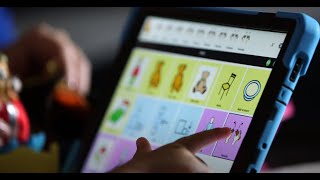
YouTube returned 6 videos for “Cboard”, and we withheld 5: 5 could not be judged, because “Cboard” is a single word that other videos use for other things. Showing the 1 we can prove is about Cboard.
Official links
What are the best Cboard alternatives?
The closest alternatives to Cboard we list are MioTTS Inference, RHVoice and TTSMaker. Ranked by direct product-type match, not category overlap.
| Alternative | Pricing | Starts at | Last verified |
|---|---|---|---|
| MioTTS Inference | Free | Free | — |
| RHVoice | Free | Free | — |
| TTSMaker | Freemium | Pricing not published | — |
Alternatives to Cboard
View all
MioTTS Inference
Free open-source Japanese text-to-speech models you self-host, six MioTTS sizes from 0.1B to 2.6B.

Tools that pair well with Cboard
Common stack mates teams adopt alongside Cboard, with the specific reason each pairing earns its keep.

MioTTS Inference
Free open-source Japanese text-to-speech models you self-host, six MioTTS sizes from 0.1B to 2.6B.
RHVoice
Free open-source multilingual speech synthesizer that gives screen reader users a native-language voice, running fully offline on Windows, Android, and Linux.

TTSMaker
Free text-to-speech online: convert text to speech in 80+ languages with 148 English voices and commercial-use MP3/WAV downloads.
Cboard vs its closest rival
Cboard's closest head-to-head is with Codametrix — CodaMetrix and Cboard serve completely different needs. If you're a large health system drowning in coding costs and denials, CodaMetrix is a proven, enterprise-grade investment with measurable ROI. If you need a free, open-source AAC tool for non-verbal communication, Cboard is a solid choice. There's no overlap; pick based on your domain. Verdict generated
Head-to-head comparisons
Cboard vs Codametrix
CodaMetrix and Cboard serve completely different needs. If you're a large health system drowning in coding costs and denials, CodaMetrix is a proven, enterprise-grade investment with measurable ROI. If you need a free, open-source AAC tool for non-verbal communication, Cboard is a solid choice. There's no overlap; pick based on your domain.
GeneratedCboard vs Rapidsos
If you run a 911 center or enterprise safety program needing AI-powered dispatch and connected device data, RapidSOS is the only choice—but it's expensive and US-focused. If you need a free, open-source AAC tool for non-verbal communication, Cboard is the clear pick. They solve completely different problems; your use case decides.
GeneratedCboard vs Isomorphic Labs
Cboard and Isomorphic Labs serve completely different users: Cboard is a free AAC app for non-verbal individuals needing symbol-based communication, while Isomorphic Labs is a high-budget AI drug discovery partner for large pharma. If you need accessible, offline AAC, pick Cboard; if you're a pharmaceutical company seeking AI-driven drug design, consider Isomorphic Labs through a partnership.
GeneratedFrequently asked questions
Categories
Best-of guides
Used Cboard? Help shape our editorial sentiment research.