
Chessvision.ai Chess Scanner
Scan chess diagrams from websites, books, images, and videos into a live analysis board with engine evaluation.
Chessvision.ai does one thing no general chess platform does: it takes a position you did not type in — from a PDF, a screenshot, a print, a YouTube frame — and drops it onto an engine board within seconds. The eBook Reader (Best Chess Startup 2020, ChessTech2020) and the Video App's position-to-video matching are the standouts, and the Library with flashcards extends that into actual rehearsal. It is a companion, not a replacement: Chess.com and Lichess remain where you play and manage games. If you mostly read chess books or watch chess video, this is the missing bridge between the two.
Verified 4d ago · liveness 73/100 · cite: rightaichoice.com/tools/chessvision-ai-chess-scanner
- Chess improvers who study from YouTube videos and want engine analysis alongside playback
- Players who read PDF chess books and want diagram-level analysis
- Teachers building diagram exercises for students
- Puzzle solvers who want quick hints from diagrams on web pages or social media
- Professional players needing full database management and a complete chess GUI
- Users who want a standalone engine without any scanning functionality
- People who prefer native desktop software over browser extensions and mobile apps
We scan live Reddit threads, YouTube comments, X posts, G2 reviews and other communities — and hand you an honest verdict in under a minute.
- Honest verdict, not marketing
- Real pros & cons from real users
- Attributed quotes with receipts
3 free scans · no card needed
Skip Chessvision.ai if you want a complete chess GUI with game databases and engine tournaments rather than a scanner that feeds positions into analysis.
Chessvision.ai Chess Scanner's pricing fits teams whose volume aligns with the published tiers. Compare against the alternatives listed below for stage-specific value.
In short
Chessvision.ai Chess Scanner — Scan chess diagrams from websites, books, images, and videos into a live analysis board with engine evaluation. Best for Chess improvers who study from YouTube videos and want engine analysis alongside playback, Players who read PDF chess books and want diagram-level analysis, Teachers building diagram exercises for students. Free to use.
What people actually say about Chessvision.ai Chess Scanner — is it worth it?
We ran a structured research pass across product reviews, community discussions, and post-purchase forum threads to surface the patterns vendors won't publish themselves. Below: the recurring strengths, the hidden costs people mention most, and the cohort that consistently regrets adopting this tool.
33 mentions across 2 sources (YouTube, App Store) · researched Jul 15, 2026.
Average across the 2 sources that answered — each source counts once, not each post.
- +Instant scanning from books, screenshots, and YouTube videos.
- +Automatic YouTube video matching for scanned positions is impressive.
- +Simple and intuitive interface according to positive reviewers.
- +Helps analyze puzzles and positions from any image source.
- +eBook Reader makes PDF chess books interactive with double-click analysis.
- −Board detection fails too often even in manual mode.
- −No way to manually edit misread positions is a major flaw.
- −Recent paywall has angered many long-time users.
- −Some users report security issues with credit card info.
- −Engine version is inconsistent (Stockfish 10 vs 13).
- • May require credit card for trial, leading to unwanted charges
- • Some features locked behind paywall that were previously free
Viability Score
How well maintained and how widely used is Chessvision.ai Chess Scanner? Built from what the vendor actually publishes (docs, changelog, tutorials, integrations, pricing), whether the site is live, and how much real users discuss it. How we calculate this
Last calculated: October 2026
How we score →Key Features
- Scan chess diagrams in Chrome, Firefox, and Safari extensions
- Scan diagrams with an iOS or Android phone camera or from your gallery
- Select Area mode for pages containing multiple chess boards
- Adds a Videos Section to the Chess.com analysis board (Chrome extension)
- eBook Reader processes any PDF chess book and opens diagrams on double-click
- Export eBook diagrams to Lichess Study or as a PDF exercise sheet
- Library to save, organize, and annotate positions scanned from any source
- Flashcard training for openings, tactics, and endgames in Library
- Automatic matching of scanned positions to YouTube videos, played from where the position occurs
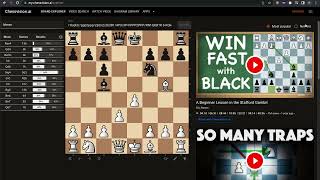
- Watch YouTube chess videos with a synchronized board, engine, and move list
- Search 30k+ YouTube videos by chess concepts (e.g. exchange sacrifice in Sicilian)
- Video Opening Explorer for studying openings on the board
- Load a PGN and find matching YouTube videos for your own games
- Twitter, Telegram, Discord, and Reddit bots that analyze chess images inline
- Fen to Image and PGN to PDF conversion tools
About Chessvision.ai Chess Scanner
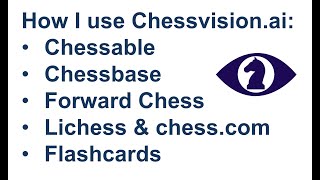
Chessvision.ai is a suite of scanning tools that turn visual chess positions — diagrams on websites, printed books, photos, and YouTube videos — into an interactive analysis board. The core products are browser extensions for Chrome, Firefox, and Safari, mobile apps for iOS and Android that scan a diagram with your camera or gallery, an eBook Reader that processes any PDF chess book so you can double-click a diagram to analyze it, and a Library for saving, organizing, annotating and training positions with flashcards. A Video App synchronizes engine analysis with YouTube playback, finds videos matching a scanned position and plays them from the exact moment the position occurs, and lets you search over 30k YouTube videos by chess concepts (for example, exchange sacrifice in the Sicilian). Bots for Twitter, Telegram, Discord and Reddit analyze chess images inline in those platforms, and a Chrome extension adds a Videos Section to the Chess.com analysis board. It is a supplemental study aid for chess learners who want to turn passive content — videos, books, social feeds — into active practice, not a full chess GUI or game database.
Behind the Verdict
The value proposition here is narrow but genuinely underserved. Chess.com and Lichess own play, ratings and databases; none of that is what Chessvision.ai is for. What it does instead is remove the transcription tax from study. Instead of setting up a position by hand from a book diagram or a paused video, you scan or double-click and the engine is already running. The four products are roughly: Browser Extension (scan any diagram on a web page, plus a Select Area mode for pages with several boards, plus a Chrome-only Videos Section inside Chess.com's analysis board); Mobile App (camera or gallery scan, automatic matching YouTube videos played from the point the position occurs, save favorites to Library); eBook Reader (processes any PDF chess book, double-click any diagram to analyze, teachers can pull diagrams into exercises exported to Lichess Study or a PDF sheet); and Library (save positions from anywhere, organize, annotate, find matching YouTube videos, and train openings, tactics and endgames with flashcards). The Video App adds an Opening Explorer, PGN loading to find videos for your own games, concept search across 30k+ videos, and synchronized board plus engine plus move list during playback. Bots cover Twitter, Telegram, Discord and Reddit for image-based analysis. Where it falls short: it needs a visual input — there is no text or PGN-free path to a position, though PGN loading exists in the Video App. Some capabilities are unequal across platforms, and the Chrome extension is the only one that adds Videos to Chess.com. If you want deep game database work, opening tree management at scale, or a full desktop GUI, this isn't that, and it doesn't pretend to be. Best mental model: keep your existing account for playing and store your scans plus flashcard drills here.
Researching Chessvision.ai Chess Scanner? Get your full AI stack in 60 seconds.
Free, no signup — tell us your goal and get tools matched to your budget & existing stack.
Real-world workflow fit
Concrete scenarios for the personas Chessvision.ai Chess Scanner actually fits — and what changes day-one when you adopt it.
You scan a position from a stream or paste a PGN, and the Video App finds YouTube videos explaining that exact position and plays them from the moment it occurs, with a synchronized board, engine, and move list beside the video.
Outcome: You stop pausing and manually setting up pieces, and you get engine-checked variations for the ideas the video is describing.
You open the PDF in the eBook Reader, let it process the book, then double-click each diagram to open it on the analysis board and play your own moves.
Outcome: Book study becomes interactive rather than passive, and diagrams you want to keep go to Lichess Study or a PDF sheet.
You select diagrams from your books in the eBook Reader and export them to Lichess Study or a PDF sheet for students.
Outcome: Exercise sets that used to require manual diagram reconstruction are produced directly from the source book.
Use Cases
- Photograph a printed diagram and get it onto an analysis board without setting up pieces by hand.
- Watch a chess YouTube video with an engine board and move list synchronized to the playback.
- Double-click a diagram inside a PDF chess book and analyze it in the reader.
- Scan a puzzle on a website and get an engine hint for the best move.
- Post a chess screenshot in a Discord server and have the bot analyze it for everyone.
- Save scanned positions to Library and drill them later with flashcards.
- Load your own PGN and find YouTube videos that explain the positions in your game.
- Search YouTube by concept — for example, exchange sacrifice videos in the Sicilian.
Limitations
- Chessvision.ai needs a visual input — a diagram on a page, a photo, a PDF, or a video frame — and does not analyze a position that arrives as plain text, which is why a full chess GUI stays in the picture.
- Feature parity across platforms is uneven: adding videos to the Chess.com analysis board is a Chrome extension capability, and the eBook Reader exists as both a web app and a mobile app.
- The Library and scanner are the spine of the product, so a buyer who wants game databases, engine tournaments, or offline-only study should look at a dedicated GUI instead.
as of 2026-10-08
Verification history
We have re-verified Chessvision.ai Chess Scanner 9 times since . Each pass re-reads the vendor's own pages and re-checks every listed field against that evidence; passes where nothing had changed are marked as such.
- — re-checked, vendor evidence unchanged
- — re-checked, vendor evidence unchanged
- — re-checked, vendor evidence unchanged
- — re-checked, vendor evidence unchanged
- — re-checked, vendor evidence unchanged
- — re-checked, vendor evidence unchanged
Showing the 6 most recent of 9 verification passes.
Free to cite with attribution — this page re-verifies continuously.
12-month cost
Project the real annual outlay, including the implied monthly cost when only an annual tier is published.
Vendor list price only. Add-on usage, seat overages, and contract minimums are surfaced under Hidden costs & gotchas.
Where the pricing makes sense
The company stage and team size where Chessvision.ai Chess Scanner's pricing actually pencils out — and where peers do it cheaper.
Chessvision.ai Chess Scanner's pricing fits teams whose volume aligns with the published tiers. Compare against the alternatives listed below for stage-specific value.
Setup time & first value
How long it actually takes to get something useful out of Chessvision.ai Chess Scanner — broken out by persona, not the marketing-page minute.
For the browser extension or mobile app, first value is close to immediate: install, scan a diagram, and the analysis board loads — the docs frame the whole product tour as under 5 minutes. The eBook Reader adds the time it takes to process your PDF book before diagrams become double-clickable. Library setup depends on how much you want to organize.
Switching to or from Chessvision.ai Chess Scanner
How to bring data in from common predecessors and how to get it back out — written for the switcher, not the buyer.
- →From Chess.com analysis alone: scan or select a position on the site and open the Videos Section in Chrome to see explanatory videos without leaving the page.
- →From Lichess Study: export scanned eBook diagrams to Lichess Study so your existing study workflow keeps working.
- →From manual diagram setup: photograph a print or scan a web diagram instead of placing pieces by hand.
- ↗To Lichess Study: export diagrams from the eBook Reader directly into a Lichess Study.
- ↗To a PDF sheet: export selected eBook diagrams as a printable exercise sheet.
- ↗To Chess.com analysis: use the Chrome extension to add the Videos Section to the Chess.com analysis board.
Integrations
Resources & Guides
Tutorials & Learning

Official links
Featured Head-to-Head Comparisons
Chessvision Ai Chess Scanner vs Surge Ai
If you're a chess learner wanting to turn passive video watching into active study, Chessvision.ai is the no-brainer — it's freemium and purpose-built. But if you're building or aligning frontier AI and need expert-graded feedback with cutting-edge benchmarks like Riemann-bench, Surge AI is the specialized enterprise tool. They serve completely different needs; pick the one that matches your domain.
Chessvision Ai Chess Scanner vs Praktika
Praktika and Chessvision.ai serve completely different needs: language learning vs chess analysis. If you're an intermediate language learner craving speaking practice with instant feedback and adaptive study plans, Praktika is a strong mobile-only choice. If you're a chess enthusiast who wants to scan diagrams from any source and turn YouTube videos into interactive study sessions, Chessvision.ai's multi-platform browser/mobile/bot suite is unmatched. Neither tool overlaps; your choice depends purely on your learning domain.
Popular in Study Tools

MagicStudent
MagicStudent gives K-12 students teacher-curated AI tutoring, quizzes, and writing feedback inside supervised Student Rooms.


Frequently Asked Questions
Categories
Best-of guides
Used Chessvision.ai Chess Scanner? Help shape our editorial sentiment research.