ClipTrend.ai
ClipTrend.ai turns any photo into a viral AI image-to-video clip using 40+ trending effect templates and 20+ models on one credit pool.
If your output lives on TikTok or Reels and you want to ride a format while it still has momentum, the live-view-count template gallery plus one shared credit pool across Seedance 2.5, Kling 3, Veo 3.1 and Wan 2.7 is a real workflow, not a gimmick. At roughly 123 credits for a 5-second Seedance image-to-video render or 150 for an 8-second Veo 3.1 Quality shot, Pro's ~3,208 monthly credits is about 26 such renders — and that is the $49/mo billed-annually rate, charged $588 up front. Occasional
Verified 1d ago · liveness 76/100 · cite: rightaichoice.com/tools/cliptrend-ai
- Short-form creators who want to ride a TikTok or YouTube format while it still has momentum
- Social marketers producing multiple variations of one brand asset across platforms
- Agencies comparing Seedance 2.5, Kling 3, Veo 3.1 and Wan 2.7 on one brief under a single budget
- Project-based users who prefer a one-time credit pack over a recurring subscription
- Long-form editors who need a timeline NLE with multi-track cutting and frame-level control
- Teams needing advanced audio post-production or precise per-frame grading
- Anyone rendering at high volume who wants a flat unlimited rate instead of credit consumption
We scan live Reddit threads, YouTube comments, X posts, G2 reviews and other communities — and hand you an honest verdict in under a minute.
- Honest verdict, not marketing
- Real pros & cons from real users
- Attributed quotes with receipts
3 free scans · no card needed
Skip ClipTrend if you need a multi-track timeline editor with frame-level grading and audio post, or if you want a flat unlimited render rate rather than credits metered by model, duration and resolution.
Annual memberships charge the whole year up front — $120 for Lite, $588 for Pro, $2,028 for Ultra — even though credits only unlock in monthly portions.
Lite at $10/mo billed annually ($120/yr) undercuts a single Runway, Pika or Kling Pro subscription ($12-$30/mo each), and Pro at $49/mo billed annually ($588/yr) replaces a $60+/mo three-tool stack plus a $10-$20 image tool. Ultra at $169/mo billed annually ($2,028/yr) is for high-volume shops. If you only render occasionally, the $19.90 one-time pack beats any subscription.
In short
ClipTrend.ai — ClipTrend.ai turns any photo into a viral AI image-to-video clip using 40+ trending effect templates and 20+ models on one credit pool. Best for Short-form creators who want to ride a TikTok or YouTube format while it still has momentum, Social marketers producing multiple variations of one brand asset across platforms, Agencies comparing Seedance 2.5, Kling 3, Veo 3.1 and Wan 2.7 on one brief under a single budget. Free to start; paid plans from $10/mo.
What's new in ClipTrend.ai
Checked 6 days agoAcross the latest 4 updates: 1 feature update and 3 news mentions.
Nano Banana 2.1 and Seedance 2.5 now available
Two new engines join the ClipTrend model list — Nano Banana 2.1 for fast low-cost image generation and edits, and Seedance 2.5 for long clips with audio and multi-reference input, promoted at 50% off.
Smalltown Boy AI two-photo workflow guide
Two photos produce a ten-second vertical clip set to the song, with the guide assigning a screamer role and a dancer role to each upload.
Halloween poster generation guide
Three text lines, four styles and an optional portrait produce a printable party invite, with the post covering theme and wording choices.
AI fashion and fitness influencer photo guides
Selfie-based outfit and lifestyle photo workflows covering eight looks, a three-photo lookbook, and guidance on labeling AI-made images clearly.
What people actually say about ClipTrend.ai — is it worth it?
We ran a structured research pass across product reviews, community discussions, and post-purchase forum threads to surface the patterns vendors won't publish themselves. Below: the recurring strengths, the hidden costs people mention most, and the cohort that consistently regrets adopting this tool.
22 mentions across 3 sources (YouTube, Product Hunt, Bluesky) · researched Jul 22, 2026.
Average across the 3 sources that answered — each source counts once, not each post.
- +Addresses a real creator pain point: blank prompt box.
- +Templates based on viral trends could save time.
- +Supports multiple AI video models for comparison.
- +Designed for beginners with simple workflows.
- +Product Hunt pitch shows clear use-case understanding.
- −Almost no real user feedback to validate claims.
- −Product Hunt launch garnered 0 upvotes.
- −YouTube compilations are generic, not tool reviews.
- −No data on reliability, performance, or uptime.
- −Feature list is empty—unknown what's included.
- • Pricing not publicly detailed on listed sources
- • Free tier may have watermark or export limits
Viability Score
How well maintained and how widely used is ClipTrend.ai? Built from what the vendor actually publishes (docs, changelog, tutorials, integrations, pricing), whether the site is live, and how much real users discuss it. How we calculate this
Last calculated: October 2026
How we score →Key Features
- AI image to video: animate any photo in one click with an optional prompt
- Text-to-video: type a scene and get a finished AI video with no footage
- Character swap: drop a new character into a clip while keeping the action
- Video face swap: place a face into any video with natural motion
- Video extend: continue an existing clip with AI-matched extra seconds
- Video edit: prompt-driven retouching and changes on existing footage
- Motion control: drive a character with motion from a reference clip
- AI dance generator: make a photo dance to a chosen move or pasted clip
- AI hug generator: turn one or two photos into a warm hug video
- Paste a TikTok URL to lift the motion from a clip you want to remix
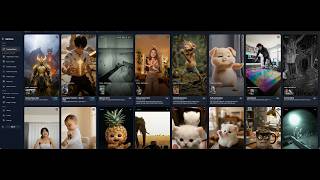
- 40+ trending AI video effect templates with live view counts
- 20+ switchable AI models in one workspace on one credit balance
- Seedance 2 real-face reference support that keeps a face locked across frames
- Text-to-image, AI photo editor, AI character, cartoon, anime and statue generators
- Nano Banana 2.1 and Seedance 2.5 model availability, added October 2026
About ClipTrend.ai
ClipTrend.ai is a browser-based AI image-to-video generator built around trends rather than a blank prompt box. Instead of asking you to engineer a prompt, it hands you a gallery of 40+ AI video effect templates lifted from formats already going viral on TikTok and Reels — each card shows real view counts and the exact credit cost before you click Generate. Upload a photo, paste a TikTok URL to lift its motion, or type a short prompt, and a watermark-free MP4 comes back in roughly 30-60 seconds. The workspace splits into 10 video tools and 6 image tools. Video covers image/video-to-video, text-to-video, character swap, video face swap, AI hug, video extend, video edit, motion control and an AI dance generator. Image covers text-to-image, an AI photo editor, AI character, AI cartoon, AI anime and AI statue generators. Named engines include Seedance 2.5, Vidu Q4, Kling 3, Veo 3.1, Wan 2.7, Grok Imagine, Nano Banana 2.1, Nano Banana Pro, Ideogram 3.0 and GPT Image 2.5 — switchable inside any workspace. One credit currency covers every model, so you are not stacking Runway, Pika and Kling Pro subscriptions to compare outputs on the same brief. Nano Banana 2.1 and Seedance 2.5 joined the model list in October 2026, with Seedance 2.5 promoted at 50% off. Pricing is credit-based rather than feature-gated: every model and tool unlocks on every paid plan, the card shows model, duration, resolution, audio and output-count cost before you render, and failed provider calls refund credits automatically. Memberships bill annually: Lite at $10/mo billed annually ($120/yr, 7,500 credits/year), Pro at $49/mo billed annually ($588/yr, 38,500 credits/year) and Ultra at $169/mo billed annually ($2,028/yr, 140,000 credits/year). Eight one-time packs run from 500 to 50,000 credits, start at $19.90 and stay valid for 2 years. Paid output carries a commercial license. It is a short-form trend workshop rather than a long-form NLE.
Behind the Verdict
Trend-chasing is the whole product thesis here, and it mostly holds up. The template gallery filters by what is actually getting views rather than what a vendor thinks looks cool, so a creator who needs one more Reel this week has a starting point inside a minute. We'd reach for ClipTrend when the brief is 'make me the current dance/costume/makeup format with my face in it' and pass when the brief is 'cut a three-minute narrative' — there is no timeline, no multi-track editing, no audio post. The model roster is the second reason to care. Comparing Seedance 2.5, Kling 3, Veo 3.1 and Wan 2.7 on the same image usually means four browser tabs and four card charges. Here it is one click and one balance, which is worth real money if you test engines for a living. Nano Banana 2.1 arriving in October 2026 gives the image side a cheap fast option too. Watch the credit math before you commit. A 5-second Kling 2.6 clip is 66 credits, a 5-second Seedance image-to-video render is 123, an 8-second Veo 3.1 Quality shot is 150 — so heavy experimentation burns Pro's monthly allowance faster than the headline '$49' suggests. The annual upfront charge is the real commitment; monthly flexibility exists but the discount assumes you stay a year. Caveats that bite in practice: the free tier is MiniMax H3 at 480p and 5 seconds, noticeably softer than paid output and queued at busy times. Vertical short-form is the native shape; if you need 10s or 15s MiniMax H3 clips, those require 768p or 2K. Support replies within two business days, which is fine for a creator and slow for an agency on deadline. Versus standalone tools, the closest alternative is just stacking Runway or Pika plus Kling Pro plus an image tool. That gives deeper editing controls per engine but no shared credits and no
Researching ClipTrend.ai? Get your full AI stack in 60 seconds.
Free, no signup — tell us your goal and get tools matched to your budget & existing stack.
Real-world workflow fit
Concrete scenarios for the personas ClipTrend.ai actually fits — and what changes day-one when you adopt it.
You sign up with Google for 30 starting credits, open the trending gallery, pick the Night Zoo CCTV Dance effect showing 81.8M views, upload a selfie and generate a 5-second render after checking the credit price on the card.
Outcome: A watermark-free vertical clip in roughly 30 to 60 seconds that rides a format still circulating, without paying for a monthly plan first.
You upload one product photo, then re-run the same brief through Seedance 2.5, Kling 3, Veo 3.1 and Wan 2.7 without a separate fee per engine, and pick the take that best matches the brand.
Outcome: Four engine variants from one asset and one credit balance, exported for TikTok, Reels and Shorts with commercial rights on paid output.
You buy a Starter credit pack from $19.90, burn it across a batch of five-second renders on multiple engines, and only then decide whether the $49/mo billed annually Pro tier fits the account.
Outcome: A real cost-per-clip number per engine before committing to a $588 annual charge.
Use Cases
- Turn a selfie into a viral AI dance video using a trending template from the gallery.
- Generate product promo clips by uploading a photo and applying a trending effect.
- Compare outputs from Seedance 2.5, Kling 3, Veo 3.1 and Wan 2.7 on the same prompt under one credit balance.
- Paste a TikTok URL to lift a viral clip's motion and remix it onto your own asset.
- Create consistent AI characters for social posts using the AI character generator and photo editor.
- Build a two-photo Smalltown Boy AI clip with assigned screamer and dancer roles.
- Produce Halloween costume, poster or party invite visuals from one portrait.
- Test a batch of five-second renders across engines before committing to an annual membership.
Models Under the Hood
as of 2026-10-18
Limitations
- ClipTrend is a credit-based, web workspace: credits are consumed per generation and cost depends on model, duration and resolution, with each template showing its price before generating.
- Model availability is capped by engine constraints — for example, MiniMax H3's 10s and 15s clips are not available at 480p and require 768p or 2K.
- Annual memberships are charged up front for the full year with credits unlocked monthly, and unused unlocked credits roll over only until the annual renewal.
as of 2026-10-16
Verification history
We have re-verified ClipTrend.ai 8 times since . Each pass re-reads the vendor's own pages and re-checks every listed field against that evidence; passes where nothing had changed are marked as such.
- — re-verified summary, description, our verdict, our analysis, pricing model, pricing tiers, features, integrations, who it suits, who should skip it
- — re-verified summary, description, our verdict, our analysis, pricing model, pricing tiers, features, integrations, who it suits, who should skip it
- — re-verified summary, description, our verdict, our analysis, pricing model, pricing tiers, features, integrations, who it suits, who should skip it
- — re-verified summary, description, our verdict, our analysis, pricing model, pricing tiers, features, integrations, who it suits, who should skip it
- — re-verified summary, description, our verdict, our analysis, pricing model, pricing tiers, features, integrations, who it suits, who should skip it
- — re-verified summary, description, our verdict, our analysis, pricing model, pricing tiers, features, integrations, who it suits, who should skip it
Showing the 6 most recent of 8 verification passes.
Free to cite with attribution — this page re-verifies continuously.
12-month cost
Project the real annual outlay, including the implied monthly cost when only an annual tier is published.
Vendor list price only. Add-on usage, seat overages, and contract minimums are surfaced under Hidden costs & gotchas.
Where the pricing makes sense
The company stage and team size where ClipTrend.ai's pricing actually pencils out — and where peers do it cheaper.
Lite at $10/mo billed annually ($120/yr) undercuts a single Runway, Pika or Kling Pro subscription ($12-$30/mo each), and Pro at $49/mo billed annually ($588/yr) replaces a $60+/mo three-tool stack plus a $10-$20 image tool. Ultra at $169/mo billed annually ($2,028/yr) is for high-volume shops. If you only render occasionally, the $19.90 one-time pack beats any subscription.
Setup time & first value
How long it actually takes to get something useful out of ClipTrend.ai — broken out by persona, not the marketing-page minute.
Free entry is near-instant: sign up with Google using a Gmail address and 30 credits appear, then the gallery is browsable with no payment. First render is typically 30 to 60 seconds once you pick a template and upload a photo. Expect 10-20 minutes to compare Seedance 2.5, Kling 3, Veo 3.1 and Wan 2.7 on the same brief before you know which engines fit your style.
Switching to or from ClipTrend.ai
How to bring data in from common predecessors and how to get it back out — written for the switcher, not the buyer.
- →From Runway: re-run your existing briefs through Seedance 2.5, Kling 3 and Veo 3.1 inside one workspace instead of one model per subscription.
- →From Pika: move the same prompts into the trending template gallery, which pre-tunes prompts per effect so you skip prompt engineering.
- →From Kling Pro: keep Kling 3 as one engine among 20+ rather than your only one, and compare its output against Veo 3.1 under one credit pool.
- →From a stacked Runway + Pika + Kling Pro setup: consolidate three subscriptions ($12-$30/mo each) into one plan or a $19.90+ credit pack.
- →From manual CapCut effect work: replace hand-built effect edits with a template card that shows view count and credit cost before you render.
- ↗To CapCut or Premiere Pro: export the watermark-free MP4 and finish cutting, grading and audio on a timeline ClipTrend does not provide.
- ↗To a dedicated image tool: take the background-removed PNG or generated still downstream for retouching work beyond the AI photo editor.
- ↗To Runway or Kling Pro directly: move over if you only ever use one engine and want that vendor's own interface and support.
- ↗To a flat-rate render service: switch if metered credits by model and resolution no longer fit a high-volume pipeline.
Resources & Guides
Tutorials & Learning
YouTube returned 6 videos for “ClipTrend.ai”, and we withheld 5: 5 could not be judged, because “ClipTrend.ai” is a single word that other videos use for other things. Showing the 1 we can prove is about ClipTrend.ai.
Official links
Tools that pair well with ClipTrend.ai
Common stack mates teams adopt alongside ClipTrend.ai, with the specific reason each pairing earns its keep.

Picsart
Picsart puts 180+ AI image and video models — Seedance 2.5, Flux 2 Pro, Nano Banana Pro — inside one editing subscription.

Instories
Instories turns prompts, photos, and long videos into stories, reels, and shorts with AI

Runway Gen-4
Runway Gen-4 generates consistent AI video characters, objects and locations across scenes, then lets you edit a single frame instead of
Featured Head-to-Head Comparisons
Cliptrend Ai vs Landr Mastering
If you need polished, album-ready audio mastering with reference matching and stem control, LANDR Mastering is the clear choice — it's trusted by pros and integrates directly into your DAW. For creators who want to pump out trending short-form AI videos fast using templates and multiple engines, ClipTrend.ai offers unmatched speed and variety. Pick the tool that matches your final output: audio or video.
Cliptrend Ai vs Storyfile
Choose StoryFile if you need authentic, historically accurate interactive video avatars for museums, legacy preservation, or public figures — expect a custom quote and professional filming. Choose ClipTrend.ai if you're a creator or agency rapidly generating short-form AI videos for TikTok/YouTube on a per-credit budget, leveraging the latest generative models without a subscription lock-in.
Cliptrend Ai vs Splice
If you're a music producer building tracks with samples and plugins, Splice is the obvious choice — its vast royalty-free library and rent-to-own models for Serum 2 are unmatched. If you instead create short-form social media videos and want to ride AI trends like face swaps or dance generators, ClipTrend.ai's trend-first workspace with multiple AI engines under one roof is faster and more fun. They serve entirely different creative workflows, so pick by your content type.
Alternatives to ClipTrend.ai
View all
Picsart
Picsart puts 180+ AI image and video models — Seedance 2.5, Flux 2 Pro, Nano Banana Pro — inside one editing subscription.

Instories
Instories turns prompts, photos, and long videos into stories, reels, and shorts with AI

Runway Gen-4
Runway Gen-4 generates consistent AI video characters, objects and locations across scenes, then lets you edit a single frame instead of
Frequently Asked Questions
Used ClipTrend.ai? Help shape our editorial sentiment research.