
Coconote
Coconote turns lectures, meetings, and uploads into AI notes, transcripts, quizzes, flashcards, and AI-narrated podcasts.
For solo learners, Coconote is the pick when you want study outputs rather than just a transcript: the same lecture recording produces notes, a quiz, flashcards, a study game, and an AI-narrated podcast. Pick Otter.ai instead if your center of gravity is meeting capture with teammates, and Notion AI if you want notes living inside a knowledge base you already write in. The honest caveat is what Coconote does not publish: the underlying AI models are not named on the homepage, and there is no documented API or team workspace surface in what we reviewed. Treat it as a personal study tool, not infrastructure.
Verified 12d ago · liveness 69/100 · cite: rightaichoice.com/tools/coconote
- College students converting lecture recordings into notes, quizzes, and flashcards
- Professionals capturing conference sessions and workshops without typing
- Learners who want an audio review loop via AI-narrated podcasts of their notes
- Students with ADHD or auditory processing needs who benefit from structured notes
- Teams that need real-time collaborative note editing in a shared workspace
- Enterprises requiring SSO, admin controls, or a documented API
- Users who want fine control over how the AI formats its output
We scan live Reddit threads, YouTube comments, X posts, G2 reviews and other communities — and hand you an honest verdict in under a minute.
- Honest verdict, not marketing
- Real pros & cons from real users
- Attributed quotes with receipts
3 free scans · no card needed
Skip Coconote if you need a shared team workspace with real-time collaborative note editing, SSO, admin controls, or a documented API — it is built as a personal study tool for one learner at a time.
Coconote's pricing fits teams whose volume aligns with the published tiers. Compare against the alternatives listed below for stage-specific value.
In short
Coconote — Coconote turns lectures, meetings, and uploads into AI notes, transcripts, quizzes, flashcards, and AI-narrated podcasts. Best for College students converting lecture recordings into notes, quizzes, and flashcards, Professionals capturing conference sessions and workshops without typing, Learners who want an audio review loop via AI-narrated podcasts of their notes. Free to use.
What people actually say about Coconote — is it worth it?
We ran a structured research pass across product reviews, community discussions, and post-purchase forum threads to surface the patterns vendors won't publish themselves. Below: the recurring strengths, the hidden costs people mention most, and the cohort that consistently regrets adopting this tool.
33 mentions across 3 sources (Hacker News, YouTube, App Store) · researched Aug 31, 2026.
Average across the 3 sources that answered — each source counts once, not each post.
- +Turns lectures into structured notes, quizzes, and flashcards automatically
- +Great for on-the-go note-taking and staying organized in college
- +Recording and transcription save time in long graduate classes
- +AI-narrated podcasts help review and share with students
- +High satisfaction among long-term users (3+ years)
- −Cannot transcribe videos from your device's gallery
- −Free tier is limited; users quickly hit paywalls for unlimited notes
- −Occasional bugs and glitches in early versions
- −Pricing tiers confusing, with conflicting prices in some stores
- −Review prompts feel intrusive when app is barely used
- • Unclear pricing in some regions (e.g., Belgium showed conflicting prices)
Viability Score
How well maintained and how widely used is Coconote? Built from what the vendor actually publishes (docs, changelog, tutorials, integrations, pricing), whether the site is live, and how much real users discuss it. How we calculate this
Last calculated: October 2026
How we score →Key Features
- Automatic AI notes from recorded lectures and meetings
- Upload audio, video, PDFs, documents, websites, and links
- Transcription and translation in 100+ languages
- AI-generated quizzes and practice exams
- AI-generated flashcards
- Study games that turn notes into short interactive review sessions
- AI podcasts narrated by Coco, generated from your own notes
- AI chat that answers questions about any saved note
- Real-time recording with instant notes and transcripts
- Sync across iPhone, iPad, Android, web, and Mac
- Apple Watch support
- Standalone Mac desktop app
- Voice capture from live audio or uploaded recordings
- Notes organized and searchable by course or topic
- Vendor-stated design aligned to academic honor codes
About Coconote
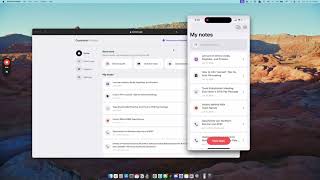
Coconote (called Coco in the app) is an AI note taker built around a study-material pipeline rather than plain transcription. You record a live lecture or meeting, or upload audio, video, PDFs, documents, websites, or links, and it returns organized notes and transcripts in seconds. From the same recording you can then generate quizzes, practice exams, flashcards, short study games, and an AI podcast narrated by Coco. It captures audio and translates in 100+ languages, and syncs notes across iPhone, iPad, Android, web, and a standalone Mac desktop app, with Apple Watch listed as a supported device. An AI chat lets you ask questions against any saved note. The vendor states the tool is designed so it helps you learn and capture key details rather than do the work for you, which matters if your school has an honor code around AI use. Coconote is owned by Quizlet, Inc. It differs from Otter.ai, which leans toward meeting capture and team workflow, and from Notion AI, which leans toward knowledge management — Coconote's differentiator is that quizzes, flashcards, games, and podcasts all come out of the same recording. It is aimed at students and individual professionals, not at teams needing shared workspaces or admin controls.
Behind the Verdict
Coconote's selling point is the second half of the workflow. Most AI note takers stop at 'here is your transcript, here is a summary.' Coconote keeps going: quizzes, practice exams, flashcards, short study games, and an AI podcast narrated by Coco, all generated from the same recording you already captured. That matters for the audience it targets, because a student who records a lecture and never re-reads the notes has gained nothing. Turning the recording into active-recall material is the actual learning step, and it is what Otter.ai does not do and Notion AI does not do out of the box. Inputs are broad: live recording, uploaded audio, video, PDFs, documents, websites, and links. Coverage is broad too — audio capture and translation in 100+ languages, and sync across iPhone, iPad, Android, web, and a standalone Mac app, with Apple Watch named alongside. AI chat works against any saved note, so you can ask a question of a lecture you recorded last month. Where it is thinner: there is no shared team workspace with real-time collaborative note editing, no SSO or admin controls, and no documented API in the material we reviewed. If you want to control exactly how the AI structures its output, Coconote does not offer that knob. The vendor also does not name the underlying AI models it uses for notes, quizzes, flashcards, or podcasts — worth knowing if model choice is a procurement criterion for you. The positioning on academic integrity is deliberate and worth taking at face value: the vendor states Coconote is built to help you learn and capture key details, not to do the work for you, and frames its School FAQ around 'as long as your professor is cool with you audio recording the class.' That is a reasonable posture, but it is not a guarantee about your specific institution's rules — check your own honor code before recording. Ownership: Coconote is owned by Quizlet, Inc., per the site footer. Practically, that means it sits inside a company whose core business is study tools, which is consistent with the study-material pipeline it has built.
Researching Coconote? Get your full AI stack in 60 seconds.
Free, no signup — tell us your goal and get tools matched to your budget & existing stack.
Real-world workflow fit
Concrete scenarios for the personas Coconote actually fits — and what changes day-one when you adopt it.
Record a 75-minute lecture on your phone, then open the note on a laptop that evening.
Outcome: You get organized notes and a transcript in seconds, then generate flashcards and a study game from the same recording instead of re-reading slides.
Capture back-to-back sessions across a multi-day event without typing during talks.
Outcome: Each session becomes its own note, and the AI chat lets you ask across your saved notes for the details you missed while moving between rooms.
Upload a long PDF, video, or link you have been putting off reading.
Outcome: Coconote returns notes plus a quiz and flashcards, and you can turn the note into an AI-narrated podcast to review on a commute.
Use Cases
- Record a lecture and get organized notes and flashcards in seconds
- Upload a PDF and have the AI turn it into a podcast summary
- Use AI chat to ask questions about a meeting you recorded
- Generate study games from your notes to prepare for exams
- Translate and transcribe content in over 100 languages
- Capture a whole week of conference sessions and workshops without typing
Models Under the Hood
as of 2026-09-14
Limitations
- Coconote does not name the underlying AI models it uses to generate notes, quizzes, flashcards, or podcasts, so you cannot pick or verify the model behind your output.
- There is no documented API and no shared team workspace with real-time collaborative editing, and no SSO or admin controls appear in the material we reviewed — treat it as a personal study tool rather than team infrastructure.
- Formatting is largely fixed; if you want to tune how notes are structured, this is not the tool.
- The vendor's academic-integrity stance is that Coconote helps you capture and learn rather than do the work for you, but that is not a substitute for checking your own school's rules on recording lectures.
as of 2026-09-25
Verification history
We have re-verified Coconote 8 times since . Each pass re-reads the vendor's own pages and re-checks every listed field against that evidence; passes where nothing had changed are marked as such.
- — re-verified summary, description, our verdict, our analysis, pricing model, pricing tiers, features, integrations, who it suits, who should skip it
- — re-checked, vendor evidence unchanged
- — re-checked, vendor evidence unchanged
- — re-checked, vendor evidence unchanged
- — re-checked, vendor evidence unchanged
- — re-checked, vendor evidence unchanged
Showing the 6 most recent of 8 verification passes.
Free to cite with attribution — this page re-verifies continuously.
12-month cost
Project the real annual outlay, including the implied monthly cost when only an annual tier is published.
Vendor list price only. Add-on usage, seat overages, and contract minimums are surfaced under Hidden costs & gotchas.
Plans compared
For each published Coconote tier: who it actually fits, and what it adds vs. the previous tier. Cross-reference the cost calculator above for projected annual outlay.
Free
$0/mo
Ideal for
Students and solo professionals who want to test whether AI notes, quizzes, flashcards, games, and podcasts fit their study or meeting routine.
What this tier adds
Free entry point: free to download and use on iPhone, iPad, Android, web, and Mac, with recording, uploads, AI notes, transcripts, 100+ language capture, quizzes, flashcards, study games, AI podcasts, and AI chat.
Unlimited Pass
Contact for pricing
Ideal for
Heavy users who hit the free tier's note ceiling and want unlimited notes plus priority support.
What this tier adds
Adds unlimited notes, priority support, and additional features beyond the free tier; the vendor directs you to contact them for pricing.
Where the pricing makes sense
The company stage and team size where Coconote's pricing actually pencils out — and where peers do it cheaper.
Coconote's pricing fits teams whose volume aligns with the published tiers. Compare against the alternatives listed below for stage-specific value.
Setup time & first value
How long it actually takes to get something useful out of Coconote — broken out by persona, not the marketing-page minute.
Students: download the app on iPhone, iPad, or Android, or use the web app, and you can record your first lecture immediately — first notes land seconds after you stop recording. Mac users can install the standalone desktop app for the same flow. No configuration is described on the homepage, so there is nothing to wire up before your first session.
Switching to or from Coconote
How to bring data in from common predecessors and how to get it back out — written for the switcher, not the buyer.
- →From Otter.ai: for lecture-heavy use, record in Coconote instead and generate quizzes, flashcards, and an AI podcast from the same recording
- →From Notion AI: upload your existing PDFs, documents, and links into Coconote to get study materials rather than summaries
- →From manual note-taking: start recording lectures and meetings and let Coconote produce the organized notes and transcript
- ↗To Otter.ai: move if meeting capture with team-facing workflow becomes the priority over study materials
- ↗To a team notes platform: move if you need shared workspaces, real-time collaborative editing, or admin controls
- ↗To a knowledge base tool: move if you want notes to live inside a workspace you already write in
Resources & Guides
Tutorials & Learning
YouTube returned 6 videos for “Coconote”, and we withheld 5: 5 could not be judged, because “Coconote” is a single word that other videos use for other things. Showing the 1 we can prove is about Coconote.
Official links
Tools that pair well with Coconote
Common stack mates teams adopt alongside Coconote, with the specific reason each pairing earns its keep.

StudyX
Free AI study platform with homework help, notes, flashcards, quizzes, and writing tools, trusted by 16M+ students.

Mumble Note
Fast AI voice notetaker for iOS, Mac, and Apple Watch that turns talk into clean notes, tasks, and ideas

Notability
Notability turns handwriting, audio, and PDFs into searchable notes, AI summaries, and study materials across Apple, Android, and web.
Featured Head-to-Head Comparisons
Coconote vs Praktika
If your goal is to improve conversational fluency through speaking practice with AI tutors, choose Praktika. If you need an automated study assistant that turns lectures and documents into notes, quizzes, and flashcards, Coconote is the better fit. They serve completely different needs, so the right choice depends on whether you want to speak or study.
Coconote vs Surge Ai
These tools serve entirely different missions. Coconote is a consumer-grade AI study aid for individuals turning lectures into notes and quizzes. Surge AI is a B2B platform providing expert human evaluation to train frontier AI models. Choose based on your need: personal learning or AI alignment work.
Alternatives to Coconote
View all
StudyX
Free AI study platform with homework help, notes, flashcards, quizzes, and writing tools, trusted by 16M+ students.

Mumble Note
Fast AI voice notetaker for iOS, Mac, and Apple Watch that turns talk into clean notes, tasks, and ideas

Notability
Notability turns handwriting, audio, and PDFs into searchable notes, AI summaries, and study materials across Apple, Android, and web.
Frequently Asked Questions
Used Coconote? Help shape our editorial sentiment research.