
CodeMorph
Free in-browser AI code translator between languages, with CLI-to-GUI conversion.
CodeMorph is a decent free tool for translating code between languages, especially for one-time conversions and learning. However, it lacks the ecosystem and enterprise features of paid alternatives like GitHub Copilot or Tabnine. If you need quick, casual translation without setup, it's worth a try, but for regular or production use, consider a more robust tool.
Verified 14d ago · liveness 37/100 · cite: rightaichoice.com/tools/codemorph
- Individual developers doing one-off code translations
- Students learning a new programming language
- Prototype developers needing quick code generation
- Legacy codebase modernization for small projects
- Enterprise teams requiring security compliance or SSO
- Teams needing on-premise deployment or offline access
- Large-scale batch translation of entire codebases
We scan live Reddit threads, YouTube comments, X posts, G2 reviews and other communities — and hand you an honest verdict in under a minute.
- Honest verdict, not marketing
- Real pros & cons from real users
- Attributed quotes with receipts
3 free scans · no card needed
Skip CodeMorph if you need production-grade reliability, enterprise security, integrations with your existing stack, or regular large-scale code translation—it's a free, no-login utility that may have undisclosed rate limits and no support.
Undisclosed rate limits could block you mid-task, forcing you to wait or find alternatives.
CodeMorph is free, making it cost-effective for casual users, but it lacks the support and features of paid tools like GitHub Copilot ($10/mo) or Tabnine (from $12/mo). For production teams, the cost of downtime and missing features outweighs the savings.
In short
CodeMorph — Free in-browser AI code translator between languages, with CLI-to-GUI conversion. Best for Individual developers doing one-off code translations, Students learning a new programming language, Prototype developers needing quick code generation. Free to use.
Viability Score
How well maintained and how widely used is CodeMorph? Built from what the vendor actually publishes (docs, changelog, tutorials, integrations, pricing), whether the site is live, and how much real users discuss it. How we calculate this
Last calculated: September 2026
How we score →Key Features
- Code translation between programming languages
- Natural language to code generation
- CLI command to GUI action conversion
- Web-based interface, no install required
- Context-aware handling of large code snippets
- Supports multiple programming languages
- Idiomatic code generation in target language
- Syntactically correct output
- Free and no-login access
About CodeMorph
CodeMorph is a web-based AI tool that translates code between programming languages, converts CLI commands to GUI actions, and generates code from natural language descriptions. It's built for individual developers, students, and teams modernizing legacy codebases or prototyping ideas. The platform handles large code snippets with context awareness, outputting syntactically correct and idiomatic code. Key features include code translation across many languages, natural language to code generation, and CLI-to-GUI conversion—all without requiring an install. While still evolving, CodeMorph aims to reduce manual rewrite effort. Compared to alternatives like GitHub Copilot or Tabnine, CodeMorph focuses specifically on translation and conversion tasks rather than general code completion. The website is in German, and the focus on free, no-login access positions it as a convenient utility for quick tasks.
Behind the Verdict
CodeMorph is a no-frills utility that delivers exactly what it promises: free, in-browser code translation, CLI-to-GUI conversion, and natural language to code generation. For a solo developer or student who needs a quick conversion without creating an account, it's a zero-friction choice. The lack of login means you can jump straight into a task, and the German-language interface may appeal to German-speaking users. However, this simplicity comes with significant trade-offs. The tool is essentially a wrapper over a large language model, with little proprietary technology or workflow depth—you could replicate its core functionality with a prompt and an API. It has no integrations, no API, no mobile app, and no collaboration features. There's no documentation hub, rate limits are undisclosed, and the site's blog content (focused on AI image generators and study tools) suggests a broad content site rather than a dedicated developer product. For serious development work, you'll quickly hit its limits: no batch processing, no enterprise security, and no support. In short, CodeMorph is fine for occasional, low-stakes use. But if you rely on code translation regularly, a dedicated tool with better reliability and support—such as GitHub Copilot or Tabnine—is worth the investment.
Researching CodeMorph? Get your full AI stack in 60 seconds.
Free, no signup — tell us your goal and get tools matched to your budget & existing stack.
Real-world workflow fit
Concrete scenarios for the personas CodeMorph actually fits — and what changes day-one when you adopt it.
Converting a Java algorithm to Python for a class assignment.
Outcome: Paste the Java code, get idiomatic Python in seconds, and study the syntax differences.
Translating a legacy VB.net module to C#.
Outcome: Quickly get a working C# version, saving hours of manual rewriting.
Turning a shell script of CLI commands into a GUI-based workflow.
Outcome: Get a list of GUI actions that replicate the script's function, useful for less technical colleagues.
Use Cases
Limitations
- The scraped content contains no documentation, pricing, or changelog pages, and no details about underlying models, rate limits, or plan restrictions.
- The site appears to be a German-language blog rather than the tool's official product page, so information about the tool is limited to the provided tagline and features.
as of 2026-08-31
Verification history
We have re-verified CodeMorph 7 times since . Each pass re-reads the vendor's own pages and re-checks every listed field against that evidence; passes where nothing had changed are marked as such.
- — re-checked, vendor evidence unchanged
- — re-checked, vendor evidence unchanged
- — re-checked, vendor evidence unchanged
- — re-checked, vendor evidence unchanged
- — re-checked, vendor evidence unchanged
- — re-verified summary, description, our verdict, our analysis, pricing model, pricing tiers, features, integrations, who it suits, who should skip it
Showing the 6 most recent of 7 verification passes.
Free to cite with attribution — this page re-verifies continuously.
Where the pricing makes sense
The company stage and team size where CodeMorph's pricing actually pencils out — and where peers do it cheaper.
CodeMorph is free, making it cost-effective for casual users, but it lacks the support and features of paid tools like GitHub Copilot ($10/mo) or Tabnine (from $12/mo). For production teams, the cost of downtime and missing features outweighs the savings.
Setup time & first value
How long it actually takes to get something useful out of CodeMorph — broken out by persona, not the marketing-page minute.
No setup required—just open the site and start translating. For a single snippet, you'll get output in seconds. For larger codebases, plan for manual review and potential revisions.
Switching to or from CodeMorph
How to bring data in from common predecessors and how to get it back out — written for the switcher, not the buyer.
- →From manual rewriting: copy-paste code into CodeMorph for a first-pass translation, then refine manually.
- ↗To GitHub Copilot: if you need ongoing translation within your IDE with better support, export your translated code and start using Copilot's chat features.
- ↗To Tabnine: for enterprise-grade security and on-prem deployment, migrate your workflows to Tabnine's IDE plugin.
Resources & Guides
Tutorials & Learning
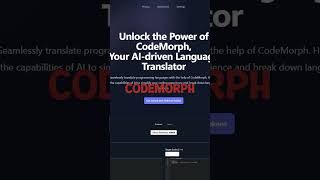
YouTube returned 6 videos for “CodeMorph”, and we withheld 5: 5 could not be judged, because “CodeMorph” is a single word that other videos use for other things. Showing the 1 we can prove is about CodeMorph.
Official links
Tools that pair well with CodeMorph
Common stack mates teams adopt alongside CodeMorph, with the specific reason each pairing earns its keep.

Featured Head-to-Head Comparisons
Codemorph vs Cognition Ai
If you need free, quick code translation or learning a new language, CodeMorph is a no-brainer. For enterprise teams aiming to automate multi-step engineering tasks with a productivity guarantee, Cognition AI's Devin (backed by FrontierCode and Devin Desktop) is the powerful, albeit pricier, choice. Choose based on scale and budget.
Codemorph vs Poolside Ai
For individual developers needing free, quick code translation and generation, CodeMorph is a practical choice. But for enterprises in finance, healthcare, or defense requiring secure, auditable, and customizable AI agents with long-context reasoning, Poolside AI is the clear winner despite higher cost and vendor engagement.
Codemorph vs Bito
For solo developers needing quick code translation, CodeMorph's free web-based tool is ideal. But for engineering teams using AI coding agents on multi-repo projects, Bito's system-wide context and recent Slack/Jira integrations make it the clear winner, despite opaque pricing.
Alternatives to CodeMorph
View all
MarsCode
Free browser-based AI coding IDE with built-in AI assistant for faster development.
GPT Engineer
GPT Engineer turns a plain-English prompt into a runnable web app codebase from your terminal or browser.
Frequently Asked Questions
Categories
Best-of guides
Used CodeMorph? Help shape our editorial sentiment research.