Deep Face Cam
Open-source desktop face swap for Mac and Windows — images, videos, GIFs, and live webcam, processed entirely on your own machine.
If local-only processing is a hard requirement rather than a preference, this is one of the few desktop face swap apps that puts images, video, GIFs, and live webcam in a single tool with checksum-verified model downloads you confirm yourself. The trade is straightforward: the AGPL-3.0 source is free but you compile it, while ready-to-run macOS universal DMG and Windows MSI/EXE builds are supporter downloads that fund signing, notarization, and packaging. Choose it over DeepFaceLive if you need more than a live camera, and over DeepFaceLab if you don't want a training pipeline. Skip it if you need training-heavy deepfake control, mobile or cloud workflows, a commercial SLA, or one-click
Verified 4d ago · liveness 69/100 · cite: rightaichoice.com/tools/deep-face-cam
- Privacy-focused streamers who need real-time webcam face swap without cloud uploads
- Content creators handling sensitive footage that cannot leave their machine
- Researchers and security teams who want auditable, checksum-verified model downloads
- Developers who want to fork or extend an open-source React/Tauri/Python face swap app
- Anyone needing training-heavy deepfake customization — DeepFaceLab remains the deeper option
- Mobile-first or cloud-based face swap workflows
- Buyers who require commercial support SLAs, warranties, or vendor indemnification
We scan live Reddit threads, YouTube comments, X posts, G2 reviews and other communities — and hand you an honest verdict in under a minute.
- Honest verdict, not marketing
- Real pros & cons from real users
- Attributed quotes with receipts
3 free scans · no card needed
Skip Deep Face Cam if you need a training pipeline for custom deepfake models, a Linux, mobile, or browser-based workflow, or a commercially supported product with an SLA.
Face enhancement is not free at runtime — GFPGAN and GPEN add per-face processing cost, so leaving them enabled on a long video or a live feed can visibly cut your FPS.
The source is free under AGPL-3.0, which puts Deep Face Cam at the low end of the cost range for face swap software — comparable to other open-source local tools like FaceFusion and DeepFaceLive, and far below subscription cloud face swap services that charge monthly for GPU time you can't audit. The paid supporter installer is a one-time packaging convenience rather than a feature gate.
In short
Deep Face Cam — Open-source desktop face swap for Mac and Windows — images, videos, GIFs, and live webcam, processed entirely on your own machine. Best for Privacy-focused streamers who need real-time webcam face swap without cloud uploads, Content creators handling sensitive footage that cannot leave their machine, Researchers and security teams who want auditable, checksum-verified model downloads. Free to use.
What's new in Deep Face Cam
Checked 4 days agoAcross the latest 5 updates: 5 news mentions.
Real-time face swap on a local PC: GPU, FPS, webcam & privacy
Explains the live pipeline, webcam capture, execution providers, FPS bottlenecks, and local-only data processing.
GFPGAN vs GPEN: which face enhancer should you use?
Compares the two optional enhancers on restoration capability, download size, per-face cost, and live runtime needs, and when to disable enhancement.
How to swap multiple faces in a video locally
Tutorial on swap-all-faces versus per-person mapping, identity crossover issues, and how render cost scales with face count.
How to face swap a video locally on PC or Mac
Consent-first tutorial covering source media selection, previewing hard frames, local export, and final video checks.
Deep Face Cam vs DeepFaceLive: live-only focus or desktop workflow?
Compares realtime face swap tooling against a broader local desktop media workflow; part of a four-post comparison series.
What people actually say about Deep Face Cam — is it worth it?
We ran a structured research pass across product reviews, community discussions, and post-purchase forum threads to surface the patterns vendors won't publish themselves. Below: the recurring strengths, the hidden costs people mention most, and the cohort that consistently regrets adopting this tool.
37 mentions across 3 sources (YouTube, Product Hunt, Lemmy) · researched Jul 27, 2026.
Average across the 3 sources that answered — each source counts once, not each post.
- +Runs entirely locally for maximum privacy.
- +Free and open-source with transparent code.
- +Supports real-time webcam and video file swapping.
- +Works on both Mac and Windows.
- +No data ever leaves your computer.
- −Installation is extremely error-prone and frustrating.
- −CUDA dependency issues block many Windows users.
- −Black preview screen occurs frequently without fix.
- −No official support or documentation beyond tutorials.
- −Corrupt archive downloads reported by users.
- • Requires a capable GPU with CUDA support (NVIDIA) for acceptable performance, which may be a hardware cost.
Viability Score
How well maintained and how widely used is Deep Face Cam? Built from what the vendor actually publishes (docs, changelog, tutorials, integrations, pricing), whether the site is live, and how much real users discuss it. How we calculate this
Last calculated: September 2026
How we score →Key Features
- Real-time face swap on live webcam feed
- Face swap on images and videos
- GIF face swap via local GIF-to-MP4-to-GIF ffmpeg workflow
- Swap all faces at once or map specific people per video
- Adjustable alignment, blending, face enhancement, and safety settings
- Local preview before export or switching to live camera mode
- Optional GFPGAN and GPEN face enhancement models
- Explicit model downloads with checksum verification after prompt
- 100% local processing with no uploads and no tracking by default
- Open source under AGPL-3.0 with auditable React, Tauri, and Python backend
- Cross-platform: macOS 12+ Apple Silicon and Intel, Windows 10/11
- Live camera execution providers: CPU, DirectML, CUDA
- FPS tuning to balance live camera performance against hardware
- Self-buildable from the public GitHub repository
- Bundled Python sidecar and ffmpeg tools in ready-to-run builds
About Deep Face Cam
Deep Face Cam is an AGPL-3.0 open-source desktop application that swaps faces in images, videos, GIFs, and live camera feeds without sending your media to a server. The build is React, Tauri, and a Python backend, with a public GitHub repository you can clone, build, fork, and audit. The workflow is four steps: import a source and target, tune alignment, blending, face enhancement, and safety settings, generate a local preview, then export a render or switch to live camera mode. Multi-face scenes can swap every face at once or map specific people across a video, and GIFs go through a local GIF-to-MP4-to-GIF round trip with ffmpeg so quality survives the pipeline. Live camera mode runs on CPU, DirectML, or CUDA execution providers, and FPS tuning lets you trade resolution and smoothness against the GPU you actually own. Model binaries are not committed to the repository — the app prompts before downloading face swap and face analysis models into your user app data directory and verifies checksums, with optional GFPGAN or GPEN enhancement models that carry different download sizes and per-face runtime cost. It runs on macOS 12+ (Apple Silicon and Intel) and Windows 10/11, with bundled Python sidecar and ffmpeg tools in the ready-to-run builds. Compared with DeepFaceLive, which is live-camera focused, Deep Face Cam covers the whole desktop media workflow; against DeepFaceLab, it is far simpler for everyday swaps but skips training-heavy customization entirely.
Behind the Verdict
Deep Face Cam's core argument is architectural: your media never leaves the machine. The homepage states 100% local processing, no uploads, and no tracking by default, and the only network access described is for model downloads and project links. For anyone handling client footage, research participants, or streamer identity that shouldn't sit on a third-party server, that single property outweighs a lot of feature polish. What it actually covers is broader than most local face swap tools. The documented pipeline handles images, videos, GIFs, and live camera feeds in one app. GIFs are routed through a local GIF-to-MP4-to-GIF conversion with ffmpeg rather than being handled as a separate toy feature. Multi-face work supports two distinct modes: swap every face in a scene at once, or map specific people across a video — which is the difference between a novelty filter and something you can actually edit with. Before committing to a render, you generate a local preview, which matters when a full video pass is expensive on your hardware. Performance is treated honestly as a hardware problem rather than a promise. Live camera mode exposes CPU, DirectML, and CUDA execution providers plus FPS tuning, so you can trade smoothness against resolution on the GPU you own. Face enhancement is optional by design: GFPGAN and GPEN are downloaded separately, and the project's own comparison notes they differ in download size, per-face runtime cost, and live suitability — turning enhancement off for live work is presented as a legitimate choice, not a downgrade. Model handling is the other notable design decision. Model binaries are deliberately not committed to the repository. The app prompts before downloading face swap and face analysis models into your user app data directory and verifies checksums, and generated CoreML files stay local. That's an auditable supply chain rather than a black box, and it's why researchers and security teams are a realistic audience here. The honest limits: it runs only on macOS 12+ and Windows 10/11, live performance depends entirely on your GPU and chosen execution provider, and it is not a training tool — DeepFaceLab remains the deeper option for anyone who wants to build custom models. It also isn't for mobile or cloud workflows, and there's no indication of commercial support SLAs, warranties, or vendor indemnification behind a project distributed as supporter-funded open source. The project prohibits deception, impersonation, harassment, and non-consensual intimate imagery, and consent-based use is an explicit condition, not a footnote.
Researching Deep Face Cam? Get your full AI stack in 60 seconds.
Free, no signup — tell us your goal and get tools matched to your budget & existing stack.
Real-world workflow fit
Concrete scenarios for the personas Deep Face Cam actually fits — and what changes day-one when you adopt it.
Streams with a webcam and wants a different on-camera identity without sending video to a cloud service. They install the app, let it download the face swap and face analysis models after the prompt, set the live camera execution provider to CUDA or DirectML, tune FPS until the feed is smooth, and run enhancement off to protect frame rate.
Outcome: Live face-swapped webcam output processed entirely on their own machine, with no uploads and no per-minute streaming cost.
Has a video with several people in frame and needs to swap only one performer's face. They import source and target, choose per-person mapping rather than swap-all-faces to avoid identity crossover, preview hard frames locally, then export the render.
Outcome: A finished video where the intended face is swapped and the other performers are untouched, with the raw footage never leaving the machine.
Clones the public repository, runs the documented npm install and npm run tauri dev to launch the local build, audits the React, Tauri, and Python backend, then forks the codebase to wire the face swap pipeline into their own application.
Outcome: A verified, self-built face swap pipeline they can modify and distribute under AGPL-3.0 without depending on a vendor's installer.
Use Cases
- Streamers who want to anonymize or customize their webcam appearance in real time without routing video through a cloud service.
- Content creators adding face-swapped characters to videos while keeping sensitive client footage on their own machine.
- Researchers needing an auditable, checksum-verified local face-swap pipeline for academic studies.
- Developers building custom face-swap applications on top of the AGPL-3.0 React/Tauri/Python codebase.
- Editors working on multi-person footage who need to swap one specific performer without disturbing the other faces in frame.
- Anyone face-swapping a GIF who needs the loop to survive conversion without visible quality loss.
Models Under the Hood
as of 2026-09-25
Limitations
- Deep Face Cam runs only on macOS 12+ (Apple Silicon and Intel) and Windows 10/11 — no Linux, mobile, or browser version is described.
- Model files are not bundled in the source repository: face swap and face analysis models, plus optional GFPGAN/GPEN enhancers, download only after an explicit prompt and checksum verification, so first run requires a network connection and a wait.
- Ready-to-run installers are offered as supporter downloads, while the source is self-buildable via the public AGPL-3.0 repo.
- Live camera performance depends on your GPU and chosen execution provider (CPU, DirectML, or CUDA), with FPS tuning managing the trade-off.
as of 2026-09-24
Verification history
We have re-verified Deep Face Cam 7 times since . Each pass re-reads the vendor's own pages and re-checks every listed field against that evidence; passes where nothing had changed are marked as such.
- — re-verified summary, description, our verdict, our analysis, pricing model, pricing tiers, features, integrations, who it suits, who should skip it
- — re-verified summary, description, our verdict, our analysis, pricing model, pricing tiers, features, integrations, who it suits, who should skip it
- — re-verified summary, description, our verdict, our analysis, pricing model, pricing tiers, features, integrations, who it suits, who should skip it
- — re-verified summary, description, our verdict, our analysis, pricing model, pricing tiers, features, integrations, who it suits, who should skip it
- — re-verified summary, description, our verdict, our analysis, pricing model, pricing tiers, features, integrations, who it suits, who should skip it
- — re-verified summary, description, our verdict, our analysis, pricing model, pricing tiers, features, integrations, who it suits, who should skip it
Showing the 6 most recent of 7 verification passes.
Free to cite with attribution — this page re-verifies continuously.
12-month cost
Project the real annual outlay, including the implied monthly cost when only an annual tier is published.
Vendor list price only. Add-on usage, seat overages, and contract minimums are surfaced under Hidden costs & gotchas.
Plans compared
For each published Deep Face Cam tier: who it actually fits, and what it adds vs. the previous tier. Cross-reference the cost calculator above for projected annual outlay.
Source Code
$0
Ideal for
Developers, researchers, and security teams who want to audit, build, or fork the React/Tauri/Python codebase under AGPL-3.0.
What this tier adds
Starting tier — free full source repository with build and packaging notes, but you compile and package it yourself.
Supporter Build
Paid (one-time)
Ideal for
Mac and Windows users who want a ready-to-run app without a build toolchain, and who are willing to fund notarization and packaging.
What this tier adds
Adds notarization-ready macOS universal DMG and Windows x64 MSI/EXE installers with bundled Python sidecar and ffmpeg, plus a SmartScreen-friendly Windows install path.
Where the pricing makes sense
The company stage and team size where Deep Face Cam's pricing actually pencils out — and where peers do it cheaper.
The source is free under AGPL-3.0, which puts Deep Face Cam at the low end of the cost range for face swap software — comparable to other open-source local tools like FaceFusion and DeepFaceLive, and far below subscription cloud face swap services that charge monthly for GPU time you can't audit. The paid supporter installer is a one-time packaging convenience rather than a feature gate.
Setup time & first value
How long it actually takes to get something useful out of Deep Face Cam — broken out by persona, not the marketing-page minute.
Developers self-building from source: a clone plus npm install and npm run tauri dev, with build and packaging notes in the repo. Supporter installer users on Mac or Windows: install and launch, then wait through the prompted model download and checksum verification before the first swap. Streamers going live: add the same model download plus a few minutes tuning execution provider and FPS
Switching to or from Deep Face Cam
How to bring data in from common predecessors and how to get it back out — written for the switcher, not the buyer.
- →From DeepFaceLive: bring your existing source and target media over and use per-person mapping for multi-face video, since Deep Face Cam adds image, video, and GIF workflows on top of the live camera mode you already
- →From DeepFaceLab: start with the four-step import, tune, preview, export flow for everyday swaps instead of a training pipeline — but expect to lose training-heavy customization.
- →From FaceFusion: if you only need a focused desktop app for image, video, GIF, and live camera swap, install the app and keep your media files local rather than managing a broader toolkit.
- →From Deep Live Cam: reuse the same source and target images and pick CPU, DirectML, or CUDA as your execution provider to match your existing hardware setup.
- ↗To DeepFaceLab: move to a training-based workflow if you need custom models and face-set training rather than ready-made swaps.
- ↗To DeepFaceLive: move if you only ever need live camera face swap and want a live-only tool instead of the broader desktop media workflow.
- ↗To FaceFusion: move if you want a broader face manipulation toolkit rather than a focused desktop app.
Resources & Guides
Tutorials & Learning
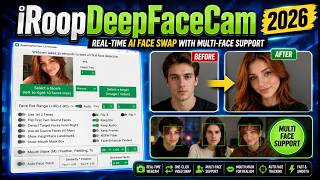
YouTube returned 6 videos for “Deep Face Cam”, and we withheld 5: 5 did not mention Deep Face Cam. Showing the 1 we can prove is about Deep Face Cam.
Official links
Tools that pair well with Deep Face Cam
Common stack mates teams adopt alongside Deep Face Cam, with the specific reason each pairing earns its keep.


Featured Head-to-Head Comparisons
Deep Face Cam vs The New Black
Deep Face Cam is the clear choice if you need real-time face swap on your webcam with absolute privacy — all processing stays local. The New Black is unmatched for fashion brands: it generates garments from text, creates model photoshoots, and auto-fills tech packs, all in one platform. Your pick depends on whether you're swapping faces or designing clothes.
Deep Face Cam vs Adobe Firefly Services
If you need private, real-time face swapping on your own PC with full control over data, Deep Face Cam is the clear winner—free, local, and auditable. If you're an enterprise team automating image generation at scale with compliance and Adobe ecosystem integration, Adobe Firefly Services is the safer bet despite higher costs at volume.
Deep Face Cam vs Qoves
Pick Deep Face Cam if you need real-time, local face swap for streaming or video editing while retaining full data control. Choose QOVES if you want a science-backed, non-surgical facial improvement plan with detailed beauty marker analysis. They serve completely different needs — one is a privacy-first face swap tool, the other is an AI beauty consultant.
Alternatives to Deep Face Cam
View all
Facefusion
Open-source face manipulation suite that runs entirely on your local machine.

FaceSwapper
Free AI face swap online for photos, videos, GIFs, and batch images — no sign-up needed.

Frequently Asked Questions
Categories
Topics
Used Deep Face Cam? Help shape our editorial sentiment research.