
Engram Translator
AI proofreader, paraphraser, and translator tuned to how non-native English speakers actually write
Engram's case rests on two things adjacent tools do badly: it does not bulldoze your passive voice, and it does not make you write a prompt. At $6.49/month billed annually ($77.88/year) — or $12.99/month if you pay monthly — it undercuts Grammarly Premium while adding a translation layer with 11 register styles that Grammarly does not really offer. Where it bites is scope: no team workspaces, no browser extension for in-app checking inside Google Docs or Gmail, and several Premium features (alternative suggestions, translation of suggestions, text-to-speech) work on web but not mobile. Buy it for one learner, researcher, or international professional. If you need org-wide seats or a full
Verified 15h ago · liveness 66/100 · cite: rightaichoice.com/tools/engram-translator
- Non-native English students writing essays, theses, and research papers
- International professionals drafting business emails, reports, and status updates
- ESL learners practicing for TOEFL, IELTS, or TOEIC with immediate feedback
- Researchers translating academic literature with academic or legal register control
- Native English speakers wanting creative or stylistic writing coaching
- Teams needing shared workspaces or collaborative editing
- Users who need a plagiarism checker, tone detector, or AI-content detector
We scan live Reddit threads, YouTube comments, X posts, G2 reviews and other communities — and hand you an honest verdict in under a minute.
- Honest verdict, not marketing
- Real pros & cons from real users
- Attributed quotes with receipts
3 free scans · no card needed
Skip Engram if you need proofreading inside Gmail, Google Docs, or other web apps as you type, or if your team needs shared workspaces — Engram is a standalone solo workspace.
Free caps out at 150 words per proofreading or paraphrasing submission and 300 words daily, so anything resume- or essay-length forces the upgrade.
Engram Premium at $77.88/year ($6.49/month billed annually) or $12.99/month if you pay month-to-month sits below Grammarly Premium and well below full translation-plus-editing stacks. It is priced for individual learners, students, and independent professionals; teams wanting shared seats should budget for a collaborative platform instead.
In short
Engram Translator — AI proofreader, paraphraser, and translator tuned to how non-native English speakers actually write. Best for Non-native English students writing essays, theses, and research papers, International professionals drafting business emails, reports, and status updates, ESL learners practicing for TOEFL, IELTS, or TOEIC with immediate feedback. Free to start; paid plans from $12.99/mo.
What's new in Engram Translator
Checked 2 days agoAcross the latest 2 updates: 2 feature updates.
Image upload for proofreading now available on mobile
Premium users on iOS and Android can now upload images of text (JPEG, PNG, and other formats) and receive proofreading suggestions after Engram extracts the text.
Real-time proofreading suggestions now available for Premium
Premium users now get grammar suggestions generated automatically as they type, instead of needing to click a button to check their text.
What people actually say about Engram Translator — is it worth it?
We ran a structured research pass across product reviews, community discussions, and post-purchase forum threads to surface the patterns vendors won't publish themselves. Below: the recurring strengths, the hidden costs people mention most, and the cohort that consistently regrets adopting this tool.
15 mentions across 4 sources (Hacker News, YouTube, Product Hunt, Lemmy) · researched Aug 29, 2026.
Average across the 4 sources that answered — each source counts once, not each post.
- +11 translation styles tailored to contexts like Academic and Advertising
- +Proofreading avoids over-correction, respecting original intent of non-native writers
- +Single-click transfer between proofreader, paraphraser, and translator reduces friction
- +Real-time suggestions and alternative rephrasings in Premium improve writing flow
- +Web and mobile apps (iOS/Android) offer on-the-go access
- −No integrations, API, or collaboration features, limiting team use
- −Free tier constraints (150 words/day proofreading, 500 chars/day translation) are restrictive
- −Limited independent reviews; community feedback is sparse
- −Some users may find translation quality not yet at human expert level
- −No offline mode, requiring internet connection
- • No hidden costs mentioned in the data, but the free trial auto-renews unless canceled
Viability Score
How well maintained and how widely used is Engram Translator? Built from what the vendor actually publishes (docs, changelog, tutorials, integrations, pricing), whether the site is live, and how much real users discuss it. How we calculate this
Last calculated: October 2026
How we score →Key Features
- Context-aware proofreading across grammar, spelling, punctuation, word choice, word order, and sentence structure
- Real-time proofreading suggestions generated automatically as you type (Premium, web)
- Paraphraser with 7 styles: Standard, Formal, Academic, Casual, Shorter, Longer, Easier
- Translator with 11 styles including Academic, Legal, and Advertising
- LLM-powered translation aiming to preserve meaning on idiomatic phrases
- Single-click transfer of text between proofreader, paraphraser, and translator
- Alternative rephrasing suggestions (Premium, web only, not supported on mobile)
- Translation of proofreading suggestions (Premium, web only, not supported on mobile)
- Text-to-speech: listen to proofreading suggestions (Premium, web only)
- Image upload for proofreading: .jpg, .jpeg, .png, .heic, .heif, .svg, .webp under 10MB (Premium, mobile only)
- PDF translation: 1/week on Free, 10/week on Premium (includes papers added in Research)
- Integrated Research section that counts toward PDF translation limits
- Resume builder
- Word counter
- Web app plus iOS and Android mobile apps
About Engram Translator
Engram is a web and mobile AI writing tool for people who write in English as a second language. It bundles three jobs into one workspace: a proofreader that fixes grammar, spelling, punctuation, word order, word choice, and sentence structure; a paraphraser with seven styles (Standard, Formal, Academic, Casual, Shorter, Longer, Easier); and a translator with eleven styles including Academic, Legal, and Advertising. Text moves between all three tools with a single click, so there is no copying, pasting, or prompt-writing. The proofreader looks at the whole sentence rather than firing isolated fixes, and Engram says its algorithm is built on top of generative AI and trained on mistakes real non-native speakers make — that is why it tends to leave passive voice alone rather than converting every instance to active voice. Translation runs on large language models and aims to preserve meaning on idiomatic phrases. Engram reports 250,000+ students and professionals using it. Free covers 150 words per proofreading or paraphrasing submission (300 daily), 500 characters per translation (1,000 daily), 2 paraphrase styles, and 4 translation styles. Premium (started with a 7-day free trial) lifts the caps: unlimited daily use, 700-word submissions, 100,000 characters per translation, all 7 paraphrase and 11 translation styles, 10 PDF translations a week, alternative suggestions, real-time suggestions, text-to-speech playback of suggestions, and mobile image upload. It is a solo writer's tool, not a team platform.
Behind the Verdict
Engram is a three-tool workspace aimed squarely at one reader: someone writing English as a second or third language who is tired of switching between a grammar checker, a translator, and a chatbot. The proofreader handles grammar, spelling, punctuation, word order, word choice, and sentence structure, and the company says it looks at context across the whole sentence rather than flagging isolated tokens. The visible benefit is fewer over-corrections — a Walmart tech PM quote on the site specifically calls out Grammarly rewriting every passive-voice instance and says Engram does not do that. The paraphraser offers seven named styles (Standard, Formal, Academic, Casual, Shorter, Longer, Easier) so you can move a cover letter from chatty to formal without rewriting. The translator runs on large language models and exposes eleven register styles — Academic, Legal, Advertising and others — so you can pick a tone before you translate instead of fixing it after. The single-click transfer between the three tools is the workflow feature that saves real time: no copy-paste, no prompt engineering, no re-typing. On Free you get 150 words per proofreading or paraphrasing submission and 300 words daily, 500 characters per translation and 1,000 daily, 2 paraphrase styles, and 4 translation styles — enough to test whether the output feels right, not to run a thesis through it. Premium removes daily caps, raises submissions to 700 words, lifts translation to 100,000 characters, opens all 18 styles, adds real-time suggestions, alternative rephrasing, translation of suggestions, text-to-speech playback, 10 PDF translations a week, and mobile image upload (JPEG, PNG, HEIC and other formats under 10MB). The tradeoffs are real. It is a solo tool — no shared workspaces or team editing. Several Premium features (alternative suggestions, translation of suggestions, text-to-speech) are web-only, and image upload is mobile-only, so platform switching is part of the routine. There is no browser extension in the components Engram documents, so proofreading inside Gmail or Google Docs is not the workflow. Engram's own pages say the algorithm is built on top of generative AI but no specific underlying model is named, so you cannot evaluate what is behind the translation quality. And the translator and proofreader are designed to leave your voice mostly alone, which is right for learners and wrong for anyone who wants creative coaching. Where it fits: an international professional polishing client emails, an ESL student writing to IELTS or TOEFL feedback, a researcher translating papers and choosing Academic or Legal register. Where it does not: an org buying seats, or a native English writer hunting stylisic punch-up.
Researching Engram Translator? Get your full AI stack in 60 seconds.
Free, no signup — tell us your goal and get tools matched to your budget & existing stack.
Real-world workflow fit
Concrete scenarios for the personas Engram Translator actually fits — and what changes day-one when you adopt it.
You draft a client update in your second language, paste it into the proofreader, click through to the Formal paraphrase for tone, then transfer the final version to the translator for a Japanese colleague.
Outcome: One draft becomes a tone-checked email and a same-day translation without opening a chatbot or a second tab.
You drop a PDF into the Research section, translate it with the Academic style, and run the English output through the proofreader before quoting it in your literature review.
Outcome: Quotable English text from a foreign-language paper in one session, with the PDF counting against your 10/week Premium allowance.
You write a practice essay, run it through the proofreader in real time, then use the Easier and Formal paraphrase styles to compare register.
Outcome: Immediate feedback on grammar and register that you can act on within the same practice session rather than waiting for a tutor.
Use Cases
- Polish emails to international clients using the Formal paraphrase or translation style
- Translate research papers into English with the Academic style
- Rephrase social media captions for a global audience with the Casual style
- Proofread and paraphrase cover letters to sharpen clarity
- Translate legal documents with the Legal style
- Convert marketing copy into multiple languages with the Advertising style
- Upload a photo of handwritten or printed text on mobile and proofread it
- Practice English writing for TOEFL or IELTS with immediate feedback
Limitations
- Engram is built for non-native English speakers, and its translator runs on large language models, but no specific underlying AI model is named on the vendor's own pages — you cannot evaluate what is under the hood.
- The Free plan is capped at 150 words per proofreading or paraphrasing submission and 300 words daily, with translation limited to 500 characters per translation and 1,000 characters daily.
- Premium removes the daily caps and raises per-submission limits to 700 words for proofreading and paraphrasing and 100,000 characters for translation.
- Several Premium features are restricted by platform: alternative suggestions, translation of suggestions, and text-to-speech are not supported on mobile, while image upload is mobile-only.
- PDF translation is capped at 10 per week on Premium, and papers added in the Research section count toward that limit.
- It is a single-user workspace with no team collaboration.
as of 2026-10-09
Verification history
We have re-verified Engram Translator 8 times since . Each pass re-reads the vendor's own pages and re-checks every listed field against that evidence; passes where nothing had changed are marked as such.
- — re-verified summary, description, our verdict, our analysis, pricing model, pricing tiers, features, integrations, who it suits, who should skip it
- — re-verified summary, description, our verdict, our analysis, pricing model, pricing tiers, features, integrations, who it suits, who should skip it
- — re-verified summary, description, our verdict, our analysis, pricing model, pricing tiers, features, integrations, who it suits, who should skip it
- — re-verified summary, description, our verdict, our analysis, pricing model, pricing tiers, features, integrations, who it suits, who should skip it
- — re-checked, vendor evidence unchanged
- — re-verified summary, description, our verdict, our analysis, pricing model, pricing tiers, features, integrations, who it suits, who should skip it
Showing the 6 most recent of 8 verification passes.
Free to cite with attribution — this page re-verifies continuously.
12-month cost
Project the real annual outlay, including the implied monthly cost when only an annual tier is published.
Vendor list price only. Add-on usage, seat overages, and contract minimums are surfaced under Hidden costs & gotchas.
Plans compared
For each published Engram Translator tier: who it actually fits, and what it adds vs. the previous tier. Cross-reference the cost calculator above for projected annual outlay.
Free
$0/mo
Ideal for
ESL learners or occasional writers testing whether Engram's non-native-speaker tuning fits their writing before paying.
What this tier adds
Free entry point: 150 words per proofreading or paraphrasing submission, 300 words daily, 2 paraphrase styles, 4 translation styles, 1 PDF translation/week.
Premium Annual
$77.88/year ($6.49/mo billed annually)
Ideal for
Committed students, researchers, or international professionals who will use Engram weekly and want the lowest effective monthly rate.
What this tier adds
Unlimited daily use, 700-word submissions, 100,000-character translations, all 7 paraphrase and 11 translation styles, 10 PDF translations/week, real-time suggestions, text-to-speech, mobile image upload — at $77.88/year ($6.49/month billed annually) after a 7-day free trial.
Premium Monthly
$12.99/mo
Ideal for
Writers on a short project — a thesis chapter, a job search, a one-off document set — who do not want a 12-month commitment.
What this tier adds
Same Premium feature set as the annual plan but billed at $12.99/month with no annual commitment, starting after a 7-day free trial.
Where the pricing makes sense
The company stage and team size where Engram Translator's pricing actually pencils out — and where peers do it cheaper.
Engram Premium at $77.88/year ($6.49/month billed annually) or $12.99/month if you pay month-to-month sits below Grammarly Premium and well below full translation-plus-editing stacks. It is priced for individual learners, students, and independent professionals; teams wanting shared seats should budget for a collaborative platform instead.
Setup time & first value
How long it actually takes to get something useful out of Engram Translator — broken out by persona, not the marketing-page minute.
Individual writer: under two minutes to first corrected sentence — sign up with email or Google, paste text, click Check grammar. If you want the 7-day Premium trial, activation is immediate and you can cancel anytime. Mobile users: download the iOS or Android app, sign in with the same account, and image upload is available immediately on Premium. No team provisioning or admin setup.
Switching to or from Engram Translator
How to bring data in from common predecessors and how to get it back out — written for the switcher, not the buyer.
- →From Grammarly: paste the same text into Engram's proofreader; expect fewer passive-voice rewrites, since Engram does not convert every instance to active voice.
- →From ChatGPT or another chatbot: skip the prompt and paste directly into the proofreader, paraphraser, or translator — no conversational back-and-forth.
- →From Google Translate: paste the source text into Engram's translator and choose a register (Academic, Legal, Advertising) instead of the default flat output.
- ↗To Grammarly: move to Grammarly if you need a browser extension that checks inside Gmail and Google Docs, or shared team workspaces.
- ↗To DeepL or Google Translate: move if you only need translation and do not use the proofreader or paraphraser.
- ↗To a general chatbot: move if you prefer conversational editing and are comfortable writing prompts each time.
Resources & Guides
Tutorials & Learning
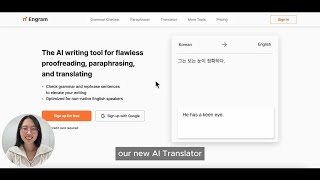
YouTube returned 6 videos for “Engram Translator”, and we withheld 5: 5 did not mention Engram Translator. Showing the 1 we can prove is about Engram Translator.
Official links
Tools that pair well with Engram Translator
Common stack mates teams adopt alongside Engram Translator, with the specific reason each pairing earns its keep.

DeepL Write Pro
DeepL's paid writing add-on that rewrites drafts for clarity and holds a whole team to one defined brand voice in five European languages.

OpenCat
Native AI chat client for Mac, iOS, and iPad with a system-wide keyboard extension and Siri access.
Quillbot
AI paraphrasing tool and writing suite for rewriting, grammar checks, and originality scans.
Featured Head-to-Head Comparisons
Engram Translator vs Surge Ai
If you're a non-native English speaker needing better writing and translation, Engram Translator is a practical, affordable choice. If you're an AI lab training frontier models, Surge AI's expert human feedback and benchmarks (like Antidote, Riemann-bench) are unmatched. These tools serve completely different purposes—choose based on whether you need writing assistance or AI alignment.
Engram Translator vs Praktika
Choose Praktika if you want to improve speaking fluency through AI tutor conversations. Choose Engram if you need polished written English with style-specific translation and proofreading. They serve different needs—vocally speaking practice vs. writing assistance.
Alternatives to Engram Translator
View all
DeepL Write Pro
DeepL's paid writing add-on that rewrites drafts for clarity and holds a whole team to one defined brand voice in five European languages.

Frequently Asked Questions
Best-of guides
Used Engram Translator? Help shape our editorial sentiment research.