
Ezier AI
Ezier AI is an all-in-one AI image, video, and audio generator running 20+ models on one credit balance.
Ezier earns its keep when you're already paying for three or four single-purpose AI tools and still re-uploading the same asset between them. Swapping Veo 3.1 against Kling 3.0 costs credits, not another subscription, and the studios turn a vague brief into something shippable. The catch is metering: credit packs are the ceiling and heavy video iteration drains a balance fast.
Verified 2h ago · liveness 65/100 · cite: rightaichoice.com/tools/ezier-ai
- Creators who want 20+ image and video models under one credit balance instead of stacked subscriptions
- E-commerce teams expanding one verified product photo into a full listing set plus a product video
- Marketers running controlled ad creative tests that hold the approved message steady
- Social media managers producing one coordinated asset per platform with optional vertical video
- Editors who need a frame-level timeline with keyframes and audio tracks
- Teams that require shared workspaces, role permissions, and review queues
- Heavy video users who need flat, predictable monthly spend rather than credit metering
We scan live Reddit threads, YouTube comments, X posts, G2 reviews and other communities — and hand you an honest verdict in under a minute.
- Honest verdict, not marketing
- Real pros & cons from real users
- Attributed quotes with receipts
3 free scans · no card needed
Skip Ezier if you need frame-level timeline editing, layered pixel-precise retouching, or team role permissions and review queues rather than prompt-and-generate workflows.
Heavier models and more advanced outputs consume more credits than simple edits, so a single Veo 3.1 or Kling 3.0 clip can eat far more of your monthly allowance than an image edit.
The Free plan ($0) is a check-in-credit entry point good for testing selected image and video models one task at a time. Paid plans are billed monthly or yearly, with annual billing saving up to 50% versus monthly; credit packs are an extra one-time purchase for subscribers. That sits in the same band as single-tool subscriptions such as Midjourney or Runway, so the value case rests on replacing several of those with one balance — not on being the cheapest option per image.
In short
Ezier AI — Ezier AI is an all-in-one AI image, video, and audio generator running 20+ models on one credit balance. Best for Creators who want 20+ image and video models under one credit balance instead of stacked subscriptions, E-commerce teams expanding one verified product photo into a full listing set plus a product video, Marketers running controlled ad creative tests that hold the approved message steady. Free to use.
What's new in Ezier AI
Checked 6 days agoAcross the latest 4 updates: 4 feature updates.
Meet Omni 1.1. Make a video, then make it yours.
A new video model, Omni 1.1, joins the Ezier model roster for video generation and follow-up refinement.
One product photo. A whole listing to show it off.
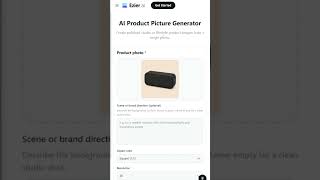
Product Photography Studio now expands a single verified product photo into a full listing of images.
Your next ad test starts with more options.
Ad Creative Testing Studio gained additional options for generating controlled ad variations.
One setup. A whole batch of product photos.
Batch Photo Editing Studio now produces a whole batch of standardised product photos from one setup.
What people actually say about Ezier AI — is it worth it?
We scanned public community sources for Ezier AI on Jul 2, 2026 and could not establish that the discussion we found is about this tool rather than something else sharing its name. Our own analysis of that scan says the posts were off-subject. Rather than publish a sentiment score built on the wrong subject, we publish nothing here and re-run the scan.
Viability Score
How well maintained and how widely used is Ezier AI? Built from what the vendor actually publishes (docs, changelog, tutorials, integrations, pricing), whether the site is live, and how much real users discuss it. How we calculate this
Last calculated: October 2026
How we score →Key Features
- Text-to-image generation across 20+ AI models including GPT Image 2.5 and Seedream 5.0 Pro
- Image-to-image restyling that keeps a visual reference
- Text-to-video with subject, action, camera, and atmosphere control
- Image-to-video animation that preserves the starting still
- Reference-to-video and video-to-video transformation
- Lip sync and AI talking avatar from an audio track
- AI Face Morph for transforming faces in image and video
- AI Video Extender for lengthening existing clips
- Videos: background removal, object removal, watermark removal, subtitle removal
- Image upscaler, enhancer, sharpener, and unblur
- Old photo restoration and image-to-prompt reverse engineering
- Text to speech, AI music generator, voice cloning, and AI voice over
- AI Ad Studio for scripts and video ad previews from a product URL
- Chat Canvas workspace with an Auto model picker
- One credit balance shared across every model and tool
About Ezier AI
Ezier AI is an AI creation workspace for turning prompts, reference images, and rough campaign ideas into finished images, video, and audio. Generation, editing, enhancement, model choice, and follow-up refinement all sit in one account, so the output of one step becomes the input to the next instead of a fresh upload into another subscription. It suits creators, marketers, e-commerce teams, designers, and founders who ship visual content on a schedule. The roster is the draw for model-shopping buyers. Image options include GPT Image 2.5, Seedream 5.0 Pro, Nano Banana 2 and Nano Banana Pro, Grok Imagine Image 2.0, Qwen Image 3.0, and Wan Image. Video options include Veo 3.1, Kling 3.0, Seedance 2.5, MiniMax H3, Wan 3.0, LTX 2.5, and Omni 1.1, the last added 2026-09-09. Chat Canvas and an Auto model picker give you a route in when the brief is still vague. Studios narrow the workflow to an outcome rather than a bare prompt box. AI Ad Studio drafts scripts and previews video ads from a product link, photo, or description. Product Photography Studio turns one verified product photo into a full listing set plus an optional product video. Batch Photo Editing Studio standardises main product images in one batch from a single setup. Ad Creative Testing Studio builds controlled variations that change one visual element while holding the approved message. Social Media Content Studio produces one coordinated image per platform with optional vertical video. The utility tool list runs deep in both directions. Images cover text-to-image, image-to-image, background and object removal, watermark and text removal, upscaling, enhancement, old-photo restoration, and unblurring. Video adds text-to-video, image-to-video, reference-to-video, lip sync, face morph, video extension, video upscaling, subtitle removal, and video unblur. Audio tools include text to speech, music generation, voice cloning, and voice over. Where it differs from stitching together Midjourney, Runway, and a
Behind the Verdict
Pick Ezier when model A/B testing is the job. If your week is spent asking whether Kling or Veo handles this product shot better, or whether Seedream or Nano Banana Pro nails the listing image, paying twice for separate subscriptions is the expensive way to answer it. Here you spend credits to find out, then keep the asset in the same workspace for cleanup and upscaling. We'd also reach for it on the batch jobs. One verified product photo going into Product Photography Studio and coming out as a full listing set, plus a batch pass to standardise main images, is a workflow that eats hours in Photoshop and a dozen re-prompts in a raw generator. Ad Creative Testing Studio does the thing most ad teams do badly by hand: change one visual element, hold the rest. Pass if you need frame-level editing. The video editor here is generation and cleanup, not a timeline with keyframes and audio tracks. Professional retouchers wanting layers and pixel-precise masks will be frustrated too. Teams needing shared workspaces, role permissions, and review queues should look at a proper DAM rather than a credit-metered generator. Cost is the real caveat. Every model costs different credits and heavier outputs cost more, so a flat monthly figure is hard to predict until you've tracked a couple of production cycles. If you buy credit packs on top, budget for it. The upside: top-ups exist, and yearly billing advertises up to 50% off monthly. Closest alternative is a single-model subscription plus a cheap upscaler. That's leaner if you've settled on one model. Ezier's pitch only pays off when model breadth and the studio workflows are things you actually use. One practical note: commercial use is permitted, but the terms of whichever model produced the output still apply. Check those
Researching Ezier AI? Get your full AI stack in 60 seconds.
Free, no signup — tell us your goal and get tools matched to your budget & existing stack.
Real-world workflow fit
Concrete scenarios for the personas Ezier AI actually fits — and what changes day-one when you adopt it.
Run Batch Photo Editing Studio over the upload batch to standardise main images, then send the finished shots to Product Photography Studio for listing variants and an optional product video.
Outcome: One finished image per upload plus a listing-ready set, without re-uploading between tools or re-briefing each step.
Use Ad Creative Testing Studio to build variations that change one visual element while keeping the approved message, then push the strongest still through Image-to-Video for a vertical cut.
Outcome: Controlled variants traced back to a single approved concept, with motion versions generated from the winning still.
Open Social Media Content Studio to produce one coordinated image per platform, then generate optional vertical video clips for short-form feeds from the same assets.
Outcome: A consistent set of platform-sized assets from one brief instead of separate generations per channel.
Use Cases
- Generate product images for e-commerce listings from text prompts
- Create one coordinated social image per platform plus optional vertical video
- Animate still product photos into short ad clips
- Remove backgrounds, objects, text, and watermarks for clean product shots
- Upscale and enhance low-resolution images for print
- Produce lip-synced videos and face-morph clips for multilingual content
- Build controlled ad variations that change one visual element at a time
- Standardise a batch of main product images with Batch Photo Editing Studio
Models Under the Hood
as of 2026-10-18
Limitations
- Credit consumption differs by model and tool, and per-model credit rates are not published, so real cost per asset only becomes clear after you spend.
- The Free plan gives limited credits earned through check-ins, runs one task at a time, and only grants access to selected image and video models.
- Prices on the pricing page load dynamically, so exact paid plan costs are not visible in the static content.
- Credit packs are one-time purchases available only with a paid subscription.
as of 2026-10-02
Verification history
We have re-verified Ezier AI 9 times since . Each pass re-reads the vendor's own pages and re-checks every listed field against that evidence; passes where nothing had changed are marked as such.
- — re-verified summary, description, our verdict, our analysis, pricing model, pricing tiers, features, integrations, who it suits, who should skip it
- — re-verified summary, description, our verdict, our analysis, pricing model, pricing tiers, features, integrations, who it suits, who should skip it
- — re-verified summary, description, our verdict, our analysis, pricing model, pricing tiers, features, integrations, who it suits, who should skip it
- — re-verified summary, description, our verdict, our analysis, pricing model, pricing tiers, features, integrations, who it suits, who should skip it
- — re-checked, vendor evidence unchanged
- — re-verified summary, description, our verdict, our analysis, pricing model, pricing tiers, features, integrations, who it suits, who should skip it
Showing the 6 most recent of 9 verification passes.
Free to cite with attribution — this page re-verifies continuously.
12-month cost
Project the real annual outlay, including the implied monthly cost when only an annual tier is published.
Vendor list price only. Add-on usage, seat overages, and contract minimums are surfaced under Hidden costs & gotchas.
Plans compared
For each published Ezier AI tier: who it actually fits, and what it adds vs. the previous tier. Cross-reference the cost calculator above for projected annual outlay.
Free
$0
Ideal for
A solo creator or evaluator testing selected image and video models before committing to a paid plan, working one task at a time.
What this tier adds
Free entry point: earn credits with check-ins, access selected image and video models, and run one task at a time.
Paid plans (monthly or yearly)
Custom
Ideal for
Creators, marketers, and e-commerce teams producing visual assets weekly who need the full image and video model roster and more monthly credits.
What this tier adds
Adds a monthly credit allowance that scales with the plan, the full image and video model roster, and the option to buy one-time credit packs; annual billing saves up to 50% versus monthly.
Where the pricing makes sense
The company stage and team size where Ezier AI's pricing actually pencils out — and where peers do it cheaper.
The Free plan ($0) is a check-in-credit entry point good for testing selected image and video models one task at a time. Paid plans are billed monthly or yearly, with annual billing saving up to 50% versus monthly; credit packs are an extra one-time purchase for subscribers. That sits in the same band as single-tool subscriptions such as Midjourney or Runway, so the value case rests on replacing several of those with one balance — not on being the cheapest option per image.
Setup time & first value
How long it actually takes to get something useful out of Ezier AI — broken out by persona, not the marketing-page minute.
Free plan: minutes — you can compare plans and credit amounts and explore models without signing in, so a first test starts almost immediately. Paid plan: same day — sign in, pick a plan, and credit allowances unlock the full model roster. First useful output for a product-photography job typically lands in one short session once you have source photos ready.
Switching to or from Ezier AI
How to bring data in from common predecessors and how to get it back out — written for the switcher, not the buyer.
- →From Midjourney: rebuild your prompt library in Ezier's text-to-image tools and keep Discord output as reference images for image-to-image restyling.
- →From Runway: move stills and clips into Ezier for upscaling, enhancement, unblurring, and reference-to-video, and keep Runway for timeline edits Ezier does not do.
- →From a standalone upscaler or background remover: route those jobs through the Image Upscaler, Image Enhancer, Background Remover, and Watermark Remover under the same credit balance.
- →From Canva or a template tool: use Social Media Content Studio for the generation pass, then place outputs into your existing layout tool.
- ↗To Runway or Premiere Pro: export finished clips when a project needs frame-level timeline control, transitions, and audio mixing.
- ↗To Photoshop or Affinity Photo: move assets out for layered, pixel-precise retouching that Ezier's cleanup tools do not cover.
- ↗To a DAM or shared workspace: offload finished assets to a system with role permissions and approval queues when your team grows past ad-hoc review.
Resources & Guides
Tutorials & Learning
YouTube returned 6 videos for “Ezier AI”, and we withheld 5: 5 could not be judged, because “Ezier AI” is a single word that other videos use for other things. Showing the 1 we can prove is about Ezier AI.
Official links
Tools that pair well with Ezier AI
Common stack mates teams adopt alongside Ezier AI, with the specific reason each pairing earns its keep.

Picsart
Picsart packs 180+ AI image, video, and audio models into one creative subscription with built-in editing.
Luma Dream Machine
Luma Dream Machine is an AI video generator that routes work across Luma's Ray3.2, Uni-1.1, Veo, Kling, and Seedance models on one credit

Magnific AI
Magnific is an AI creative suite that generates images, video, audio and 3D from one credit pool and a node-based canvas.
Featured Head-to-Head Comparisons
Ezier Ai vs Splice
If you need AI-generated images, videos, and audio from a single creative workspace, Ezier AI is the clear choice with its 20+ models. If you're a music producer needing millions of royalty-free samples and rent-to-own plugins, Splice is unmatched. They serve completely different domains, so pick the tool that matches your primary content medium.
Ezier Ai vs The New Black
Ezier AI wins for creators who need a jack-of-all-trades media generator (images, video, audio) with model flexibility. The New Black is the clear choice for fashion brands requiring production-ready garment designs and tech packs. No overlap: choose based on your industry.
Ezier Ai vs Storyfile
If you need rapid, versatile generation of images, videos, and audio for social media or e-commerce, Ezier AI's broad model library and freemium model make it a strong choice. But if your goal is to create authentic, interactive conversational avatars for museums, legacy preservation, or digital twins (like the recent CNN project), StoryFile's cinematic recording and real-video AI is unmatched. Choose based on whether you prioritize creative volume or human authenticity.
Alternatives to Ezier AI
View all
Picsart
Picsart packs 180+ AI image, video, and audio models into one creative subscription with built-in editing.
Luma Dream Machine
Luma Dream Machine is an AI video generator that routes work across Luma's Ray3.2, Uni-1.1, Veo, Kling, and Seedance models on one credit

Magnific AI
Magnific is an AI creative suite that generates images, video, audio and 3D from one credit pool and a node-based canvas.
Frequently Asked Questions
Categories
Best-of guides
Used Ezier AI? Help shape our editorial sentiment research.