Insanely Fast Whisper is live · free · last verified 25 Oct 2026 · viability monitor

Insanely Fast Whisper
Insanely Fast Whisper transcribes 2.5 hours of audio in under 98 seconds on an A100 GPU
Free, MIT-licensed, and genuinely the quickest local Whisper route we've seen documented on an A100: 98 seconds for 2.5 hours with large-v3, or 78 seconds with distil-large-v2. The 8x-plus gap over Faster Whisper's own numbers is the reason to care. Just budget an hour for setup friction before you see that speed.
Verdict generatedVerified 5d ago · liveness 57/100 · cite: rightaichoice.com/tools/insanely-fast-whisper
- Developers with an NVIDIA CUDA GPU who want the fastest free local Whisper transcription
- Researchers batch-transcribing hundreds of hours of audio on their own hardware
- Creators generating offline captions and word-level JSON for subtitle pipelines
- Privacy-conscious teams barred from sending audio to a cloud transcription API
- Users without a CUDA GPU, or Mac owners expecting A100-class speed
- Anyone who needs real-time or streaming transcription from a live microphone
- Non-technical users who want a GUI and zero setup
We scan live Reddit threads, YouTube comments, X posts, G2 reviews and other communities — and hand you an honest verdict in under a minute.
- Honest verdict, not marketing
- Real pros & cons from real users
- Attributed quotes with receipts
3 free scans · no card needed
Skip Insanely Fast Whisper if you do not have a CUDA GPU, need real-time streaming, or want a GUI without installing Python tooling and flags.
The 98-second benchmark assumes an NVIDIA A100 80GB — on weaker or consumer GPUs the same 150-minute job takes substantially longer, so your real cost is hardware, not license fees.
Insanely Fast Whisper is free under the MIT license, so the comparison is not tier-to-tier but hardware-to-hardware: an A100-class GPU gets you ~98 seconds per 150 minutes of audio, while paying per-minute cloud transcription services such as a hosted Whisper API trade zero capex for a recurring per-minute bill. It is cheapest for anyone who already owns a CUDA GPU and runs batch jobs; most expensive for anyone who would have to buy or rent that GPU just for transcription.
In short
Insanely Fast Whisper — Insanely Fast Whisper transcribes 2.5 hours of audio in under 98 seconds on an A100 GPU. Best for Developers with an NVIDIA CUDA GPU who want the fastest free local Whisper transcription, Researchers batch-transcribing hundreds of hours of audio on their own hardware, Creators generating offline captions and word-level JSON for subtitle pipelines. Free to use.
What is Insanely Fast Whisper?
Insanely Fast Whisper — Insanely Fast Whisper transcribes 2.5 hours of audio in under 98 seconds on an A100 GPU. Best for Developers with an NVIDIA CUDA GPU who want the fastest free local Whisper transcription, Researchers batch-transcribing hundreds of hours of audio on their own hardware, Creators generating offline captions and word-level JSON for subtitle pipelines. Free to use.
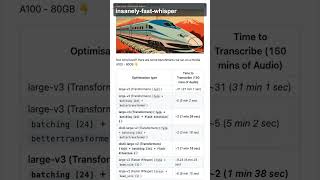
Insanely Fast Whisper is an opinionated command-line tool for local Whisper speech-to-text, built on Hugging Face Transformers, Optimum, and Flash Attention 2. The whole project exists to answer one question: how quickly can 150 minutes of audio become a transcript on hardware you already own? On an NVIDIA A100 80GB with OpenAI's Whisper Large v3 in fp16, batching at 24, and Flash Attention 2 enabled, the README's headline number is 1 minute 38 seconds. The workflow is a single command. Point --file-name at a local file or a URL, pick a checkpoint with --model-name (default openai/whisper-large-v3), and the JSON transcript lands wherever --transcript-path says, output.json by default. --timestamp switches between chunk-level and word-level timestamps, --task translate renders speech into English, and --hf_token wires in Pyannote.audio for speaker diarization. Language detection is automatic unless you pin it with --language. Hardware reality: it targets NVIDIA CUDA GPUs and Apple Silicon Macs (add --device-id mps on macOS). Installation runs through pipx or pip, and pipx run skips a permanent install for one-off jobs. There's also a Colab notebook and a Replicate demo if you'd rather rent a GPU than buy one. Versus alternatives, it trades polish for raw throughput. Faster Whisper is the closest competitor and the README's own A100 benchmark puts it at roughly 8 minutes 15 seconds for the same 150-minute job in 8-bit, versus the 98-second Flash Attention 2 run here. Pick this one when you have the GPU and live in a terminal; pick a GUI app or hosted API when you don't.
Key features
- Transcribes 150 minutes (2.5 hours) of audio in about 98 seconds on an NVIDIA A100 80GB
- Flash Attention 2 via --flash True brings the A100 benchmark to 1 min 38 sec
- distil-large-v2 with Flash Attention 2 transcribes 150 minutes in about 1 min 18 sec
- fp16 + batching (24) + BetterTransformer cuts the same job to about 5 minutes
- Default model openai/whisper-large-v3, swappable with --model-name
- Accepts a local file path or audio URL through --file-name
- Writes JSON transcripts to --transcript-path (default output.json)
- Chunk-level or word-level timestamps via --timestamp
- Translate-to-English mode via --task translate
- Automatic language detection unless --language is set
- Speaker diarization through Pyannote.audio with --hf_token
- Runs on NVIDIA CUDA GPUs and Apple Silicon Macs via --device-id mps
- Adjustable --batch-size to trade memory against throughput
- Install via pipx or pip, with one-off runs through pipx run insanely-fast-whisper
- Google Colab notebook and Replicate demo for cloud-GPU transcription
Behind the verdict
The decision here is about your machine and your tolerance for a shell, not about transcription quality. Whisper large-v3 sounds the same whichever wrapper runs it. What Insanely Fast Whisper buys you is throughput: on an A100 the README clocks 31 minutes for a 150-minute file at fp32, roughly 5 minutes with fp16 plus batching and BetterTransformer, and 1 minute 38 seconds once Flash Attention 2 is in the mix. The distil-large-v2 + FA2 run hits 1 minute 18 seconds. We'd reach for this if you already own a modern NVIDIA card and want to batch a large archive of audio overnight. Researchers with hundreds of hours of interviews, podcast teams generating their own captions, and anyone under a data-residency rule that forbids uploading audio to a cloud API are the natural fits. Setup is where it bites. Python 3.12 is blocked by the onnxruntime dependency, so you'll pin 3.11 with --python python3.11. Worse, on some 3.11.x installs pipx misreads the version and quietly installs 0.0.8, a build the README says no longer works with current BetterTransformers; the fix is a forced reinstall with --ignore-requires-python. Flash Attention 2 needs its own build step (pipx runpip insanely-fast-whisper install flash-attn --no-build-isolation). None of that is hard, but it's an hour you won't get back. On Apple Silicon the --device-id mps flag works, though the A100 numbers tell you nothing about Mac speed. If a GUI would serve you better, MacWhisper is the obvious buy. If you want a Python library you can call from code rather than a CLI, Faster Whisper slots in more naturally and its 8-bit A100 figure of about 8 minutes 15 seconds is plenty for most jobs. Caveats worth knowing before you commit: this is a community fork of Vaibhavs10's project, the README describes it as purely
Models under the hood
as of 2026-10-24
Limitations
- The advertised speed (150 minutes of audio in under 98 seconds) is measured on an NVIDIA A100 80GB, so real-world performance tracks your local hardware closely; Mac MPS runs slower.
- It is a command-line tool distributed via GitHub — you install and run it yourself, there is no hosted interface.
- Python 3.12 is not supported because of an onnxruntime dependency, and on some Python 3.11.x setups pipx may silently install version 0.0.8, which no longer works with current BetterTransformers.
- Optional speaker diarization relies on Pyannote.audio and requires a Hugging Face token.
- The README describes the project as purely community driven, so feature direction follows community demand rather than a vendor roadmap.
as of 2026-10-09
Researching Insanely Fast Whisper? Get your full AI stack in 60 seconds.
Free, no signup — tell us your goal and get tools matched to your budget & existing stack.
Is Insanely Fast Whisper still active?
Insanely Fast Whisper is live · free · last verified 25 Oct 2026 · viability monitor.
Viability score
How well maintained and how widely used is Insanely Fast Whisper? Built from what the vendor actually publishes (docs, changelog, tutorials, integrations, pricing), whether the site is live, and how much real users discuss it. How we calculate this
Last calculated: October 2026
How we score →What do users say about Insanely Fast Whisper?
What people actually say about Insanely Fast Whisper — is it worth it?
Our community sentiment research written Jul 3, 2026 is more than 90 days old, so it is being re-reviewed against current data and is not shown.
How we verified this
Every listed fact about Insanely Fast Whisper— pricing, features, links, status — is re-read from the vendor's own pages by our verification pipeline and each change is logged with a date; the last pass ran on 25 Oct 2026. Pages mix model-assisted synthesis with human review; see how we verify.
Verification history
We have re-verified Insanely Fast Whisper 12 times since . Each pass re-reads the vendor's own pages and re-checks every listed field against that evidence; passes where nothing had changed are marked as such.
- — changed integrations, our verdict, who it suits, description, features, summary, who should skip it, pricing tiers
- — changed models, pricing page
- — changed pricing page
- — changed summary, pricing tiers, who should skip it, our verdict, who it suits, features, description
- — changed pricing page
- — changed models, our verdict, who should skip it, hidden costs, setup time, limitations, features, pricing tiers, use cases, summary, description, pricing fit, switching in, who it suits, switching out
Showing the 6 most recent of 12 verification passes.
Free to cite with attribution — this page re-verifies continuously.
How much does Insanely Fast Whisper cost in 2026?
Insanely Fast Whisper: Free to use. Pricing last verified 25 Oct 2026.
Plans compared
Every published Insanely Fast Whisper tier, its price as the vendor publishes it, who it fits, and what it adds over the tier below. The 12-month cost projection follows.
| Plan | Price | Billing | Who it's for |
|---|---|---|---|
| Free (open source, MIT license) | Free | — | — |
12-month cost
Project the real annual outlay, including the implied monthly cost when only an annual tier is published.
Vendor list price only. Add-on usage, seat overages, and contract minimums are surfaced under Hidden costs & gotchas.
Where the pricing makes sense
The company stage and team size where Insanely Fast Whisper's pricing actually pencils out — and where peers do it cheaper.
Insanely Fast Whisper is free under the MIT license, so the comparison is not tier-to-tier but hardware-to-hardware: an A100-class GPU gets you ~98 seconds per 150 minutes of audio, while paying per-minute cloud transcription services such as a hosted Whisper API trade zero capex for a recurring per-minute bill. It is cheapest for anyone who already owns a CUDA GPU and runs batch jobs; most expensive for anyone who would have to buy or rent that GPU just for transcription.
Has Insanely Fast Whisper's pricing changed?
No plan price for Insanely Fast Whisper has moved since we began logging in Aug 2026; the pricing page is re-read on every verification pass.
Who should pick Insanely Fast Whisper?
Pick Insanely Fast Whisper if you are Developers with an NVIDIA CUDA GPU who want the fastest free local Whisper transcription, Researchers batch-transcribing hundreds of hours of audio on their own hardware, Creators generating offline captions and word-level JSON for subtitle pipelines, Privacy-conscious teams barred from sending audio to a cloud transcription API.
Look elsewhere if you are Users without a CUDA GPU, or Mac owners expecting A100-class speed, Anyone who needs real-time or streaming transcription from a live microphone, Non-technical users who want a GUI and zero setup, Python 3.12 users unwilling to pin 3.11 for the onnxruntime dependency.
Skip it if Skip Insanely Fast Whisper if you do not have a CUDA GPU, need real-time streaming, or want a GUI without installing Python tooling and flags.
GeneratedReal-world workflow fit
Concrete scenarios for the personas Insanely Fast Whisper actually fits — and what changes day-one when you adopt it.
Install with pipx (adding --python python3.11 if Python 3.12 is your default), then run insanely-fast-whisper --file-name meeting.mp4 --flash True on a two-hour recording.
Outcome: A JSON transcript with chunk-level timestamps in output.json, produced in minutes rather than hours, with the audio never leaving the machine.
Loop the CLI over a folder of dataset audio using distil-whisper/large-v2 to cut the run time further, then parse the word-level timestamps for alignment work.
Outcome: A full corpus transcribed locally on your own GPU with consistent JSON output and no per-minute API spend.
Run the CLI inside an air-gapped or on-prem machine with --device-id mps on Apple Silicon or CUDA on a workstation GPU, feeding confidential recordings in by file path.
Outcome: Transcripts generated without any audio crossing a network boundary, satisfying internal data-handling rules.
Use cases
- Batch-transcribe recorded meetings or lectures locally so the audio never leaves your machine
- Generate subtitle tracks for video content without paying a per-minute transcription service
- Process large speech datasets on your own GPU for speech-to-text research
- Drop the CLI into an automated pipeline to transcribe podcast back catalogs
- Transcribe confidential or regulated audio entirely offline with no cloud API call
- Produce word-level timestamp JSON for editing, captioning, or alignment tooling
Setup time & first value
How long it actually takes to get something useful out of Insanely Fast Whisper — broken out by persona, not the marketing-page minute.
On a CUDA machine with a working Python 3.11 environment, expect roughly 15–30 minutes from pipx install to first transcript, plus model download time for Whisper Large v3. On Apple Silicon, add time to verify the --device-id mps flag and accept slower throughput. Budget extra effort if you need Pyannote diarization, which requires a Hugging Face token and its own dependencies.
Switching to or from Insanely Fast Whisper
How to bring data in from common predecessors and how to get it back out — written for the switcher, not the buyer.
- →From Faster Whisper: point the same --file-name input at this CLI and add --flash True to move from roughly 8 minutes 15 seconds to about 1 minute 38 seconds on a 150-minute job on an A100.
- →From a cloud transcription API: replace per-minute API calls with a local pipx install and run batch jobs against your own GPU.
- →From hand-rolled Transformers Whisper scripts: swap your inference loop for the CLI flags (--model-name, --flash, --batch-size) and keep the JSON output.
- ↗To MacWhisper: move to a Mac GUI app if your team needs point-and-click transcription rather than terminal flags.
- ↗To a hosted Whisper API: switch if you would rather pay per minute than own and maintain a CUDA GPU.
- ↗To Faster Whisper: revert if you need a CPU-friendly or more broadly hardware-tolerant Whisper runtime.
Integrations
Resources & guides
Tutorials & Learning
"Insanely Fast Whisper" does local speech transcription at speed #ai
Build Things With AI
驚異的な速さのWhisper:2.5時間の音声を98秒で文字起こし
Prism Labs
YouTube returned 6 videos for “Insanely Fast Whisper”, and we withheld 4: 4 did not mention Insanely Fast Whisper. Showing the 2 we can prove are about Insanely Fast Whisper.
Official links
What are the best Insanely Fast Whisper alternatives?
The closest alternatives to Insanely Fast Whisper we list are MacWhisper, Audioflare and Sonix. Ranked by direct product-type match, not category overlap.
| Alternative | Pricing | Starts at | Last verified |
|---|---|---|---|
| MacWhisper | Freemium | Pricing not published | — |
| Audioflare | Free | Free | — |
| Sonix | Paid | Pricing not published | — |
Alternatives to Insanely Fast Whisper
View all
MacWhisper
MacWhisper transcribes audio to text offline on your Mac with Whisper, Parakeet and Qwen3-ASR — no audio leaves your machine.

Audioflare
Audioflare is a free open-source browser playground that transcribes, analyzes, translates, and summarizes audio clips up to 30 seconds on Cloudflare Workers
Tools that pair well with Insanely Fast Whisper
Common stack mates teams adopt alongside Insanely Fast Whisper, with the specific reason each pairing earns its keep.

MacWhisper
MacWhisper transcribes audio to text offline on your Mac with Whisper, Parakeet and Qwen3-ASR — no audio leaves your machine.

Audioflare
Audioflare is a free open-source browser playground that transcribes, analyzes, translates, and summarizes audio clips up to 30 seconds on Cloudflare Workers
Sonix
Sonix transcribes audio and video at 99% accuracy in 54+ languages, then layers AI analysis, speaker diarization, and cited answers across
Insanely Fast Whisper vs its closest rival
Insanely Fast Whisper's closest head-to-head is with Voiceitt — If you have non-standard speech (e.g., cerebral palsy, ALS) and need personalized ASR with real-time captions in Webex or Alexa, Voiceitt is the only viable choice. If you are a developer who needs ultra-fast, local transcription of clean audio on NVIDIA GPUs, Insanely Fast Whisper is free and unmatched in speed. Choose based on your speech profile and hardware. Verdict generated
Head-to-head comparisons
Insanely Fast Whisper vs Voiceitt
If you have non-standard speech (e.g., cerebral palsy, ALS) and need personalized ASR with real-time captions in Webex or Alexa, Voiceitt is the only viable choice. If you are a developer who needs ultra-fast, local transcription of clean audio on NVIDIA GPUs, Insanely Fast Whisper is free and unmatched in speed. Choose based on your speech profile and hardware.
GeneratedInsanely Fast Whisper vs Retell Ai
Choose Insanely Fast Whisper if you need ultra-fast, free, local transcription on CUDA GPUs and value privacy. Choose Retell AI if you need a full-stack conversational AI platform for automating phone calls at scale, with low latency and rich integrations. They serve different problems; the right tool depends on whether your core need is transcription or conversation.
GeneratedInsanely Fast Whisper vs Soniox
Choose Soniox if you need real-time multilingual voice AI with built-in TTS, translation, and enterprise compliance (HIPAA/SOC 2) — ideal for voice agents and live translation. Choose Insanely Fast Whisper if you want free, fast local batch transcription for research, captioning, or privacy-sensitive use cases on a powerful GPU. Your decision hinges on latency/real-time needs vs. cost/deployment control.
GeneratedFrequently asked questions
Categories
Best-of guides
Topics
Used Insanely Fast Whisper? Help shape our editorial sentiment research.