
Lama Cleaner
Free, open-source, self-hosted image inpainting and outpainting that runs on your own hardware
IOPaint is still the reference free option for local inpainting: LaMa for erasing, PowerPaintV2 for replacement and outpainting, AnyText for text, plus Segment Anything, RemoveBG, RealESRGAN and GFPGAN plugins, at no cost and with no usage limits. The catch is the read-only archive of August 13, 2025 — no upstream bug fixes — and the self-hosting work of managing models and, ideally, a GPU. If you want zero-install convenience, look at cloud tools like Adobe Photoshop's Generative Fill or ClipDrop instead. For privacy-first, unlimited batch work on your own hardware, take it.
Verified 4d ago · liveness 68/100 · cite: rightaichoice.com/tools/lama-cleaner
- Photographers retouching on a budget with unlimited, private edits
- Content creators needing quick local inpainting and outpainting
- Developers building batch image-cleanup pipelines
- Privacy-conscious users avoiding cloud image editing
- Users seeking a cloud-based, zero-install solution
- Studios requiring real-time collaborative editing and version control
- Teams needing a maintained, supported product with an upstream roadmap
We scan live Reddit threads, YouTube comments, X posts, G2 reviews and other communities — and hand you an honest verdict in under a minute.
- Honest verdict, not marketing
- Real pros & cons from real users
- Attributed quotes with receipts
3 free scans · no card needed
Skip IOPaint if you need a zero-install editor with active upstream development, since the GitHub repo was archived read-only on August 13, 2025 and every install and model download is on you.
A GPU is effectively required for diffusion replacement work, so you may face a hardware purchase or cloud-GPU rental bill on top of the $0 software
IOPaint costs $0 — Apache-2.0 licensed, all models and all plugins included, no usage limits. Compared with paid cloud editors like Adobe Photoshop's Generative Fill or ClipDrop, which bill per seat or per credit, the only cost here is your own hardware and time. It is the cheapest option by a wide margin and the least convenient.
In short
Lama Cleaner — Free, open-source, self-hosted image inpainting and outpainting that runs on your own hardware. Best for Photographers retouching on a budget with unlimited, private edits, Content creators needing quick local inpainting and outpainting, Developers building batch image-cleanup pipelines. Free to use.
What people actually say about Lama Cleaner — is it worth it?
We ran a structured research pass across product reviews, community discussions, and post-purchase forum threads to surface the patterns vendors won't publish themselves. Below: the recurring strengths, the hidden costs people mention most, and the cohort that consistently regrets adopting this tool.
23 mentions across 5 sources (YouTube, Product Hunt, Bluesky, GitHub, Lemmy) · researched Jul 28, 2026.
Average across the 5 sources that answered — each source counts once, not each post.
- +Completely free with no usage limits or subscriptions.
- +All processing is local; no data ever leaves your machine.
- +Supports multiple AI models: LaMa, PowerPaint, AnyText, SD inpainting.
- +Plugins for segmentation, background removal, super-resolution, face restoration.
- +Simple web UI with brush-based editing.
- −Manual setup requires Python and can be error-prone (GitHub issues).
- −No dedicated support; community is tiny and quiet.
- −Original repository is archived; future uncertain.
- −Web UI is functional but not as polished as commercial tools.
- −GPU recommended for reasonable performance on large images.
- • Hardware: requires a decent GPU for good performance (or slow CPU processing)
- • Time: manual setup and troubleshooting
- • Electricity: local GPU usage increases power consumption
Viability Score
How well maintained and how widely used is Lama Cleaner? Built from what the vendor actually publishes (docs, changelog, tutorials, integrations, pricing), whether the site is live, and how much real users discuss it. How we calculate this
Last calculated: October 2026
How we score →Key Features
- Erase objects, defects, watermarks and people with LaMa erase models
- Replace objects with diffusion inpainting models like SDXL and BrushNet
- Outpaint by extending image borders with PowerPaintV2
- Draw custom text into images with AnyText
- Paint-by-Example replacement driven by a reference image
- Text-prompt guidance for diffusion replacement models
- Segment Anything plugin for interactive object segmentation
- RemoveBG plugin for background removal and foreground mask generation
- Anime Segmentation plugin tuned for anime images
- RealESRGAN plugin for super-resolution upscaling
- GFPGAN and RestoreFormer plugins for face restoration
- FileManager plugin to browse images and save to an output directory
- Local web UI with canvas and brush tools on localhost:8080
- Command-line batch processing with mask folders
- Runs on CPU, CUDA GPU, Linux ROCm and Apple Silicon
About Lama Cleaner
IOPaint (the project formerly published as Lama Cleaner) is a free, open-source inpainting and outpainting tool you install and run yourself. You brush over anything you want gone — objects, defects, photobombers, watermarks, text — and the LaMa erase model fills it in. For replacement rather than removal you switch to a diffusion model such as SDXL inpainting, BrushNet, PowerPaintV2, Realistic Vision V3.0 inpainting, DreamShaper 8 inpainting, Anything 4.0 inpainting or Paint-by-Example, and you can outpaint to extend a canvas with PowerPaintV2 or write text into an image with AnyText. A local web UI gives you canvas and brush tools at http://localhost:8080, and the same package runs from the command line for batch jobs with mask folders. Plugins add Segment Anything for interactive object segmentation, RemoveBG and Anime Segmentation for background removal, RealESRGAN for super-resolution, and GFPGAN or RestoreFormer for face restoration. It installs via pip, Docker, or a Windows 1-Click Installer, and runs on CPU, GPU (CUDA and ROCm on Linux) and Apple Silicon. Because everything stays on your machine there are no usage limits and no images leaving your network. The GitHub repository was archived by its owner on August 13, 2025 and is now read-only, so the code is frozen but functional; OptiClean, a macOS and iOS app for object erase, continues alongside it. This is a tool for people who would rather manage an installation than pay per edit.
Behind the Verdict
The thing that separates IOPaint from cloud editing tools is that the whole pipeline lives on your machine. You install it with pip, run `iopaint start --model=lama --device=cpu --port=8080`, open localhost:8080, and every brush stroke is processed locally — nothing is uploaded, and there is no quota to watch. That is a real structural advantage for anyone working under confidentiality constraints or with tens of thousands of images to clean. Capability-wise it is not a one-trick eraser. The LaMa erase models handle removal of objects, defects, watermarks and people. The diffusion models handle replacement — SDXL inpainting, BrushNet, PowerPaintV2, Realistic Vision V3.0 inpainting, DreamShaper 8 inpainting, Anything 4.0 inpainting, Paint-by-Example — with PowerPaintV2 also doing outpainting, and AnyText letting you draw text into the image. Text prompts drive the replacement models. The plugin layer is unusually deep for a free tool: Segment Anything gives interactive segmentation, RemoveBG and Anime Segmentation strip backgrounds, RealESRGAN upscales, and GFPGAN or RestoreFormer repair faces. FileManager lets you browse and save directly to an output directory. Installation paths are genuinely varied: pip, Docker, or a Windows 1-Click Installer, with CPU, CUDA GPU, Linux ROCm, and Apple Silicon all supported. For volume work, the command line accepts mask folders so you can batch-process a directory of shots rather than clicking through the UI one at a time. The honest downsides: the repo was archived on August 13, 2025, so upstream development has stopped and the project is read-only — you inherit whatever bugs exist. Diffusion models are heavy; a GPU is close to mandatory for replacement work, and even erase jobs benefit from one. Setup is command-line-first for any non-Windows path, and you are responsible for downloading and storing model weights. There is no collaborative editing, no version history, and no hosted API for a team to build against. If any of those are hard requirements, a paid cloud service is the pragmatic answer; if they are not, this costs nothing and imposes no limits.
Researching Lama Cleaner? Get your full AI stack in 60 seconds.
Free, no signup — tell us your goal and get tools matched to your budget & existing stack.
Real-world workflow fit
Concrete scenarios for the personas Lama Cleaner actually fits — and what changes day-one when you adopt it.
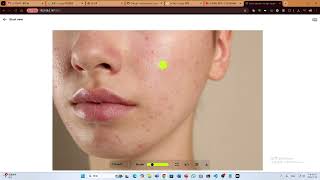
After a shoot you spot unwanted objects in a dozen frames. You start IOPaint locally with `iopaint start --model=lama --device=cuda --port=8080`, open localhost:8080, brush over each object and let the LaMa erase model fill it in, then save to your output directory via FileManager.
Outcome: A dozen cleaned frames in an evening with no upload, no credits spent, and originals untouched on disk.
You have a folder of product shots with watermarks and stray props. You put masks alongside each image and run IOPaint from the command line to batch-process the whole directory overnight, then spot-check and re-run individual files in the web UI.
Outcome: Hundreds of images cleaned in one unattended batch run with no per-image fee.
You pip install iopaint into an existing Python service, pick PowerPaintV2 for outpainting and RealESRGAN for upscaling, and script the inpainting step so incoming images are cleaned before they reach your downstream model.
Outcome: Image cleanup becomes an ordinary build step running on hardware you already control.
Use Cases
- Erase photobombers and unwanted objects from personal photos
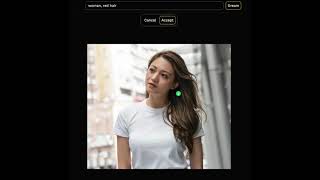
- Replace a background element with generated content via text prompt
- Remove defects or blemishes from product images for e-commerce
- Draw custom text onto images for memes or branding with AnyText
- Extend a photo's canvas to change composition or aspect ratio
- Batch-process a folder of images to strip watermarks from the command line
- Restore old or damaged photos with face restoration and super-resolution
- Run image cleanup locally on confidential material that cannot leave the network
Models Under the Hood
as of 2026-09-22
Limitations
- Self-hosted only: you install it, download model weights, and ideally own a GPU for diffusion replacement models.
- The GitHub repository was archived by its owner on August 13, 2025 and is now read-only, so no further upstream fixes or features are coming; the code remains functional.
- Command-line setup is the norm outside the Windows 1-Click Installer.
- There is no collaborative editing, no version history, and no hosted API tier.
- Batch processing requires you to prepare mask folders yourself.
as of 2026-10-04
Verification history
We have re-verified Lama Cleaner 9 times since . Each pass re-reads the vendor's own pages and re-checks every listed field against that evidence; passes where nothing had changed are marked as such.
- — re-checked, vendor evidence unchanged
- — re-verified summary, description, our verdict, our analysis, pricing model, pricing tiers, features, integrations, who it suits, who should skip it
- — re-verified summary, description, our verdict, our analysis, pricing model, pricing tiers, features, integrations, who it suits, who should skip it
- — re-verified summary, description, our verdict, our analysis, pricing model, pricing tiers, features, integrations, who it suits, who should skip it
- — re-verified summary, description, our verdict, our analysis, pricing model, pricing tiers, features, integrations, who it suits, who should skip it
- — re-checked, vendor evidence unchanged
Showing the 6 most recent of 9 verification passes.
Free to cite with attribution — this page re-verifies continuously.
12-month cost
Project the real annual outlay, including the implied monthly cost when only an annual tier is published.
Vendor list price only. Add-on usage, seat overages, and contract minimums are surfaced under Hidden costs & gotchas.
Plans compared
For each published Lama Cleaner tier: who it actually fits, and what it adds vs. the previous tier. Cross-reference the cost calculator above for projected annual outlay.
Free
$0/mo
Ideal for
Anyone with their own machine — hobbyists, freelancers, privacy-constrained teams — who wants unlimited local inpainting at no cost
What this tier adds
Starting tier and only tier: $0 for all erase, inpaint, outpaint and text models plus every plugin, with no usage limits or watermarks
Where the pricing makes sense
The company stage and team size where Lama Cleaner's pricing actually pencils out — and where peers do it cheaper.
IOPaint costs $0 — Apache-2.0 licensed, all models and all plugins included, no usage limits. Compared with paid cloud editors like Adobe Photoshop's Generative Fill or ClipDrop, which bill per seat or per credit, the only cost here is your own hardware and time. It is the cheapest option by a wide margin and the least convenient.
Setup time & first value
How long it actually takes to get something useful out of Lama Cleaner — broken out by persona, not the marketing-page minute.
On Windows with the 1-Click Installer you can be erasing in roughly 15-30 minutes, mostly model download time. Via pip, budget 30-60 minutes the first time to sort PyTorch and CUDA or ROCm versions, plus several gigabytes of model downloads. Batch pipeline integration takes longer — expect half a day to wire the CLI or Python entry point into existing infrastructure.
Switching to or from Lama Cleaner
How to bring data in from common predecessors and how to get it back out — written for the switcher, not the buyer.
- →From Adobe Photoshop Generative Fill: export the images you were editing to local files and reproduce each edit in IOPaint's web UI or a batch run
- →From ClipDrop: replace per-edit credit purchases with a local install and process the same removal and outpainting tasks without uploads
- →From paying per-use inpainting APIs: install IOPaint locally and move the same jobs onto your own CPU or GPU
- →From manual clone-stamp retouching: switch to brushing a mask and letting LaMa fill the region automatically
- ↗To OptiClean: move object-erase work to the macOS and iOS app maintained alongside IOPaint when you want a native mobile or desktop flow
- ↗To Adobe Photoshop Generative Fill: move to a hosted, zero-install editor when setup and GPU management become the bottleneck
- ↗To ClipDrop: switch when you want browser-based convenience without maintaining Python and model weights
- ↗To a hosted inpainting API: move when you need a vendor-supported endpoint rather than infrastructure you run yourself
Resources & Guides
Tutorials & Learning
Official links
Tools that pair well with Lama Cleaner
Common stack mates teams adopt alongside Lama Cleaner, with the specific reason each pairing earns its keep.

Krita Ai Diffusion
Open-source AI image plugin that brings inpainting, outpainting and composition control into Krita, running locally for free.
Pixlr
Pixlr is a free browser-based AI photo editor and image generator with 20+ editing tools plus AI video and audio generation.
Bing Image Creator
Bing Image Creator is Microsoft's free browser-based text-to-image and image-editing tool, with short AI video generation on mobile.
Featured Head-to-Head Comparisons
Lama Cleaner vs Adobe Firefly Services
Choose Lama Cleaner if you need a free, private, offline image inpainting tool with no usage limits—perfect for hobbyists and individuals. Choose Adobe Firefly Services if you're an enterprise or developer requiring scalable, API-driven generative image creation with commercial safety and regulatory compliance.
Lama Cleaner vs Qoves
Choose QOVES if you want a science-backed, non-surgical facial improvement plan and are willing to pay for it. Choose Lama Cleaner if you need a free, private, self-hosted tool to erase objects or edit photos locally. These tools serve completely different needs; your decision hinges on whether you want analysis or editing.
Lama Cleaner vs The New Black
Choose Lama Cleaner if you need free, private image editing with inpainting/outpainting and are comfortable with local setup. Choose The New Black if you're a fashion brand needing AI-generated apparel designs with production-ready outputs and tech pack exports. They serve completely different needs.
Alternatives to Lama Cleaner
View all
Krita Ai Diffusion
Open-source AI image plugin that brings inpainting, outpainting and composition control into Krita, running locally for free.
Pixlr
Pixlr is a free browser-based AI photo editor and image generator with 20+ editing tools plus AI video and audio generation.
Bing Image Creator
Bing Image Creator is Microsoft's free browser-based text-to-image and image-editing tool, with short AI video generation on mobile.
Frequently Asked Questions
Used Lama Cleaner? Help shape our editorial sentiment research.