Logo Diffusion
AI logo maker that generates logo concepts and exports them as layered, editable SVG vector files.
If your logo work stops at 'get concepts, then hand off clean vector files,' Logo Diffusion removes the most annoying step in the chain — re-drawing an AI output by hand. The paid plans do the real work: Basic at $24/mo unlocks unlimited watermark-free downloads, the vectorizer and a commercial license, while Pro at $49/mo adds 3 concurrent generations and 4x upscales for people running 3-5 client projects a month. The credit pool is honest and the Free tier is genuinely usable for testing, but its watermarked 512x512 downloads and no-commercial-rights rule mean anyone shipping real work starts at $24/mo. Pay annually and you get two months free. Pick Illustrator instead if you need
Verified 13h ago · liveness 73/100 · cite: rightaichoice.com/tools/logo-diffusion
- Freelance designers and small studios running 3-5 client logo projects a month
- Entrepreneurs who need a professional logo and layered SVG files fast
- Agencies with high-volume logo output that need 4 concurrent generations
- Non-designers building a full brand identity from prompts or rough sketches
- Illustrators needing advanced vector node editing or complex custom artwork
- Teams requiring API access or on-premise logo generation
- Anyone who needs free commercial rights — the free plan excludes them
We scan live Reddit threads, YouTube comments, X posts, G2 reviews and other communities — and hand you an honest verdict in under a minute.
- Honest verdict, not marketing
- Real pros & cons from real users
- Attributed quotes with receipts
3 free scans · no card needed
Skip Logo Diffusion if you need node-level vector illustration control, an API or on-premise generation, or free commercial rights — the Free tier's watermark and no-commercial-license rule rules it out for client work.
Credits are shared across every tool, so running a batch of Image to Logo generations at 5 credits each burns through a Free tier's monthly 24 credits in about four runs.
Basic at $24/mo month-to-month (or two months free billed yearly) undercuts Looka's entry tiers and sits below a single hour of most freelance designer rates, while Pro at $49/mo is aimed squarely at freelancers running 3-5 client projects a month. Elite at $99/mo is the agency tier: cheaper than a junior designer's day rate, but you are paying for 6,000 credits and 4 concurrent generations rather than for illustration depth, which is where Adobe Illustrator or a human illustrator still wins.
In short
Logo Diffusion — AI logo maker that generates logo concepts and exports them as layered, editable SVG vector files. Best for Freelance designers and small studios running 3-5 client logo projects a month, Entrepreneurs who need a professional logo and layered SVG files fast, Agencies with high-volume logo output that need 4 concurrent generations. Free to start; paid plans from $24/mo.
What people actually say about Logo Diffusion — is it worth it?
We scanned public community sources for Logo Diffusion on Jul 3, 2026 and could not establish that the discussion we found is about this tool rather than something else sharing its name. Our own analysis of that scan says the posts were off-subject. Rather than publish a sentiment score built on the wrong subject, we publish nothing here and re-run the scan.
Viability Score
How well maintained and how widely used is Logo Diffusion? Built from what the vendor actually publishes (docs, changelog, tutorials, integrations, pricing), whether the site is live, and how much real users discuss it. How we calculate this
Last calculated: October 2026
How we score →Key Features
- Text to Logo generation across 11 styles and 45+ substyles
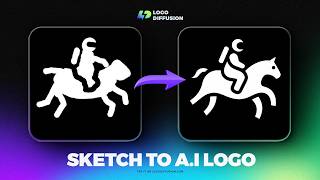
- Sketch to Logo: draw on canvas with brushes, shapes and fonts
- Image to Logo from a photo or existing mark, prompt optional
- Magic Editor Smart Text Swap that preserves font, style and layout
- Logo to Logo System: lockups, marks and layout variations
- Logo to Icon Set: matching icon family for apps, web and UI
- Vector export as layered SVG with gradient support
- Vectorizer with quality and standard modes for raster-to-SVG
- Background remover optimized for graphics and logos
- Creative upscaler at 2x and 4x with content-type and prompt guidance
- Style transfer using any image texture with 70+ pre-made styles
- AI-generated mockups with lighting, camera and material control
- Custom brand color palette control
- Private generation and commercial license on paid plans
- 1-4 concurrent generations depending on plan
About Logo Diffusion
Logo Diffusion is an AI logo maker built around one idea: generate logo concepts, then edit and export them as real vector files. It runs its own proprietary model trained specifically for logo design rather than generic imagery, so the output reads like a logo instead of AI clip art. Three entry points cover most workflows — Text to Logo across 11 styles and 45+ substyles, Sketch to Logo where you draw on the canvas with brushes, shapes and fonts and the AI refines it, and Image to Logo which turns an uploaded photo or existing mark into new options with or without a prompt. The Magic Editor is what separates it from prompt-and-pray generators: Smart Text Swap replaces words inside a logo while holding the font, style and layout, on-brand variations change individual elements without drifting off tone, Logo to Logo System turns one mark into lockups and layout variants, and Logo to Icon Set generates a matching app and UI icon family. Post-production lives in the same subscription — a vectorizer with gradient support and layer-by-layer construction, a background remover, 2x and 4x creative upscaling, style transfer with 70+ pre-made styles, and AI-built mockups with lighting and camera control. The vendor states it is used by 1.4m+ users. Pricing runs on one credit pool that works across every tool: a $0 Free tier with 24 credits (~12 logos) but no vector export and no commercial rights, Basic at $24/mo (1,000 credits), Pro at $49/mo (2,500 credits, 3 concurrent generations), Elite at $99/mo (6,000 credits, 4 concurrent jobs) — each cheaper on the annual '2 months free' option — plus a $59 one-time Starter Pack with 1,500 credits valid 90 days. Aimed at freelancers, agencies and founders who need brand-ready files fast.
Behind the Verdict
Logo Diffusion's real claim to difference is that it was built around a proprietary model trained specifically on logo design rather than generic image generation. The practical consequence shows in the three input paths: Text to Logo generates up to 4 options per run across 11 styles (Pictorial, Logotype, Mascot, Monogram, Engraved, Line Art, Retro, Cartoon, Badge, Abstract, Flat) and 45+ substyles, and you can test the same idea across every style without reprompting. Sketch to Logo lets you draw directly on the canvas with brushes, shapes and fonts, so the AI is guided rather than guessed at. Image to Logo starts from a photo or an existing mark and generates options with or without a text prompt. Where it pulls ahead of typical AI logo generators is the Magic Editor. Smart Text Swap replaces a word inside a logo while holding the font, style and layout — the examples on the site swap 'BOSTON' to 'NEWYORK' and 'Dino' to 'Kids'. Logo to Logo System turns one mark into lockups, marks and layout variations, and Logo to Icon Set produces a matching icon family for apps, websites, UI and social. Those are the tasks that normally send you back to Illustrator. Post-production is included rather than bolted on: a vectorizer that builds vectors layer by layer and preserves gradients in the output (the vendor notes most vectorizers drop them), quality and standard modes for detail versus speed, a background remover tuned for graphics and logos, 2x and 4x creative upscaling with a creativity slider and content-type awareness, style transfer that reads the texture of any uploaded image across 70+ pre-made styles, and AI-generated mockups with lighting, camera angle and material controls exported at up to 4K. On the money side, everything draws from one credit pool. Text to Logo costs 2 credits per generation; Image to Logo 5; vectorizer exports 5 credits standard and 8 HQ; background removal 2; a 2x upscale 5 and 4x 20. The Free tier gives 24 credits a month (~12 logos), one concurrent job, 3 of 8 Image to Logo styles, base models only, public generations, no vector export, watermarked 512x512 downloads and no commercial rights. Basic at $24/mo (or two months free on annual) lifts that to 1,000 credits, unlimited watermark-free downloads, the vectorizer up to 200 standard or 125 HQ exports, background remover, base plus Pro models on Magic Editor and Mockup Gen, private generation and a commercial license, with 2 concurrent jobs. Pro at $49/mo adds 2,500 credits, 3 concurrent generations, 500 vectorizer exports, 2x and 4x upscales, and higher Magic Editor and upscaler ceilings. Elite at $99/mo goes to 6,000 credits, 4 concurrent jobs and roughly 3,000 logos a month. A $59 one-time Starter Pack gives 1,500 credits, 6 downloads, access to all tools, valid 90 days, and switching to a monthly plan later credits $15 to your first month. The honest trade-offs: Illustrator remains the tool for node-level illustration work and complex bespoke artwork, there is
Researching Logo Diffusion? Get your full AI stack in 60 seconds.
Free, no signup — tell us your goal and get tools matched to your budget & existing stack.
Real-world workflow fit
Concrete scenarios for the personas Logo Diffusion actually fits — and what changes day-one when you adopt it.
A client approves a text direction on a Monday call. You run Text to Logo at 2 credits a generation across three of the 11 styles in parallel on Pro's 3 concurrent jobs, pick the strongest option, then use Smart Text Swap to test the mark with the client's full legal name.
Outcome: You have a chosen direction with legal-name and short-name variants inside the first hour, before the client's feedback window closes.
You sketch a rough mark directly on the Logo Diffusion canvas, generate options from it, then run Logo to Icon Set so the same mark covers your app icon and website favicon.
Outcome: A launch-ready logo plus matching icon family exported as layered SVG, without hiring a designer for the first version.
A padel club chain needs one mark adapted into signage, apparel and app lockups. You generate the base mark, then run Logo to Logo System and AI-generated mockups with lighting and camera controls instead of templated mockups.
Outcome: A full logo system plus presentation decals at up to 4K, produced on Elite's 4 concurrent generations and shipped to the client in a single working day.
Use Cases
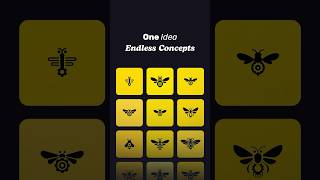
- Generate a complete set of logo variations for a new startup in under 5 minutes.
- Upload a client's sketch and turn it into a polished vector logo with multiple options.
- Create an icon set for an app or website from a single logo.
- Swap text in a logo (e.g., 'BOSTON' to 'NEWYORK') while preserving font and style.
- Build a full logo system for a padel club or sheriff-themed brand.
- Vectorize a raster logo into clean SVG paths for use in Illustrator or Figma.
Models Under the Hood
as of 2026-09-24
Limitations
- Free plan is limited to 24 credits/month with no vector export, watermarked 512x512 downloads and no commercial rights; Image to Logo is restricted to 3 of 8 styles and Magic Editor and Mockup Gen run base models only.
- All usage is credit-based and shared across tools (Text to Logo 2 credits, Image to Logo 5, vectorizer 5 standard / 8 HQ, background removal 2, 2x upscale 5, 4x upscale 20), so heavy editing sessions drain the pool faster than raw generation.
- Concurrent generations cap at 1 on Free, 2 on Basic, 3 on Pro and 4 on Elite.
- Paid plans run $24/mo (Basic), $49/mo (Pro) and $99/mo (Elite) month-to-month, with a two-months-free discount when you pay yearly.
- Commercial license and private generation require a paid plan.
as of 2026-10-08
Verification history
We have re-verified Logo Diffusion 8 times since . Each pass re-reads the vendor's own pages and re-checks every listed field against that evidence; passes where nothing had changed are marked as such.
- — re-verified summary, description, our verdict, our analysis, pricing model, pricing tiers, features, integrations, who it suits, who should skip it
- — re-checked, vendor evidence unchanged
- — re-checked, vendor evidence unchanged
- — re-checked, vendor evidence unchanged
- — re-checked, vendor evidence unchanged
- — re-verified summary, description, our verdict, our analysis, pricing model, pricing tiers, features, integrations, who it suits, who should skip it
Showing the 6 most recent of 8 verification passes.
Free to cite with attribution — this page re-verifies continuously.
12-month cost
Project the real annual outlay, including the implied monthly cost when only an annual tier is published.
Vendor list price only. Add-on usage, seat overages, and contract minimums are surfaced under Hidden costs & gotchas.
Plans compared
For each published Logo Diffusion tier: who it actually fits, and what it adds vs. the previous tier. Cross-reference the cost calculator above for projected annual outlay.
Free
$0/mo
Ideal for
Someone testing whether AI logo generation fits their workflow before spending anything — good for a personal project or a first look, not for client deliverables.
What this tier adds
Starting tier at $0/mo: 24 credits (~12 logos), base models only, 3 of 8 Image to Logo styles, public generations, 1 concurrent job, no vector export and watermarked 512x512 downloads with no commercial rights.
Basic
$24/mo
Ideal for
Freelancers exploring ideas or designers doing 1-2 logo projects a month who need watermark-free files and a commercial license.
What this tier adds
Adds 1,000 credits (~500 logos), unlimited watermark-free downloads, the vectorizer up to 200 standard or 125 HQ exports, background remover, in-app editor, base plus Pro models, private generation, a commercial license and 2 concurrent jobs.
Pro
$49/mo
Ideal for
Designers and freelancers running 3-5 client logo projects a month who need throughput and higher-resolution output.
What this tier adds
Raises the allowance to 2,500 credits (~1,250 logos), 3 concurrent generations, 500 vectorizer exports, and adds 2x and 4x creative upscales on top of everything in Basic.
Elite
$99/mo
Ideal for
Agencies and teams with high-volume logo output that hit concurrency and credit ceilings on Pro.
What this tier adds
Goes to 6,000 credits (~3,000 logos), 4 concurrent generations and 1,200 vectorizer exports, with higher Magic Editor and upscaler ceilings.
Starter Pack
$59 one-time
Ideal for
Buyers with a one-off project who need full tool access without committing to a recurring subscription.
What this tier adds
A $59 one-time purchase: 1,500 credits, 6 downloads, access to all tools, valid 90 days.
Where the pricing makes sense
The company stage and team size where Logo Diffusion's pricing actually pencils out — and where peers do it cheaper.
Basic at $24/mo month-to-month (or two months free billed yearly) undercuts Looka's entry tiers and sits below a single hour of most freelance designer rates, while Pro at $49/mo is aimed squarely at freelancers running 3-5 client projects a month. Elite at $99/mo is the agency tier: cheaper than a junior designer's day rate, but you are paying for 6,000 credits and 4 concurrent generations rather than for illustration depth, which is where Adobe Illustrator or a human illustrator still wins.
Setup time & first value
How long it actually takes to get something useful out of Logo Diffusion — broken out by persona, not the marketing-page minute.
Free tier: minutes — describe an idea or sketch on the canvas and you have generated options immediately, though export testing is limited by watermarks and no vector export. Basic and above: under an hour to your first production-ready file, since the vectorizer, background remover and downloads are unlocked; allow an afternoon to learn the Magic Editor's Smart Text Swap and Logo to Logo System
Switching to or from Logo Diffusion
How to bring data in from common predecessors and how to get it back out — written for the switcher, not the buyer.
- →From Canva or Looka: keep your existing palette, run Image to Logo on your current mark to generate vector alternatives, then switch to layered SVG export for files those tools don't produce.
- →From an Illustrator-only workflow: import a sketch into the Sketch to Logo canvas to generate directions, then open the resulting layered SVG in Illustrator for node-level finishing.
- →From a raster logo (JPG/PNG): run the vectorizer in quality mode to get layer-by-layer SVG with gradients preserved.
- →From a generic AI image generator: move the same prompt into Text to Logo so output is trained on logo design rather than stock imagery, and use Logo to Icon Set for the assets a general generator won't produce.
- ↗To Illustrator: export layered SVG and continue with node-level editing for complex bespoke illustration.
- ↗To Figma: open the exported SVG directly for UI and app-icon layouts.
- ↗To a human illustrator: hand off the layered SVG and icon set as a starting system rather than a finished mark.
Resources & Guides
Tutorials & Learning
Official links
Tools that pair well with Logo Diffusion
Common stack mates teams adopt alongside Logo Diffusion, with the specific reason each pairing earns its keep.

AI Logo Maker
AI Logo Maker by Bizthug generates logo concepts from a text prompt in a mobile app for iOS and Android.
Looka
Looka's AI generates logo concepts from your business name, then carries your colors and fonts into 300+ branded templates

Fancy AI
Fancy AI is an iOS-only studio app that generates logos, anime avatars, tattoo concepts, and AI artwork from your iPhone.
Featured Head-to-Head Comparisons
Logo Diffusion vs Adobe Firefly Services
Choose Logo Diffusion if you need a simple, one-stop logo design tool with SVG output and no coding—ideal for small businesses and freelancers. Choose Adobe Firefly Services if you’re an enterprise or developer embedding generative AI into scalable content workflows, requiring API integration, compliance, and Adobe ecosystem compatibility. They serve fundamentally different needs; pick based on your technical requirements and scale.
Logo Diffusion vs Polycam
Polycam is the clear choice for professionals who need accurate 3D scans, floor plans, and photogrammetry from any device — its LiDAR, drone, and AI processing pack enterprise-grade features. Logo Diffusion wins for entrepreneurs and designers who want fast, editable SVG logos without hiring a designer. They serve completely different needs, so pick based on your core task: physical asset capture vs. brand identity creation.
Logo Diffusion vs The New Black
If you're in fashion design, The New Black is the only AI tool purpose-built for apparel, with tech pack exports and virtual try-on. For logo and brand identity, Logo Diffusion's editable SVGs, sketch-to-logo, and commercial license make it the professional choice. Pick the tool that matches your output need—fashion or branding.
Alternatives to Logo Diffusion
View all
AI Logo Maker
AI Logo Maker by Bizthug generates logo concepts from a text prompt in a mobile app for iOS and Android.

Frequently Asked Questions
Best-of guides
Topics
Used Logo Diffusion? Help shape our editorial sentiment research.