
Marketing Blocks Web App
Type one keyword and Marketing Blocks Web App produces a matched landing page, ads, logo, branding kit, and marketing copy in one bundle.
If your bottleneck is getting something live this afternoon, Marketing Blocks Web App delivers a coherent bundle fast — page, ads, logo, and copy that actually match. If your bottleneck is control, brand precision, or repeatable campaigns at scale, the thin customization will frustrate you. The honest comparison is Canva for pixel-level control and a dedicated landing page builder for conversion structure; Marketing Blocks trades both for speed and cohesion. On-file feature depth sits in the generated outputs, not in fine-grained controls, so judge it on the first draft, not the final polish. Worth a pilot with one offer before you commit a whole campaign to it.
Verified 19h ago · liveness 62/100 · cite: rightaichoice.com/tools/marketing-blocks-web-app
- Solo entrepreneurs launching a new business and needing a full asset set fast
- Small business owners running a quick promotion without a design team
- Marketers building campaign prototypes to test an offer
- Non-designers who need presentable landing pages, ads, and logos
- Established brands with strict existing brand guidelines the output must match
- Professional designers who need granular control over layouts and typography
- Teams running repeatable, data-driven campaigns with A/B testing infrastructure
We scan live Reddit threads, YouTube comments, X posts, G2 reviews and other communities — and hand you an honest verdict in under a minute.
- Honest verdict, not marketing
- Real pros & cons from real users
- Attributed quotes with receipts
3 free scans · no card needed
Skip Marketing Blocks Web App if you already have locked brand guidelines or a designer who needs pixel-level control over layout, since the tool is built to produce a matching first draft fast rather than to honour an existing design system.
Every asset set is a first draft — budget editing time before anything is published, because unedited output goes live with your brand on it.
Treat this as a fast-draft line item, not a design budget. It sits in the same conversation as a stock-asset subscription or a Canva seat — you buy it to get a first pass done in an afternoon, then spend the real money on a designer or a page builder only once an idea proves out. Compare it against running a freelance brief for a logo, a page, and an ad set at once, which is the job it compresses.
In short
Marketing Blocks Web App — Type one keyword and Marketing Blocks Web App produces a matched landing page, ads, logo, branding kit, and marketing copy in one bundle. Best for Solo entrepreneurs launching a new business and needing a full asset set fast, Small business owners running a quick promotion without a design team, Marketers building campaign prototypes to test an offer. Contact Sales pricing.
What people actually say about Marketing Blocks Web App — is it worth it?
We ran a structured research pass across product reviews, community discussions, and post-purchase forum threads to surface the patterns vendors won't publish themselves. Below: the recurring strengths, the hidden costs people mention most, and the cohort that consistently regrets adopting this tool.
17 mentions across 2 sources (Product Hunt, Lemmy) · researched Jul 3, 2026.
Average across the 2 sources that answered — each source counts once, not each post.
- +Generates full marketing suite from one keyword in under a minute.
- +All-in-one platform replaces multiple tools: copy, design, ads, logo.
- +Targets entrepreneurs needing rapid idea validation and prototyping.
- +Simple workflow: enter keyword, get cohesive branded assets.
- +Promises to save time and reduce dependency on designers/copywriters.
- −Very few real user reviews — hard to assess true quality.
- −Pricing not transparent — may be expensive for solo founders.
- −Single 3-star rating on Product Hunt indicates lukewarm reception.
- −Customizability likely limited compared to manual design tools.
- −No evidence of reliability at scale or for production use.
- • No free tier or trial mentioned in community data
- • Potential upselling for premium templates or higher usage
Viability Score
How well maintained and how widely used is Marketing Blocks Web App? Built from what the vendor actually publishes (docs, changelog, tutorials, integrations, pricing), whether the site is live, and how much real users discuss it. How we calculate this
Last calculated: October 2026
How we score →Key Features
- Generate a complete landing page from a single keyword prompt
- Create social media ads for multiple platforms at once
- Generate a logo plus a matching branding kit
- Write marketing copy: headlines, descriptions, and emails
- Produce graphics and other visual marketing assets
- Assemble brand colors, fonts, and a style guide automatically
- One-click export of all generated assets
- Get keyword-driven content and strategy suggestions
- Voice conversation support
- Vision and image understanding
- Image generation
- Real-time streaming outputs
- API access for programmatic generation
- Team collaboration on generated assets
- Mobile app for iOS and Android
About Marketing Blocks Web App
Marketing Blocks Web App is a single-prompt marketing asset generator. You enter one keyword describing your business, product, or idea, and it returns a coordinated set of branded outputs — a landing page, social media ads sized for multiple platforms, a logo with a matching branding kit, headlines, descriptions and email copy, plus supporting graphics and an automatic style guide of colors and fonts. The point of the product is the bundling rather than any single generator: instead of pairing a copy tool, a logo maker, and a page builder and then trying to force them to look related, the assets share colors, fonts, and tone because they came from the same prompt. The workflow is deliberately narrow — one keyword in, a synchronized bundle out — and the output is exported in one click. The on-file profile also lists voice conversation, vision and image understanding, image generation, real-time streaming outputs, and a mobile app for iOS and Android. It suits solo founders testing an offer, small businesses running a short promotion, and non-designers who need a presentable page, ad set, and logo without briefing a designer or a copywriter. It is a launch-and-prototype tool, not a design system: Canva gives you more control over every pixel, and dedicated page builders give you more control over conversion structure. Treat the output as a strong first draft you will edit.
Behind the Verdict
The reason to look at Marketing Blocks Web App is not that it writes a better headline than a dedicated copy tool, or draws a better landing page than a dedicated page builder. It is that the page, the social ads, the logo, the branding kit, and the email copy all come out of the same keyword prompt and therefore look like they belong together. That consistency is the product. For a solo founder validating an idea over a weekend, or a small business running a short promotion, the alternative is typically a logo made in one tool, a page built in a second, ad copy written in a third, and an afternoon spent trying to make the three match. Marketing Blocks collapses that into one prompt and one export. Strengths: landing page generation, multi-platform social ad creation, logo plus branding kit, marketing copy for headlines, descriptions and emails, visual asset generation, automatic brand colors, fonts and style guide, keyword-driven content and strategy suggestions, and one-click export of everything at once. The on-file profile also lists voice conversation, vision and image understanding, image generation, real-time streaming outputs, and a mobile app for iOS and Android, which widens where you can drive it from — hands-free voice while you brainstorm, or a phone when you are away from a desk. Weaknesses: depth sits in the outputs rather than in fine-grained controls. There is no design system behind it — you cannot hand it your existing brand guidelines and expect the output to honour them, and professional designers will find layout and typography control thin. Teams running repeatable, data-driven campaigns with A/B testing infrastructure will hit a wall quickly, because the tool is oriented toward producing a first asset set, not toward running the twentieth iteration of a tested campaign. And as with any AI generation pipeline, the output is a draft; publishing it unedited is a risk to your brand, not a workflow. Where it fits: brand-new ventures with no existing identity, short-lived promotions and pop-up events, campaign prototypes you want to put in front of a real audience before spending on design, and non-designers who need something presentable now. Where it doesn't: established brands with locked guidelines, professional designers who need control, and performance teams that live in an experimentation stack. One caveat on the record set: the vendor's live pages were behind a bot-verification screen when this page was refreshed, so the feature list and positioning above rest on the tool's on-file profile rather than a fresh read of the site. Nothing here should be read as a statement about how the vendor prices, what tiers exist, or what its documentation or integrations pages contain.
Researching Marketing Blocks Web App? Get your full AI stack in 60 seconds.
Free, no signup — tell us your goal and get tools matched to your budget & existing stack.
Real-world workflow fit
Concrete scenarios for the personas Marketing Blocks Web App actually fits — and what changes day-one when you adopt it.
You type the product keyword into Marketing Blocks Web App and get a landing page, a logo with a branding kit, multi-platform social ads, and launch email copy that all share the same colors, fonts, and tone, then export the set in one click.
Outcome: You have a presentable page and ad set to put in front of real visitors the same day, instead of a week of design back-and-forth, and you can decide whether the idea deserves a real brand investment.
You describe the promotion in one prompt, generate matching social ads and a promo landing page, and export the graphics for the channels you already post on.
Outcome: The promotion goes out with assets that visibly match each other, without hiring anyone for a two-day campaign.
You use voice conversation and real-time streaming to iterate on ad variations during a live brainstorming session, with team collaboration on the generated assets.
Outcome: You walk into the review with concrete, on-brand mockups rather than a written brief, which shortens the round trip to an approved direction.
Use Cases
- Generate a complete brand kit from a keyword for a new e-commerce store.
- Create a landing page and social ads to test a product idea within minutes.
- Develop marketing copy for a launch email campaign using a single prompt.
- Produce consistent visual assets for a pop-up event or temporary promotion.
- Rapidly iterate on branding concepts before committing to a designer.
- Use voice commands to generate assets hands-free during a meeting.
- Generate ad variations in real-time while brainstorming with a team.
Limitations
- Depth sits in the generated outputs rather than in fine-grained controls: you cannot feed it an existing brand guide and expect the result to follow it, and layout and typography control is thin next to a design tool.
- Teams that run repeatable, tested campaigns will outgrow it, because it produces a first asset set rather than the twentieth iteration of a proven one.
- Every output needs human editing before it goes in front of an audience.
- The vendor's live site was behind a bot-verification screen at refresh time, so plan size, usage limits, and documentation could not be confirmed from the source.
as of 2026-10-08
Verification history
We have re-verified Marketing Blocks Web App 9 times since . Each pass re-reads the vendor's own pages and re-checks every listed field against that evidence; passes where nothing had changed are marked as such.
- — re-verified summary, description, our verdict, our analysis, pricing model, pricing tiers, features, integrations, who it suits, who should skip it
- — re-checked, vendor evidence unchanged
- — re-checked, vendor evidence unchanged
- — re-checked, vendor evidence unchanged
- — re-checked, vendor evidence unchanged
- — re-checked, vendor evidence unchanged
Showing the 6 most recent of 9 verification passes.
Free to cite with attribution — this page re-verifies continuously.
Where the pricing makes sense
The company stage and team size where Marketing Blocks Web App's pricing actually pencils out — and where peers do it cheaper.
Treat this as a fast-draft line item, not a design budget. It sits in the same conversation as a stock-asset subscription or a Canva seat — you buy it to get a first pass done in an afternoon, then spend the real money on a designer or a page builder only once an idea proves out. Compare it against running a freelance brief for a logo, a page, and an ad set at once, which is the job it compresses.
Setup time & first value
How long it actually takes to get something useful out of Marketing Blocks Web App — broken out by persona, not the marketing-page minute.
For a solo founder, expect first assets in minutes — one keyword prompt and one export, with the real time going into editing the draft. For a small business running a promotion, add an hour to adjust the page and ads to your actual offer and channels. For a team, budget a session to agree on tone and the keyword before generating, plus a review pass on the collaborative output.
Switching to or from Marketing Blocks Web App
How to bring data in from common predecessors and how to get it back out — written for the switcher, not the buyer.
- →From a DIY stack of a logo maker plus a page builder plus a copy tool: replace the three prompts with one keyword bundle so the assets share colors, fonts, and tone from the start.
- →From a designer-led brand sprint: run a Marketing Blocks bundle first to stress-test direction cheaply, then brief the designer with the version that resonated.
- ↗To Canva or a professional design suite: export the generated landing page, logo, and ad assets and rebuild them with pixel-level control where the thin customization limits you.
- ↗To a dedicated landing page builder: move the generated page across once you need conversion structure and A/B testing rather than a single draft page.
- ↗To a dedicated copy or brand tool: keep the written headlines and email drafts and rebuild the identity in a system that can enforce locked brand guidelines.
Resources & Guides
Tutorials & Learning
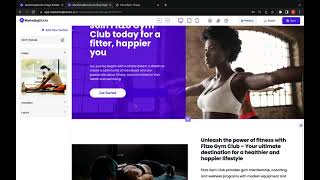
YouTube returned 6 videos for “Marketing Blocks Web App”, and we withheld 5: 5 did not mention Marketing Blocks Web App. Showing the 1 we can prove is about Marketing Blocks Web App.
Official links
Tools that pair well with Marketing Blocks Web App
Common stack mates teams adopt alongside Marketing Blocks Web App, with the specific reason each pairing earns its keep.
Designs.ai
Designs.ai turns one plain-language brief into on-brand images, video, audio, slides, and copy using six specialist AI agents.

Tilda Publishing
Tilda Publishing is a no-code website builder that turns a short AI prompt into a designed, responsive site page.
AdCreative.ai
AI ad creative generator that scores and predicts high-converting ads before you spend.
Featured Head-to-Head Comparisons
Marketing Blocks Web App vs Weglot
Choose Marketing Blocks Web App if you need a one-stop shop to rapidly generate marketing assets from scratch—ideal for early-stage launches. Choose Weglot if your website already exists and you need to translate it with brand consistency and SEO muscle. They solve different problems; the best pick depends on whether your priority is creation or localization.
Marketing Blocks Web App vs Chili Piper
Marketing Blocks and Chili Piper serve entirely different needs. Choose Marketing Blocks if you're a solo founder needing instant marketing assets from a single keyword. Choose Chili Piper if you're an enterprise B2B team that must convert high-intent web traffic into booked meetings instantly. They're not competitors—pick based on whether you need to generate content or capture leads.
Marketing Blocks Web App vs Polycam
If you need to capture real-world 3D objects, spaces, or floor plans, Polycam is the clear choice — it's a mature, device-agnostic tool trusted by professionals. If instead you need instant marketing collateral (landing pages, ads, logos) from a single idea, Marketing Blocks Web App is faster and simpler, but its pricing is opaque. Pick the one that matches your output: 3D scans vs. marketing assets.
Alternatives to Marketing Blocks Web App
View allDesigns.ai
Designs.ai turns one plain-language brief into on-brand images, video, audio, slides, and copy using six specialist AI agents.

Tilda Publishing
Tilda Publishing is a no-code website builder that turns a short AI prompt into a designed, responsive site page.
AdCreative.ai
AI ad creative generator that scores and predicts high-converting ads before you spend.
Frequently Asked Questions
Best-of guides
Used Marketing Blocks Web App? Help shape our editorial sentiment research.