
PixelBin Generative Background Creator
PixelBin's AI background generator turns a product shot plus a scene description into a studio-style e-commerce backdrop.
Pick this if your product photography bottleneck is backgrounds specifically, and you want generation, compression, and delivery in one platform rather than three subscriptions. Automatic subject detection and masking plus batch processing are the features that actually matter at catalog scale, and the credit-based metering means volume sneaks up on you — model your monthly SKU count before committing. Pass if you need frame-by-frame manual lighting control, or if your catalog is full of transparent, reflective, or high-detail products that break automated masking; dedicated cutout tools and a retoucher will serve you better.
Verified 1h ago · liveness 78/100 · cite: rightaichoice.com/tools/pixelbin-generative-background-creator
- E-commerce sellers automating product photography at catalog scale
- Marketing teams producing consistent product visuals across campaigns
- Small businesses without studio equipment or a photographer
- Graphic designers needing fast background variants for A/B tests
- Photographers wanting frame-by-frame manual lighting control
- Products with extreme transparency, glass, or fine fringe detail
- Portrait or non-product image editing
We scan live Reddit threads, YouTube comments, X posts, G2 reviews and other communities — and hand you an honest verdict in under a minute.
- Honest verdict, not marketing
- Real pros & cons from real users
- Attributed quotes with receipts
3 free scans · no card needed
Skip PixelBin Generative Background Creator if your catalog is dominated by glass, transparent, or highly reflective products where automated masking breaks, or if you need frame-by-frame manual lighting control rather than prompt-driven scenes.
Background generation and background removal both draw from the same credit pool, so a mixed workflow burns through your monthly allotment faster than generation alone.
The freemium entry costs nothing but only covers 10 credits a month, which is a trial rather than a working tier. Pro at $19/mo fits a small-to-mid seller pushing a few hundred SKUs monthly and needing 4K output plus API access. Enterprise is custom-quoted for catalog-scale volume. Against standalone cutout tools that charge per image, the bundled optimization and delivery layer is where the value sits — but model your monthly SKU count before assuming Pro's 500 credits is enough.
In short
PixelBin Generative Background Creator — PixelBin's AI background generator turns a product shot plus a scene description into a studio-style e-commerce backdrop. Best for E-commerce sellers automating product photography at catalog scale, Marketing teams producing consistent product visuals across campaigns, Small businesses without studio equipment or a photographer. Free to start; paid plans from $19/mo.
What people actually say about PixelBin Generative Background Creator — is it worth it?
We ran a structured research pass across product reviews, community discussions, and post-purchase forum threads to surface the patterns vendors won't publish themselves. Below: the recurring strengths, the hidden costs people mention most, and the cohort that consistently regrets adopting this tool.
15 mentions across 1 source (Product Hunt) · researched Jul 3, 2026.
Average across the 1 source that answered — each source counts once, not each post.
- +One-click AI background generation from text prompts saves hours.
- +Batch processing handles multiple images simultaneously, boosting workflow.
- +High-resolution output up to 4K suitable for professional use.
- +Adjustable creativity level gives control over originality.
- +Seamless integration with PixelBin's optimization pipeline.
- −Background generation is paywalled — no free trial available.
- −AI can struggle with transparent or complex product shapes.
- −No free trial means you must pay to test quality.
- −Limited community feedback outside Product Hunt launch.
- −May produce inconsistent results on highly detailed products.
- • Credit-based usage tracking may lead to extra charges for heavy use
Viability Score
How well maintained and how widely used is PixelBin Generative Background Creator? Built from what the vendor actually publishes (docs, changelog, tutorials, integrations, pricing), whether the site is live, and how much real users discuss it. How we calculate this
Last calculated: October 2026
How we score →Key Features
- AI background generation from text prompts
- Automatic subject detection and masking
- Batch processing across multiple product images
- High-resolution output up to 4K on Pro
- Creativity level control for prompt interpretation
- Template presets for common product backdrops
- Background removal as the inverse operation
- REST API for programmatic background generation
- Web dashboard with drag-and-drop upload
- Credit-based usage tracking
- Multi-language prompt support
- Integration with PixelBin image optimization pipeline
About PixelBin Generative Background Creator
PixelBin Generative Background Creator is an AI background generator for e-commerce sellers, marketers, and small product teams who need studio-grade product photos without a studio. You upload a product image, type a scene description such as 'a marble counter with soft morning light', and the tool generates a backdrop that matches the product's lighting, shadows, and perspective instead of pasting a flat cutout onto a stock image. Automatic subject detection and masking keep the product intact while the background is replaced, and batch processing pushes a whole catalog through in one pass rather than SKU by SKU. Creativity level and prompt controls let you dial between literal scene matching and looser interpretations, and template presets cover recurring jobs like white-background marketplace listings. Credit-based usage tracking sits on top so you can see where your quota goes. The tool lives inside PixelBin's wider image optimization platform, so the same pipeline that generates your background also compresses and delivers the final asset — useful if you already ship images through PixelBin's CDN and transformations. A REST API covers programmatic access for teams wiring background generation into their own catalog workflow. Against alternatives like Clipdrop or Remove.bg, PixelBin's angle is the bundled optimization and delivery layer rather than a single best generation model.
Behind the Verdict
The interesting thing about PixelBin Generative Background Creator is not the generation step — plenty of tools write a backdrop from a prompt — it is where the output goes next. Backgrounds generated here drop into the same pipeline that compresses and delivers your images, so you are not exporting from one tool, optimizing in a second, and pushing to a CDN in a third. For a seller shipping hundreds of SKUs a month, that consolidation is the real product. Strengths: automatic subject detection and masking protect the product while the scene changes; batch processing handles a catalog rather than one photo at a time; creativity level controls let you tune between literal and loose interpretations of your prompt; template presets cover recurring jobs like white-background marketplace listings; and high-resolution output up to 4K on Pro is enough for most listing and campaign requirements. Weaknesses: the credit model is the pressure point. Every generation and every background removal draws from the same meter, and the allotments are modest, so a busy month can burn through quota faster than expected. Batch uploads and API rate limits also put a ceiling on genuinely large catalog pushes. And the masking, while good on ordinary opaque products, is the weak link on transparency, glass, fine fringe detail, and highly reflective surfaces — exactly the products that are hardest to reshoot manually. Where it fits: sellers with a steady flow of ordinary opaque products (apparel, packaged goods, furniture, accessories) who want consistent backdrops across a catalog and already care about image delivery performance. Where it doesn't: photographers who want manual lighting control, and any catalog where the product itself is transparent or reflective. If your bottleneck is cutouts rather than backgrounds, a dedicated removal tool is the cheaper first stop.
Researching PixelBin Generative Background Creator? Get your full AI stack in 60 seconds.
Free, no signup — tell us your goal and get tools matched to your budget & existing stack.
Real-world workflow fit
Concrete scenarios for the personas PixelBin Generative Background Creator actually fits — and what changes day-one when you adopt it.
Uploads a batch of product shots to the PixelBin dashboard, picks a template preset for white-background marketplace listings, and lets automatic subject detection and masking replace the messy original backgrounds across the set.
Outcome: A consistent catalog of listing-ready images without a reshoot, with the compressed finals delivered through the same PixelBin pipeline.
Uses the prompt field to describe a scene like 'a marble counter with soft morning light', dials the creativity level up for looser interpretations, and generates several backdrop variants for A/B testing on product pages.
Outcome: Multiple themed product visuals in an afternoon instead of a studio booking, with the winning variant identified from real page performance.
Calls the REST API to submit product images with scene prompts, relying on automatic masking to isolate each subject before the generated background is composited.
Outcome: Background generation becomes a step in the existing publishing pipeline rather than a manual design task, subject to the API's 100 requests per minute limit.
Use Cases
- Generate studio-quality white backgrounds for e-commerce product listings.
- Create seasonal themed backgrounds for marketing campaigns in seconds.
- Replace unappealing backgrounds in user-submitted product photos.
- Batch generate background variants for A/B testing on product pages.
- Produce lifestyle-like settings without hiring a photographer or renting a studio.
Models Under the Hood
as of 2026-09-09
Limitations
- The free tier is extremely limited at only 10 credits per month, which is insufficient for real testing.
- The Pro plan caps at 500 credits, which may not cover high-volume catalogs.
- Batch uploads are limited to 50 images on Pro, and API rate limits of 100 requests per minute can slow large-scale integrations.
- The AI may struggle with complex product outlines, transparent objects, or very fine details.
- Generation and background removal draw on the same credit pool, so mixed workflows consume quota faster than expected.
as of 2026-10-09
Verification history
We have re-verified PixelBin Generative Background Creator 7 times since . Each pass re-reads the vendor's own pages and re-checks every listed field against that evidence; passes where nothing had changed are marked as such.
- — re-verified summary, description, our verdict, our analysis, pricing model, pricing tiers, features, integrations, who it suits, who should skip it
- — re-checked, vendor evidence unchanged
- — re-checked, vendor evidence unchanged
- — re-checked, vendor evidence unchanged
- — re-checked, vendor evidence unchanged
- — re-checked, vendor evidence unchanged
Showing the 6 most recent of 7 verification passes.
Free to cite with attribution — this page re-verifies continuously.
12-month cost
Project the real annual outlay, including the implied monthly cost when only an annual tier is published.
Vendor list price only. Add-on usage, seat overages, and contract minimums are surfaced under Hidden costs & gotchas.
Plans compared
For each published PixelBin Generative Background Creator tier: who it actually fits, and what it adds vs. the previous tier. Cross-reference the cost calculator above for projected annual outlay.
Free
$0
Ideal for
Sellers and designers testing whether prompt-driven backdrops suit their product type before committing budget.
What this tier adds
Starting tier at $0 — 10 monthly credits, automatic subject detection and masking, drag-and-drop dashboard, and template presets.
Pro
$19/mo
Ideal for
Small-to-mid sellers pushing a few hundred SKUs a month who need 4K assets and API access.
What this tier adds
Adds a 500-credit allotment, output up to 4K, faster processing priority, batch processing up to 50 images, REST API access, and creativity level controls.
Enterprise
Custom
Ideal for
Catalog-scale operations needing volume terms and direct support rather than self-serve limits.
What this tier adds
Adds custom credit and volume terms, dedicated support, and API access sized for catalog-scale workflows.
Where the pricing makes sense
The company stage and team size where PixelBin Generative Background Creator's pricing actually pencils out — and where peers do it cheaper.
The freemium entry costs nothing but only covers 10 credits a month, which is a trial rather than a working tier. Pro at $19/mo fits a small-to-mid seller pushing a few hundred SKUs monthly and needing 4K output plus API access. Enterprise is custom-quoted for catalog-scale volume. Against standalone cutout tools that charge per image, the bundled optimization and delivery layer is where the value sits — but model your monthly SKU count before assuming Pro's 500 credits is enough.
Setup time & first value
How long it actually takes to get something useful out of PixelBin Generative Background Creator — broken out by persona, not the marketing-page minute.
Solo sellers: minutes — sign up, drag a product image into the dashboard, type a scene description, and you have a first generated backdrop on the free credit allotment. Marketing teams: under an hour to settle on a template preset and creativity level that matches your brand look. Developers: longer, since REST API wiring for programmatic generation depends on your own pipeline, and API access
Switching to or from PixelBin Generative Background Creator
How to bring data in from common predecessors and how to get it back out — written for the switcher, not the buyer.
- →From Remove.bg: keep the cutout habit but add a generated scene behind each product instead of leaving a transparent or flat white background.
- →From Clipdrop: move from one-off prompt generations to batch processing plus the bundled PixelBin optimization and delivery pipeline.
- →From manual Photoshop work: replace per-image background masking with automatic subject detection, then use template presets to keep listings consistent.
- →From stock-photo compositing: generate a backdrop that matches the product's lighting, shadows, and perspective rather than pasting a cutout onto a stock image.
- ↗To a dedicated cutout tool: if your bottleneck turns out to be masking accuracy rather than backgrounds, a removal-first tool plus your existing editor covers it.
- ↗To a studio retoucher: for glass, transparent, or highly reflective products where automated masking struggles, manual lighting and masking remains the reliable path.
Integrations
Resources & Guides
Tutorials & Learning
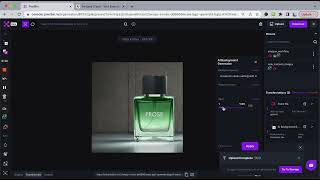
YouTube returned 6 videos for “PixelBin Generative Background Creator”, and we withheld 5: 5 did not mention PixelBin Generative Background Creator. Showing the 1 we can prove is about PixelBin Generative Background Creator.
Official links
Tools that pair well with PixelBin Generative Background Creator
Common stack mates teams adopt alongside PixelBin Generative Background Creator, with the specific reason each pairing earns its keep.

mokker.ai
Mokker.ai turns one product photo into studio-style images with AI background removal and 100+ scenes — no photoshoot required.

Pacdora AI Background Generator
Free AI background generator that replaces and generates realistic 3D product scenes for e-commerce listings.

Lorean Labs
Lorean Labs turns a single phone photo into studio-quality product shots and UGC-style video ads in minutes.
Featured Head-to-Head Comparisons
Pixelbin Generative Background Creator vs Adobe Firefly Services
For e-commerce sellers needing quick, high-volume product background generation, PixelBin Generative Background Creator offers a more accessible, lower-cost solution with built-in integrations and batch processing. For enterprises requiring compliance, custom model fine-tuning, and deep Adobe ecosystem integration, Adobe Firefly Services is the scalable choice despite higher costs.
Pixelbin Generative Background Creator vs The New Black
If you're a fashion brand or apparel designer creating new collections from scratch, The New Black is purpose-built with tech pack exports and virtual try-on. But for e-commerce sellers who need to swap product backgrounds quickly and at scale, PixelBin's generative background creator with batch processing and Shopify integration wins hands down. Choose based on your primary need: fashion design vs. product photography automation.
Pixelbin Generative Background Creator vs Qoves
QOVES and PixelBin Generative Background Creator serve completely different needs: one is for personal facial analysis and non-surgical improvement, the other for e-commerce product background generation. Choose QOVES if you want a data-driven glow-up plan with research-backed recommendations. Choose PixelBin if you need to automate product photography backgrounds for your online store. They are not direct competitors, but rather tools for distinct use cases.
Alternatives to PixelBin Generative Background Creator
View all
mokker.ai
Mokker.ai turns one product photo into studio-style images with AI background removal and 100+ scenes — no photoshoot required.

Pacdora AI Background Generator
Free AI background generator that replaces and generates realistic 3D product scenes for e-commerce listings.

Lorean Labs
Lorean Labs turns a single phone photo into studio-quality product shots and UGC-style video ads in minutes.
Frequently Asked Questions
Categories
Used PixelBin Generative Background Creator? Help shape our editorial sentiment research.