
PopPop AI Vocal Remover
Free browser-based AI vocal remover that splits a song or video into acapella and instrumental MP3 stems without an account.
For a fast two-stem split at zero cost, this is the tab to open first — paste a YouTube link, hit start, and you have an acapella before you've finished reading this. It doesn't pretend to be a studio stem separator: you get vocals plus instrumental as MP3, a 400 MB / 20-minute ceiling, and no batch or API pipeline. If you need bass, drums, and piano as separate files or WAV output, budget for Moises or LALAL.AI rather than fighting this one. Best fit: karaoke singers, DJs, and podcasters who need one clean split right now and don't want a signup wall in the way.
Verified 2d ago · liveness 74/100 · cite: rightaichoice.com/tools/poppop-ai-vocal-remover
- Karaoke singers who want an instrumental backing track in minutes
- DJs and producers pulling a quick acapella or instrumental for an edit
- Podcasters and video editors isolating vocals or cleaning up background audio
- Creators sampling vocals without paying for stems
- Producers who need multitrack stems (bass, drums, piano) rather than vocals plus instrumental
- Engineers needing lossless or WAV delivery — downloads are MP3
- Teams needing batch processing or an automated pipeline
We scan live Reddit threads, YouTube comments, X posts, G2 reviews and other communities — and hand you an honest verdict in under a minute.
- Honest verdict, not marketing
- Real pros & cons from real users
- Attributed quotes with receipts
3 free scans · no card needed
Skip PopPop AI Vocal Remover if you need bass, drums, and piano as separate files, WAV or lossless delivery, or a batched pipeline rather than one two-stem MP3 split at a time.
The vendor page describes extraction as completely free with no per-use charge, which undercuts paid stem separators like Moises and LALAL.AI for occasional two-stem work. You trade capability rather than cash: those paid tools charge for multitrack stems, lossless delivery, batch jobs, and higher file ceilings that this one doesn't offer at any price.
In short
PopPop AI Vocal Remover — Free browser-based AI vocal remover that splits a song or video into acapella and instrumental MP3 stems without an account. Best for Karaoke singers who want an instrumental backing track in minutes, DJs and producers pulling a quick acapella or instrumental for an edit, Podcasters and video editors isolating vocals or cleaning up background audio. Free to use.
What's new in PopPop AI Vocal Remover
Checked todayAcross the latest 3 updates: 3 news mentions.
How to Convert PDF to Audio for Free
PopPop AI's guide shows how to turn a PDF into an MP3 or WAV audio file using the TTSFree text-to-speech tool and its realistic voices.
How to Make a Custom Text to Speech Voice
A walkthrough of creating a personalized AI voice with TTSFree AI using simple prompts, aimed at videos and audiobooks.
Best Free Text to Speech Software with Natural Voices – TTSFree AI
PopPop AI positions TTSFree AI as a free text-to-speech option with human-like voices for creators and students.
What people actually say about PopPop AI Vocal Remover — is it worth it?
We ran a structured research pass across product reviews, community discussions, and post-purchase forum threads to surface the patterns vendors won't publish themselves. Below: the recurring strengths, the hidden costs people mention most, and the cohort that consistently regrets adopting this tool.
12 mentions across 1 source (Product Hunt) · researched Jul 3, 2026.
Average across the 1 source that answered — each source counts once, not each post.
- +100% free with no sign-in, usage limits, or hidden fees.
- +Supports uploads up to 400 MB and URLs from YouTube, TikTok, X.
- +Simple three-step process: upload, process, download.
- +No account required — truly instant access.
- +Works for both audio (MP3, WAV, FLAC) and video (MP4, MKV, MOV).
- −Separates only two stems (vocals and instrumentals).
- −Limited feedback on separation quality for complex songs.
- −No native mobile app — must use mobile browser.
- −No batch processing — one file at a time.
- −No adjustable settings or stem preview before download.
Viability Score
How well maintained and how widely used is PopPop AI Vocal Remover? Built from what the vendor actually publishes (docs, changelog, tutorials, integrations, pricing), whether the site is live, and how much real users discuss it. How we calculate this
Last calculated: October 2026
How we score →Key Features
- AI vocal remover splits a song into two stems: isolated vocals (acapella) and instrumental
- Paste a URL from 1,000+ supported sites including YouTube, TikTok, and X
- Upload audio in MP3, WAV, FLAC, or M4A
- Upload video in MP4, MKV, or MOV
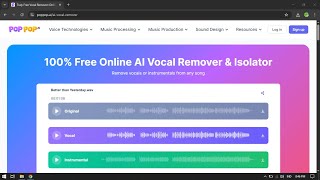
- Three-track preview of original, vocal, and instrumental before download
- Download isolated vocals (acapella) as MP3
- Download the instrumental karaoke track as MP3
- Save All action downloads both extracted stems at once
- No account, sign-in, or registration required
- Vendor page states extraction is completely free
- Accepts files up to 400 MB and 20 minutes per file
- Web-based — no app or software install
- Runs on Windows, macOS, Android, and iOS
- Works in Chrome, Firefox, Safari, and Edge
- Part of the PopPop AI suite alongside text to speech, voice cloning, AI cover songs, and AI karaoke
About PopPop AI Vocal Remover
PopPop AI Vocal Remover is a free, browser-based vocal isolator that takes an audio file (MP3, WAV, FLAC, M4A), a video file (MP4, MKV, MOV), or a pasted link from over 1,000 supported sites including YouTube, TikTok, and X, and splits the track into two stems: the isolated vocals (acapella) and the instrumental karaoke backing. The vendor caps uploads at 400 MB and 20 minutes per file. The workflow is three steps long: upload a file or paste a URL, start vocal removal, then save the vocals and the instrumental. Before you download, the tool gives you a three-track preview of the original, the vocal, and the instrumental so you can check the split for bleed or artifacts, and a Save All action pulls both extracted stems down as standard MP3. There is no account, no sign-in, and no software to install. It runs in Chrome, Firefox, Safari, and Edge on Windows, macOS, Android, and iOS. The URL-paste path is the practical differentiator: you can isolate vocals from a YouTube or TikTok link without downloading the video first. If a link isn't supported, the page points you to SurFast Video Downloader so you can grab the file and upload it instead. PopPop's own FAQ is blunt that separation is rarely perfect and varies with how dense the mix is, and that commercial use of extracted vocals still depends on the original track's copyright. The tool fits karaoke and sing practice, remix and DJ edits, composition and sampling, and podcast or video audio cleanup. It sits inside the wider PopPop AI suite alongside text to speech tools (marketed as TTSFree AI), voice cloning, AI cover songs, an AI karaoke maker, an AI acapella extractor, an AI instrumental maker, and an AI sound effect generator. Where it stops is at two stems and MP3 delivery — bass, drums, and piano as separate files, lossless exports, batch work, and API pipelines belong with Moises or LALAL.AI.
Behind the Verdict
The strength here is friction, not fidelity. PopPop AI Vocal Remover asks for nothing before it works: no account, no install, no per-use charge on the vendor's page, and it runs in the browser on Windows, macOS, Android, and iOS across Chrome, Firefox, Safari, and Edge. The three-step flow (upload or paste URL, start vocal removal, save vocals and instrumental) is short enough that the tool gets out of your way, and the three-track preview — original, vocal, instrumental — is the single most useful thing on the page, because it lets you hear bleed before you commit to a download. The direct-link support across 1,000+ sites including YouTube, TikTok, and X is the real time saver; almost every competitor makes you download the video first. Be clear about what you're buying with the price tag of nothing. You get exactly two stems — vocals and instrumental — both delivered as MP3. There is no way to pull out bass, drums, or piano individually, and no lossless or WAV export. Files are capped at 400 MB and 20 minutes, so a full live set or a long podcast episode has to be chopped first. There's no batch queue and no saved project history between sessions, which means a repeat job starts from zero every time. PopPop's own FAQ says separation is often imperfect and depends on the complexity of the mix, and that extracted vocals remain subject to the original track's copyright — take that seriously if you're planning anything commercial. Where it fits: karaoke and sing practice, quick remix and DJ edits, pulling a vocal line to sample, isolating a voice for pitch or speed analysis in teaching, and stripping vocals from podcast audio so the bed can sit underneath narration. Where it doesn't: multitrack stem work, lossless delivery, automated or high-volume pipelines, and anything over 20 minutes. It is one tool in a wider PopPop suite that includes text to speech (TTSFree AI), voice cloning, AI cover songs, AI karaoke, acapella extraction, instrumental making, and sound effects — so if your job is audio generally rather than this one split, the suite is the reason to stay on the domain. If your job is professional stem separation, it's the reason to leave.
Researching PopPop AI Vocal Remover? Get your full AI stack in 60 seconds.
Free, no signup — tell us your goal and get tools matched to your budget & existing stack.
Real-world workflow fit
Concrete scenarios for the personas PopPop AI Vocal Remover actually fits — and what changes day-one when you adopt it.
You find a song on YouTube you want to sing, copy the link, paste it into the URL field on the PopPop page, and start vocal removal. When the split finishes you preview the instrumental alongside the original to check for vocal bleed, then hit Save All and drop the MP3 into your karaoke app.
Outcome: A usable karaoke backing track in a few minutes with no video download step and no account created.
You pull an acapella from a track you want to bootleg over a different beat. You upload the MP3 you already own, run the separation, and listen to the vocal stem in the three-track preview to judge whether the bleed is acceptable for the edit.
Outcome: An acapella MP3 you can drop straight into your DAW, or a clear signal that this particular mix is too dense for a clean two-stem split.
You have a podcast episode with a music bed you want to reuse, or an MP4 whose instrumental you want to keep. You upload the audio or the video file, separate it, and save the instrumental stem as MP3 before trimming it to length.
Outcome: A background bed or instrumental track you can lay under new narration, delivered as a standard MP3 with no signup.
Use Cases
- Create a karaoke backing track by erasing the vocals from a favorite song
- Extract an instrumental for a remix, DJ set, or bootleg edit
- Sample a vocal line from an existing track for a new composition
- Isolate the vocal part for pitch or speed analysis in music teaching
- Strip vocals from podcast audio so the bed can serve as background music
- Pull an acapella directly from a YouTube or TikTok link without downloading it first
- Separate audio from an MP4, MKV, or MOV video file to reuse the instrumental in a new edit
Limitations
- Two stems only — vocals and instrumental, with no way to isolate individual instruments.
- File size is capped at 400 MB and duration at 20 minutes.
- Both extracted tracks download as MP3 only, so there is no lossless export.
- No batch processing.
- The vendor's own FAQ notes that vocal isolation tools often do not achieve perfect separation and that results vary with the complexity of the audio mix, and it notes that commercial use of extracted vocals still depends on the original track's copyright.
- There is no saved project history between sessions, so the same job starts from scratch next time.
as of 2026-10-10
Verification history
We have re-verified PopPop AI Vocal Remover 9 times since . Each pass re-reads the vendor's own pages and re-checks every listed field against that evidence; passes where nothing had changed are marked as such.
- — re-checked, vendor evidence unchanged
- — re-verified summary, description, our verdict, our analysis, pricing model, pricing tiers, features, integrations, who it suits, who should skip it
- — re-verified summary, description, our verdict, our analysis, pricing model, pricing tiers, features, integrations, who it suits, who should skip it
- — re-checked, vendor evidence unchanged
- — re-verified summary, description, our verdict, our analysis, pricing model, pricing tiers, features, integrations, who it suits, who should skip it
- — re-verified summary, description, our verdict, our analysis, pricing model, pricing tiers, features, integrations, who it suits, who should skip it
Showing the 6 most recent of 9 verification passes.
Free to cite with attribution — this page re-verifies continuously.
12-month cost
Project the real annual outlay, including the implied monthly cost when only an annual tier is published.
Vendor list price only. Add-on usage, seat overages, and contract minimums are surfaced under Hidden costs & gotchas.
Plans compared
For each published PopPop AI Vocal Remover tier: who it actually fits, and what it adds vs. the previous tier. Cross-reference the cost calculator above for projected annual outlay.
Free
$0
Ideal for
Karaoke singers, DJs, podcasters, and creators who need an occasional two-stem vocal/instrumental split without paying or creating an account.
What this tier adds
Starting tier: the vendor page describes it as completely free, with uploads up to 400 MB and 20 minutes, URL paste from 1,000+ sites, a three-track preview, and MP3 downloads of both stems.
Where the pricing makes sense
The company stage and team size where PopPop AI Vocal Remover's pricing actually pencils out — and where peers do it cheaper.
The vendor page describes extraction as completely free with no per-use charge, which undercuts paid stem separators like Moises and LALAL.AI for occasional two-stem work. You trade capability rather than cash: those paid tools charge for multitrack stems, lossless delivery, batch jobs, and higher file ceilings that this one doesn't offer at any price.
Setup time & first value
How long it actually takes to get something useful out of PopPop AI Vocal Remover — broken out by persona, not the marketing-page minute.
Karaoke singers, DJs, and podcasters: first value in about two minutes — open the page, paste a YouTube or TikTok link (or drag in an MP3 or MP4), start vocal removal, and check the three-track preview. Nothing to install and no account to create, so the only real wait is the separation itself. Files near the 400 MB / 20-minute ceiling take longer.
Switching to or from PopPop AI Vocal Remover
How to bring data in from common predecessors and how to get it back out — written for the switcher, not the buyer.
- →From downloading YouTube or TikTok videos manually: paste the link into PopPop's URL field and skip the download-then-upload round trip entirely.
- →From a paid stem separator for occasional two-stem jobs: run the acapella/instrumental split here for free and keep the paid tool for multitrack or WAV work.
- →From desktop vocal-remover software: use the browser tool on Windows, macOS, Android, or iOS with no install.
- ↗To Moises or LALAL.AI: move when you need bass, drums, and piano as separate stems, lossless or WAV output, or higher file and duration ceilings.
- ↗To a DAW-based stem workflow: export the MP3 stems here, then re-separate or refine inside your DAW if the two-stem split isn't clean enough.
- ↗To a batch or API pipeline: move when you need to process many tracks unattended rather than one file at a time in the browser.
Integrations
Resources & Guides
Tutorials & Learning
YouTube returned 6 videos for “PopPop AI Vocal Remover”, and we withheld 5: 5 did not mention PopPop AI Vocal Remover. Showing the 1 we can prove is about PopPop AI Vocal Remover.
Official links
Tools that pair well with PopPop AI Vocal Remover
Common stack mates teams adopt alongside PopPop AI Vocal Remover, with the specific reason each pairing earns its keep.

MusicHero.ai
MusicHero.ai turns a text prompt or your lyrics into a finished song, then removes vocals, splits stems, and renders an MP4 lyrics video in the same account.

Free Music Creator AI
Browser-based AI music generator that turns text prompts, lyrics, or a mood idea into downloadable royalty-free tracks and stems.

Audimee
Web-based AI vocal conversion and voice cloning that turns your raw take into royalty-free vocals, harmonies and stems — no install, no plugin.
Featured Head-to-Head Comparisons
Poppop Ai Vocal Remover vs Splice
Splice is essential for music producers building a sample library and renting premium plugins, but it's not a tool for vocal separation. PopPop AI Vocal Remover is the go-to free solution for isolating vocals from any track instantly, no sign-up required. Buyers looking for a comprehensive production suite should choose Splice; those needing quick, high-quality vocal extraction should use PopPop.
Poppop Ai Vocal Remover vs Landr Mastering
Choose LANDR Mastering if you need professional AI mastering for a released track, especially with album consistency and streaming optimization. Choose PopPop AI Vocal Remover if you need instant, free vocal isolation for karaoke, sampling, or remixing. They are complementary rather than direct competitors — decide based on your goal: polish a mix (LANDR) or extract stems (PopPop).
Poppop Ai Vocal Remover vs Storyfile
StoryFile and PopPop AI Vocal Remover serve completely different needs — StoryFile creates interactive, real-person video avatars for museums and legacy projects (enterprise pricing), while PopPop offers free, unlimited vocal separation for karaoke and remixing. Choose StoryFile if you need authentic conversational AI from filmed interviews; choose PopPop for instant stem extraction without sign-up.
Alternatives to PopPop AI Vocal Remover
View all
MusicHero.ai
MusicHero.ai turns a text prompt or your lyrics into a finished song, then removes vocals, splits stems, and renders an MP4 lyrics video in the same account.

Free Music Creator AI
Browser-based AI music generator that turns text prompts, lyrics, or a mood idea into downloadable royalty-free tracks and stems.

Frequently Asked Questions
Categories
Best-of guides
Topics
Used PopPop AI Vocal Remover? Help shape our editorial sentiment research.