
PortraitAI
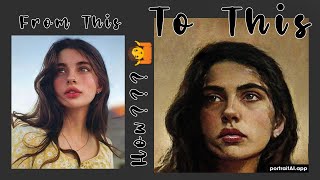
Upload a selfie and get an AI-painted 18th-century portrait, or turn a casual photo into a professional headshot.
PortraitAI is a single-purpose novelty-and-headshot generator, and that is the honest framing. The 18th-century flow is the core: upload a passport-style selfie with no glasses and a large face area, and you get a period-styled result. The July 2026 web app launch added professional headshots on the same upload flow, which makes it more defensible than a one-trick filter site. If you need real retouching, layered edits or a bulk pipeline, look at a general editor or a dedicated headshot service instead. Treat it as a fast, low-effort experiment rather than a production imaging tool.
Verified 22h ago · liveness 63/100 · cite: rightaichoice.com/tools/portraitai
- Professionals who need a quick polished headshot from an existing casual photo
- Social media users hunting a distinctive profile picture
- People buying a novelty or gag-gift portrait
- History and period-art enthusiasts
- Professional portrait photographers needing high-resolution, editable outputs
- Users who need layer, mask or fine-tuning controls
- Businesses needing bulk processing or an automated pipeline
We scan live Reddit threads, YouTube comments, X posts, G2 reviews and other communities — and hand you an honest verdict in under a minute.
- Honest verdict, not marketing
- Real pros & cons from real users
- Attributed quotes with receipts
3 free scans · no card needed
Skip PortraitAI if you need layered editing, retouching brushes, bulk processing or guaranteed high-resolution output — it renders one style per upload from a single photo.
PortraitAI's pricing fits teams whose volume aligns with the published tiers. Compare against the alternatives listed below for stage-specific value.
In short
PortraitAI — Upload a selfie and get an AI-painted 18th-century portrait, or turn a casual photo into a professional headshot. Best for Professionals who need a quick polished headshot from an existing casual photo, Social media users hunting a distinctive profile picture, People buying a novelty or gag-gift portrait. Free to use.
What people actually say about PortraitAI — is it worth it?
We ran a structured research pass across product reviews, community discussions, and post-purchase forum threads to surface the patterns vendors won't publish themselves. Below: the recurring strengths, the hidden costs people mention most, and the cohort that consistently regrets adopting this tool.
29 mentions across 2 sources (Product Hunt, App Store) · researched Jul 3, 2026.
Average across the 2 sources that answered — each source counts once, not each post.
- +Easy to use: simple upload-and-generate interface for casual users.
- +Wide variety of filter options: over 20 styles including classic, anime, and surreal.
- +Fast image generation turnaround, suitable for quick social media sharing.
- +Web-based, no download or installation required.
- +Innovative video style transfer feature claims high FPS and quality.
- −Portraits lack facial resemblance; users report unrecognizable results.
- −Racial bias: consistently lightens skin and changes ethnic features to Caucasian.
- −Nearly impossible to cancel subscription; users charged for a full year.
- −Free trial is misleading; cancellation shortly after trial still incurs charges.
- −No one-time purchase option; recurring subscription required.
- • Free trial automatically converts to a full-year paid subscription with no easy cancellation.
Viability Score
How well maintained and how widely used is PortraitAI? Built from what the vendor actually publishes (docs, changelog, tutorials, integrations, pricing), whether the site is live, and how much real users discuss it. How we calculate this
Last calculated: October 2026
How we score →Key Features
- 18th-century painted portrait generation from an uploaded selfie
- Professional AI headshot generation from casual photos (web app, launched July 2026)
- Browser-based drag-and-drop upload, no software install required
- Downloadable app advertised as carrying 100+ additional filters
- Classic Portraits style
- Anime style
- Cartoon and Cartoon+ styles
- Cubism style
- Digital style
- Futuristic style
- Artist-inspired styles: Alex Katz, Mona Lisa, Pablo Picasso, Henri Matisse
- Character and fantasy styles: Joker, Goblin, Vampire, Werewolf, Zombie, Barbie, Elf, Gorilla
- Chubby style variant
- Video style transfer for artistic restyling of clips
- In-flow input guidance: passport-like photo, no glasses, large face area
About PortraitAI
PortraitAI is a browser-based image generator with two jobs. The first is a novelty one: upload a selfie and the site renders it as an 18th-century painted portrait, using styles such as Classic Portraits, Mona Lisa, Pablo Picasso, Henri Matisse and Alex Katz. The second arrived in July 2026, when the team launched a web app that converts casual photos into professional headshots on the same upload flow — a marked step beyond the gag-portrait use case, because the output is aimed at a LinkedIn-style profile picture rather than a party invitation. The whole product is deliberately narrow: you drag and drop a photo, pick a style, and get an image back. There are no layers, masks, retouching brushes or bulk pipelines. The vendor is unusually direct about input quality — the upload area asks for a passport-like photo, no glasses, with a large face area — and that guidance is the single biggest lever on your result. A separate downloadable app is advertised as carrying 100+ additional filters, including Cartoon, Portrait HD, Halloween and Child styles. Seed material also records character and fantasy styles (Joker, Goblin, Vampire, Werewolf, Zombie, Barbie, Elf, Gorilla, Chubby, Cartoon+), plus a video style transfer feature for restyling clips. PortraitAI suits people who want one good-looking image fast — a headshot from an existing casual photo, a distinctive profile picture, or a novelty gift — and not photographers who need editable, high-resolution output.
Behind the Verdict
PortraitAI's strongest asset is that it does not pretend to be Photoshop. The upload box, the style picker and the result are the entire web experience, and the site says plainly what it wants from you: a passport-like photo, no glasses, large face area. That is more honest than most AI image tools, and it also tells you where the product will disappoint — a group shot or a dim phone selfie with sunglasses on will not produce the painted portrait or the headshot you pictured. The style catalogue is broader than the homepage suggests. Beyond the 18th-century painting look, seed material lists Classic Portraits, Anime, Cartoon, Cubism, Digital and Futuristic, character and fantasy options (Joker, Goblin, Vampire, Werewolf, Zombie, Barbie, Elf, Gorilla), artist-inspired styles named after Alex Katz, Mona Lisa, Pablo Picasso and Henri Matisse, plus Chubby and Cartoon+ variants. The downloadable app is advertised as adding 100+ filters including Cartoon, Portrait HD, Halloween and Child. A video style transfer feature rounds out the set for anyone restyling clips. The July 2026 headshot launch is what changes the buying calculus. A novelty portrait site is a one-visit curiosity; a headshot tool from an existing casual photo has a recurring reason to exist, because people need profile pictures more often than they need a Renaissance costume. That said, the two features share the same constraints. The vendor publishes no resolution or output-size guarantees, and there are no customization or fine-tuning controls — you choose a style and the model decides the rest. The site does not name which AI models power the transformations. Customers who want editable files, retouching or batch runs are outside the intended flow, and should budget for a general editor or a specialist headshot service rather than trying to bend PortraitAI into that shape.
Researching PortraitAI? Get your full AI stack in 60 seconds.
Free, no signup — tell us your goal and get tools matched to your budget & existing stack.
Real-world workflow fit
Concrete scenarios for the personas PortraitAI actually fits — and what changes day-one when you adopt it.
You have a decent casual photo on your phone but no recent studio headshot. You open the PortraitAI web app, drag the photo into the upload box, and pick a headshot style rather than an 18th-century or fantasy look.
Outcome: A profile-ready headshot generated from the photo you already had, with no photographer booking and no shoot day.
You upload a passport-style selfie — no glasses, face filling the frame, exactly as the page instructs — and cycle through Classic Portraits, Anime and the artist-inspired styles named after Mona Lisa, Pablo Picasso and Henri Matisse.
Outcome: A small set of painted avatars to choose between, with the best one dropped straight into your profile.
You take a clear photo of a friend, upload it, and render it in an artist-inspired or fantasy style such as Vampire, Elf or Barbie for a party invitation or framed novelty gift.
Outcome: A personalised, one-off image you can print or send, produced without hiring a costumer or illustrator.
Use Cases
- Turn a selfie into a classical oil-painting-style portrait for a social profile picture
- Generate a professional headshot from a casual photo for a LinkedIn-style profile
- Create themed avatars for party invitations or event graphics
- Try out historical or artist-inspired looks without hiring a photographer or costumer
- Make a personalised gift by turning a friend's photo into a portrait
- Restyle a short video clip with artistic filters
Limitations
- Output quality tracks input quality, and the vendor says so on the upload page: it asks for a passport-like photo, no glasses and a large face area.
- No resolution or output-size guarantees are published.
- There are no customization or fine-tuning controls described, so you cannot steer a render beyond choosing a style.
- The site does not disclose which AI models power the transformations.
- Customers wanting editable files, retouching or bulk runs are outside the intended flow.
as of 2026-10-09
Verification history
We have re-verified PortraitAI 8 times since . Each pass re-reads the vendor's own pages and re-checks every listed field against that evidence; passes where nothing had changed are marked as such.
- — re-checked, vendor evidence unchanged
- — re-verified summary, description, our verdict, our analysis, pricing model, pricing tiers, features, integrations, who it suits, who should skip it
- — re-checked, vendor evidence unchanged
- — re-verified summary, description, our verdict, our analysis, pricing model, pricing tiers, features, integrations, who it suits, who should skip it
- — re-checked, vendor evidence unchanged
- — re-verified summary, description, our verdict, our analysis, pricing model, pricing tiers, features, integrations, who it suits, who should skip it
Showing the 6 most recent of 8 verification passes.
Free to cite with attribution — this page re-verifies continuously.
Where the pricing makes sense
The company stage and team size where PortraitAI's pricing actually pencils out — and where peers do it cheaper.
PortraitAI's pricing fits teams whose volume aligns with the published tiers. Compare against the alternatives listed below for stage-specific value.
Setup time & first value
How long it actually takes to get something useful out of PortraitAI — broken out by persona, not the marketing-page minute.
Under five minutes to first output: open the site, drag a photo into the upload box, choose a style and generate. The real time cost is sourcing the right input — the page asks for a passport-like photo, no glasses, large face area. The separate downloadable app with 100+ filters adds an install step.
Switching to or from PortraitAI
How to bring data in from common predecessors and how to get it back out — written for the switcher, not the buyer.
- →From a general photo editor: keep it for crops and colour fixes, and use PortraitAI for the styled portrait or headshot render you'd otherwise do by hand.
- ↗To a dedicated headshot service: move when you need consistent multi-person team headshots or published resolution guarantees.
Resources & Guides
Tutorials & Learning
YouTube returned 6 videos for “PortraitAI”, and we withheld 5: 5 could not be judged, because “PortraitAI” is a single word that other videos use for other things. Showing the 1 we can prove is about PortraitAI.
Official links
Tools that pair well with PortraitAI
Common stack mates teams adopt alongside PortraitAI, with the specific reason each pairing earns its keep.

ToonMe
ToonMe turns your selfies into hand-drawn cartoon portraits on iOS, Android, and the web.

Glam AI
Glam AI turns one selfie into AI photoshoots, talking avatars, hairstyle try-ons, and trend-based short videos.

mnml AI
mnml AI turns sketches, photos and SketchUp, Revit or Rhino views into photoreal architectural renders with a guided Studio workspace and a collaborative Flow
Featured Head-to-Head Comparisons
Portraitai vs The New Black
Choose The New Black if you need a professional AI tool for fashion design, tech packs, and brand consistency. Choose PortraitAI for quick, fun, and artistic selfie filters. They serve completely different purposes.
Portraitai vs Qoves
For data-driven self-improvers wanting a personalized, research-backed non-surgical plan, QOVES is the only choice. PortraitAI is purely for artistic social media fun – it’s not a comparable tool. Choose QOVES if you seek objective beauty insights and actionable advice; choose PortraitAI only if you want a quick, entertaining portrait filter.
Portraitai vs Adobe Firefly Services
PortraitAI is ideal for individual users seeking playful, low-effort artistic selfies at zero cost. Adobe Firefly Services targets enterprises needing scalable, compliant generative AI integrated into existing workflows. Choose PortraitAI for fun; choose Firefly Services for production-grade automation and security.
Alternatives to PortraitAI
View all


Frequently Asked Questions
Used PortraitAI? Help shape our editorial sentiment research.