
Preso Budget
Preso Budget turns your real transaction history into a self-tracking budget and years-long financial plan.
If your real question is "will I be okay at 75, not just this month," Preso Budget answers it from the accounts you already linked, with taxes and RMDs in every year. The $11.99 flat plan and self-maintaining tracker make it low-effort for desktop users. You're paying for planning depth, not polish or a mobile app — and it's still invite-only beta.
Verified 12h ago · liveness 66/100 · cite: rightaichoice.com/tools/preso-budget
- Desktop-focused budgeters who want a hands-off, self-tracking plan
- Couples planning retirement who need two Social Security claiming dates and RMDs handled
- People who prefer asking plain-English questions about their own transactions instead of reading reports
- Households that want budgeting, net worth, and retirement projection from one connected account set
- Mobile-first users — the vendor states desktop-only support, no companion app
- Anyone who needs a free tier; the 14-day trial converts to $11.99/month
- Envelope-method devotees who want to assign every dollar manually, better served by YNAB
We scan live Reddit threads, YouTube comments, X posts, G2 reviews and other communities — and hand you an honest verdict in under a minute.
- Honest verdict, not marketing
- Real pros & cons from real users
- Attributed quotes with receipts
3 free scans · no card needed
Skip Preso Budget if you need a mobile app or a free plan — it's invite-only private beta, desktop web only, and the 14-day trial converts to $11.99/month with no free tier.
The 14-day free trial converts straight to $11.99/month with no free tier, so there's no permanently free way to keep using it.
One flat $11.99/month covers unlimited connected accounts, the AI assistant, and retirement and net worth projections — cheaper than Monarch Money and YNAB for a household that wants automation plus long-range planning. There are no tiers to outgrow and no add-ons, so a solo budgeter and a couple planning retirement pay the same. The trade-off is that it sits behind invite-only beta access, and there's no free plan to fall back on.
In short
Preso Budget — Preso Budget turns your real transaction history into a self-tracking budget and years-long financial plan. Best for Desktop-focused budgeters who want a hands-off, self-tracking plan, Couples planning retirement who need two Social Security claiming dates and RMDs handled, People who prefer asking plain-English questions about their own transactions instead of reading reports. Free to start; paid plans from $11.99/mo.
What people actually say about Preso Budget — is it worth it?
We ran a structured research pass across product reviews, community discussions, and post-purchase forum threads to surface the patterns vendors won't publish themselves. Below: the recurring strengths, the hidden costs people mention most, and the cohort that consistently regrets adopting this tool.
29 mentions across 2 sources (YouTube, Product Hunt) · researched Jul 3, 2026.
Average across the 2 sources that answered — each source counts once, not each post.
- +AI automatically categorizes transactions and creates personalized budgets.
- +Real-time spending alerts help users stay on track.
- +360-degree financial dashboard gives a complete view of finances.
- +Recurring charge detection surfaces hidden subscriptions.
- +Goal tracking with progress milestones keeps motivation high.
- −Too few user reviews to confirm long-term reliability.
- −No mobile app yet; web-only may limit accessibility.
- −No integrations listed with banks or other tools.
- −Premium AI features require a paid subscription.
- −Cannot handle investment or business finance tracking.
- • No hidden costs reported yet, but premium price not publicly stated in available data.
Viability Score
How well maintained and how widely used is Preso Budget? Built from what the vendor actually publishes (docs, changelog, tutorials, integrations, pricing), whether the site is live, and how much real users discuss it. How we calculate this
Last calculated: October 2026
How we score →Key Features
- Plaid bank account linking for checking, savings, credit cards, and investment accounts
- Read-only account connections with 256-bit encryption
- Option to add account balances manually instead of linking
- AI-generated personalized budget built from your real spending history
- Automatic transaction categorization and merchant labeling
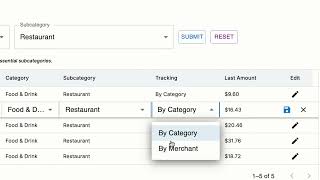
- Essential vs non-essential spending breakdown by category and subcategory
- Self-tracking budget that updates against live transactions with no monthly reset
- Budget AI Assistant that answers plain-English questions about your spending
- Answers and charts built from your own transaction data, not generic advice
- Merchant-level and category-level spending insights
- Dynamic charts and graphs that update as spending changes
- Customizable categories and subcategories (add, edit, remove) plus transaction re-labeling
- Cash flow projection with side-by-side what-if comparison
- Net worth projection across ages 55–90 with a range of outcomes
- Year-by-year retirement ledger showing taxes, Social Security, and withdrawals
About Preso Budget
Preso Budget is an AI budgeting tool that builds your budget from accounts you already have. Link checking, savings, credit cards, and investment accounts once through a read-only Plaid connection, or enter balances by hand, and Preso analyzes your real spending, splits essentials from non-essentials, and generates a personalized budget that then tracks itself against live transactions. Because the same numbers carry forward, that budget also drives cash flow, net worth, and a year-by-year retirement projection. Every projection year includes federal taxes, so the chart you see is after-tax; couples can set separate Social Security claiming ages for each spouse, and required minimum withdrawals are applied automatically when the rules trigger them. A year-by-year ledger opens up behind the chart so you can trace how each figure was assembled rather than trusting a black box. A Budget AI Assistant answers plain-English questions about your spending and returns charts and analysis built from your own transactions, not generic advice. You can add, edit, or remove categories and subcategories, relabel merchants, and split essentials from non-essentials. Spending insights break down by merchant and by category, and cash flow what-ifs sit side by side for comparison. It's aimed at desktop users who want planning rather than manual entry. Preso is in invite-only private beta at $11.99/month after a 14-day free trial, one plan with no tiers or add-ons. Against Monarch Money and YNAB, the differentiator is the retirement math — but you trade away mobile access and envelope-style discipline to get it.
Behind the Verdict
Most budgeting apps stop at the month. Preso Budget's pitch is that the same connected accounts that categorize your groceries should also tell you what your net worth looks like at 78. That's a genuinely different product from Monarch Money or YNAB, and it's the reason to consider it. We'd reach for this when retirement math matters more than day-to-day discipline. The projection runs ages 55–90 with a range of outcomes, federal taxes baked into every year, two separate Social Security claiming ages for couples, and automatic required minimum withdrawals. The year-by-year ledger is the part that earns trust: you can open the table and see taxes, Social Security, and withdrawals for 2036, 2037, 2038 line by line instead of accepting a single squiggly line on a chart. The automation is real. Link accounts once through Plaid read-only, and Preso builds a budget from your history, splits essential from non-essential, and keeps tracking against live transactions without a monthly reset. Where it bites: you're trusting its categorization until you go fix it. Relabeling merchants and editing categories is supported, so budget twenty minutes after onboarding to correct the categories you disagree with — otherwise your projection inherits the errors. Pass on this if you live on your phone. The vendor states desktop-only support, so there's no companion app for on-the-go entry. Pass too if you want the envelope method — YNAB still does deliberate, assignment-based budgeting better, and Preso's philosophy is closer to "let the system run and adjust exceptions." If you want a mature, mobile-first tracker with strong reporting, Monarch Money is the safer buy today. Availability is the practical caveat. Preso is in invite-only private beta, priced at $11.99/month after a 14-day
Researching Preso Budget? Get your full AI stack in 60 seconds.
Free, no signup — tell us your goal and get tools matched to your budget & existing stack.
Real-world workflow fit
Concrete scenarios for the personas Preso Budget actually fits — and what changes day-one when you adopt it.
They link checking, savings, credit cards, and investment accounts through Plaid, let Preso generate a budget from their history, then open the retirement projection to set separate Social Security claiming ages for each spouse and run what-if comparisons on retirement dates.
Outcome: They see an after-tax, year-by-year projection from ages 55–90 — including RMDs applied automatically — anchored to the same accounts that drive their monthly budget.
After a one-time account connection, they stop rebuilding a spreadsheet each month and instead ask the Budget AI Assistant things like what they spent on dining last quarter, then relabel a few merchants and move one category between essential and non-essential.
Outcome: The budget tracks itself against live transactions, categories reflect how they actually live, and the charts update without manual re-entry.
They use the year-by-year ledger to check how every projection figure was assembled, and adjust assumptions directly wherever they disagree — for example changing retirement ages and re-running the what-if side by side.
Outcome: They get transparent math they can verify line by line instead of an opaque score or recommendation.
Use Cases
- Build a monthly budget automatically from linked accounts instead of starting from a template each month
- See which spending is actually fixed by splitting essentials from non-essentials in your own categories
- Ask plain-English questions about past spending, like what you spent on dining last quarter, and get charts from your own data
- Set a savings goal and track real-time progress against your live transactions
- Spot recurring or forgotten charges through merchant-level and category-level analytics
- Project net worth and retirement from the same accounts that power your budget
- Compare what-if scenarios side by side, such as different retirement dates or claiming ages
- Adjust categories and merchant labels as your income or expenses change
Limitations
- Preso Budget is in private beta and access is by invitation only, so you may not be able to sign up immediately.
- It requires linking bank accounts via Plaid (checking, savings, credit cards, investment) or adding balances manually.
- Pricing is a single $11.99/month plan after a 14-day free trial, with no free tier or tiered options.
as of 2026-09-14
Verification history
We have re-verified Preso Budget 8 times since . Each pass re-reads the vendor's own pages and re-checks every listed field against that evidence; passes where nothing had changed are marked as such.
- — re-verified summary, description, our verdict, our analysis, pricing model, pricing tiers, features, integrations, who it suits, who should skip it
- — re-verified summary, description, our verdict, our analysis, pricing model, pricing tiers, features, integrations, who it suits, who should skip it
- — re-verified summary, description, our verdict, our analysis, pricing model, pricing tiers, features, integrations, who it suits, who should skip it
- — re-verified summary, description, our verdict, our analysis, pricing model, pricing tiers, features, integrations, who it suits, who should skip it
- — re-checked, vendor evidence unchanged
- — re-checked, vendor evidence unchanged
Showing the 6 most recent of 8 verification passes.
Free to cite with attribution — this page re-verifies continuously.
12-month cost
Project the real annual outlay, including the implied monthly cost when only an annual tier is published.
Vendor list price only. Add-on usage, seat overages, and contract minimums are surfaced under Hidden costs & gotchas.
Plans compared
For each published Preso Budget tier: who it actually fits, and what it adds vs. the previous tier. Cross-reference the cost calculator above for projected annual outlay.
Preso (Private Beta)
$11.99/mo
Where the pricing makes sense
The company stage and team size where Preso Budget's pricing actually pencils out — and where peers do it cheaper.
One flat $11.99/month covers unlimited connected accounts, the AI assistant, and retirement and net worth projections — cheaper than Monarch Money and YNAB for a household that wants automation plus long-range planning. There are no tiers to outgrow and no add-ons, so a solo budgeter and a couple planning retirement pay the same. The trade-off is that it sits behind invite-only beta access, and there's no free plan to fall back on.
Setup time & first value
How long it actually takes to get something useful out of Preso Budget — broken out by persona, not the marketing-page minute.
For a desktop user, first value is quick: connecting accounts via Plaid is a one-time step and Preso builds the initial budget from your history in one pass, so a fundermental budget typically appears within the same session. Adding balances manually instead of linking takes longer since you enter figures yourself. Retirement and net worth projections depend on the same accounts already being
Switching to or from Preso Budget
How to bring data in from common predecessors and how to get it back out — written for the switcher, not the buyer.
- →From spreadsheets: Link accounts via Plaid and let Preso generate the budget from your real history, then adjust categories to match your old sheet.
- →From manual-entry apps: Connect accounts through Plaid and drop recurring manual transaction entry, keeping the categories you care about.
- →From Mint-style trackers: Rebuild by connecting the same accounts in Preso and mapping your old categories to Preso's essential and non-essential subcategories.
- ↗To a spreadsheet: Export or note your category structure before cancelling, since Preso's value is the automation you'd be replacing by hand.
- ↗To Monarch Money: Expect a broader feature set with mobile apps; you'd re-link accounts and rebuild categories there.
- ↗To YNAB: Expect an envelope-style method instead of Preso's history-generated plan, requiring you to re-allocate budget amounts manually.
Integrations
Resources & Guides
Tutorials & Learning
YouTube returned 6 videos for “Preso Budget”, and we withheld 5: 5 did not mention Preso Budget. Showing the 1 we can prove is about Preso Budget.
Official links
Tools that pair well with Preso Budget
Common stack mates teams adopt alongside Preso Budget, with the specific reason each pairing earns its keep.

Money Pro
Bill planning, budgeting and account tracking with a large calendar, built for iPhone, iPad and Mac.

Hisabi
Open-source, self-hosted personal finance that turns your bank SMS alerts into automatic expense tracking.

Origin
Origin is an SEC-regulated AI financial advisor that syncs your accounts, builds a budget, tracks your portfolio, and tells you what money move to make next.
Featured Head-to-Head Comparisons
Preso Budget vs Cryptohopper
Don't compare apples to oranges. If you need a crypto trading bot with copy trading, DCA, and AI market data integration via MCP server, choose Cryptohopper. If you want AI to automate your personal budgeting and savings, choose Preso Budget. These tools serve completely different domains.
Preso Budget vs Transfix
If you run a freight brokerage or 3PL needing an AI-powered TMS that protects your data and automates pricing/execution, Transfix is the clear choice. For personal finance automation—letting AI build and adjust a budget based on your spending—Preso Budget’s freemium model is ideal. They serve completely different buyers; pick based on your domain: logistics vs. personal money management.
Preso Budget vs Bitsgap
Bitsgap and Preso Budget serve entirely different domains: automated crypto trading vs. personal finance budgeting. Choose Bitsgap if you trade crypto and want bots to manage positions across exchanges; choose Preso Budget for AI‑powered personal expense tracking and savings plans. They are not direct competitors.
Alternatives to Preso Budget
View all


Frequently Asked Questions
Categories
Topics
Used Preso Budget? Help shape our editorial sentiment research.