
SheetAI.app
Bulk AI text, image, video, and music generation that runs inside Google Sheets formulas.
If your work already lives in Google Sheets and you need hundreds of outputs rather than one, SheetAI answers a question most AI tools ignore: how do I do this 500 times? The $0 BYOK tier makes the trial cost literally nothing beyond your provider bill, and Replicate media inside a formula bar is something few add-ons attempt. The hosted math is the part to check — $12/month buys only about 500 AI runs, while $29/month is where bulk Replicate image, video, and music workflows actually unlock. Heavy hosted users who fill columns daily may find the $29 one-time-to-$299 credit packs cheaper than a recurring subscription.
Verified 14h ago · liveness 87/100 · cite: rightaichoice.com/tools/sheetai-app
- Marketers producing bulk ad copy, product images, and short video creatives from one sheet
- Data analysts classifying, tagging, and cleaning thousands of messy rows without code
- Content creators brainstorming outlines, headlines, and video ideas at fill-down scale
- Sales teams drafting personalized follow-up emails and outreach per lead row
- Anyone who wants a chat-style AI assistant with back-and-forth refinement mid-task
- Users needing advanced numerical analysis, pivot tables, or statistical modeling
- Enterprises requiring on-premise deployment or custom model hosting
We scan live Reddit threads, YouTube comments, X posts, G2 reviews and other communities — and hand you an honest verdict in under a minute.
- Honest verdict, not marketing
- Real pros & cons from real users
- Attributed quotes with receipts
3 free scans · no card needed
Skip SheetAI if you want to refine an answer conversationally rather than write a formula and fill it down a column, or if your work is statistical modeling and pivot tables rather than bulk text and media generation.
The $0 BYOK tier is free from SheetAI but your actual spend runs through OpenAI, Anthropic, Google, or Replicate, so a whole-column fill on a 2,000-row sheet bills your provider per row.
For a solo operator or small team already on a provider key, BYOK at $0 plus your own API bill is cheaper than almost any seat-based AI writing tool. Hosted Starter at $12/month fits light daily use under roughly 500 AI runs. Pro at $29/month competes with mid-tier AI writing subscriptions but only pays off if you are filling columns regularly. Credit packs from $29 to $299 suit one-off bulk jobs where a recurring $12 or $29 subscription would be waste.
In short
SheetAI.app — Bulk AI text, image, video, and music generation that runs inside Google Sheets formulas. Best for Marketers producing bulk ad copy, product images, and short video creatives from one sheet, Data analysts classifying, tagging, and cleaning thousands of messy rows without code, Content creators brainstorming outlines, headlines, and video ideas at fill-down scale. Free to start; paid plans from $12/mo.
What's new in SheetAI.app
Checked todayAcross the latest 3 updates: 1 launch and 2 changelog entries.
New Docs, Formula Reference & Formula Quiz
SheetAI published reference pages for 50+ Google Sheets formulas and an interactive quiz covering its 14 functions.
Dark Mode & Website Redesign
Dark mode rolled out across the SheetAI website alongside a redesigned homepage and new free video downloader tools.
SheetAI v3 Adds AI Agent, Batch Processing & Sidebar Chat
SheetAI v3 ships an in-Sheets AI chat sidebar, one-click batch processing for hundreds of rows, and drag-and-drop image analysis.
Viability Score
How well maintained and how widely used is SheetAI.app? Built from what the vendor actually publishes (docs, changelog, tutorials, integrations, pricing), whether the site is live, and how much real users discuss it. How we calculate this
Last calculated: October 2026
How we score →Key Features
- =SHEETAI() text generation inside Google Sheets cells
- =SHEETAI_IMAGE() bulk image generation via Replicate
- =SHEETAI_VIDEO() short clips and product reels from prompts
- =SHEETAI_MUSIC() batch audio, jingles, and stems via Replicate
- =SHEETAI_LIST() list generation
- =SHEETAI_EXTRACT() data extraction from text
- =SHEETAI_CLASSIFY() text classification for tagging rows
- =SHEETAI_SUMMARIZE() text summarization
- =SHEETAI_FILL() auto-fill columns with AI
- Bring your own API key (OpenAI, Claude, Gemini, Grok, Replicate)
- Cache stores past results so repeated queries don't re-bill your API
- Formula generator sidebar in Google Sheets
- 14 documented SheetAI functions with 50+ formula reference pages
- Interactive formula quiz for learning the function set
- Bulk fills, classify, and summarize across whole columns
About SheetAI.app
SheetAI.app is a Google Workspace Marketplace add-on that turns Google Sheets into a bulk AI workspace. You write a formula in a cell — =SHEETAI("Write a tagline for a coffee brand") — drag it down a column, and every row returns an answer. Text work runs through =SHEETAI(), plus =SHEETAI_LIST(), =SHEETAI_EXTRACT(), =SHEETAI_CLASSIFY(), =SHEETAI_SUMMARIZE(), and =SHEETAI_FILL() for whole-column operations. Media runs through Replicate models wired into Sheets: =SHEETAI_IMAGE() to fill 200 rows with 200 product shots, =SHEETAI_VIDEO() for short clips and product reels row by row, =SHEETAI_MUSIC() for background tracks and jingles per SKU. The vendor markets it to marketers, data analysts, content creators, researchers, and sales teams — anyone whose briefs, catalogs, and leads already live in a spreadsheet. Pricing splits two ways. The BYOK tier is $0 forever: you paste your own OpenAI, Claude, Gemini, Grok, or Replicate key, keep unlimited calls, and pay providers directly. Hosted plans are $12/month for about 500 AI runs and $29/month for soft-unlimited use plus bulk Replicate media, with Pro Yearly at $290/year billed once a year. One-time credit packs run $29 to $299 for bulk jobs without a subscription. A built-in cache replays repeated queries from the database rather than re-billing your key. The Marketplace listing reports 198k+ installs and a 4.5/5 rating from 45 reviews. It is not a chat assistant and not a data modeling environment — it is a fill-down engine, and pivot tables and statistical work still belong elsewhere.
Behind the Verdict
SheetAI's core insight is structural, not technological. ChatGPT, Midjourney, and Runway all assume one output per interaction. SheetAI assumes a column. That single assumption changes what the tool is good for: campaign packs, product catalogs, localization tables, lead lists, and research matrices — jobs where the bottleneck is repetition, not cleverness. Strengths. The formula set is unusually broad for a Sheets add-on. =SHEETAI() handles generation; =SHEETAI_LIST() builds lists; =SHEETAI_EXTRACT() pulls structured values out of messy text; =SHEETAI_CLASSIFY() tags rows; =SHEETAI_SUMMARIZE() condenses; =SHEETAI_FILL() populates columns. Media is handled by Replicate rather than a homegrown model, which means =SHEETAI_IMAGE(), =SHEETAI_VIDEO(), and =SHEETAI_MUSIC() inherit whatever image, video, and audio models Replicate is hosting. The April 2026 documentation rebuild added 50+ formula reference pages plus an interactive formula quiz, which matters because 14 functions is enough surface area that most users will not discover the full set by accident. The cache is a real cost control: repeated queries pull from the database instead of re-billing your API key, and the vendor documents this explicitly on the pricing page. Weaknesses. The workflow is formula-driven, so if you are uncomfortable writing =SHEETAI_EXTRACT(A2, "email") and filling down, you will feel the friction. There is no back-and-forth refinement — you cannot nudge an output mid-task the way you would in a chat window. The BYOK tier means your actual cost is set by OpenAI, Anthropic, Google, or Replicate, not by SheetAI, and media generation in particular gets expensive fast because image, video, and music models bill per asset. The Starter hosted tier at $12/month covers roughly 500 AI runs, which sounds generous until you are filling a 2,000-row catalog. Where it fits. Marketing ops generating bulk ad copy, product descriptions, and short video creatives from a single sheet. Data analysts classifying and cleaning thousands of rows without writing Python. Content creators brainstorming outlines and headlines at fill-down scale. Sales teams drafting personalized outreach per lead row. Researchers summarizing papers and organizing findings in a table. Where it does not. Anyone who wants a conversational assistant with iterative refinement. Anyone doing serious numerical analysis — this is not a modeling environment. Occasional users running a handful of prompts a month, for whom a chat subscription is simply cheaper. And enterprises that require on-premise deployment or custom model hosting will not find that here.
Researching SheetAI.app? Get your full AI stack in 60 seconds.
Free, no signup — tell us your goal and get tools matched to your budget & existing stack.
Real-world workflow fit
Concrete scenarios for the personas SheetAI.app actually fits — and what changes day-one when you adopt it.
A 400-SKU sheet already holds product names and specs. You add =SHEETAI("Write a 30-word product description for "&A2) in column C and fill down, then add =SHEETAI_IMAGE(A2) in column D to generate a hero shot per SKU.
Outcome: 400 descriptions and 400 images land in the same sheet, already matched to SKU rows, without exporting to ChatGPT or Midjourney.
You paste 3,000 rows of raw customer feedback, add =SHEETAI_CLASSIFY(A2, "positive, negative, neutral") in column B, and =SHEETAI_EXTRACT(A2, "product name") in column C, then fill both down.
Outcome: Every row is tagged and product-mapped in place. You pivot the result in Sheets rather than writing a Python script.
Your lead list has company, role, and a recent-news column. You add =SHEETAI("Write a 3-sentence follow-up email to the "&B2&" at "&A2&" referencing "&D2) and fill down the column.
Outcome: Unique follow-up drafts for every lead, ready to review and send, without a separate AI tab or copy-paste loop.
Use Cases
- Generate ad copy, product descriptions, and social posts at scale inside Sheets
- Classify customer feedback into positive/negative/neutral sentiment
- Extract company names or emails from text columns
- Auto-fill geography data such as capitals, currencies, and countries
- Summarize long reports into brief snippets across hundreds of rows
- Brainstorm blog post ideas using =SHEETAI_LIST()
- Fill 200 rows with 200 product shots using =SHEETAI_IMAGE()
- Generate short product reels and jingles per SKU via =SHEETAI_VIDEO() and =SHEETAI_MUSIC()
Models Under the Hood
as of 2026-10-15
Limitations
- The free BYOK tier requires you to bring your own API key, so you pay your own AI and Replicate provider costs on top of $0 to SheetAI.
- The Starter hosted plan is capped at about 500 AI runs per month, and Pro at $29/month is described by the vendor as soft-unlimited rather than fixed.
- Bulk image, video, and music generation is Replicate-powered and tied to paid or hosted usage.
- The workflow is formula-driven inside Google Sheets, so real work depends on writing and filling down formulas.
as of 2026-09-29
Verification history
We have re-verified SheetAI.app 22 times since . Each pass re-reads the vendor's own pages and re-checks every listed field against that evidence; passes where nothing had changed are marked as such.
- — re-checked, vendor evidence unchanged
- — re-checked, vendor evidence unchanged
- — re-verified summary, description, our verdict, our analysis, pricing model, pricing tiers, features, integrations, who it suits, who should skip it
- — re-checked, vendor evidence unchanged
- — re-verified summary, description, our verdict, our analysis, pricing model, pricing tiers, features, integrations, who it suits, who should skip it
- — re-verified summary, description, our verdict, our analysis, pricing model, pricing tiers, features, integrations, who it suits, who should skip it
Showing the 6 most recent of 22 verification passes.
Free to cite with attribution — this page re-verifies continuously.
12-month cost
Project the real annual outlay, including the implied monthly cost when only an annual tier is published.
Vendor list price only. Add-on usage, seat overages, and contract minimums are surfaced under Hidden costs & gotchas.
Plans compared
For each published SheetAI.app tier: who it actually fits, and what it adds vs. the previous tier. Cross-reference the cost calculator above for projected annual outlay.
BYOK Free
$0 forever
Ideal for
Developers, analysts, and technically comfortable marketers who already hold an OpenAI, Claude, Gemini, Grok, or Replicate key and want unlimited calls at provider cost.
What this tier adds
Starting tier. $0 forever with unlimited SHEETAI calls via your own key — you pay only your AI and Replicate provider bill.
Starter
$12/month
Ideal for
Individuals running light daily AI work in Sheets who do not want to manage API keys or track provider spend.
What this tier adds
Adds hosted AI with no API key needed and up to about 500 AI runs per month, plus the formula generator sidebar and email support.
Pro
$29/month
Ideal for
Marketers and ops teams running bulk media workflows and heavy daily column fills who need Replicate image, video, and music generation unlocked.
What this tier adds
Raises AI usage to soft unlimited and adds bulk image, video, and music via Replicate, plus bulk fills, classify and summarize, multimodel BYOK, and priority support.
Pro Yearly
$290/year
Ideal for
Committed Pro users filling columns every month who want the same hosted power use without a monthly charge.
What this tier adds
Same capabilities as Pro monthly, billed once a year at $290/year — saving roughly two months versus paying monthly.
Credit Packs
From $29 one-time
Ideal for
Teams or freelancers with a single large bulk job — a catalog launch or a one-time localization push — who do not want a recurring subscription.
What this tier adds
One-time token purchases with no subscription, running from $29 for up to 97M tokens to $299 for up to 1B tokens.
Where the pricing makes sense
The company stage and team size where SheetAI.app's pricing actually pencils out — and where peers do it cheaper.
For a solo operator or small team already on a provider key, BYOK at $0 plus your own API bill is cheaper than almost any seat-based AI writing tool. Hosted Starter at $12/month fits light daily use under roughly 500 AI runs. Pro at $29/month competes with mid-tier AI writing subscriptions but only pays off if you are filling columns regularly. Credit packs from $29 to $299 suit one-off bulk jobs where a recurring $12 or $29 subscription would be waste.
Setup time & first value
How long it actually takes to get something useful out of SheetAI.app — broken out by persona, not the marketing-page minute.
Install from the Google Workspace Marketplace takes about two minutes, per the vendor's own "Install free — 2 min setup" claim. Then it splits by path: BYOK users paste an OpenAI, Claude, Gemini, Grok, or Replicate key and are running formulas immediately; hosted-plan users skip key setup entirely. Expect ten to fifteen minutes to learn the 14-function set — the rebuilt docs include 50+ formula
Switching to or from SheetAI.app
How to bring data in from common predecessors and how to get it back out — written for the switcher, not the buyer.
- →From ChatGPT copy-paste workflows: replace the manual loop with =SHEETAI() in a cell and fill down the column.
- →From Midjourney: point =SHEETAI_IMAGE() at a prompt column so generated assets arrive already bound to their row.
- →From Runway: use =SHEETAI_VIDEO() to produce short clips and product reels row by row inside the campaign sheet.
- →From a standalone media or audio tool: use =SHEETAI_MUSIC() to batch jingles and background tracks per SKU.
- →From manual data tagging in Sheets: replace row-by-row categorization with =SHEETAI_CLASSIFY() and =SHEETAI_EXTRACT() filled down.
- ↗To ChatGPT or Claude directly: move to a chat interface when you need back-and-forth refinement mid-task rather than fill-down output.
- ↗To a BI tool: move pivot tables, statistical modeling, and numerical analysis out of Sheets entirely.
- ↗To a dedicated image or video platform: move to Midjourney or Runway if you need fine-grained per-asset control rather than batch generation.
- ↗To a code-based pipeline: move to Python or a notebook when you need programmatic orchestration beyond formula fill-down.
Integrations
Resources & Guides
Tutorials & Learning
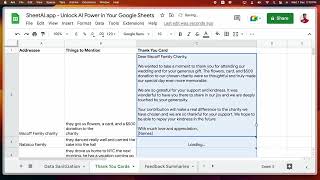
Use ChatGPT inside Google Sheets with SheetAI
GPT-3 Demo

Streamline Your Spreadsheet Workflow with SheetAI app The Ultimate Productivity Tool
Ejecto

Transform Your Text Instructions into Google Sheets Formulas in Seconds with Sheetai.app! #ai
phill ai
YouTube returned 6 videos for “SheetAI.app”, and we withheld 3: 3 could not be judged, because “SheetAI.app” is a single word that other videos use for other things. Showing the 3 we can prove are about SheetAI.app.
Official links
Tools that pair well with SheetAI.app
Common stack mates teams adopt alongside SheetAI.app, with the specific reason each pairing earns its keep.

Anakin.ai
Anakin.ai is a no-code AI platform for text, image, video and voice generation, workflows and batch automation.

GPT for Sheets and Docs
GPT for Sheets and Docs turns plain-language prompts into bulk AI spreadsheet automation inside Google Sheets and Docs.

Copilot for Microsoft 365
Microsoft 365 Copilot is an AI assistant inside Word, Excel, Outlook, and Teams that grounds answers in your tenant data.
Featured Head-to-Head Comparisons
Chat 5 vs Sheetai App
There is no real decision here today. SheetAI.app is a shipping product you can install, paste a key into, and drag formulas down a column; Chat 5 is a Firebase 'Setup Complete' page with no editor, no login, and no pricing. If you need AI writing at spreadsheet scale now, buy SheetAI.app and budget for your own OpenAI/Claude/Gemini/Replicate usage. Re-check Chat 5 in a few months; right now a trial is impossible because there is nothing to trial.
Dramaclaw vs Sheetai App
These two don't belong in the same buying decision. Pick SheetAI.app if your problem is doing AI work at row-scale inside a spreadsheet you already live in — bulk ad copy, catalog descriptions, classifying messy data, filling columns with image or short-clip prompts. Pick Dramaclaw if your problem is producing a finished narrative video (an episode, an ad, an otome/game cutscene) from a script through one automated pipeline. A spreadsheet formula tool and a film-production engine solve different jobs for different teams; only compare them if you happen to be doing both, in which case you'd likely run both.
Alternatives to SheetAI.app
View all
Anakin.ai
Anakin.ai is a no-code AI platform for text, image, video and voice generation, workflows and batch automation.

GPT for Sheets and Docs
GPT for Sheets and Docs turns plain-language prompts into bulk AI spreadsheet automation inside Google Sheets and Docs.

Copilot for Microsoft 365
Microsoft 365 Copilot is an AI assistant inside Word, Excel, Outlook, and Teams that grounds answers in your tenant data.
Frequently Asked Questions
Categories
Best-of guides
Used SheetAI.app? Help shape our editorial sentiment research.