Tldraw
Free instant collaborative whiteboard for sketching, diagramming, and voice-controlled AI drawing in the browser
If your problem is "get a shared sketch in front of three people right now," Tldraw removes more steps than almost anything else — the canvas is free, loads instantly, and a link is the whole collaboration model. The $8/mo Plus tier buys on-canvas AI drawing and shared boards, and the Maker tier at $25/mo raises AI usage limits. The Agent Draw community extension makes voice-controlled sketching real, which is genuinely unusual. Choose Miro or FigJam instead when you need structured workshops, voting, or template libraries.
Verified 9d ago · liveness 83/100 · cite: rightaichoice.com/tools/tldraw
- Developers who want a shared canvas mid-conversation
- Designers doing fast concept sketching
- Remote teams needing zero-setup visual collaboration
- Educators giving instant visual explanations
- Teams running structured workshops with voting and sticky notes
- Enterprise buyers who need SSO and access controls
- High-fidelity UI design or detailed wireframing
We scan live Reddit threads, YouTube comments, X posts, G2 reviews and other communities — and hand you an honest verdict in under a minute.
- Honest verdict, not marketing
- Real pros & cons from real users
- Attributed quotes with receipts
3 free scans · no card needed
Skip Tldraw if you need structured workshops with sticky notes, voting, and templates, or enterprise access controls and SSO, since Tldraw is a fast canvas rather than a team workspace.
Tldraw's free canvas covers ad-hoc sketching for individuals and small teams at no cost, and Plus at $8/mo is cheaper than Miro or FigJam seats for teams whose only real need is a shared board with light AI drawing. Maker at $25/mo is priced for people who hit the Plus AI drawing limits, which puts it near entry-level paid seats at deeper whiteboard platforms without their workshop tooling.
In short
Tldraw — Free instant collaborative whiteboard for sketching, diagramming, and voice-controlled AI drawing in the browser. Best for Developers who want a shared canvas mid-conversation, Designers doing fast concept sketching, Remote teams needing zero-setup visual collaboration. Free to start; paid plans from $8/mo.
What people actually say about Tldraw — is it worth it?
We ran a structured research pass across product reviews, community discussions, and post-purchase forum threads to surface the patterns vendors won't publish themselves. Below: the recurring strengths, the hidden costs people mention most, and the cohort that consistently regrets adopting this tool.
37 mentions across 3 sources (Hacker News, GitHub, Lemmy) · researched Aug 18, 2026.
Average across the 3 sources that answered — each source counts once, not each post.
- +Real-time collaboration with no sign-up for instant sketching
- +Infinite canvas with clean, minimal UI that stays out of the way
- +Open-source SDK with 49,840 GitHub stars for building custom canvas apps
- +New offline mode enables shared editing between humans and AI agents
- +Scripting with JS and LLM-driven customization (Steve Ruiz demos it)
- −Paused community contributions due to AI slop, slowing open-source momentum
- −Lacks structured project management and templates found in Miro
- −No enterprise controls or advanced admin features
- −Limited feedback from non-developers on usability
- −AI-assisted drawing is paywalled behind Plus plan at $8/mo
- • AI features require Plus plan, but most community buzz is about the free core or SDK, so no hidden costs reported so far
Viability Score
How well maintained and how widely used is Tldraw? Built from what the vendor actually publishes (docs, changelog, tutorials, integrations, pricing), whether the site is live, and how much real users discuss it. How we calculate this
Last calculated: October 2026
How we score →Key Features
- Infinite canvas whiteboard
- Real-time collaboration via shared link
- Pen drawing tool
- Shape tools for diagramming
- Text on canvas
- No sign-up required to start drawing
- Instant sharing via link
- PNG export
- Works in the browser without installation
- Minimal, fast-loading interface
- AI-assisted drawing on the canvas (Plus)
- Generate and refine visuals on the board (Plus)
- Shared collaborative boards (Plus)
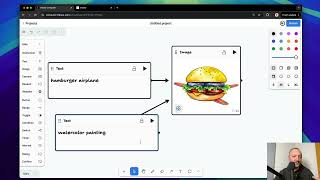
- Voice-controlled drawing via the community Agent Draw extension
- Higher AI drawing usage limits (Maker)
About Tldraw
Tldraw is a free collaborative whiteboard that opens straight into an infinite canvas — no template picker, no project hierarchy, no account wall before you draw. You get pen, shape, and text tools, a shareable link for real-time collaboration, and PNG export for whatever you sketch. It is aimed at developers, designers, remote teams, and educators who want a shared sketch in front of two or more people within seconds, whether that is a quick UI mockup, an ad-hoc diagram during a call, or a visual explanation in a live class. The paid Plus plan adds AI-assisted drawing directly on the canvas so you can generate and refine visuals without leaving the board, and the Maker plan raises the usage limits for people drawing with AI regularly. Beyond the core product, the community extension Agent Draw — described in July 2026 coverage — is built on Tldraw and enables voice-controlled drawing: you speak and an agent sketches in real time, which is useful for hands-free whiteboarding during meetings. Tldraw stays deliberately lean compared with Miro or FigJam: it is a canvas, not a workspace with task boards, voting, or template libraries, and that narrowness is the point.
Behind the Verdict
Tldraw's strongest asset is the absence of ceremony. You land on an infinite canvas with pen, shapes, and text, and sharing is a link — no workspace setup, no board naming, no admin inviting people. For remote pair sketching during a call or a developer whiteboarding an architecture idea mid-conversation, that friction gap versus Miro and FigJam is the entire value proposition, and it is a real one. The paid layers are narrow and clearly scoped. Plus at $8/mo adds AI-assisted drawing on the canvas — generate and refine visuals where you are already sketching — plus shared collaborative boards. Maker at $25/mo exists for people who lean on AI drawing enough to hit the Plus limits. Neither tier tries to turn Tldraw into a project management tool, and that restraint keeps the interface fast. The Agent Draw extension is the most interesting thing in the ecosystem: built on Tldraw, it lets you speak and watch an agent sketch in real time, which makes hands-free whiteboarding plausible during calls or when presenting. Treat it as a community extension rather than a supported product tier when you plan around it. Where Tldraw does not fit: teams that run structured workshops with sticky notes, dot voting, and template libraries; organisations that need access controls and SSO as a precondition; and anyone doing high-fidelity UI design where a drawing canvas is the wrong instrument. Those buyers should look at Miro or FigJam for process and Excalidraw for a similarly lightweight alternative with a different flavour of simplicity. What you keep by choosing Tldraw is speed — everything else is a trade you make knowingly.
Researching Tldraw? Get your full AI stack in 60 seconds.
Free, no signup — tell us your goal and get tools matched to your budget & existing stack.
Real-world workflow fit
Concrete scenarios for the personas Tldraw actually fits — and what changes day-one when you adopt it.
You open tldraw.com, sketch the data flow you are arguing about, and paste the link into the call chat so your pair can draw on the same canvas immediately.
Outcome: The architecture question is resolved visually in the same conversation, and you export a PNG to attach to the ticket afterwards.
You start a board, block out two interface layouts, and share the link so the stakeholder can move shapes around live while you talk.
Outcome: Feedback lands on the sketch itself rather than in a written comment thread, and you export the agreed direction as PNG.
You open Tldraw in a browser tab, diagram the concept as you explain it, and share the link so students can annotate alongside you.
Outcome: Students get a visual explanation in real time without installing anything, and the PNG export becomes the lesson handout.
Use Cases
- Sketching a quick UI mockup and sharing the link for real-time team feedback
- Running a remote brainstorm without setting up a workspace or inviting accounts
- Explaining a concept visually during a live online class
- Diagramming a flow ad hoc while on a call
- Sketching hands-free by voice during a meeting via the Agent Draw extension
- Generating and refining a visual on the canvas with AI assistance on Plus
Limitations
- Tldraw is deliberately a canvas and little else, so teams wanting structured workflows — task lists, voting rounds, template libraries — will find it too thin and should look at Miro or FigJam.
- Voice-controlled drawing is the community Agent Draw extension rather than a first-party, vendor-supported feature, so evaluate it as such before building a workflow on it.
- AI-assisted drawing sits behind the paid Plus plan, not the free canvas.
- High-fidelity UI design and detailed wireframing are outside what a sketching tool does well.
- The scraped vendor content for this run did not load, so details of documentation, export formats beyond PNG, and integration surface are not characterised here.
as of 2026-09-29
Verification history
We have re-verified Tldraw 19 times since . Each pass re-reads the vendor's own pages and re-checks every listed field against that evidence; passes where nothing had changed are marked as such.
- — re-verified summary, description, our verdict, our analysis, pricing model, pricing tiers, features, integrations, who it suits, who should skip it
- — re-verified summary, description, our verdict, our analysis, pricing model, pricing tiers, features, integrations, who it suits, who should skip it
- — re-checked, vendor evidence unchanged
- — re-verified summary, description, our verdict, our analysis, pricing model, pricing tiers, features, integrations, who it suits, who should skip it
- — re-verified summary, description, our verdict, our analysis, pricing model, pricing tiers, features, integrations, who it suits, who should skip it
- — re-checked, vendor evidence unchanged
Showing the 6 most recent of 19 verification passes.
Free to cite with attribution — this page re-verifies continuously.
12-month cost
Project the real annual outlay, including the implied monthly cost when only an annual tier is published.
Vendor list price only. Add-on usage, seat overages, and contract minimums are surfaced under Hidden costs & gotchas.
Plans compared
For each published Tldraw tier: who it actually fits, and what it adds vs. the previous tier. Cross-reference the cost calculator above for projected annual outlay.
Free
$0/mo
Ideal for
Individuals and small teams doing ad-hoc sketching who want no account and no spend
What this tier adds
Starting tier: infinite canvas, pen, shapes, text, real-time collaboration via link, PNG export, no sign-up required
Plus
$8/mo
Ideal for
Solo sketchers and small teams who want AI drawing on the board and shared collaborative boards
What this tier adds
Adds AI-assisted drawing on the canvas, generate-and-refine visuals, and shared collaborative boards over Free
Maker
$25/mo
Ideal for
Individuals or small teams drawing with AI often enough to hit the Plus usage limits
What this tier adds
Adds higher AI drawing usage limits on top of everything in Plus
Where the pricing makes sense
The company stage and team size where Tldraw's pricing actually pencils out — and where peers do it cheaper.
Tldraw's free canvas covers ad-hoc sketching for individuals and small teams at no cost, and Plus at $8/mo is cheaper than Miro or FigJam seats for teams whose only real need is a shared board with light AI drawing. Maker at $25/mo is priced for people who hit the Plus AI drawing limits, which puts it near entry-level paid seats at deeper whiteboard platforms without their workshop tooling.
Setup time & first value
How long it actually takes to get something useful out of Tldraw — broken out by persona, not the marketing-page minute.
Under a minute for anyone sketching solo — open the site and start drawing with no account. About two minutes to a shared collaborative session: draw, copy the link, send it. Teams wanting AI-assisted drawing need a Plus subscription, which adds a checkout step before the first AI-assisted sketch.
Switching to or from Tldraw
How to bring data in from common predecessors and how to get it back out — written for the switcher, not the buyer.
- →From a physical whiteboard: redraw the key diagram once on Tldraw's infinite canvas and share the link instead of photographing the board.
- ↗To Miro or FigJam: recreate the board when you need sticky notes, voting, template libraries, and enterprise access controls that Tldraw does not provide.
Resources & Guides
Tutorials & Learning
YouTube returned 6 videos for “Tldraw”, and we withheld 4: 4 could not be judged, because “Tldraw” is a single word that other videos use for other things. Showing the 2 we can prove are about Tldraw.
Official links
Tools that pair well with Tldraw
Common stack mates teams adopt alongside Tldraw, with the specific reason each pairing earns its keep.

Figma
Figma is a collaborative browser-based design canvas where designers, developers, and AI agents work on the same file.

DGM
Browser-based sketchnoting and diagramming with AI code generation from your diagrams

Creately VIZ
Infinite-canvas diagramming and whiteboarding where data-linked visuals stay in sync across every view
Featured Head-to-Head Comparisons
Alternatives to Tldraw
View all
Figma
Figma is a collaborative browser-based design canvas where designers, developers, and AI agents work on the same file.

Creately VIZ
Infinite-canvas diagramming and whiteboarding where data-linked visuals stay in sync across every view
Frequently Asked Questions
Categories
Topics
Used Tldraw? Help shape our editorial sentiment research.