
to teach
AI tool that turns a topic or your own material into a lesson plan plus differentiated worksheets, presentations and interactive activities.
If your bottleneck is prep time, to-teach attacks it at the source: it plans the lesson, then builds the differentiated materials around it. The four-step workflow and one-click export to PDF, DOCX or H5P is a tighter loop than assembling output from a general chatbot, and the ability to turn your own YouTube video, text or document into a worksheet is the feature most competitors make you improvise. It is not an assessment or analytics platform — there is no grading or progress tracking — so pair it with your existing gradebook rather than replacing it. Against Diffit or Eduaide, it leans further into the full plan-to-material pipeline and LMS-ready H5P output.
Verified 16d ago · liveness 74/100 · cite: rightaichoice.com/tools/to-teach
- K-12 teachers who need a lesson plan and matching materials for the same topic
- Language instructors differentiating one source text across multiple learner levels
- Teachers covering last-minute lessons who need a worksheet from a YouTube video fast
- Schools already using Moodle or an LMS that accepts H5P activities
- Buyers looking for built-in grading, student analytics or progress tracking
- Teams wanting a full LMS rather than a material creation layer
- Anyone expecting publish-ready accuracy without reviewing AI-drafted content before class
We scan live Reddit threads, YouTube comments, X posts, G2 reviews and other communities — and hand you an honest verdict in under a minute.
- Honest verdict, not marketing
- Real pros & cons from real users
- Attributed quotes with receipts
3 free scans · no card needed
Skip to-teach if you need student assessment, grading or progress analytics — it creates the materials, it does not track what students do with them.
The free plan's 5 exercises, 3 worksheets and 2 lesson plans per month run out fast in a normal teaching week, pushing you onto a paid tier quickly.
At €5/mo (Starter, annual billing) to-teach undercuts most AI teaching-material tools and is cheap enough for an individual teacher to expense without approval; €10/mo (Pro, annual billing) is where the differentiation and answer-key workflow actually completes. Schools rolling it out by department should compare against general AI assistants, which cost more per seat once you factor in the prep time you spend rebuilding the pipeline by hand.
In short
to teach — AI tool that turns a topic or your own material into a lesson plan plus differentiated worksheets, presentations and interactive activities. Best for K-12 teachers who need a lesson plan and matching materials for the same topic, Language instructors differentiating one source text across multiple learner levels, Teachers covering last-minute lessons who need a worksheet from a YouTube video fast. Free to start; paid plans from €5/mo.
What people actually say about to teach — is it worth it?
We ran a structured research pass across product reviews, community discussions, and post-purchase forum threads to surface the patterns vendors won't publish themselves. Below: the recurring strengths, the hidden costs people mention most, and the cohort that consistently regrets adopting this tool.
85 mentions across 4 sources (Hacker News, YouTube, Stack Overflow, Lemmy) · researched Aug 1, 2026.
Average across the 4 sources that answered — each source counts once, not each post.
- +Time-saving AI-generated exercises, worksheets, and lesson plans in seconds.
- +YouTube-to-worksheet converter is innovative and highly valued by educators.
- +Curriculum alignment with language levels supports differentiated instruction.
- +Over 800 pre-made subject-specific resources are ready to customize.
- +Gamified formats like crosswords and mindmaps increase student engagement.
- −Very little community feedback exists to validate reliability or quality.
- −Free tier limits (5 exercises/month) are too low for regular classroom use.
- −No native integrations with Google Classroom or Canvas mentioned.
- −Customer support speed and effectiveness are unproven.
- −Premium features like solution keys are locked behind paid plans.
- • Premium features like solution keys and supercharged lesson plans are only on paid tiers.
- • No refund information or trial period for paid tiers discovered.
Viability Score
How well maintained and how widely used is to teach? Built from what the vendor actually publishes (docs, changelog, tutorials, integrations, pricing), whether the site is live, and how much real users discuss it. How we calculate this
Last calculated: October 2026
How we score →Key Features
- AI lesson plan generator with learning objectives and activity sequences
- Lesson plan builder with selectable lesson openers (problem, informative, brainstorming, playful)
- Lesson focus options: presentation, group work, individual work, creative work
- Curriculum or source material attachment at plan time
- AI worksheet maker using your own texts, images and documents
- YouTube-to-worksheet converter for video-based lessons
- Language and difficulty adaptation for different learner levels
- Scaffolding and language simplification on existing texts and exercises
- Exercise question types: gap-fill, multiple-choice and true-or-false
- Gamified activity formats including crossword puzzles and mindmaps
- Presentation generation from your lesson plan
- Quiz and interactive video activities for digital use
- Editable AI-generated texts and tasks for class-specific adjustment
- Student view for shared interactive activities on a tablet
- Export materials as PDF, DOCX or H5P
About to teach
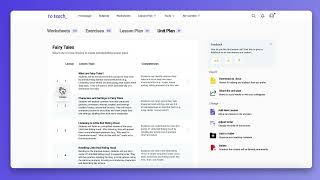
to-teach is an AI lesson-planning and material-creation platform for K-12 and language teachers. You describe the subject, topic, class, and (optionally) attach curriculum or source material, choose a lesson opener and focus, and it returns a structured lesson plan with objectives, stages and teaching methods you can edit and reuse. From there you build the materials that go with the plan: worksheets, presentations, quizzes and interactive video activities. The workflow runs in four documented steps — plan the lesson, create teaching materials, adapt them for the students you teach, print or share — so you are not juggling prompts in a generic chatbot. Materials can start from your own texts, documents, images or a YouTube video rather than from scratch. You can then adjust language and difficulty to suit lower-attaining and higher-attaining groups from the same source. Exercise formats include gap-fill, multiple-choice and true-or-false questions, plus gamified options such as crossword puzzles and mindmaps. Vendor figures put adoption at 400,000+ teachers, and the resource library adds 10,000+ items curated and created by the to-teach education team. Export runs to PDF, DOCX and H5P, with direct sends to fobizz, Canva and Google Classroom — and H5P output drops straight into Moodle. It sits between ready-made worksheet marketplaces and general-purpose AI assistants, with its weight on the lesson-plan-to-material pipeline rather than on student assessment.
Behind the Verdict
to-teach's differentiation is the resource pipeline, not the model underneath. The site is explicit about the four steps — plan your lesson, create teaching materials, adapt materials for your students, print or share — and each step has a real editor attached to it rather than a chat box. That matters in practice: you get a lesson plan with stated learning objectives and a sequence of activities, then you convert those activities into worksheets, presentations and interactive activities without re-explaining your class to a fresh prompt. The adaptation step is the strongest part. You can adjust language and difficulty for different learner levels and adapt texts and exercises to suit the students in front of you, which is exactly the work that eats prep periods in mixed-ability classes. The input side is unusually flexible for this category: your own texts, documents and images, or a YouTube video, can serve as the source. Exercise types cover gap-fill, multiple-choice and true-or-false, with gamified formats including crossword puzzles and mindmaps. Output goes to PDF, DOCX or H5P, or directly to fobizz, Canva and Google Classroom — H5P is the one that matters most for schools running Moodle, since teachers can upload the activity to their platform rather than rebuilding it. Teacher testimonials in the scrape back this up, with one naming H5P-to-Moodle as the time-saver. The 10,000+ resource library and the 400,000+ teacher figure also mean you can often start from something curated rather than generating at all. Where it doesn't fit: it is a material-creation layer, not a teaching platform. There is no grading, no student analytics, no progress tracking, so anyone shopping for an LMS or assessment engine is in the wrong aisle. AI-drafted content still needs an editor's eye before class — the platform gives you editable texts and tasks precisely so you can make that pass. Treat it as a prep accelerator and it does its job well; treat it as an autopilot and you'll be embarrassed by a wrong answer in front of thirty students.
Researching to teach? Get your full AI stack in 60 seconds.
Free, no signup — tell us your goal and get tools matched to your budget & existing stack.
Real-world workflow fit
Concrete scenarios for the personas to teach actually fits — and what changes day-one when you adopt it.
You have a source text about online misinformation and three attainment groups in the room. You paste the text in, generate a worksheet, then use the simplification and scaffolding options to produce a lower-attaining version while the original goes to the top group — one source, two difficulty levels.
Outcome: One prep session produces differentiated worksheets that match the plan, exported as PDF for printing or H5P if the class is on tablets.
You drop a YouTube video link into the worksheet maker and let it build gap-fill, multiple-choice and true-or-false questions from the video, then review and edit the tasks before class.
Outcome: A classroom-ready video-based worksheet in a fraction of the time it takes to watch the video and write questions yourself.
You set the topic and class in the lesson-plan builder, pick an opener and focus, accept the plan, then export the matching interactive activity as H5P and upload it to your Moodle course.
Outcome: Students complete the activity inside the school's existing LMS instead of on a separate platform.
Use Cases
- Generate a full lesson plan with objectives and activities for a topic you're teaching next week.
- Turn a YouTube video into a worksheet for your class in minutes.
- Create a grammar worksheet from your own text or document.
- Design a crossword puzzle that reinforces key vocabulary before a test.
- Adapt one reading comprehension exercise to different language levels for a mixed-ability class.
- Build a media-literacy unit: lesson plan, presentation, simplified worksheet and a student matching activity.
- Export an H5P interactive worksheet and upload it to your school's Moodle course.
- Print worksheets for class or share interactive activities digitally, depending on how students will use them.
Limitations
- to-teach is aimed at teachers and schools as an AI-supported lesson planning and material-creation platform, not a full LMS: lessons, worksheets, presentations and interactive activities are generated for export or classroom use rather than for managing a class.
- The homepage and about page describe it as designed for European schools with data-protection built in, and as a way to produce materials 'for real school work rather than generic chatbot output' rather than as a platform for generic chat.
- The scraped pages did not capture pricing details, the changelog or any developer/API documentation, so plan caps and API availability cannot be characterised from this evidence.
as of 2026-09-22
Verification history
We have re-verified to teach 8 times since . Each pass re-reads the vendor's own pages and re-checks every listed field against that evidence; passes where nothing had changed are marked as such.
- — re-verified summary, description, our verdict, our analysis, pricing model, pricing tiers, features, integrations, who it suits, who should skip it
- — re-checked, vendor evidence unchanged
- — re-verified summary, description, our verdict, our analysis, pricing model, pricing tiers, features, integrations, who it suits, who should skip it
- — re-checked, vendor evidence unchanged
- — re-checked, vendor evidence unchanged
- — re-checked, vendor evidence unchanged
Showing the 6 most recent of 8 verification passes.
Free to cite with attribution — this page re-verifies continuously.
12-month cost
Project the real annual outlay, including the implied monthly cost when only an annual tier is published.
Vendor list price only. Add-on usage, seat overages, and contract minimums are surfaced under Hidden costs & gotchas.
Plans compared
For each published to teach tier: who it actually fits, and what it adds vs. the previous tier. Cross-reference the cost calculator above for projected annual outlay.
Free
€0/mo
Ideal for
A single teacher testing whether the lesson-plan-to-worksheet loop fits how you prep, at no cost.
What this tier adds
Starting tier: up to 5 exercises, 3 worksheets and 2 lesson plans per month, with plan generation and level adaptation included.
Starter
€5/mo billed yearly
Ideal for
A teacher who preps weekly and needs to actually print or share the output.
What this tier adds
Raises limits to 100 exercises, 20 worksheets and 5 lesson plans per month, and unlocks gamified formats plus PDF, DOCX and H5P export and direct sends to fobizz, Canva and Google Classroom.
Pro
€10/mo billed yearly
Ideal for
A teacher who differentiates constantly and needs marking-ready output with answer keys.
What this tier adds
Adds solution keys for exercises and worksheets and 'supercharged' lesson plans on top of Starter's limits and export options.
Where the pricing makes sense
The company stage and team size where to teach's pricing actually pencils out — and where peers do it cheaper.
At €5/mo (Starter, annual billing) to-teach undercuts most AI teaching-material tools and is cheap enough for an individual teacher to expense without approval; €10/mo (Pro, annual billing) is where the differentiation and answer-key workflow actually completes. Schools rolling it out by department should compare against general AI assistants, which cost more per seat once you factor in the prep time you spend rebuilding the pipeline by hand.
Setup time & first value
How long it actually takes to get something useful out of to teach — broken out by persona, not the marketing-page minute.
Individual teacher: minutes to first output — you can sign up, type a topic and class description, and have a lesson plan or worksheet drafted in one sitting. Building a differentiated set (plan plus worksheets plus a presentation) for a full topic takes roughly one prep period once you know the editors. A school rolling it out across a department should budget a short walkthrough for the export
Switching to or from to teach
How to bring data in from common predecessors and how to get it back out — written for the switcher, not the buyer.
- →From generic AI chatbots: stop pasting prompts — attach your curriculum or source material in the plan builder and the four-step workflow carries it through to worksheets and export.
- →From worksheet marketplaces: upload your own texts, documents or images and generate the differentiated versions rather than buying a fixed resource.
- →From Diffit or Eduaide: rebuild your topic as a to-teach lesson plan so the plan and the materials stay linked, then use H5P export for your LMS.
- →From hand-made Word worksheets: move existing texts into the worksheet editor and use simplification and scaffolding to produce the level variants.
- ↗To a full LMS or assessment platform: there is no grading or progress tracking to export, so keep your gradebook and treat to-teach only as the content layer.
- ↗To general AI assistants: export your worksheets and lesson plans as PDF or DOCX first, since the platform's pipeline work does not transfer as prompts.
Integrations
Resources & Guides
Tutorials & Learning
YouTube returned 6 videos for “to teach”, and we withheld 5: 5 could not be judged, because “to teach” is a single word that other videos use for other things. Showing the 1 we can prove is about to teach.
Official links
Tools that pair well with to teach
Common stack mates teams adopt alongside to teach, with the specific reason each pairing earns its keep.

EducatorLab
AI lesson-plan and worksheet generator for standards-aligned K-12 and adult education content.

Twee
Twee is an AI lesson-material generator for language teachers, covering 40+ CEFR-aligned tools across 10 languages.

Honen
Honen turns your own documents into AI-built courses with practice and a voice tutor attached to every lesson.
Featured Head-to-Head Comparisons
To Teach vs Surge Ai
These tools serve completely different markets. Surge is for AI labs needing expert human feedback to align frontier models; to-teach is for educators automating lesson planning. Choose based on your domain: AI safety or classroom teaching.
To Teach vs Praktika
Choose Praktika if you are a language learner aiming to improve speaking fluency through AI conversation practice. Choose to teach if you are a teacher needing fast, customizable lesson materials. They serve different needs; one is for learners, the other for educators.
Alternatives to to teach
View all
EducatorLab
AI lesson-plan and worksheet generator for standards-aligned K-12 and adult education content.

Frequently Asked Questions
Categories
Best-of guides
Used to teach? Help shape our editorial sentiment research.