
Vibe3D
AI 3D rendering for architects — upload a SketchUp or Revit model and get a photoreal render in about 30 seconds.
If your bottleneck is hours of lighting setup before a client review, Vibe3D is one of the few AI renderers that claims to respect your scene — geometry and materials come back unchanged, and the homepage's '100% accurate' framing is backed by the specific claim that nothing in your model gets reinterpreted. The credit model is readable: 1 credit for a High-Fidelity render or edit, 4 for HyperReal, 2 for a HyperReal edit, and 1 credit per second of flythrough video. That last number is the one to watch — a 25-second walkthrough eats 25 credits, so a Starter plan at $19/mo (75 credits) covers three of them. Skip Vibe3D if you need to hand-tune bounce, sampling, or render passes; that control
Verified 4d ago · liveness 69/100 · cite: rightaichoice.com/tools/vibe3d
- Architects who need photoreal client visuals in minutes, not hours of lighting setup
- Interior designers iterating on material and lighting options with clients in real time
- Small and mid-size studios scaling render volume without buying GPU workstations
- Solo practitioners who want renders from a laptop browser with pay-as-you-go credits
- Visualization specialists who need parameter-level control over bounce, sampling, and render passes
- Offline or air-gapped workflows — rendering is cloud-only and requires an internet connection
- Non-architectural 3D work such as product, character, or VFX modeling
We scan live Reddit threads, YouTube comments, X posts, G2 reviews and other communities — and hand you an honest verdict in under a minute.
- Honest verdict, not marketing
- Real pros & cons from real users
- Attributed quotes with receipts
3 free scans · no card needed
Skip Vibe3D if you need parameter-level control over bounce, sampling, and render passes, need to work offline or air-gapped, or plan to lean on flythrough video on the $19/mo Starter plan — video burns 1 credit per output second.
Flythrough videos consume 1 credit per second of output, so a single 25-second walkthrough eats 25 of Starter's 75 monthly credits at $19/mo.
At $19/mo Starter, $39/mo Pro, $79/mo Studio, and $9/mo for verified .edu/.ac students, Vibe3D undercuts perpetual-license desktop renderers like V-Ray and Lumion and lands in the same band as Enscape and D5 Render, but on credits rather than seats. Solo architects and small studios get the best value on Pro at $39/mo; the unlimited tier at $79/mo only pays off when your monthly HyperReal and video volume would otherwise exceed 300 credits repeatedly.
In short
Vibe3D — AI 3D rendering for architects — upload a SketchUp or Revit model and get a photoreal render in about 30 seconds. Best for Architects who need photoreal client visuals in minutes, not hours of lighting setup, Interior designers iterating on material and lighting options with clients in real time, Small and mid-size studios scaling render volume without buying GPU workstations. Free to start; paid plans from $9/mo.
What's new in Vibe3D
Checked 4 days agoAcross the latest 5 updates: 5 news mentions.
Best Rendering Software for SketchUp (2026 Guide) — Vibe3D listed among top tools
Vibe3D is included in a roundup of top SketchUp rendering tools, highlighting its AI-driven approach for 2026.
Best Architectural Rendering Software in 2026: 12 Tools Compared
Vibe3D is compared against 12 other architectural rendering tools, demonstrating its place in the market.
Common 3D Rendering Mistakes That AI Can Now Eliminate
Explains how Vibe3D's AI fixes rendering errors in geometry, materials, and lighting automatically.
How to Render in SketchUp: A Step-by-Step Guide (2026)
Provides a step-by-step AI workflow for photoreal SketchUp renders without plugins or lighting rigs.
How to Make Interior Renders Look Photorealistic
Shares tips on lighting, materials, and AI-assisted workflows for realistic interior renders.
Viability Score
How well maintained and how widely used is Vibe3D? Built from what the vendor actually publishes (docs, changelog, tutorials, integrations, pricing), whether the site is live, and how much real users discuss it. How we calculate this
Last calculated: October 2026
How we score →Key Features
- Photorealistic AI rendering from SketchUp, Revit, Rhino, Archicad, Vectorworks, Chief Architect, 3ds Max, and Blender models
- Auto-detects architectural context — no prompt engineering required
- Design-accurate output that preserves geometry, materials, and textures
- HyperReal Engine 2.0 higher-detail render mode at 4 credits per render
- One-click render editing in natural language for time of day, lighting, material, and landscape
- Instant Render Relighting without rebuilding lighting setups
- Cinematic flythrough videos generated from static renders
- Smooth, stabilized camera paths without manual scene stitching
- Auto-matched music for walkthrough videos
- AI Render Enhancing with intelligent upscaling, AI denoising, and HDR output
- Site plan rendering from 2D floorplans and masterplans
- Interior visualization, exterior architectural rendering, and furniture rendering
- Cloud rendering on remote GPU infrastructure — no local workstation required
- Runs in a modern web browser on laptop or tablet
- Pay-as-you-go one-time credit packs that never expire, plus commercial license on every plan
About Vibe3D
Vibe3D is a cloud AI rendering suite for architects, interior designers, and visualization studios who need presentable visuals without owning a render farm or spending an evening on lighting. You upload a scene from SketchUp, Revit, Rhino, Archicad, Vectorworks, Chief Architect, 3ds Max, or Blender, and the AI reads the architectural context itself — the vendor states geometry, materials, textures, and camera angles stay exactly as modeled, with no prompt writing required. Vibe3D cites an average render time of roughly 30 seconds, and says 2,000,000+ photoreal renders have been produced by 120,000+ designers across 180+ countries. Three products sit under one account. Photorealistic AI Rendering handles stills. Cinematic Walkthrough Videos turn static renders into smooth, stabilized camera paths with auto-matched music, no separate video software or manual scene stitching. AI Render Enhancing does one-click upscaling, denoising, and HDR output on low-resolution images. HyperReal Engine 2.0 is the higher-detail render mode, billed at 4 credits per render versus 1 for a standard High-Fidelity render. Natural-language editing covers the iterative loop — type a change to time of day, lighting, material, or landscape and the AI applies it, with HyperReal edits costing 2 credits. Interior visualization, exterior rendering, and site plan rendering from floorplans or masterplans are all covered. Pricing runs on credits rather than seats. Starter is $19/mo for 75 credits, Pro is $39/mo (discounted from $59/mo) for 300 credits, and Studio is $79/mo (discounted from $129/mo) for unlimited usage plus priority support. Students with a .edu or .ac address get 50 credits for $9/mo. One-time credit packs are also sold and those credits never expire, while monthly plan credits refresh each billing cycle. Every plan — including the 3 free renders on signup — carries a commercial license covering client projects, presentations, marketing materials, planning submissions, and property listings. Against V-Ray, Enscape, Lumion, or D5 Render, Vibe3D trades parameter-level control for speed and a zero-GPU-setup workflow that runs in a browser on a laptop or tablet.
Behind the Verdict
Vibe3D's pitch is narrow and honest: you already modeled the thing, so stop re-lighting it. The upload path covers SketchUp, Revit, Rhino, Archicad, Vectorworks, Chief Architect, 3ds Max, and Blender, and the vendor's core claim is that the AI auto-detects architectural context so there is no prompt to write — you upload, the AI reads the scene, and you render in one click. That is the entire value proposition, and for the architect who needs a client-ready image by 4pm it is the right one. The three-product structure is what separates Vibe3D from a single-purpose image generator. Photorealistic AI Rendering is the core. Cinematic Walkthrough Videos take static renders and produce stabilized camera paths with auto-matched music, which is the piece most AI render tools do not attempt — and the vendor explicitly frames it as avoiding separate video software and manual scene stitching. AI Render Enhancing handles the post step: intelligent upscaling, AI denoising, and HDR output on low-resolution sources. Instant Render Relighting and one-click natural-language editing (time of day, lighting, material, landscape) close the iteration loop, so a client conversation can turn into a changed render without a rebuild. The credit economy is genuinely fair and worth understanding before you buy. High-Fidelity render or edit: 1 credit. HyperReal render: 4 credits. HyperReal edit: 2 credits. Flythrough video: 1 credit per second of output. Monthly plan credits refresh each billing cycle; one-time credit packs never expire. That mix means you can meter quality per image rather than guessing, and you can top up mid-project without changing plans. Where it does not fit: visualization specialists who need parameter-level control over bounce, sampling, and render passes will find Vibe3D the wrong instrument — Vibe3D is not trying to be V-Ray with a chat box. Offline or air-gapped workflows are out, because rendering is cloud-only and runs in a modern browser. Non-architectural 3D work — product, character, VFX — is not the target. And teams that need full post-processing and compositing inside the same tool will still reach for Photoshop or After Effects after the render lands. The strongest signal in the reviews the vendor surfaces is the Enscape switcher: 'I switched from Enscape and never looked back. This AI understands lighting like a professional photographer.' That is the buyer Vibe3D is built for — someone who knows what good lighting looks like and would rather describe it than build it.
Researching Vibe3D? Get your full AI stack in 60 seconds.
Free, no signup — tell us your goal and get tools matched to your budget & existing stack.
Real-world workflow fit
Concrete scenarios for the personas Vibe3D actually fits — and what changes day-one when you adopt it.
You finish a SketchUp model the night before a client walkthrough, upload it to Vibe3D, and generate High-Fidelity exterior renders at 1 credit each — roughly 30 seconds per image per the vendor's stated average — then type a lighting edit for an evening version of the same view.
Outcome: A handful of photoreal stills and an alternate time-of-day version in one sitting, drawing on the 75 monthly credits at $19/mo, with the commercial license already covering the client presentation.
Mid-meeting, a client asks to see the living room with warmer materials and daylight instead of evening. You open Vibe3D, run one-click natural-language edits on the existing interior render for material and time of day, and follow with AI Render Enhancing to denoise and upscale the result to presentation quality.
Outcome: Revised, presentation-ready interior visuals inside the meeting itself rather than a next-day turnaround, drawn from the Pro plan's 300 monthly credits.
A competition submission needs exterior renders, interior renders, a site plan visualization, and a short client-facing flythrough. The team renders stills at High-Fidelity throughout the week, reserves HyperReal Engine 2.0 for the hero exterior shots at 4 credits each, and generates a walkthrough video from a static render with auto-matched music.
Outcome: A full presentation package produced without booking GPU time or hiring an external visualization artist, on the unlimited-usage Studio plan at $79/mo with priority support.
Use Cases
- Generate a photorealistic exterior render from a SketchUp model in about 30 seconds for a client approval meeting.
- Edit the time of day and lighting of a Revit scene by typing a plain-language command instead of rebuilding lights.
- Produce a cinematic walkthrough video from a static render without opening separate video software or stitching a path.
- Upscale and denoise a low-resolution render to presentation quality in one click with AI Render Enhancing.
- Iterate on interior design options quickly by changing materials and landscape through text edits.
- Render unlimited interior and exterior images for a high-volume project on the Studio plan at $79/mo.
- Turn a 2D floorplan or masterplan into a fully detailed site plan visualization without 3D modeling the site.
- Run the whole pipeline from a laptop browser on a tablet or notebook, with no GPU workstation purchase.
Models Under the Hood
as of 2026-09-23
Limitations
- Vibe3D is cloud-based, so it needs an internet connection and runs in a modern web browser on a laptop or tablet — the vendor's material does not describe an offline mode.
- The credit model is the real constraint to price out before committing: High-Fidelity renders and edits cost 1 credit, HyperReal renders cost 4 credits and HyperReal edits 2 credits, and flythrough videos consume 1 credit per second of output, so a 25-second walkthrough uses 25 credits.
- Monthly plan credits refresh each billing cycle; one-time credits never expire.
- The Pro and Studio discounts are described on the pricing page as a limited-time launch offer, and Vibe3D states pricing may increase — so the $39/mo and $79/mo figures are promotional rather than guaranteed.
- The vendor positions Vibe3D as design-accurate rather than parameter-controllable; if you need to hand-tune render settings, this is not the tool.
- Documentation and API availability were not reached in this run.
as of 2026-10-04
Verification history
We have re-verified Vibe3D 9 times since . Each pass re-reads the vendor's own pages and re-checks every listed field against that evidence; passes where nothing had changed are marked as such.
- — re-verified summary, description, our verdict, our analysis, pricing model, pricing tiers, features, integrations, who it suits, who should skip it
- — re-verified summary, description, our verdict, our analysis, pricing model, pricing tiers, features, integrations, who it suits, who should skip it
- — re-verified summary, description, our verdict, our analysis, pricing model, pricing tiers, features, integrations, who it suits, who should skip it
- — re-verified summary, description, our verdict, our analysis, pricing model, pricing tiers, features, integrations, who it suits, who should skip it
- — re-verified summary, description, our verdict, our analysis, pricing model, pricing tiers, features, integrations, who it suits, who should skip it
- — re-verified summary, description, our verdict, our analysis, pricing model, pricing tiers, features, integrations, who it suits, who should skip it
Showing the 6 most recent of 9 verification passes.
Free to cite with attribution — this page re-verifies continuously.
12-month cost
Project the real annual outlay, including the implied monthly cost when only an annual tier is published.
Vendor list price only. Add-on usage, seat overages, and contract minimums are surfaced under Hidden costs & gotchas.
Plans compared
For each published Vibe3D tier: who it actually fits, and what it adds vs. the previous tier. Cross-reference the cost calculator above for projected annual outlay.
Free
$0
Ideal for
Architects and designers testing Vibe3D on a real model before paying anything — no credit card required at signup.
What this tier adds
Free entry point: 3 renders on signup plus the commercial license every paid plan also carries.
Student
$9/mo
Ideal for
Architecture and interior design students who can register with a valid .edu or .ac email address and need full feature access on a small budget.
What this tier adds
Unlocks full access to all Vibe3D features, including HyperReal and flythrough video, at 50 credits for $9/mo — gated behind .edu/.ac verification.
Starter
$19/mo
Ideal for
Solo architects and beginners producing still renders at moderate volume who do not need HyperReal detail or walkthrough video.
What this tier adds
Adds 75 monthly credits on top of the free tier with High-Fidelity Rendering, one-click Render Editing, and a commercial license — but no HyperReal, Render Enhancing, or flythrough video.
Pro
$39/mo (discounted from $59/mo)
Ideal for
Professional architects and interior designers running client iteration cycles that need high-detail hero images and walkthrough video.
What this tier adds
Unlocks HyperReal rendering, AI Render Enhancing, Cinematic Flythrough Videos, Instant Render Relighting, and raises the allowance to 300 monthly credits at $39/mo (discounted from $59/mo).
Studio
$79/mo (discounted from $129/mo)
Ideal for
High-volume design studios producing continuous render, relight, and flythrough output across multiple concurrent projects.
What this tier adds
Replaces the credit meter with unlimited usage and adds priority support at $79/mo (discounted from $129/mo), keeping every Pro feature.
Where the pricing makes sense
The company stage and team size where Vibe3D's pricing actually pencils out — and where peers do it cheaper.
At $19/mo Starter, $39/mo Pro, $79/mo Studio, and $9/mo for verified .edu/.ac students, Vibe3D undercuts perpetual-license desktop renderers like V-Ray and Lumion and lands in the same band as Enscape and D5 Render, but on credits rather than seats. Solo architects and small studios get the best value on Pro at $39/mo; the unlimited tier at $79/mo only pays off when your monthly HyperReal and video volume would otherwise exceed 300 credits repeatedly.
Setup time & first value
How long it actually takes to get something useful out of Vibe3D — broken out by persona, not the marketing-page minute.
Signing up is free and gives you 3 renders with no credit card, so you can test the upload-and-render loop on a real model in a few minutes. Solo architects on Starter typically reach first deliverable render the same session, since there is no plugin install and no lighting rig — you upload a SketchUp or Revit scene in the browser and hit render. Interior designers iterating on Pro can be
Switching to or from Vibe3D
How to bring data in from common predecessors and how to get it back out — written for the switcher, not the buyer.
- →From Enscape: upload your existing SketchUp or Revit scene to Vibe3D and render in the browser instead of setting up lighting per view, keeping your geometry and materials intact.
- →From V-Ray: keep modeling where you model, upload the scene, and use High-Fidelity renders as the fast pass while reserving HyperReal Engine 2.0 for hero images that need more detail.
- →From Lumion: replace the separate render environment with direct upload from SketchUp, Revit, Rhino, Archicad, Vectorworks, Chief Architect, 3ds Max, or Blender.
- →From D5 Render: move existing stills into AI Render Enhancing for one-click upscaling, AI denoising, and HDR output rather than re-rendering at higher settings.
- →From a manual lighting workflow: start with the 3 free renders on signup to test design accuracy on a live project before committing to a monthly credit plan.
- ↗To V-Ray: export back to your modeling tool for parameter-level control over bounce, sampling, and render passes when a project demands hand-tuned output.
- ↗To D5 Render: move to a GPU-based realtime renderer if you need to render offline or work inside a desktop pipeline rather than a browser.
- ↗To Lumion: shift to a full-scene animation and rendering environment when you need post-processing and compositing inside the same tool.
- ↗To Photoshop or After Effects: take Vibe3D's rendered stills and flythrough video into a compositing pass for finishing work Vibe3D does not cover.
Integrations
Resources & Guides
Tutorials & Learning
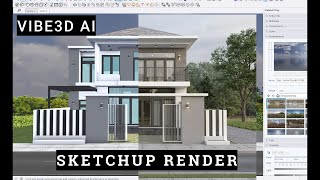
YouTube returned 6 videos for “Vibe3D”, and we withheld 5: 5 could not be judged, because “Vibe3D” is a single word that other videos use for other things. Showing the 1 we can prove is about Vibe3D.
Official links
Tools that pair well with Vibe3D
Common stack mates teams adopt alongside Vibe3D, with the specific reason each pairing earns its keep.

ArchRender
AI rendering platform for architects: turn sketches, elevations, and 3D models into photorealistic visuals in seconds.

Coohom
Browser-based 3D home design with an AI floor planner, 600,000+ models, and photorealistic renders in about 10 seconds.

Fenestra
Browser-based AI rendering for architects: turn sketches, CAD drawings, photos and 3D models into photorealistic renders and animations.
Featured Head-to-Head Comparisons
Vibe3d vs Splice
Splice and Vibe3d serve entirely different creative verticals—music production and architectural visualization. Splice is the clear choice if you need a massive library of royalty-free samples plus rent-to-own plugins like Serum 2, with a new DAW plugin beta. Vibe3D wins for architects who want instant photorealistic renders from 3D models without GPU investment. Choose based on your field: music vs. architecture.
Vibe3d vs The New Black
Choose The New Black if you're in fashion and need AI-generated designs with tech pack exports. Choose Vibe3D if you're an architect or interior designer needing instant photorealistic renders from 3D models. They serve completely different industries, so your decision hinges on your creative domain.
Vibe3d vs Storyfile
StoryFile and Vibe3D serve entirely different markets — one is a conversational video AI for authentic human interaction (museums, legacies), the other an AI renderer for architects. If your goal is to create a lifelike, interactive digital twin of a person (like StoryFile's work with George Takei or Kara Swisher), choose StoryFile. If you need to turn a 3D model into a photorealistic render in seconds for a client presentation, choose Vibe3D.
Alternatives to Vibe3D
View all
ArchRender
AI rendering platform for architects: turn sketches, elevations, and 3D models into photorealistic visuals in seconds.


Frequently Asked Questions
Best-of guides
Used Vibe3D? Help shape our editorial sentiment research.