
Videoall.ai
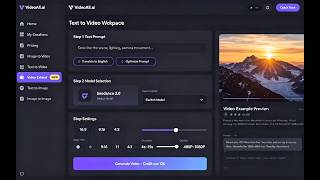
VideoAll.ai compares Kling 3.0, Runway Gen-4, Veo 3.1, Seedance and Wan in one credit pool, with the credit cost shown before you generate.
If your problem is subscription sprawl and surprise credit burn, VideoAll.ai addresses both: ten models under one shared credit pool, and a credit price shown before the render instead of after. The fit scores (Seedance 2.0 at 96%, Wan 2.6 at 88%, Kling 3.0 at 74% for animating a product photo) are genuinely useful when you don't already know which model suits a shot. It is a managed layer, though - pick it for breadth and cost control, not for frame-level editing control. Teams that already know their one model and want its deepest native controls, or that need programmatic generation, should look elsewhere.
Verified 5d ago · liveness 58/100 · cite: rightaichoice.com/tools/videoall-ai
- Creators comparing AI video models before committing credits to one render
- Marketers producing ad creative and product demos who need the cost quoted before generation
- Small teams that want Kling, Runway, Veo and Seedance output without four separate subscriptions
- Image-first workflows - restyling portraits, product shots and photos into 3D, doodle or painting styles
- Editors who need frame-level manual control over every cut and transition
- Teams that want to call video generation programmatically from their own code
- Professionals requiring offline or desktop-native video software
We scan live Reddit threads, YouTube comments, X posts, G2 reviews and other communities — and hand you an honest verdict in under a minute.
- Honest verdict, not marketing
- Real pros & cons from real users
- Attributed quotes with receipts
3 free scans · no card needed
Skip VideoAll.ai if you already know your single model and want that vendor's own deepest controls, or if you need to drive generation from your own code rather than through a shared web workspace.
Tier pricing is the yearly rate - Basic is $16/mo only when billed yearly as $192, so monthly billing or a short commitment costs more per month.
For a solo creator or small marketing team, Basic at $16/mo billed yearly as $192 undercuts the combined cost of separate Veo, Kling and Runway subscriptions and covers 19,000 credits a year. Pro at $23/mo billed yearly as $276 and Plus at $32/mo billed yearly as $384 suit teams generating 200-360 videos a month. Ultra at $69/mo billed yearly as $828 fits high-volume shops at 800 videos and 2,400 images a month. Going direct to a single vendor is cheaper if you only need one model; VideoAll
In short
Videoall.ai — VideoAll.ai compares Kling 3.0, Runway Gen-4, Veo 3.1, Seedance and Wan in one credit pool, with the credit cost shown before you generate. Best for Creators comparing AI video models before committing credits to one render, Marketers producing ad creative and product demos who need the cost quoted before generation, Small teams that want Kling, Runway, Veo and Seedance output without four separate subscriptions. Free to start; paid plans from $16/mo.
Viability Score
How well maintained and how widely used is Videoall.ai? Built from what the vendor actually publishes (docs, changelog, tutorials, integrations, pricing), whether the site is live, and how much real users discuss it. How we calculate this
Last calculated: October 2026
How we score →Key Features
- Text-to-video across Kling 3.0, Runway Gen-4, Veo 3.1, Seedance 2.5, Seedance 2.0, MiniMax H3, Wan 2.6 and Hailuo 2.3 Pro
- Image-to-video animation that turns a still photo into motion
- Smart model recommendation with a percentage fit score per prompt (e.g. Seedance 2.0 at 96%)
- Real-time credit cost preview that updates with model, duration, resolution and aspect ratio
- Automatic credit refund or recovery when a generation fails
- AI prompt polishing that expands keywords into a director-grade prompt with motion, lens and lighting
- Video-to-video editing and restyling via Runway Aleph
- Video extend for producing longer clips from an existing render
- Text-to-image generation with two A/B variation takes per prompt
- Image-to-image restyling: 3D animated portrait via Nano Banana 2, MS Paint doodle via GPT Image 2, oil painting via Grok Imagine
- Shared credit pool across video, image and video-editing workflows
- One workspace for ten models with no re-uploading between them
- Multi-currency checkout in USD, EUR, GBP, CAD, AUD, BRL, INR, JPY and CNY
- Showcase gallery pairing each creator's result with the exact model and prompt used
- Billing portal self-service cancellation, active until the end of the paid period
About Videoall.ai
VideoAll.ai is a multi-model AI video and image workspace that puts ten models in one place: Seedance 2.5, Seedance 2.0, MiniMax H3, Kling 3.0, Runway Gen-4, Veo 3.1, Wan 2.6, Hailuo 2.3 Pro, Runway Aleph for video editing, plus GPT Image 2, Nano Banana 2 and Grok Imagine for image work. Grok Imagine and Seedance 2.0 were added in January 2026, bringing the catalog to ten models. It is built for creators, marketers and small teams who would otherwise keep three or four vendor subscriptions open and re-upload the same product photo into each one. The workflow is four steps: upload an optional image, type a prompt (or let the prompt polisher expand keywords into a director-grade brief with motion, lens and lighting), accept or override the recommended model and settings, then confirm the credit price and generate. Everything draws on one shared credit pool across video, image and video-editing workflows, so trying Runway Gen-4 after Kling 3.0 does not mean a second invoice. The comparison layer is what separates it from going direct. You describe the shot and get fit scores - the site rates Seedance 2.0 at 96% for animating a product photo, Wan 2.6 at 88% and Kling 3.0 at 74%. A live cost preview updates as you change model, duration, resolution and aspect ratio; an 8s 1080p Veo 3.1 clip is quoted at 12 credits before you click. Failed renders return the credits. Image work sits alongside the video tools: text-to-image with A/B variation takes, image-to-image restyling (3D animated portrait via Nano Banana 2, MS Paint doodle via GPT Image 2, oil painting via Grok Imagine), video extend, and video-to-video editing through Runway Aleph. Basic starts at $16/mo billed yearly as $192. Against stacking individual Veo, Kling and Runway plans, the pitch is one bill instead of several - the tradeoff being you get VideoAll's interface, not each vendor's own controls.
Behind the Verdict
VideoAll.ai is a reseller-and-comparison layer over other companies' video and image models, and it is honest about that: the model names on the pricing page are Seedance 2.0, Kling 3.0, Runway Gen-4, Veo 3.1, Wan 2.6, Hailuo 2.3 Pro, Runway Aleph, GPT Image 2, Nano Banana 2 and Grok Imagine, and every plan unlocks that same list. Strengths. The pre-generation cost preview is the strongest feature. VideoAll quotes an 8s 1080p Veo 3.1 generation at 12 credits and updates that number live as you change resolution, duration or aspect ratio, which removes the usual guessing game with credit-based video tools. The fit-score recommender does something similar for model choice - give it a prompt like 'animate this product photo' and it ranks Seedance 2.0 at 96%, Wan 2.6 at 88% and Kling 3.0 at 74%. If you generate a failure, the product returns the used credits or routes you to support. The shared credit pool means image work and video editing draw on the same balance as video generation, and the showcase gallery pairs each creator's result with the exact model and prompt behind it, which is a more useful reference than a model spec sheet. Weaknesses. You are working inside VideoAll's interface, not each vendor's. Anyone who needs Runway's or Kling's own granular controls should buy those directly. The model catalog is a moving target - the credit costs attached to each model can change as the underlying providers change theirs, so monitor the balance. Monthly video and image caps differ per tier (105 videos and 316 images on Basic, up to 800 videos and 2,400 images on Ultra). Commercial usage rights depend on both the active plan and the model provider's own terms, so check before client work. Where it fits. Marketing and creator teams that produce ad creative, product demos, social clips and image restyles across several styles, and that want one bill and one cost preview instead of four. Also anyone learning which model suits which shot without burning credits on blind tests. Where it doesn't. Editors who need frame-level manual control, teams that want to call generation programmatically, professionals who need offline or desktop-native software, and buyers who already know their single model and want its deepest native controls.
Researching Videoall.ai? Get your full AI stack in 60 seconds.
Free, no signup — tell us your goal and get tools matched to your budget & existing stack.
Real-world workflow fit
Concrete scenarios for the personas Videoall.ai actually fits — and what changes day-one when you adopt it.
Uploads a studio product photo, types 'animate this product photo', accepts the recommended Seedance 2.0 at 96% fit, checks the credit price in the preview and generates a slow rotation.
Outcome: Gets a usable 10s 16:9 product clip without opening a second vendor tab, and if the render fails the credits come back.
Writes a plain-language shot description, lets the prompt polisher expand it into a director-grade brief with motion, lens and lighting, then overrides the model to Kling 3.0 for cinematic motion and confirms cost before generating.
Outcome: Produces a graded short-form clip and can compare the same shot on Veo 3.1 later from the same shared credit pool.
Runs one prompt through text-to-image for two A/B takes, restyles a client portrait into a 3D animated avatar via Nano Banana 2, and extends an existing cut with Video extend.
Outcome: Delivers several creative routes to the client off one bill instead of reconciling three vendor invoices.
Use Cases
- Generate a cinematic product commercial from a text prompt in minutes.
- Animate a still product photo into a slow-motion lifestyle video.
- Create social media clips with consistent brand style across multiple models.
- Restyle an existing image into an oil painting, MS Paint doodle or 3D animated portrait.
- Rapidly iterate ad concepts by generating two A/B variations from one prompt.
- Produce short wedding highlight reels from image galleries.
- Turn a portrait photo into a 3D animated avatar for profile use.
- Extend a finished clip into a longer cut without re-rendering from scratch.
Models Under the Hood
as of 2026-09-29
Limitations
- Credit cost varies by model, duration, quality, output count, resolution and aspect ratio, so you must preview costs and monitor your shared credit balance.
- Every plan unlocks the same ten-model list, with credits shared across video, image and video-editing workflows; monthly video and image caps differ by tier (105 videos/316 images on Basic up to 800 videos/2,400 images on Ultra).
- Commercial usage depends on both the active plan and the model provider's terms.
- Failed generations may be refunded or have used credits returned on request through support.
as of 2026-10-03
Verification history
We have re-verified Videoall.ai 8 times since . Each pass re-reads the vendor's own pages and re-checks every listed field against that evidence; passes where nothing had changed are marked as such.
- — re-verified summary, description, our verdict, our analysis, pricing model, pricing tiers, features, integrations, who it suits, who should skip it
- — re-verified summary, description, our verdict, our analysis, pricing model, pricing tiers, features, integrations, who it suits, who should skip it
- — re-verified summary, description, our verdict, our analysis, pricing model, pricing tiers, features, integrations, who it suits, who should skip it
- — re-checked, vendor evidence unchanged
- — re-verified summary, description, our verdict, our analysis, pricing model, pricing tiers, features, integrations, who it suits, who should skip it
- — re-checked, vendor evidence unchanged
Showing the 6 most recent of 8 verification passes.
Free to cite with attribution — this page re-verifies continuously.
12-month cost
Project the real annual outlay, including the implied monthly cost when only an annual tier is published.
Vendor list price only. Add-on usage, seat overages, and contract minimums are surfaced under Hidden costs & gotchas.
Plans compared
For each published Videoall.ai tier: who it actually fits, and what it adds vs. the previous tier. Cross-reference the cost calculator above for projected annual outlay.
Free trial
$0
Basic
$16/mo billed yearly as $192
Ideal for
Solo creator or one-person marketing function producing roughly 100 short videos a month and testing which model suits a given shot.
What this tier adds
Starting tier: 19,000 credits a year, up to 105 videos and 316 images a month, all ten models unlocked, at $16/mo billed yearly as $192.
Pro
$23/mo billed yearly as $276
Ideal for
Small content team of two or three people running regular social and ad creative at around 200 videos a month.
What this tier adds
Nearly doubles Basic to 36,000 credits a year with up to 200 videos and 600 images a month, at $23/mo billed yearly as $276.
Plus
$32/mo billed yearly as $384
Ideal for
Marketing team or small agency shipping multi-model campaigns in the 360-videos-a-month range.
What this tier adds
Raises the allowance to 64,800 credits a year with up to 360 videos and 1,080 images a month, at $32/mo billed yearly as $384.
Ultra
$69/mo billed yearly as $828
Ideal for
High-volume studio or agency running continuous video and image production across several client accounts.
What this tier adds
Top tier: 144,000 credits a year with up to 800 videos and 2,400 images a month, at $69/mo billed yearly as $828.
Where the pricing makes sense
The company stage and team size where Videoall.ai's pricing actually pencils out — and where peers do it cheaper.
For a solo creator or small marketing team, Basic at $16/mo billed yearly as $192 undercuts the combined cost of separate Veo, Kling and Runway subscriptions and covers 19,000 credits a year. Pro at $23/mo billed yearly as $276 and Plus at $32/mo billed yearly as $384 suit teams generating 200-360 videos a month. Ultra at $69/mo billed yearly as $828 fits high-volume shops at 800 videos and 2,400 images a month. Going direct to a single vendor is cheaper if you only need one model; VideoAll
Setup time & first value
How long it actually takes to get something useful out of Videoall.ai — broken out by persona, not the marketing-page minute.
Solo creator: under 10 minutes to first render - sign up, take the free starter credits, upload an optional photo, type a prompt and confirm the credit price. Small marketing team: about 20-30 minutes to compare models on one real shot and pick a tier. Agency onboarding several workflows: roughly half a day to settle on per-model conventions and currency, since all ten models share one billing
Switching to or from Videoall.ai
How to bring data in from common predecessors and how to get it back out — written for the switcher, not the buyer.
- →From a single vendor subscription (e.g. Runway or Kling direct): keep the existing account for native controls, route exploratory and multi-model work through VideoAll's shared credit pool.
- →From stacked vendor subscriptions: consolidate Kling, Runway, Veo and Seedance spend into one plan, since every tier unlocks all ten models.
- →From free-tier only usage: start on the $0 starter credits, then move to Basic at $16/mo billed yearly as $192 once 19,000 credits a year becomes the constraint.
- ↗To Runway direct: move work that depends on Runway Gen-4 or Aleph's own granular controls to a native Runway plan.
- ↗To Kling or Veo direct: go direct if you only ever use one model and want its deepest native settings and provider-side terms.
- ↗To a desktop NLE plus standalone generation: export finished clips into your editor of choice for frame-level cutting.
- ↗To a developer pipeline: leave for a provider with a documented programmatic surface if you need generation triggered from your own systems.
Resources & Guides
Tutorials & Learning
YouTube returned 6 videos for “Videoall.ai”, and we withheld 5: 5 could not be judged, because “Videoall.ai” is a single word that other videos use for other things. Showing the 1 we can prove is about Videoall.ai.
Official links
Tools that pair well with Videoall.ai
Common stack mates teams adopt alongside Videoall.ai, with the specific reason each pairing earns its keep.

WeryAI
WeryAI bundles Kling 3.0, Seedance 2.5, Veo, FLUX and more video and image engines plus editing tools into one credit-based dashboard.

Runway Gen-4
Runway Gen-4: AI video generation and frame-level editing in one credit-based studio, now with plugin access inside Adobe, Resolve and MCP agents.
Kling AI
Kling AI generates native 4K AI video with synchronized audio, Multi-Shot control, and a 4.0 model built for shot direction.
Featured Head-to-Head Comparisons
Videoall Ai vs Storyfile
If you need quick, cheap synthetic videos for social media or ads, Videoall.ai offers massive model variety with upfront credit pricing. But for authentic, emotionally resonant conversational AI — think museum exhibits or family legacy — StoryFile is unmatched, using real footage and AI indexing, as proven by recent high-profile deployments (Kara Swisher, George Takei). Your choice hinges on synthetic speed vs. human credibility.
Videoall Ai vs Splice
If you need AI-powered video creation from text or images, Videoall.ai is the clear choice with its aggregated top models and smart recommendations. If you're a music producer looking for royalty-free samples and rent-to-own plugins like Serum 2, Splice is unmatched. These tools serve completely different creative workflows, so choose based on your content type.
Videoall Ai vs The New Black
Choose Videoall.ai if you need fast, multi-model video generation for marketing or social content. Choose The New Black if you're in fashion design and need production-ready apparel concepts. They serve completely different use cases.
Alternatives to Videoall.ai
View all
WeryAI
WeryAI bundles Kling 3.0, Seedance 2.5, Veo, FLUX and more video and image engines plus editing tools into one credit-based dashboard.

Runway Gen-4
Runway Gen-4: AI video generation and frame-level editing in one credit-based studio, now with plugin access inside Adobe, Resolve and MCP agents.
Frequently Asked Questions
Categories
Used Videoall.ai? Help shape our editorial sentiment research.