
Vidnoz
Vidnoz is a free AI video generator that turns scripts into avatar-led videos with 1,900+ avatars and 2,000+ voices.
Treat Vidnoz as a volume tool, not a craft tool. Sixty free credits a day plus a 1,900-avatar and 3,200-template library is a genuinely usable zero-cost starting point, and the add-on toolkit (dubbing, lip sync, voice cloning, background remover, SCORM export on Starter) covers the jobs small teams actually outsource. Paid tiers are sold in credits at $2/credit with 25% off the first month. What you give up is control: nothing Vidnoz documents describes timeline or keyframe editing, so frame-accurate work belongs in a real NLE. If avatar realism must pass for filmed footage, trial Synthesia or HeyGen alongside it.
Verified 3d ago · liveness 71/100 · cite: rightaichoice.com/tools/vidnoz
- Solopreneurs who need a credible spokesperson video without booking a camera or presenter
- E-learning and training teams needing virtual presenters plus SCORM export
- Small marketing teams producing high volumes of short social and product videos
- Universities and institutions creating teaching, onboarding and announcement content
- Film, broadcast or high-budget productions where avatar realism has to be flawless
- Editors who need timeline, keyframe or compositing control
- Projects where a free-tier watermark or daily credit cap is a dealbreaker
We scan live Reddit threads, YouTube comments, X posts, G2 reviews and other communities — and hand you an honest verdict in under a minute.
- Honest verdict, not marketing
- Real pros & cons from real users
- Attributed quotes with receipts
3 free scans · no card needed
Skip Vidnoz if you need frame-accurate timeline and keyframe editing, or if broadcast-grade avatar realism has to hold up next to filmed footage.
Credits are sold at $2/credit rather than as a flat seat fee, so your monthly bill depends entirely on how many generations you run
Vidnoz sells credits at $2/credit with a 25% first-month discount, and starter credit allowances (15/month on Starter, 30/month on Business) are small relative to avatar-video peers that bundle unlimited minutes on a flat seat price. It is cheaper than enterprise-grade Synthesia or HeyGen seats for occasional output, and a free tier of 60 credits a day makes zero-cost experimentation viable. If you publish daily, model credit spend against a flat-rate competitor before committing.
In short
Vidnoz — Vidnoz is a free AI video generator that turns scripts into avatar-led videos with 1,900+ avatars and 2,000+ voices. Best for Solopreneurs who need a credible spokesperson video without booking a camera or presenter, E-learning and training teams needing virtual presenters plus SCORM export, Small marketing teams producing high volumes of short social and product videos. Free to start; paid plans from $2.
No head-to-head comparison for Vidnoz yet — the alternatives below are the closest matches we list.
What people actually say about Vidnoz — is it worth it?
We scanned public community sources for Vidnoz on Oct 8, 2026 and could not establish that the discussion we found is about this tool rather than something else sharing its name. Only 0 of the posts we fetched could be positively tied to Vidnoz. Rather than publish a sentiment score built on the wrong subject, we publish nothing here and re-run the scan.
Viability Score
How well maintained and how widely used is Vidnoz? Built from what the vendor actually publishes (docs, changelog, tutorials, integrations, pricing), whether the site is live, and how much real users discuss it. How we calculate this
Last calculated: October 2026
How we score →Key Features
- AI Video Wizard turns a text script into a finished avatar video in four steps
- 1,900+ realistic AI avatars with lip sync on paid plans
- Expressive Avatar builds a talking avatar from a single photo
- Custom AI Avatar generated from your own uploaded video (Business)
- AI Product Avatar presents products inside the video frame
- 2,660+ AI voices on Starter and Business, 890 on Free
- Voice cloning of your own voice (Business plan)
- 3,200+ free video templates
- Text-to-video and image-to-video generation
- AI talking photo and AI lip sync
- AI video dubbing, video translation and voice translation
- AI voice changer, text-to-speech and audio-to-text
- AI script generator
- AI photo editor, background remover, clothes changer and image remover
- AI image generator and AI photo dance
About Vidnoz
Vidnoz is a browser-based AI video generator for anyone who needs a watchable presenter video without a camera, an actor or an editor. Paste a script or start from a template, pick one of 1,900+ realistic AI avatars and a voice, and the AI Video Wizard handles voiceover, layout and rendering. The free plan gives you 60 credits a day, and paid tiers extend a single video to 60 minutes. Beyond avatar video, Vidnoz bundles a wide set of single-purpose tools: text-to-video, image-to-video, AI talking photo, lip sync, video dubbing and translation, video enhancer, compressor, background remover, clothes changer, photo dance, image generator, voice cloning, voice changer, text-to-speech and a script generator. The Expressive Avatar line builds a talking avatar from one photo, AI Product Avatar shows products inside the frame, and Custom AI Avatar builds a digital twin from a video you upload. Generation can also be routed through third-party models Vidnoz lists on its site: Google Veo, Sora, Nano Banana, Nano Banana Pro, Kling 2.6, Kling O1, Kling 2.5 Turbo, Seedance, Wan, Hailuo, Pixverse, Luma Ray, Flux, Google Imagen, Gemini, ChatGPT and Qwen. That breadth matters if you want one account covering both avatar narration and prompt-driven b-roll. Vidnoz is built for solopreneurs, educators and small marketing teams producing high volumes of short video. It is not a professional NLE — the site documents no timeline, keyframe or compositing workflow — so compare it against Synthesia or HeyGen for lip-sync polish and review controls before committing.
Behind the Verdict
Vidnoz's pitch is breadth at a low entry price, and the site backs it up with numbers: 1,900+ AI avatars on paid plans, 3,200+ video templates, 2,660+ voices on Starter and Business, and a free tier that resets 60 credits daily. The AI Video Wizard takes a script through voiceover, avatar and render in four steps, so a first video is a matter of minutes rather than a shoot day. Where it earns its place is the long tail of small video jobs. Dubbing and video translation (the site's testimonials come from universities translating academic content, including into Catalan), lip sync, talking photo, background remover, clothes changer and a script generator all sit under one login. Teams on the Business plan get voice cloning, Custom AI Avatar from their own uploaded footage, a brand kit, branded video pages with CTAs, embeddable videos, video analytics and SAML/SSO with team collaboration — that is a real e-learning and internal-comms bundle, not just a toy generator. The second differentiator is model routing. Vidnoz lists Google Veo, Sora, Nano Banana, Nano Banana Pro, Kling 2.6, Kling O1, Kling 2.5 Turbo, Seedance, Wan, Hailuo, Pixverse, Luma Ray, Flux, Google Imagen, Gemini, ChatGPT and Qwen as supported engines, so one credit balance can cover avatar narration and prompt-driven b-roll. The trade-off is that credit burn is not linear with video length — routing through a heavyweight third-party engine costs more than a standard render. Weaknesses are real but narrow. Free exports carry a watermark, cap at 3 minutes per video and 2,000 characters per scene; Starter and Business lift that to 60 minutes and 15,000 characters. The plans are credit-denominated at $2/credit, which makes budgeting less obvious than a flat seat price — check the monthly credit allowance against your expected output before you buy. Editing is template- and wizard-driven; there is no timeline, keyframe or compositing control documented, so precise motion work finishes elsewhere. Resolution tops out at 1080p and avatar realism suits training, explainer, news and social content rather than film or broadcast. The platform is browser-only. Where it fits: universities and training teams (SCORM export, SSO, custom avatars), small marketing teams shipping weekly social and product videos, and solopreneurs who need a credible spokesperson without booking a camera. Where it doesn't: broadcast-grade production, editors who need frame-accurate control, and anyone whose brief demands shot-by-shot lip-sync performance.
Researching Vidnoz? Get your full AI stack in 60 seconds.
Free, no signup — tell us your goal and get tools matched to your budget & existing stack.
Real-world workflow fit
Concrete scenarios for the personas Vidnoz actually fits — and what changes day-one when you adopt it.
You have a product launch script and no camera. You paste it into the AI Video Wizard, pick an avatar and voice from the 1,900+ library, apply a 3,200+ template, and render on the free 60-credit daily allowance.
Outcome: A watermarked draft you can review same-day, then upgrade to Starter for a clean 1080p export with watermark removal and 60 minutes of video length.
You build onboarding modules monthly. On Business you clone your own voice, create a Custom AI Avatar from an uploaded presenter video, apply the brand kit, and export SCORM packages for the LMS.
Outcome: Consistent virtual-presenter modules without booking a studio, with SAML/SSO for your team and video analytics on completion.
You have lecture recordings in several languages. You run them through AI video dubbing and translation, and build short announcement videos from a single staff photo with Expressive Avatar.
Outcome: Localised academic content published faster, with the Enterprise plan available for volume licensing and a dedicated account manager.
Use Cases
- Produce weekly social and product marketing videos without filming
- Build onboarding and compliance training modules with virtual presenters
- Create e-learning content with voiceover and SCORM export
- Turn a still photo into a talking presenter for quick announcements
- Dub and translate existing videos for non-English audiences
- Generate explainer videos from a script using 3,200+ templates
- Make sales and outreach videos with an AI product avatar
- Route a prompt through Veo, Sora or Kling for b-roll inside the same account
Models Under the Hood
as of 2026-10-16
Limitations
- Free exports are watermarked, capped at 3 minutes per video and 2,000 characters per scene; Starter and Business raise that to 60 minutes and 15,000 characters, with 15 and 30 credits a month respectively on top of 30 free daily credits.
- Credits are consumed per generation, and routing a clip through a heavyweight engine such as Google Veo or Sora costs more than a standard render, so credit burn is not linear with video length.
- The site states no timeline, keyframe or compositing workflow, so precise motion work has to finish in a separate editor.
- Output tops out at 1080p on paid tiers (720p on Free), and avatar realism suits training, explainer, news and social content rather than passing for filmed footage.
- The platform is browser-only; no offline mode is described.
as of 2026-10-19
Verification history
We have re-verified Vidnoz 22 times since . Each pass re-reads the vendor's own pages and re-checks every listed field against that evidence; passes where nothing had changed are marked as such.
- — re-checked, vendor evidence unchanged
- — re-verified summary, description, our verdict, our analysis, pricing model, pricing tiers, features, integrations, who it suits, who should skip it
- — re-checked, vendor evidence unchanged
- — re-checked, vendor evidence unchanged
- — re-checked, vendor evidence unchanged
- — re-checked, vendor evidence unchanged
Showing the 6 most recent of 22 verification passes.
Free to cite with attribution — this page re-verifies continuously.
12-month cost
Project the real annual outlay, including the implied monthly cost when only an annual tier is published.
Vendor list price only. Add-on usage, seat overages, and contract minimums are surfaced under Hidden costs & gotchas.
Plans compared
For each published Vidnoz tier: who it actually fits, and what it adds vs. the previous tier. Cross-reference the cost calculator above for projected annual outlay.
Free
$0/mo
Ideal for
Solo creator testing avatar video before spending anything, on a 60-credits-a-day allowance
What this tier adds
Free entry point: 1,800+ avatars, 3,200+ templates, 890 voices, 720p export, 3 minutes per video, 2,000 characters per scene, watermarked
Starter
$2/credit (25% off first month)
Ideal for
Solopreneur or small team publishing regular social and explainer videos that need clean 1080p exports
What this tier adds
Adds watermark removal, 1080p export, fast processing, 60 minutes per video, 15,000 characters per scene and 2,660+ voices with emotions
Business
$2/credit (25% off first month)
Ideal for
Training, e-learning and internal-comms teams that need custom avatars, SSO and analytics
What this tier adds
Everything in Starter plus voice cloning, Custom AI Avatar, unlimited photo avatars, brand kit, branded video pages with CTAs, embeds, video analytics, SAML/SSO and team collaboration
Enterprise
Custom
Ideal for
Universities and large institutions needing volume licensing, a dedicated data center and named support
What this tier adds
Everything in Business plus custom credits and duration, Avatar Pro, video creation support, dedicated account manager and paired solution engineer
Where the pricing makes sense
The company stage and team size where Vidnoz's pricing actually pencils out — and where peers do it cheaper.
Vidnoz sells credits at $2/credit with a 25% first-month discount, and starter credit allowances (15/month on Starter, 30/month on Business) are small relative to avatar-video peers that bundle unlimited minutes on a flat seat price. It is cheaper than enterprise-grade Synthesia or HeyGen seats for occasional output, and a free tier of 60 credits a day makes zero-cost experimentation viable. If you publish daily, model credit spend against a flat-rate competitor before committing.
Setup time & first value
How long it actually takes to get something useful out of Vidnoz — broken out by persona, not the marketing-page minute.
Free tier: under 10 minutes to a first rendered avatar video, since the AI Video Wizard only asks for a script, avatar, voice and template. Starter and Business: roughly 15-30 minutes once you add brand kit, voice cloning and a Custom AI Avatar from uploaded footage. Enterprise onboarding with SSO and a dedicated account manager is scheduled through a demo.
Switching to or from Vidnoz
How to bring data in from common predecessors and how to get it back out — written for the switcher, not the buyer.
- →From manual filming: replace a shoot-and-edit cycle with the AI Video Wizard, then re-cut finished footage in your NLE only if you need motion control
- →From Synthesia: rebuild your presenter library as Vidnoz avatars and templates, keeping your scripts as-is
- →From HeyGen: re-upload brand assets to the Business brand kit and recreate custom avatars from source video
- →From a captioning or dubbing service: move existing clips into AI video dubbing and translation under the same login
- ↗To a professional NLE: export 1080p renders and finish motion, keyframing and compositing there
- ↗To Synthesia or HeyGen: if lip-sync polish and review controls become the blocker, re-create avatars and re-link templates on the new platform
- ↗To a flat-rate avatar vendor: if per-credit spend outgrows a seat price, model your monthly credit use first, then port scripts and brand assets
Resources & Guides
- Resourcevidnoz.com
Vidnoz Support Center
Go through the comprehensive Vidnoz AI and Vidnoz Flex guidelines so you can use Vidnoz better to maximize your productivity!
- Quickstartvidnoz.com
get-started
describe
- Resourcevidnoz.com
Vidnoz AI Blog - Easy Tips and Guides to AI Creation
Discover how to use AI to simplify content creation workflows on Vidnoz AI Blog. It offers insights, best practices, and guides from experts and practitioners.
Tutorials & Learning
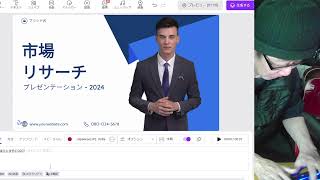
YouTube returned 6 videos for “Vidnoz”, and we withheld 5: 5 could not be judged, because “Vidnoz” is a single word that other videos use for other things. Showing the 1 we can prove is about Vidnoz.
Official links
Tools that pair well with Vidnoz
Common stack mates teams adopt alongside Vidnoz, with the specific reason each pairing earns its keep.

Wondershare Virbo
Virbo turns one sentence, one product image, or one link into a human-led product video with AI avatars and multilingual voiceover.

Akool
Akool bundles AI face swap, avatar video, and 155+ language video translation with lip-sync in one credit-based studio.

VMEG
VMEG dubs, subtitles, and lip-syncs recorded video into 170+ languages using 17,000+ voices and voice cloning.
Alternatives to Vidnoz
View all
Wondershare Virbo
Virbo turns one sentence, one product image, or one link into a human-led product video with AI avatars and multilingual voiceover.


Frequently Asked Questions
Best-of guides
Used Vidnoz? Help shape our editorial sentiment research.