
Voicetypr
Offline AI voice dictation for Mac and Windows — one lifetime license, no subscription.
Voicetypr is the pick if you dictate all day and refuse another monthly bill: $69 once for one device, $99 for two, $139 for four, with local Whisper and Parakeet processing so audio stays on your machine. The CLI and Agent API (audio in, text or JSON out) plus 99-language auto-detection and file transcription with diarization make it more than a hotkey wrapper. The 2.0.x releases — cloud STT providers, native Rust AI polish, a unified hotkey engine, and Windows discrete-GPU selection in 2.0.5 — show real maintenance. Against Wispr Flow the trade is subscription for ownership; against macOS Dictation or Microsoft Voice Access you pay for offline privacy and cleaner output. It is a
Verified 12d ago · liveness 80/100 · cite: rightaichoice.com/tools/voicetypr
- Solo founders, developers, and creators who type all day and want to stop paying monthly for dictation
- Privacy-conscious users who need transcription handled entirely on their own machine
- Developers who want a CLI and Agent API to feed dictated text or JSON into scripts and agents
- Mac and Windows users who want one license covering a laptop and a desktop
- Teams needing shared vocabulary, admin controls, or seat collaboration features
- Mobile-only or web-only users — this is a desktop application for macOS and Windows
- Buyers who want enterprise-level support contracts and a vendor-run cloud service
We scan live Reddit threads, YouTube comments, X posts, G2 reviews and other communities — and hand you an honest verdict in under a minute.
- Honest verdict, not marketing
- Real pros & cons from real users
- Attributed quotes with receipts
3 free scans · no card needed
Skip Voicetypr if you need shared team vocabulary, admin controls, or seat management, or if you work only on mobile and web rather than a Mac or Windows desktop.
Cloud transcription engines (Soniox, OpenAI, Groq, Deepgram, Cohere) bill through your own provider account, so heavy cloud use adds a second invoice on top of the $69 license.
One-time $69 for 1 device, $99 for 2, $139 for 4, with a 3-day card-free trial and a 7-day money-back guarantee — cheaper in year one than subscription dictation at roughly $10–15/mo, and it never renews. Solo users and laptop-plus-desktop setups get the best value; teams needing seats or admin controls are better served by a per-seat subscription rival.
In short
Voicetypr — Offline AI voice dictation for Mac and Windows — one lifetime license, no subscription. Best for Solo founders, developers, and creators who type all day and want to stop paying monthly for dictation, Privacy-conscious users who need transcription handled entirely on their own machine, Developers who want a CLI and Agent API to feed dictated text or JSON into scripts and agents. Free to start; paid plans from $69.
What's new in Voicetypr
Checked 5 days agoAcross the latest 4 updates: 4 changelog entries.
Voicetypr 2.0.5 adds Stable and Beta release channels
Voicetypr 2.0.5: Stable and Beta release channels, optional audio cues for recording and delivery, dedicated support-report page, improved Windows GPU selection and CPU fallback.
Voicetypr 2.0.4 speeds up cloud dictation with connection reuse
Voicetypr 2.0.4 pre-warms cloud speech-to-text and AI-formatting connections at recording start and pools one HTTP client across requests, skipping handshakes.
Voicetypr 2.0.2 rebuilds hotkey engine on native trigger system
Voicetypr 2.0.2 unifies key combos, modifier holds and taps on one native trigger engine, fixes Windows tray startup crashes, and ships debug symbols.
Voicetypr 2.0.3 fixes Deepgram key validation and shows cloud models
Voicetypr 2.0.3 validates Deepgram keys against the documented token endpoint, reports scope and plan problems accurately, and shows the model on each cloud card.
What people actually say about Voicetypr — is it worth it?
We ran a structured research pass across product reviews, community discussions, and post-purchase forum threads to surface the patterns vendors won't publish themselves. Below: the recurring strengths, the hidden costs people mention most, and the cohort that consistently regrets adopting this tool.
8 mentions across 3 sources (Hacker News, Product Hunt, GitHub), 1 more we could not attribute · researched Sep 23, 2026.
Weighted by the 9 posts each of 3 sources contributed.
- +One-time $69 purchase versus $10–15/month subscriptions from Wispr Flow and Superwhisper
- +On-device Whisper and Parakeet processing keeps voice audio off the cloud by default
- +Global hotkey dictation works in Gmail, Slack, Cursor, and Notion without per-app setup
- +Maintainers closed four GitHub issues same-day in September 2026 — responsive fixes
- +CLI and API output text or JSON, making it usable for scripting and AI agent pipelines
- −Only two Product Hunt reviews and one HN post — very limited independent validation
- −R2T2 model support was requested on 2026-09-20 and remains an open GitHub issue
- −Auto-detect language for local models was only added after a September 2026 request
- −Dark mode on Windows was ignored until a GitHub issue prompted a fix
- −Whisper inference error -6 was reported by at least one macOS 15.7.3 user
- • Cloud engines (Soniox, OpenAI, Groq, Deepgram) and AI cleanup require your own API keys — you pay those providers separately
- • A second device means paying the $99 tier, an extra $30 over the single-device price
- • No refund or subscription-style exit once you've paid for the lifetime license
Viability Score
How well maintained and how widely used is Voicetypr? Built from what the vendor actually publishes (docs, changelog, tutorials, integrations, pricing), whether the site is live, and how much real users discuss it. How we calculate this
Last calculated: October 2026
How we score →Key Features
- On-device voice dictation using local Whisper and Parakeet models
- Global hotkey dictation into any app with a text cursor, no per-app setup
- Offline by default — audio never leaves your machine
- Optional per-recording cloud transcription via Soniox, OpenAI, Groq, Deepgram, and Cohere
- AI text cleanup using your own OpenAI, Anthropic, or Gemini key (text only, never audio)
- CLI installed on your PATH with an Agent API returning text or JSON (audio in, text out)
- Dictation for AI agents including OpenClaw, Hermes, and nanoclaw
- Audio and video file transcription with cloud speaker diarization (Deepgram, Soniox), saved as .txt or .md
- 99 languages with automatic detection
- Custom vocabulary for names, jargon, and acronyms
- Six formatting modes plus per-app rules
- Push-to-talk and tap-to-lock hands-free capture modes
- Searchable local transcript history
- Network transcription over local Wi-Fi from a GPU desktop to a lighter laptop
- Stable and Beta release channels with optional audio feedback cues
About Voicetypr
Voicetypr is a desktop voice dictation app for macOS 14+ and Windows 10+ that turns speech into text inside any app with a text cursor — Gmail, Slack, Notion, Cursor, Word, ChatGPT — via a single global hotkey, with no per-app setup and no copy-paste. Local Whisper and Parakeet models are the default, so audio is transcribed on your own machine and never leaves it; if your hardware is lighter, you can switch per recording to cloud engines (Soniox, OpenAI, Groq, Deepgram, Cohere), or let a GPU desktop transcribe for a lighter laptop over your own Wi-Fi. The vendor claims roughly 3x typing speed at about 130 wpm spoken versus 40 wpm typed. Beyond raw dictation it adds AI polish using your own OpenAI, Anthropic, or Gemini key — text only, never audio, and optional — plus a CLI and Agent API that returns text or JSON (audio in, text out) for scripting and for wiring dictation into AI agents such as OpenClaw, Hermes, and nanoclaw. It also transcribes audio and video files with speaker diarization on cloud providers, detects 99 languages automatically, supports custom vocabulary, six formatting modes, per-app rules, push-to-talk and tap-to-lock capture, and a searchable local transcript history. Pricing is a one-time purchase: $69 for 1 device, $99 for 2 devices, $139 for 4 devices, after a 3-day trial that needs no card, with a 7-day money-back guarantee. It is a deliberate answer to subscription rivals like Wispr Flow, and the 2.0.x line has shipped cloud STT, a native Rust AI-polish engine, a rebuilt hotkey engine, and Windows GPU handling.
Behind the Verdict
Voicetypr's core claim is unglamorous and checkable: press one hotkey, speak, and clean text appears where your cursor is. The vendor states about 130 wpm spoken against roughly 40 wpm typed, about 3x. What makes it more than a dictation toy is the engine layer. Local Whisper and Parakeet run on-device by default, which matters when you travel or work on networks you do not trust. When you want speed or accuracy you can switch per recording to Soniox, OpenAI, Groq, Deepgram, or Cohere — 2.0.3 fixed Deepgram key validation and moved Soniox to its current async model, and 2.0.4 pre-warms the cloud connection so the first transcription skips the DNS/TCP/TLS handshake. There is also network transcription, where a GPU desktop does the work for a lighter laptop over your own Wi-Fi. The output layer is the other half. Bring your own OpenAI, Anthropic, or Gemini key and AI polish rewrites rough speech into emails, prompts, and notes; 2.0.0 rebuilt that polish natively in Rust. Only text is sent, never audio, and the step is optional. For developers, the CLI installs a `voicetypr` command on your PATH and the Agent API returns text or JSON — audio in, text out — which is the honest way to give agents like OpenClaw, Hermes, and nanoclaw ears. File uploads support cloud speaker diarization via Deepgram and Soniox, saved as .txt or .md, and there is 99-language auto-detection, custom vocabulary, six formatting modes, and per-app rules. Where it is weak: it is a Mac and Windows desktop app only, with no mobile or web client. Cloud engines and AI cleanup need your own provider API keys, which carry their own costs outside the license. The trial is 3 days. Support is the solo founder replying in hours, not a support contract. And the moment you need shared vocabulary, admin controls, or seat collaboration, there is nothing here for you — you are pointed at a contact form for 5+ seats. The 2.0.x changelog is unusually candid for a small product: a unified native hotkey engine replacing the old global-shortcut plugin, tray crash fixes, opt-out diagnostics, Whisper decode timeouts, and Stable and Beta release channels so you can pick early builds or stay on production. That cadence is the argument that the lifetime license is not abandonment risk in year one.
Researching Voicetypr? Get your full AI stack in 60 seconds.
Free, no signup — tell us your goal and get tools matched to your budget & existing stack.
Real-world workflow fit
Concrete scenarios for the personas Voicetypr actually fits — and what changes day-one when you adopt it.
Installs Voicetypr, picks a local Whisper model and a hotkey, then dictates customer emails in Gmail and replies in Slack without leaving the keyboard.
Outcome: Email and message drafting moves at speaking speed, and nothing is sent to a cloud service unless they opt in per recording.
Installs the `voicetypr` CLI, adds custom vocabulary for framework names, dictates code comments and commit messages in Cursor, and pipes transcript JSON into an agent script.
Outcome: Docs and commit messages get written while hands stay on the keyboard, and the Agent API feeds text or JSON straight into automation.
Runs local Whisper and Parakeet on a MacBook while travelling, switching to network transcription from a GPU desktop at home over the same Wi-Fi when accuracy matters.
Outcome: Dictation keeps working with no steady internet, and audio stays on machines they own.
Use Cases
- Dictate emails and Slack messages with a global hotkey instead of typing them out.
- Write code comments, docs, and commit messages by voice using custom vocabulary for programming terms.
- Transcribe meeting, interview, or content audio and video files with speaker diarization.
- Pipe dictated text or JSON into scripts and AI agents via the CLI and Agent API.
- Capture brainstorming and early ideas faster than typing, entirely offline.
- Dictate in sensitive environments where audio cannot be sent to a cloud service.
- Work on a laptop while a GPU desktop handles transcription over your own Wi-Fi.
Models Under the Hood
as of 2026-10-08
Limitations
- Voicetypr is a desktop application for macOS 14+ and Windows 10+, with no mobile or web app.
- Cloud transcription and AI cleanup require your own API keys from providers like Soniox, OpenAI, Anthropic, or Gemini, which may incur separate costs outside the license.
- The trial runs 3 days; continued use requires a one-time purchase.
- Team features are absent — shared vocabulary, admin controls, and seat collaboration are not part of the product, and 5+ seats go through a contact form.
- Support is direct from the solo founder rather than a support organisation.
as of 2026-09-26
Verification history
We have re-verified Voicetypr 8 times since . Each pass re-reads the vendor's own pages and re-checks every listed field against that evidence; passes where nothing had changed are marked as such.
- — re-verified summary, description, our verdict, our analysis, pricing model, pricing tiers, features, integrations, who it suits, who should skip it
- — re-verified summary, description, our verdict, our analysis, pricing model, pricing tiers, features, integrations, who it suits, who should skip it
- — re-verified summary, description, our verdict, our analysis, pricing model, pricing tiers, features, integrations, who it suits, who should skip it
- — re-verified summary, description, our verdict, our analysis, pricing model, pricing tiers, features, integrations, who it suits, who should skip it
- — re-verified summary, description, our verdict, our analysis, pricing model, pricing tiers, features, integrations, who it suits, who should skip it
- — re-verified summary, description, our verdict, our analysis, pricing model, pricing tiers, features, integrations, who it suits, who should skip it
Showing the 6 most recent of 8 verification passes.
Free to cite with attribution — this page re-verifies continuously.
12-month cost
Project the real annual outlay, including the implied monthly cost when only an annual tier is published.
Vendor list price only. Add-on usage, seat overages, and contract minimums are surfaced under Hidden costs & gotchas.
Plans compared
For each published Voicetypr tier: who it actually fits, and what it adds vs. the previous tier. Cross-reference the cost calculator above for projected annual outlay.
Free Trial
$0
Ideal for
Anyone who wants to test local model accuracy on their own microphone and accent before spending anything.
What this tier adds
Free entry point: 3 days of full app access, no credit card, covering local Whisper and Parakeet dictation.
Lifetime — 1 device
$69 once
Ideal for
A solo founder, developer, or creator dictating on one Mac or one Windows machine.
What this tier adds
Starting paid tier: one-time $69 for a single device activation, on-device dictation, optional cloud engines, AI cleanup with your own key, the CLI and Agent API, and future updates.
Lifetime — 2 devices
$99 once
Ideal for
Someone running a laptop plus a desktop who wants dictation on both without a second purchase.
What this tier adds
Adds a second device activation over the 1-device tier and enables network transcription between your own machines over Wi-Fi.
Lifetime — 4 devices
$139 once
Ideal for
A primary machine plus secondary laptops, or a home setup spanning several computers.
What this tier adds
Adds four device activations total, the same feature set as the lower tiers, for $139 once.
Where the pricing makes sense
The company stage and team size where Voicetypr's pricing actually pencils out — and where peers do it cheaper.
One-time $69 for 1 device, $99 for 2, $139 for 4, with a 3-day card-free trial and a 7-day money-back guarantee — cheaper in year one than subscription dictation at roughly $10–15/mo, and it never renews. Solo users and laptop-plus-desktop setups get the best value; teams needing seats or admin controls are better served by a per-seat subscription rival.
Setup time & first value
How long it actually takes to get something useful out of Voicetypr — broken out by persona, not the marketing-page minute.
Install, pick a local model (small for speed, large for accuracy), and set a hotkey — the vendor's own four-step onboarding suggests most users reach first dictated text within a few minutes. Cloud engines and AI polish add time only because you paste in your own provider API keys.
Switching to or from Voicetypr
How to bring data in from common predecessors and how to get it back out — written for the switcher, not the buyer.
- →From macOS Dictation: install Voicetypr, keep your existing shortcut habit by mapping a similar hotkey, and gain offline model choice and custom vocabulary.
- →From Microsoft Voice Access: install the .exe on Windows 10+, set a global hotkey, and replace command-based control with dictation into any text field.
- →From Wispr Flow: export anything you need from your flow history, install Voicetypr, and re-add your custom terms to the vocabulary list since glossaries do not transfer.
- →From typing-only workflow: run the 3-day trial first and dictate one real task per day to judge whether local model accuracy suits your accent and microphone.
- ↗To Wispr Flow: if you need continuous cloud updates and a cross-platform service, a subscription rival is the swap, at the cost of a monthly fee and cloud audio.
- ↗To macOS Dictation or Microsoft Voice Access: drop to the built-in OS tool if you only need occasional dictation and no longer want to manage model downloads.
- ↗To a cloud transcription API: if you are only using Voicetypr for file transcription, a direct Deepgram or Soniox integration can replace the desktop app for batch work.
Integrations
Resources & Guides
Tutorials & Learning
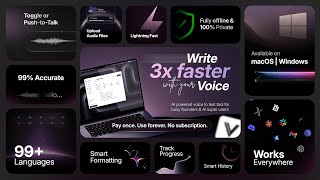
Voicetypr Full Demo - Best offline AI voice to text app for founders and builders
Moinul Moin
Voice typing in Cursor with voicetypr.com - Build your next idea 3x faster
Moinul Moin
YouTube returned 6 videos for “Voicetypr”, and we withheld 4: 4 could not be judged, because “Voicetypr” is a single word that other videos use for other things. Showing the 2 we can prove are about Voicetypr.
Official links
Tools that pair well with Voicetypr
Common stack mates teams adopt alongside Voicetypr, with the specific reason each pairing earns its keep.

Whisperstream
Whisperstream is private, offline dictation for Windows — $29 once, no subscription, no audio uploads.

Wispr Flow
Wispr Flow is AI voice dictation and a meeting Notetaker that turns rambling speech into edited text in any app, on Mac, Windows, iOS, and Android.

Lemon
System-wide macOS and Windows voice tool that turns rambling speech into structured prompts and clean dictation in any text field.
Featured Head-to-Head Comparisons
Voicetypr vs Guesty
Guesty and Voicetypr solve completely different problems. Choose Guesty if you manage vacation rentals and need AI-driven automation for guest messaging, channel management, and reconciliation. Choose Voicetypr if you're an individual looking to type faster by voice offline with a one-time purchase — it's a privacy-focused dictation tool, not a PMS.
Voicetypr vs Gem
Gem and Voicetypr serve completely different needs, so the choice depends on your job function. If you lead recruiting and want an ATS/CRM with AI agents to automate sourcing, screening, and scheduling, Gem is purpose-built (but costly). If you're a founder, developer, or writer who types all day and wants to cut dictation friction with a one-time purchase + offline privacy, Voicetypr wins hands down.
Voicetypr vs Poke Interaction Co
Choose Voicetypr if you need fast, private voice dictation on desktop (one-time purchase) and type extensively. Pick Poke if you prefer managing email, calendar, and tasks via chat in your messaging apps, with automations and integrations—though it requires a recurring subscription. They serve different primary needs.
Alternatives to Voicetypr
View all
Whisperstream
Whisperstream is private, offline dictation for Windows — $29 once, no subscription, no audio uploads.

Wispr Flow
Wispr Flow is AI voice dictation and a meeting Notetaker that turns rambling speech into edited text in any app, on Mac, Windows, iOS, and Android.

Frequently Asked Questions
Categories
Best-of guides
Used Voicetypr? Help shape our editorial sentiment research.