Sticker Doodle vs QOVES
Side-by-side comparison of features, pricing, and ratings
At a glance
| Dimension | Sticker Doodle | QOVES |
|---|---|---|
| Pricing | Free | Paid (no free tier) |
| Platform | iOS/iPadOS | Web (browser-based) |
| Core Function | Create custom stickers from photos or doodles | AI facial analysis & non-surgical glow-up plan |
| Integrations | iMessage, WhatsApp, Telegram, Discord, Slack | None listed |
| Best For | Messaging app power users on Apple devices | Evidence-based facial improvement seekers |
| Not For | Desktop/web users, Android, advanced editing | Surgical planning, quick free analysis, human consultation |
Sticker Doodle and QOVES serve entirely different needs: one is a free iOS app for creating fun custom stickers, the other a paid facial analysis tool for a data-driven glow-up. If you want personalized chat stickers on Apple devices, pick Sticker Doodle. If you’re seeking a science-backed, non-surgical improvement plan for your face, QOVES is the choice — but be prepared to pay and have no free trial.
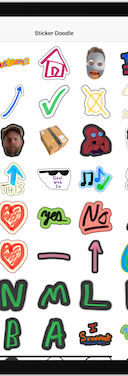
Sticker Doodle is an iPhone and iPad app that turns your doodles and photos into custom stickers for iMessage, WhatsApp, Telegram, Discord, and Slack.
Visit Website
AI facial analysis that turns 160+ beauty markers into a personalized, non-surgical glow-up plan.
Visit WebsiteWho should pick which
- Messaging app enthusiast on iPhonePick: Sticker Doodle
Sticker Doodle lets you create custom stickers from photos or doodles and export directly to iMessage, WhatsApp, Telegram, Discord, and Slack — all for free.
- Self-improvement seeker wanting science-backed beauty advicePick: QOVES
QOVES provides a detailed facial analysis and non-surgical glow-up plan with citations, tailored to your ethnicity and lifestyle.
- Parent making custom sticker packs for family chatsPick: Sticker Doodle
Easily turn family photos or kids' doodles into stickers and share across multiple messaging platforms.
- Person curious about facial biometrics without surgeryPick: QOVES
QOVES offers in-depth measurements like jaw geometry and eye limbal ring, with research-backed recommendations for non-surgical changes.
- Team wanting custom Slack emojisPick: Sticker Doodle
Sticker Doodle exports doodles as custom Slack emojis, perfect for team inside jokes.
Frequently Asked Questions
Sticker Doodle vs QOVES: which should you choose?
Sticker Doodle and QOVES serve entirely different needs: one is a free iOS app for creating fun custom stickers, the other a paid facial analysis tool for a data-driven glow-up. If you want personalized chat stickers on Apple devices, pick Sticker Doodle. If you’re seeking a science-backed, non-surgical improvement plan for your face, QOVES is the choice — but be prepared to pay and have no free trial.
Can I use Sticker Doodle on Android?
No, Sticker Doodle is only available on iOS and iPadOS — no Android or desktop/web version.
Does QOVES offer a free trial?
No, QOVES has no free tier or trial; it is a paid service.
Can I export QOVES results to social media?
There are no integrations or export features listed for QOVES; results are likely viewed within the web platform.
Does Sticker Doodle work with Apple Pencil?
Yes, you can draw stickers using your finger or Apple Pencil.
Is QOVES analysis based on scientific research?
Yes, QOVES claims research-backed recommendations with citations, considering factors like ethnic background and aging.
Can I share stickers from Sticker Doodle via AirDrop?
Yes, you can share sticker files via AirDrop, Email, or Messages.
More Sticker Doodle or QOVES comparisons
For indie game developers and hobbyists needing a free, local, open-source 2D sprite generator, PerfectPixel Studio is the clear choice. QOVES is a paid, web-only facial analysis service for those see
Choose QOVES if you want a science-backed non-surgical facial improvement plan based on 160+ beauty markers. Choose ImaginPrompt if you need to reverse-engineer images into prompts for AI image genera
Choose Camera Eye if you want a free, all-in-one photography app for fun filters and manual controls. Choose QOVES if you're serious about a science-backed, non-surgical facial improvement plan and wi
For a science-based non-surgical glow-up plan, QOVES is the clear choice; for professional photo editing with batch AI retouching, Evoto AI wins. These tools serve completely different needs—pick base
QOVES and Refloow Photo Studio serve entirely different needs. For privacy-first background removal and basic edits at zero cost, Refloow Photo Studio is unbeatable. If you're seeking data-driven faci
Choose Image Translator if you need a free, no-account tool to extract and translate text from images for travel, manga, or design localization. Choose QOVES if you want a research-backed, personalize
Explore each tool further
Browse these categories
One email a week — new tools, honest comparisons, no spam.
Last reviewed: July 9, 2026