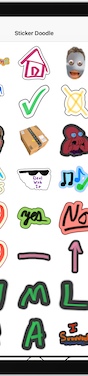
Sticker Doodle
Sticker Doodle is an iPhone and iPad app that turns your doodles and photos into custom stickers for iMessage, WhatsApp, Telegram, Discord, and Slack.
If you and your friends are on iPhone and iPad, Sticker Doodle is the least fiddly way to get your own stickers into chats. Finger and Apple Pencil drawing, photo-to-sticker conversion with borders, iCloud sync, and one-tap export to iMessage, WhatsApp, Telegram, Discord, and Slack cover the whole loop—and the custom Slack emoji export is a genuinely useful touch for small teams. There's no account to create, so the barrier is basically the App Store download. The catch is platform: there's no Android or web version, so cross-platform teams are left out, and the app isn't aimed at vector-grade graphic output. If you're all-Apple, it's a straightforward pick; if your group is mixed-platform,
Verified 5d ago · liveness 68/100 · cite: rightaichoice.com/tools/sticker-doodle
- iPhone and iPad users who want personal stickers in their chats
- Parents and families making custom stickers for inside jokes
- Small teams that want custom Slack emojis they made themselves
- People who enjoy doodling with Apple Pencil on iPad
- Anyone who needs a desktop or web version
- Android users or mixed-platform groups
- Designers who need vector-based graphic output
We scan live Reddit threads, YouTube comments, X posts, G2 reviews and other communities — and hand you an honest verdict in under a minute.
- Honest verdict, not marketing
- Real pros & cons from real users
- Attributed quotes with receipts
3 free scans · no card needed
Skip Sticker Doodle if you or your team work mainly on Android, Windows, or the web—creating stickers requires an iPhone or iPad.
Sticker Doodle's pricing fits teams whose volume aligns with the published tiers. Compare against the alternatives listed below for stage-specific value.
In short
Sticker Doodle — Sticker Doodle is an iPhone and iPad app that turns your doodles and photos into custom stickers for iMessage, WhatsApp, Telegram, Discord, and Slack. Best for iPhone and iPad users who want personal stickers in their chats, Parents and families making custom stickers for inside jokes, Small teams that want custom Slack emojis they made themselves. Free to use.
What people actually say about Sticker Doodle — is it worth it?
We ran a structured research pass across product reviews, community discussions, and post-purchase forum threads to surface the patterns vendors won't publish themselves. Below: the recurring strengths, the hidden costs people mention most, and the cohort that consistently regrets adopting this tool.
77 mentions across 5 sources (YouTube, Product Hunt, App Store, Bluesky, Lemmy) · researched Jul 15, 2026.
Average across the 5 sources that answered — each source counts once, not each post.
- +Draw or use photos to make custom stickers easily.
- +Exports directly to iMessage, WhatsApp, Telegram, Discord, Slack.
- +iCloud syncs stickers across iPhone and iPad seamlessly.
- +Outlining tool for photos is delightful and addicting (Product Hunt).
- +Add borders and backgrounds to photo stickers.
- −Free tier limited to 5 stickers, full access is $1.99.
- −iMessage integration broke on recent iOS versions (App Store reviews).
- −Lag reported on iPhone 16 when drawing.
- −Confusing sticker creation: some users couldn't find how to make stickers.
- −No custom GIF support, only static stickers.
- • One-time $1.99 in-app purchase for full access; some users paid but had lingering bugs
Viability Score
How well maintained and how widely used is Sticker Doodle? Built from what the vendor actually publishes (docs, changelog, tutorials, integrations, pricing), whether the site is live, and how much real users discuss it. How we calculate this
Last calculated: September 2026
How we score →Key Features
- Draw stickers with your finger directly on screen
- Apple Pencil support for detailed doodles on iPad
- Turn any photo into a sticker
- Turn a selected portion of a photo into a sticker
- Add colorful borders and backgrounds to photo stickers
- Export stickers directly to iMessage
- Export stickers directly to WhatsApp
- Export stickers directly to Telegram
- Export doodles as Discord stickers
- Export doodles as custom Slack emojis
- iCloud syncing across iPhone and iPad
- Edit existing stickers after creating them
- Share sticker files via AirDrop, Email, or Messages
- Full light and dark mode support
- Available in nine languages
About Sticker Doodle
Sticker Doodle is an iPhone and iPad app for making your own stickers and emojis. You can draw on-screen with your finger or an Apple Pencil, or select any portion of a photo and turn it into a sticker with a colorful border or background. Finished stickers export straight into iMessage, WhatsApp, and Telegram, and your doodles can be exported as custom Slack emojis or Discord stickers for chats and servers. Creations sync through iCloud so you can start a sticker on one Apple device and finish it on another, and you can reopen and edit any sticker later. You can also share sticker files with AirDrop, Email, or Messages. The app supports full light and dark mode and ships in nine languages: English, Spanish, Italian, German, French, Portuguese, Arabic, Chinese, and Japanese. It's aimed at people inside Apple's ecosystem who want their chats to feel more personal—families sharing inside jokes, friends sending reactions to each other, or teams wanting custom Slack emojis. No account is required to use it. The main constraint is that it only runs on iPhone and iPad: there's no Android or web version, so if your team or friends are on other platforms, only the exported sticker files travel, not the creation workflow.
Behind the Verdict
Sticker Doodle does one thing and does it without ceremony: it lets you make stickers on an iPhone or iPad and send them to the messaging apps you already use. The feature list is concrete rather than padded—finger drawing, Apple Pencil support, turning any photo or portion of a photo into a sticker, adding colorful borders and backgrounds, and then exporting. The export surface is the standout: iMessage, WhatsApp, Telegram, Discord (as Discord stickers), and Slack (as custom Slack emojis). That last one is what separates it from a typical iMessage sticker pack, because it means your doodles can show up in a team workspace, not just a group chat. Thoughtful smaller touches matter here. iCloud syncing lets you sketch on the iPad and finish on the phone. Stickers are editable after the fact, so you can reopen a creation and tweak it instead of starting over. Files can be shared via AirDrop, Email, or Messages, and the app runs in light and dark mode with localization in nine languages. There's no account to set up, which keeps the onboarding trivial—download, draw, export. Where it stops is anywhere that isn't an Apple device. The site itself tells desktop visitors to scan with an iPhone or iPad, and there's no Android or web app. The trade-off is real but narrow: the sticker files themselves travel to WhatsApp, Telegram, Discord, and Slack on any platform, but the making of them stays in iOS. Teams that want consistent sticker or emoji production across, say, a mix of iPhones and Android phones won't get it here. As for the output, this is a playful drawing-and-photo tool, not a design suite. If you need clean vector assets for brand use, this isn't that. If you're an individual, a family, or a small team on Apple hardware that wants custom reactions and workspace emojis without learning new software, Sticker Doodle is exactly the right size.
Researching Sticker Doodle? Get your full AI stack in 60 seconds.
Free, no signup — tell us your goal and get tools matched to your budget & existing stack.
Real-world workflow fit
Concrete scenarios for the personas Sticker Doodle actually fits — and what changes day-one when you adopt it.
You snap a photo of your kid making a face, open Sticker Doodle, select just the face, add a colorful border, and export it straight to your family iMessage group.
Outcome: A one-of-a-kind reaction sticker the family keeps using, made in a couple of minutes with no account setup.
You draw an in-joke doodle with Apple Pencil on your iPad, then export it as a custom Slack emoji and your teammates drop it into channel messages.
Outcome: A custom workspace emoji that would normally require an admin and a design file, produced by one person on a tablet.
You sketch a pack of doodles on your iPhone at lunch, pick up the iPad at home where iCloud has synced them, refine each one, and export the set to Telegram.
Outcome: A finished personalized Telegram sticker pack built across two devices without redoing any work.
Use Cases
- Turn a photo of your kid pulling a face into a sticker for the family iMessage group.
- Draw custom birthday stickers on your iPad with Apple Pencil and send them through WhatsApp.
- Create branded emoji stickers from doodles for your team's Slack workspace.
- Build a personalized Telegram sticker pack from your own finger drawings.
- Export a hand-drawn logo as a Discord sticker for your server.
- Start a doodle on your iPhone and finish it on your iPad thanks to iCloud syncing.
- Share a sticker file with a friend over AirDrop, Email, or Messages so they can use it too.
Limitations
- Sticker Doodle is an iOS app: you need an iPhone or iPad to create and use stickers, and the site tells desktop visitors to scan with an iPhone or iPad.
- Stickers come from finger drawing, Apple Pencil drawing, or turning a photo (or part of a photo) into a sticker, and then exporting to iMessage, WhatsApp, Telegram, Discord, or Slack.
- The scraped site describes no AI features, and no API, CLI, plugin, or web app is mentioned.
- Output is playful drawing-and-photo work rather than vector graphic design.
as of 2026-09-23
Verification history
We have re-verified Sticker Doodle 8 times since . Each pass re-reads the vendor's own pages and re-checks every listed field against that evidence; passes where nothing had changed are marked as such.
- — re-checked, vendor evidence unchanged
- — re-checked, vendor evidence unchanged
- — re-checked, vendor evidence unchanged
- — re-checked, vendor evidence unchanged
- — re-checked, vendor evidence unchanged
- — re-checked, vendor evidence unchanged
Showing the 6 most recent of 8 verification passes.
Free to cite with attribution — this page re-verifies continuously.
Where the pricing makes sense
The company stage and team size where Sticker Doodle's pricing actually pencils out — and where peers do it cheaper.
Sticker Doodle's pricing fits teams whose volume aligns with the published tiers. Compare against the alternatives listed below for stage-specific value.
Setup time & first value
How long it actually takes to get something useful out of Sticker Doodle — broken out by persona, not the marketing-page minute.
For a solo iPhone or iPad user: download the app and you can be drawing and exporting your first sticker to iMessage in a couple of minutes—no account is required. For a team adding custom Slack emojis: allow a short extra step to draw and export each emoji on an iPhone or iPad, since creation doesn't happen on desktop.
Integrations
Resources & Guides
Tutorials & Learning
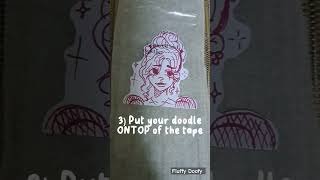
YouTube returned 6 videos for “Sticker Doodle”, and we withheld 5: 5 did not mention Sticker Doodle. Showing the 1 we can prove is about Sticker Doodle.
Official links
Tools that pair well with Sticker Doodle
Common stack mates teams adopt alongside Sticker Doodle, with the specific reason each pairing earns its keep.


Featured Head-to-Head Comparisons
Sticker Doodle vs Qoves
Sticker Doodle and QOVES serve entirely different needs: one is a free iOS app for creating fun custom stickers, the other a paid facial analysis tool for a data-driven glow-up. If you want personalized chat stickers on Apple devices, pick Sticker Doodle. If you’re seeking a science-backed, non-surgical improvement plan for your face, QOVES is the choice — but be prepared to pay and have no free trial.
Sticker Doodle vs Adobe Firefly Services
If you want to create fun, personalized stickers on your iPhone or iPad for friends and family, Sticker Doodle is a free, effortless choice. But if you're a developer or enterprise needing to automate high-volume image generation with compliance and API access, Adobe Firefly Services is the clear winner — despite its usage-based cost.
Sticker Doodle vs The New Black
Choose Sticker Doodle if you want a free, simple way to create custom stickers from doodles or photos for your favorite messaging apps on iPhone/iPad. Choose The New Black if you're a fashion brand or designer needing AI-powered tools to generate, model, and publish apparel designs with e-commerce integrations.
Alternatives to Sticker Doodle
View all
Sticker.ly
Free mobile app to turn photos, memes, and videos into custom WhatsApp and Telegram stickers.

Sticker Maker + Stickers
iOS app for making custom and animated stickers you can send in iMessage, WhatsApp, Telegram and Snapchat.
Popular in Fun Photo & Video Apps

Frequently Asked Questions
Categories
Best-of guides
Used Sticker Doodle? Help shape our editorial sentiment research.