
Acronis Cyber Protect
AI-native cyber protection platform uniting backup, disaster recovery, endpoint security, and RMM in one MSP console.
For an MSP juggling Veeam plus a separate EDR plus an RMM, Acronis is one of the few credible one-console answers, and v17's security awareness training folds in something partners were previously buying elsewhere. Judge it on consolidation economics, not on beating a dedicated SOC platform at threat hunting. Sell GenAI governance while it's still a differentiated line item.
Verified 1h ago · liveness 79/100 · cite: rightaichoice.com/tools/acronis-cyber-protect
- MSPs consolidating backup, DR, cybersecurity, and RMM into one console and one data model
- Partners selling managed GenAI governance and shadow-AI monitoring as a recurring service
- SMB and mid-market clients needing ransomware protection with fast, rehearsed recovery
- Service providers replacing a Veeam-plus-EDR-plus-RMM stack with fewer vendor relationships
- Security operations centres needing a dedicated SIEM or SOAR for deep threat hunting
- Organizations requiring an on-premises-only deployment with no cloud component
- MSPs unwilling to absorb the migration cost of re-engineering backup jobs and security policies
We scan live Reddit threads, YouTube comments, X posts, G2 reviews and other communities — and hand you an honest verdict in under a minute.
- Honest verdict, not marketing
- Real pros & cons from real users
- Attributed quotes with receipts
3 free scans · no card needed
Skip Acronis Cyber Protect if you run a hunt-heavy SOC that already depends on a dedicated SIEM and SOAR, or you're a small shop that only needs file backup with no security or multi-tenant management requirements.
Microsoft 365 and G Suite backup, Disaster Recovery, immutable storage, and whitelists are subscription-only capabilities, so a maintenance-licence renewal won't include them.
Acronis sells per-workstation annual licences for business editions (Standard, Advanced, Backup Advanced) with multi-year options that lock in pricing. That suits MSPs billing clients monthly against a predictable annual per-seat cost. Compare the total platform cost against assembling Veeam plus CrowdStrike plus an RMM tool, where consolidation is the whole saving — and against Veeam alone if you don't need the security modules.
In short
Acronis Cyber Protect — AI-native cyber protection platform uniting backup, disaster recovery, endpoint security, and RMM in one MSP console. Best for MSPs consolidating backup, DR, cybersecurity, and RMM into one console and one data model, Partners selling managed GenAI governance and shadow-AI monitoring as a recurring service, SMB and mid-market clients needing ransomware protection with fast, rehearsed recovery. Plans from $63/yr.
No head-to-head comparison for Acronis Cyber Protect yet — the alternatives below are the closest matches we list.
What's new in Acronis Cyber Protect
Checked 4 days agoAcross the latest 5 updates: 1 launch and 4 news mentions.
Acronis Cyber Protect v17: cyber resilience across people, data and infrastructure
Cyber Protect v17 (Q3 2026) adds security awareness capabilities, improved backup operations, and protection for more virtual environments inside the same platform.
Acronis Threat Research Unit: latest security updates
The Acronis Threat Research Unit published its latest security updates covering current threat activity the vendor is tracking.
Acronis positions Security Awareness Training as managed security control for MSPs
Acronis argues AI phishing, BEC, and social engineering put user behaviour on the attack path, and pitches its training tool at human risk reduction at MSP scale.
Acronis publishes prompt injection protection guidance
Acronis details prompt injection techniques and how its platform detects and blocks malicious AI instructions mixed in with trusted data.
Acronis outlines guardrails for safe agentic AI in MSP environments
Acronis covers guardrails, tenant isolation, and access controls for safe agentic AI deployments by MSPs and SMBs.
What people actually say about Acronis Cyber Protect — is it worth it?
We ran a structured research pass across product reviews, community discussions, and post-purchase forum threads to surface the patterns vendors won't publish themselves. Below: the recurring strengths, the hidden costs people mention most, and the cohort that consistently regrets adopting this tool.
18 mentions across 2 sources (YouTube, Lemmy) · researched Oct 14, 2026.
Weighted by the 24 posts each of 2 sources contributed.
- +One console covers backup, DR, EDR, XDR, MDR, and RMM for MSP client estates
- +Broad workload coverage: Windows, Linux, macOS, mobile, VMware, Hyper-V, Nutanix, Proxmox, AWS, Azure
- +Native Microsoft 365 and Google Workspace backup plus email archiving in the same platform
- +July 2026 GenAI Protection lets MSPs monitor and block shadow-AI use as a billable service
- +Three-step Autonomous IT roadmap (Assisted, Supervised, Autonomous) gives a staged AI adoption path
- −Acronis itself warned of 20+ security vulnerabilities in Cyber Protect in March 2026
- −Cloud storage quotas reportedly shrank from 500GB to 250GB at effectively the same price
- −Subscription-only licensing frustrates users who want to own a perpetual license like True Image
- −Backup browser shows filenames only, no thumbnails — unusable for large photo libraries
- −Uninstall is messy and users report the client can hijack or destabilize a machine
- • Cloud storage overage fees when client backup data exceeds the included quota
- • Per-workload licensing that scales quickly across mixed VM, SaaS, and database estates
- • Security module add-ons (MDR, DLP, GenAI Protection) priced separately from base backup
- • Three-year or multi-year commitments common in MSP agreements, raising total cost of switching
Viability Score
How well maintained and how widely used is Acronis Cyber Protect? Built from what the vendor actually publishes (docs, changelog, tutorials, integrations, pricing), whether the site is live, and how much real users discuss it. How we calculate this
Last calculated: October 2026
How we score →Key Features
- Backup for physical, virtual, cloud, and SaaS workloads
- Disaster recovery with one-click restore and rehearsed failover
- Cyber Frame disaster recovery infrastructure
- Direct backup to public cloud storage
- Backup and email archiving for Microsoft 365 and Google Workspace
- Endpoint Detection & Response (EDR)
- Extended Detection & Response (XDR)
- Managed Detection & Response (MDR)
- Email and collaboration security for Microsoft 365 and Google Workspace
- Security posture management and compliance reporting
- Data Loss Prevention (DLP)
- Security awareness training for end users (v17)
- GenAI Protection with prompt blocking and shadow-AI monitoring
- Prompt injection detection and blocking
- Remote Monitoring and Management (RMM) and PSA in one console
About Acronis Cyber Protect
Acronis Cyber Protect Cloud puts backup, disaster recovery, endpoint security, and IT automation behind a single console built for managed service providers and multi-site IT teams. Every service writes into a shared data model, so AI agents and human technicians work from the same picture of a client environment rather than stitching together a backup tool, an EDR, and an RMM stack. Workload coverage runs across physical Windows and Linux machines, macOS and mobile endpoints, virtual and cloud environments, Microsoft 365 and Google Workspace, and databases including SQL, Oracle, SharePoint, and Exchange. The security side spans EDR, XDR, MDR, email and collaboration security, security posture management, DLP, and — as of the v17 release — security awareness training. GenAI Protection is packaged as a sellable managed service: monitor Generative AI usage across clients, block sensitive data headed to public AI tools, and stop harmful prompts. Agentic automation is framed as a three-step path to Autonomous IT: Assisted (suggestions, off by default), Supervised (agents act with human confirmation), and Autonomous (policy-gated agents act with guardrails, least-privilege scoped permissions, and tenant isolation). That last piece matters — Acronis has published guidance on guardrails for safe agentic AI in MSP environments and on prompt injection detection. The vendor reports 21,000+ service providers covering 750,000+ companies across 150+ countries. Against Veeam on data protection and CrowdStrike or SentinelOne on endpoint security, the pitch isn't depth in any single lane — it's fewer vendors, fewer consoles, and one data model for the whole book of business.
Behind the Verdict
The question I'd ask before buying is simple: how many vendors is this replacing? If the answer is three or more, the math usually works. If you're a Veeam shop with a mature EDR already humming and an RMM you like, migrating backup jobs and rewriting security policies is real work, and the payoff is consolidation rather than capability you can't get elsewhere. Where Acronis earns its keep is the shared data model. Agents acting across backup, security, and operations with the same tenant context is genuinely different from bolting APIs between three products — the vendor's own framing about least-privilege scoped permissions per tenant is worth reading before you let anything run at Level 2 or 3. That's the caveat. The agentic features ship off by default at Assisted, and the value depends entirely on how far you let them run. Supervised modes that require human confirmation are the sensible default for most partners for a while yet. Pick this when you're selling managed GenAI governance. Monitoring shadow-AI use and blocking sensitive data headed to public tools is a line item clients increasingly ask about, and few competitors package it as cleanly. Prompt injection protection guidance from Acronis in June 2026 suggests they're treating that threat surface seriously rather than as marketing. Pass when your clients need a dedicated SIEM or SOAR for deep threat hunting, or when on-premises-only deployment is a hard requirement. Pass too if you're a small shop that can't absorb re-engineering backup jobs — the migration cost lands before the savings do. In practice, the recurring complaint with all-in-one suites is depth at the edges. Acronis is shallow next to CrowdStrike in a hunt-heavy SOC and shallow next to Veeam in some enterprise data-protection corners. If
Researching Acronis Cyber Protect? Get your full AI stack in 60 seconds.
Free, no signup — tell us your goal and get tools matched to your budget & existing stack.
Real-world workflow fit
Concrete scenarios for the personas Acronis Cyber Protect actually fits — and what changes day-one when you adopt it.
You migrate client backup jobs into Acronis Cyber Protect and turn on multi-tenant management, consolidating what was Veeam plus a separate RMM console into one view of every client environment.
Outcome: One console and one vendor escalation path; Bluemoon IT Solutions reports 20%–30% cost savings from a single solution covering multiple applications.
You package GenAI Protection as a monthly service: monitor which clients' staff use public AI tools, block prompts carrying sensitive data, and report on it alongside security awareness training.
Outcome: A new recurring line item built on an existing console, with prompt-injection guidance from Acronis Threat Research Unit to back your client conversations.
Ransomware hits a file server; you use behavioral detection to isolate the endpoint, then restore from the last clean recovery point to dissimilar hardware.
Outcome: Recovery from a clean point without a separate backup product, and patch staging prevents re-infection on rollout.
Use Cases
- Back up Microsoft 365 mailboxes, OneDrive, and SharePoint with one-click restore
- Protect endpoints from ransomware using behavioral and anomaly detection
- Automate third-party and Windows patch deployment with staging and rollback
- Deliver cyber protection as a service with multi-tenant management for MSPs
- Recover an entire server to dissimilar hardware after a hardware failure
- Sell GenAI governance as a managed service: monitor shadow AI and block sensitive prompts
- Run compliance and cyber-insurance readiness reporting for clients
- Stand up disaster recovery for client environments on Cyber Frame infrastructure
Limitations
- The advanced cybersecurity services — EDR, XDR, MDR, DLP, and GenAI Protection — are separate capabilities that may sit behind specific plan tiers rather than the entry-level subscription.
- The product set spans home, business, and enterprise lines (True Image, Cyber Protect Standard, Cyber Protect Advanced, Backup Advanced), so confirm which edition your quote actually refers to before comparing prices.
- Subscription-only capabilities include Microsoft 365 and G Suite backup, Disaster Recovery, immutable storage, and global/local whitelists — a maintenance-only licence won't carry them.
- Autonomous IT agent functions are off by default at Level 1, so advertised automation is something you switch on per tenant.
- Acronis doesn't name the underlying AI models in its public material.
- And a consolidated suite still trails dedicated SIEM and SOAR platforms for advanced threat hunting.
as of 2026-10-18
Verification history
We have re-verified Acronis Cyber Protect 20 times since . Each pass re-reads the vendor's own pages and re-checks every listed field against that evidence; passes where nothing had changed are marked as such.
- — re-verified summary, description, our verdict, our analysis, pricing model, pricing tiers, features, integrations, who it suits, who should skip it
- — re-verified summary, description, our verdict, our analysis, pricing model, pricing tiers, features, integrations, who it suits, who should skip it
- — re-verified summary, description, our verdict, our analysis, pricing model, pricing tiers, features, integrations, who it suits, who should skip it
- — re-verified summary, description, our verdict, our analysis, pricing model, pricing tiers, features, integrations, who it suits, who should skip it
- — re-verified summary, description, our verdict, our analysis, pricing model, pricing tiers, features, integrations, who it suits, who should skip it
- — re-verified summary, description, our verdict, our analysis, pricing model, pricing tiers, features, integrations, who it suits, who should skip it
Showing the 6 most recent of 20 verification passes.
Free to cite with attribution — this page re-verifies continuously.
12-month cost
Project the real annual outlay, including the implied monthly cost when only an annual tier is published.
Vendor list price only. Add-on usage, seat overages, and contract minimums are surfaced under Hidden costs & gotchas.
Where the pricing makes sense
The company stage and team size where Acronis Cyber Protect's pricing actually pencils out — and where peers do it cheaper.
Acronis sells per-workstation annual licences for business editions (Standard, Advanced, Backup Advanced) with multi-year options that lock in pricing. That suits MSPs billing clients monthly against a predictable annual per-seat cost. Compare the total platform cost against assembling Veeam plus CrowdStrike plus an RMM tool, where consolidation is the whole saving — and against Veeam alone if you don't need the security modules.
Setup time & first value
How long it actually takes to get something useful out of Acronis Cyber Protect — broken out by persona, not the marketing-page minute.
A single-tenant deployment — install agents, set a backup policy, run a first restore test — is a same-day job for one technician. Multi-tenant MSP rollout takes longer: expect to re-engineer existing backup jobs and security policies per client, and to run Level 1 Assisted agent functions off by default until you've validated them against real telemetry.
Switching to or from Acronis Cyber Protect
How to bring data in from common predecessors and how to get it back out — written for the switcher, not the buyer.
- →From Veeam: recreate backup jobs in the Acronis console and re-point storage to Acronis cloud or your own public cloud bucket, then run parallel restores before cutting over.
- →From standalone RMM: import client and endpoint inventory into multi-tenant management, then retire the separate console once patching runs from Acronis.
- →From Microsoft 365 native backup: enable the Microsoft 365 backup module, which is a subscription-only capability, and seed the first full backup before relying on it for restore.
- ↗To Veeam: export recovery points where formats allow, rebuild jobs in Veeam, and keep the Acronis subscription active until the last restore window has passed.
- ↗To CrowdStrike or SentinelOne: run the new EDR in detect-only mode alongside Acronis EDR before removing the Acronis security modules, so you don't create a detection gap.
Integrations
Resources & Guides
- Resourceacronis.com
Academy
Helpful link from acronis.com
- Tutorialacronis.com
Acronis Resource Center: Videos & Product Demos
Check out the latest Videos & Product Demos produced by Acronis
- Resourceacronis.com
Customer Service and Support | Acronis
Customer Service and Support | Acronis
- Resourceacronis.com
Cyber Protection & Cybersecurity Blog
Stay up to date with the latest cybersecurity and cyber protection news, research, vulnerabilities, threats and computer attacks.
Tutorials & Learning
Acronis Cyber Protect Cloud Product Demo: Protection console - How to Create and Manage Alerts
Acronis
Acronis Cyber Protect Cloud: Tip 2 - How to Create a Protection Plan
Acronis
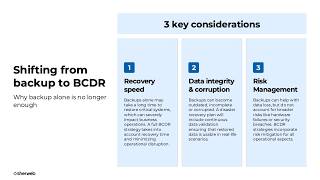
Acronis Cyber Protect Cloud: All-in-one backup, BCDR and cybersecurity for MSPs
Sherweb
YouTube returned 6 videos for “Acronis Cyber Protect”, and we withheld 3: 3 did not mention Acronis Cyber Protect. Showing the 3 we can prove are about Acronis Cyber Protect.
Official links
Tools that pair well with Acronis Cyber Protect
Common stack mates teams adopt alongside Acronis Cyber Protect, with the specific reason each pairing earns its keep.

Coro
Coro unifies endpoint, email, cloud and network security into one workspace cybersecurity platform run by a single AI agent.

SentinelOne Singularity
AI-native endpoint, identity, and cloud security that detects and autonomously contains threats at machine speed

Todyl
Todyl bundles SASE, SIEM, MXDR, endpoint security and GRC into one agent and one console for MSPs
Alternatives to Acronis Cyber Protect
View all
Coro
Coro unifies endpoint, email, cloud and network security into one workspace cybersecurity platform run by a single AI agent.

SentinelOne Singularity
AI-native endpoint, identity, and cloud security that detects and autonomously contains threats at machine speed

Frequently Asked Questions
Topics
Used Acronis Cyber Protect? Help shape our editorial sentiment research.