
Brewit
Brewit turns plain-English questions into SQL, charts, and shareable data reports.
Brewit earns its place for small teams that live in one or two databases and want self-service answers today rather than after a data-team backlog. The automated semantic layer plus data catalog is the real differentiator versus plain text-to-SQL toys, and SSH tunneling makes it viable for locked-down databases. The June 2024 embed API also opens a path for SaaS teams that want to ship an analytics chat to their own customers. Be clear-eyed about two things: the Growth tier's 2,000 messages/month runs out fast if your whole team leans on it daily, and the pricing page lists both tiers as Contact Us, so you'll need a conversation to learn what you'd pay.
Verified 8d ago · liveness 78/100 · cite: rightaichoice.com/tools/brewit
- Startups and SMBs with no dedicated data analyst
- Data-driven teams that want self-service analytics without SQL
- Product teams embedding an analytics chat agent into their app
- Analysts who want to speed up ad-hoc queries and reporting
- Teams requiring on-premise or self-hosted deployment
- Users who need to plug in custom LLM models
- High-volume chat users — Growth caps at 2,000 messages/mo
We scan live Reddit threads, YouTube comments, X posts, G2 reviews and other communities — and hand you an honest verdict in under a minute.
- Honest verdict, not marketing
- Real pros & cons from real users
- Attributed quotes with receipts
3 free scans · no card needed
Skip Brewit if you need on-premise or self-hosted deployment, want to bring your own LLM, or expect your team to exceed 2,000 analytics messages a month on a small-team budget.
The Growth tier's 2,000 messages/mo ceiling is a hard cap — a team asking questions throughout the workday can burn through it well before the month ends.
Brewit sits in the self-service analytics bracket rather than the enterprise BI bracket. Growth is sized for small teams: unlimited members, but 2,000 messages/mo, 5 data sources, and 5 workbooks up to 5GB. Once you need unlimited messages, unlimited data sources, API access, or whitelabeling you move to Enterprise. Because both tiers list Contact Us rather than a published rate, compare against alternatives on scope first, then pricing.
In short
Brewit — Brewit turns plain-English questions into SQL, charts, and shareable data reports. Best for Startups and SMBs with no dedicated data analyst, Data-driven teams that want self-service analytics without SQL, Product teams embedding an analytics chat agent into their app. Contact Sales pricing.
What's new in Brewit
Checked 8 days agoAcross the latest 4 updates: 4 feature updates.
Embed chat in your projects
Brewit added an API for embedding its chat agent into your own projects. Create a key under Developers in workspace settings, then follow the embed documentation and the React or Streamlit demo repositories.
New Connector: Databricks
The Databricks connector went live, letting you connect a Databricks SQL warehouse in a few clicks and query it in natural language with visualized results.
View Tables Used in Chat
Chat responses now show which tables were used to produce them, with a preview of the table data, improving transparency and traceability of each answer.
Connecting databases via SSH tunnels
Brewit supports connecting to databases through SSH tunnels, so you can reach databases behind firewalls or on internal networks without exposing them to the public internet.
Viability Score
How well maintained and how widely used is Brewit? Built from what the vendor actually publishes (docs, changelog, tutorials, integrations, pricing), whether the site is live, and how much real users discuss it. How we calculate this
Last calculated: October 2026
How we score →Key Features
- Natural language to SQL query generation
- Recommended charts based on your data question
- Drill-down analysis directly on chat responses
- View tables used in a chat response, with table preview
- Automated semantic layer over your data
- Built-in data catalog and data dictionary
- Notion-style notebook editor for reports and dashboards
- Connect PostgreSQL, MySQL, Snowflake, BigQuery, Databricks, SQL Server
- CSV file support
- Databricks SQL warehouse connector
- Embed the chat agent in your own app via API
- React and Streamlit demo repositories for embedding
- SSH tunnel connections for databases behind firewalls
- Whitelabeling on the Enterprise tier
- SOC 2 compliance per the vendor's security page
About Brewit
Brewit is a conversational AI data analyst for teams that want answers from their databases without writing SQL. Ask a question in plain English and it writes the SQL query, recommends a chart, and lets you drill into the result right from the chat. It connects to PostgreSQL, MySQL, Snowflake, BigQuery, Databricks SQL warehouses, Microsoft SQL Server, and CSV files. An automated semantic layer backs a built-in data catalog and data dictionary, so metric definitions stay consistent and two people asking the same question get the same number. When a finding matters, the Notion-style notebook editor turns raw output into a report or dashboard you can share. Developers can embed the chat agent into their own product via Brewit's API — a capability added in June 2024 alongside React and Streamlit demo repositories. Security-conscious teams get SSH tunneling for databases behind firewalls. Pricing runs on two tiers, both listed as Contact Us on the pricing page: Growth for small teams with unlimited members, 2,000 messages/month, 5 data sources, and 5 workbooks up to 5GB, and Enterprise with unlimited editors, messages, and data sources plus API access, invoicing, and whitelabeling. It fits startups and SMBs that want self-service analytics fast.
Behind the Verdict
Brewit's pitch is narrow and honest: be the first analyst a small team hires, not the BI platform an enterprise standardizes on. Two things make that credible. The automated semantic layer backed by a data catalog and data dictionary is genuine infrastructure — it's the difference between a query generator and a system where the number for 'active customer' means the same thing to the CMO and the PM. And the connector list is unusually broad for a tool at this stage: PostgreSQL, MySQL, Snowflake, BigQuery, Databricks SQL warehouses, Microsoft SQL Server, and CSV, with Databricks added in May 2024. SSH tunnel support, added the same month, is the quiet feature that makes Brewit usable in companies where databases don't sit on the public internet. The June 2024 embed API pushes Brewit toward a second audience: product teams that want to ship an analytics chat inside their own app rather than send customers to a separate dashboard. React and Streamlit demo repositories lower the cost of trying that. Where Brewit requires a clear-eyed look is the Growth tier's limits. Unlimited members is generous, but 2,000 messages a month and 5 data sources are not — an active team asking questions daily will feel that ceiling, and a sixth data source forces an upgrade conversation. Both published tiers list as Contact Us, so you're learning the price in a sales conversation rather than from the page, which matters if you're evaluating solo. There is also a self-hosting and custom-LLM question the vendor itself raises on its homepage FAQ; the scraped pages don't answer it, so if either is a hard requirement, confirm before you commit. For a startup that lives in one or two warehouses and wants answers this week, Brewit is a reasonable bet.
Researching Brewit? Get your full AI stack in 60 seconds.
Free, no signup — tell us your goal and get tools matched to your budget & existing stack.
Real-world workflow fit
Concrete scenarios for the personas Brewit actually fits — and what changes day-one when you adopt it.
Connect the production PostgreSQL replica on day one, then ask 'Which acquisition channel had the best trial-to-paid rate last quarter?' and get the query plus a chart in the chat, drilling into a specific channel from there.
Outcome: Answers arrive in minutes instead of a ticket to the data team, and every result carries the underlying table names so you can sanity-check the source.
Define core metrics in the data catalog first, then let marketing and product ask their own questions and assemble findings into a weekly report in the notebook editor.
Outcome: Marketing and product self-serve routine questions on the same numbers, and the analyst spends the week on modeling rather than ad-hoc requests.
Create an API key under Developers in workspace settings, follow the embed documentation, and start from the posted React or Streamlit demo repository to wire the Brewit chat into a customer dashboard.
Outcome: Customers query their own data inside your product without your team building a query builder or charting layer from scratch.
Use Cases
- Ask 'What were our top 10 products last month?' and get a bar chart with the SQL query shown alongside it.
- Connect a Snowflake warehouse and let the sales team run self-service revenue analyses.
- Build a weekly performance report in the notebook editor, pulling live data from multiple sources.
- Embed the Brewit chat agent into your SaaS product so customers explore their own data.
- Use the data catalog to enforce consistent metric definitions across departments.
- Connect to databases behind firewalls via SSH tunnels without exposing them to the public internet.
- Product managers check conversion rates without waiting on an engineering ticket.
- Marketing teams analyze campaign performance across channels in plain English.
Limitations
- Growth includes 2,000 messages per month, 5 data sources, and 5 workbooks with up to 5GB storage — the message ceiling is the one most teams hit first.
- Enterprise is the only tier with unlimited editors, unlimited messages, unlimited data sources, API access, invoicing, and whitelabeling.
- Brewit's own homepage FAQ asks whether you can self-host it or use custom LLMs, which tells you those are common buyer questions, but the scrape does not include the answers.
- Both published tiers are listed as Contact Us, so per-seat economics aren't visible without a conversation.
- The scrape does not cover the docs or developer pages, so API depth and documentation quality are not assessed here.
as of 2026-10-02
Verification history
We have re-verified Brewit 7 times since . Each pass re-reads the vendor's own pages and re-checks every listed field against that evidence; passes where nothing had changed are marked as such.
- — re-verified summary, description, our verdict, our analysis, pricing model, pricing tiers, features, integrations, who it suits, who should skip it
- — re-verified summary, description, our verdict, our analysis, pricing model, pricing tiers, features, integrations, who it suits, who should skip it
- — re-verified summary, description, our verdict, our analysis, pricing model, pricing tiers, features, integrations, who it suits, who should skip it
- — re-verified summary, description, our verdict, our analysis, pricing model, pricing tiers, features, integrations, who it suits, who should skip it
- — re-checked, vendor evidence unchanged
- — re-verified summary, description, our verdict, our analysis, pricing model, pricing tiers, features, integrations, who it suits, who should skip it
Showing the 6 most recent of 7 verification passes.
Free to cite with attribution — this page re-verifies continuously.
12-month cost
Project the real annual outlay, including the implied monthly cost when only an annual tier is published.
Vendor list price only. Add-on usage, seat overages, and contract minimums are surfaced under Hidden costs & gotchas.
Plans compared
For each published Brewit tier: who it actually fits, and what it adds vs. the previous tier. Cross-reference the cost calculator above for projected annual outlay.
Growth
Contact Us
Ideal for
Small teams of any member count that want self-service Q&A over one to five databases, with a 2,000 message/mo ceiling to keep usage in check.
What this tier adds
Starting tier: unlimited members, 2,000 messages/mo, 5 data sources, 5 workbooks up to 5GB storage, and priority chat support.
Enterprise
Contact Us
Ideal for
Larger teams and companies that have outgrown the message and data-source caps, need API access for embedding, or want to ship the chat as a whitelabeled experience.
What this tier adds
Adds unlimited editors, unlimited messages, unlimited data sources, API access, invoicing, and whitelabeling on top of everything in Growth.
Where the pricing makes sense
The company stage and team size where Brewit's pricing actually pencils out — and where peers do it cheaper.
Brewit sits in the self-service analytics bracket rather than the enterprise BI bracket. Growth is sized for small teams: unlimited members, but 2,000 messages/mo, 5 data sources, and 5 workbooks up to 5GB. Once you need unlimited messages, unlimited data sources, API access, or whitelabeling you move to Enterprise. Because both tiers list Contact Us rather than a published rate, compare against alternatives on scope first, then pricing.
Setup time & first value
How long it actually takes to get something useful out of Brewit — broken out by persona, not the marketing-page minute.
Connecting a database takes minutes if you have credentials to hand — pick the source type, enter connection details, test, and create. Databases behind a firewall add an SSH tunnel config step (host, port, username, private key). Teams defining a semantic layer and data dictionary before rolling out to non-technical users should budget real time for that step, since it is what keeps answers
Switching to or from Brewit
How to bring data in from common predecessors and how to get it back out — written for the switcher, not the buyer.
- →From ad-hoc SQL and spreadsheets: connect the same database and re-ask the recurring questions in plain English instead of rewriting queries.
- →From a legacy BI tool: replicate your key reports in the notebook editor, then point the data catalog at your existing metric definitions so terminology stays consistent.
- →From a text-to-SQL chat tool: move the prompts you already rely on into Brewit and add the semantic layer so results stop drifting between users.
- ↗To a self-hosted or on-prem BI stack: expect to rebuild semantic-layer definitions and dashboards by hand, since Brewit's data dictionary does not export as a portable artifact in the scraped content.
- ↗To a custom-LLM analytics build: you would reimplement query generation, chart recommendation, and the catalog from scratch rather than port them.
Integrations
Resources & Guides
Tutorials & Learning
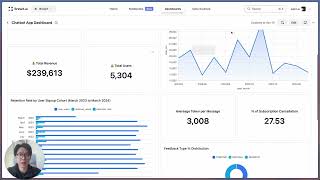
YouTube returned 6 videos for “Brewit”, and we withheld 5: 5 could not be judged, because “Brewit” is a single word that other videos use for other things. Showing the 1 we can prove is about Brewit.
Official links
Tools that pair well with Brewit
Common stack mates teams adopt alongside Brewit, with the specific reason each pairing earns its keep.

Formula Bot
Better Analyst — formerly Formula Bot — turns plain-English data questions into charts, dashboards, spreadsheets, and scheduled analytics workflows.
Julius AI
Julius AI answers plain-English questions about your CSV and Excel data with charts, statistics, and statistical tests — no Python required.

BlazeSQL
BlazeSQL is an AI data analyst that answers plain-English questions directly against your SQL database.
Featured Head-to-Head Comparisons
Brewit vs Geologicai
If you mine critical minerals at scale, GeologicAI's end-to-end scanning and AI logging (now with LIBS for REEs) is unmatched. For everyday data analytics, Brewit offers a low-cost, no-SQL chat interface. They serve entirely different domains – choose based on your core need.
Brewit vs Screenplayiq
If you're a screenwriter or producer needing data-driven script analysis with box office predictions, ScreenplayIQ is the clear choice. If you're a data-driven team wanting to query databases with natural language, Brewit is the superior tool. They serve entirely different domains, so the decision hinges on your core need: narrative analytics vs. SQL-free data exploration.
Brewit vs Nectar Energy
Choose Nectar Energy if you need AI-driven automation for HVAC and lighting in commercial buildings with a focus on energy savings and ESG compliance. Choose Brewit if you want to empower non-technical teams to query databases using natural language and get visual insights quickly.
Alternatives to Brewit
View allFormula Bot
Better Analyst — formerly Formula Bot — turns plain-English data questions into charts, dashboards, spreadsheets, and scheduled analytics workflows.

Frequently Asked Questions
Best-of guides
Used Brewit? Help shape our editorial sentiment research.