
Claid.ai
AI product photography for e-commerce — realistic backgrounds, AI fashion models, and 4K AI video from a plain product shot.
If your bottleneck is producing consistent product and fashion imagery at volume, Claid is worth the switch — the API plus dedicated AI Fashion Models and AI Photoshoot tools are where general editors like Photoroom or Canva fall apart, and the 2-3 second automatic check-and-edit step is what marketplace teams actually need. The catch is the credit model: AI Video runs 60 credits per 5-second clip, so Essentials (33 video generations on Pro) gets expensive fast for video-heavy brands, and features are otherwise identical across paid tiers. Buy it for catalog throughput and API automation, not for one-off creative retouching or pixel-level manual work.
Verified 5d ago · liveness 69/100 · cite: rightaichoice.com/tools/claid-ai
- Marketplaces that must normalize and QA thousands of seller-uploaded product images before listing
- Fashion and apparel brands that need on-model and lifestyle shots without a photo shoot
- E-commerce teams producing catalog and ad creative in one consistent brand style
- Print-on-demand and dropship sellers turning plain mockups into lifestyle scenes
- Retouchers who need precise masks, layers, and pixel-level manual control
- Teams requiring an offline or desktop editor — Claid runs in the browser and via API only
- Portrait, landscape, or artistic photo editing outside product and fashion imagery
We scan live Reddit threads, YouTube comments, X posts, G2 reviews and other communities — and hand you an honest verdict in under a minute.
- Honest verdict, not marketing
- Real pros & cons from real users
- Attributed quotes with receipts
3 free scans · no card needed
Skip Claid if your output is video-first, since AI Video burns 60 credits per 5-second clip and the 50-credit trial includes none of it — still-image catalogs are where the credits go further.
AI Video costs 60 credits per 5-second clip, so a 30-clip social campaign can consume most of an Essentials plan before you generate a single product shot.
Claid's paid tiers share one toolset and differ mainly in monthly credits, so the price ladder is really a volume ladder: Essentials for a single brand keeping a small catalog fresh, Pro for teams producing hundreds of shoots and needing API-key access, Business for marketplaces and enterprises that want unlimited operations plus custom SLAs. Compared with Canva or Photoroom, Claid costs more per seat but replaces a photographer and a retoucher; compared with a traditional studio at per-image
In short
Claid.ai — AI product photography for e-commerce — realistic backgrounds, AI fashion models, and 4K AI video from a plain product shot. Best for Marketplaces that must normalize and QA thousands of seller-uploaded product images before listing, Fashion and apparel brands that need on-model and lifestyle shots without a photo shoot, E-commerce teams producing catalog and ad creative in one consistent brand style. Free to start; paid plans from $120/mo.
What's new in Claid.ai
Checked 5 days agoAcross the latest 5 updates: 1 feature update and 4 news mentions.
7 AI lifestyle photo generators for ecommerce in 2026
Claid's roundup comparing AI lifestyle photo generators for ecommerce, including how on-model shots are produced without a physical shoot.
8 AI face and model swap tools for fashion photos in 2026
A comparison of AI face and model swap tools for fashion photography, covering features, usage limits, and pricing differences.
9 virtual try-on tools for fashion ecommerce in 2026
Claid reviews virtual try-on tools for fashion ecommerce, covering what inputs they accept, which integrations exist, and where results typically fail.
Product photography pricing in 2026: traditional vs. AI costs
A breakdown of 2026 product photography costs comparing traditional studio rates with AI tool pricing, including the hidden fees buyers often miss.
Claid AI Video update: fashion and UGC-style talking videos
Claid AI Video was upgraded to generate fashion and UGC-style talking clips from photos, with more natural motion, improved lip-sync, and generated sound.
Viability Score
How well maintained and how widely used is Claid.ai? Built from what the vendor actually publishes (docs, changelog, tutorials, integrations, pricing), whether the site is live, and how much real users discuss it. How we calculate this
Last calculated: October 2026
How we score →Key Features
- AI Photoshoot: places products into editorial and lifestyle scenes
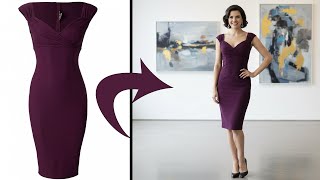
- AI Fashion Models: turns flat garment photos into on-model shots
- AI Video: converts still images into fashion and UGC-style talking clips with generated sound and improved lip-sync
- AI Backgrounds with templates
- Background remover: instant clean, consistent product cutouts
- Enhancer and upscaler: sharpens detail and raises resolution
- Object eraser: removes unwanted objects from product photos
- Remove people: erases people from product and listing images
- Image expander / outpaint: extends canvas outward with AI
- AI Shadows: generates realistic product shadows
- Generative resize: reframes images by generating new content
- Smart Frame: auto-frames products for Shopify and other formats
- Text-to-image generation from prompts
- Light and color correction for dark or faded product photos
- Multi-input AI Edit: combines product shots with reference images
About Claid.ai
Claid.ai is a cloud AI photo studio built for product and fashion imagery rather than general photo editing. You upload a plain product or garment shot and get back studio-style visuals: editorial and lifestyle scenes via AI Photoshoot, on-model garment shots via AI Fashion Models, and short fashion or UGC-style clips via AI Video, which the company updated in September 2026 to generate talking clips with more natural motion, improved lip-sync, and generated sound. The edit side covers background removal, upscaling and enhancement, object eraser, remove-people, image expander, AI Shadows, generative resize, Smart Frame, text-to-image, and light and color correction; the company says logos, labels, and textures are preserved, with downloads up to 128 MP on Pro and 559 MP on Business. Where Claid differs from general editors is the API. Every tool — fashion models, background generation, removal, upscale, image-to-video, shadows, light correction, generative resize, Smart Frame, and text-to-image — has a documented endpoint, so marketplaces can normalize and QA seller uploads automatically in 2-3 seconds per image. Rappi reports cutting 42% of editing time and onboarding 33% more restaurants; Mixtiles uses it to standardize user-generated content. Claid says it has 10,000+ customers, 200M+ images edited, and has been building generative AI since 2018. Pricing is credit-based: a free trial with 50 credits, then Essentials, Pro, and Business, which share the same toolset and differ mainly in monthly credits.
Behind the Verdict
Claid's pitch is narrow on purpose, and that narrowness is its main advantage. The AI is trained only on product and fashion photography, which shows up in the details that matter commercially: preserved logos, labels, and product shapes, brand-approved background and color control, and automatic light adjustment so a catalog shot from a seller's phone sits next to a studio shot without looking wrong. AI Photoshoot drops a product into editorial or lifestyle scenes; AI Fashion Models turns a flat garment photo into on-model shots; AI Video (updated September 2026) turns stills into fashion and UGC-style talking clips with improved lip-sync and generated sound. The real differentiator is breadth of API coverage. Fashion models, background generation, background removal, upscale, image-to-video, shadow generation, light correction, generative resize, Smart Frame, and text-to-image all have documented endpoints, which lets a marketplace validate and normalize seller uploads automatically in 2-3 seconds instead of queuing them to human editors. The published Rappi numbers — 42% less editing time, 28% less seller-management time, 33% more restaurants onboarded — and Mixtiles' use of the API to fix messy user-generated content are the kind of outcomes that come from automation, not from a nicer editor UI. Where it gets weaker: the credit model makes cost hard to predict if your mix is video-heavy, since AI Video consumes 60 credits per 5 seconds and the free trial includes zero video generations. The free trial's 50 credits is enough to evaluate, not to produce. Upload limits are also tier-gated in ways that surprise people — Essentials allows uploads up to 10 MB / 24 MP, Pro up to 10 MB / 48 MP, and only Business goes to 20 MB and 559 MP downloads, so a studio archiving large source files will feel the ceiling. And the tool is deliberately not general: no portrait, landscape, or fine-art editing, no precision masking-and-layers workflow, no desktop or offline mode. If you need deep manual retouching control, this replaces your throughput problem, not your retoucher.
Researching Claid.ai? Get your full AI stack in 60 seconds.
Free, no signup — tell us your goal and get tools matched to your budget & existing stack.
Real-world workflow fit
Concrete scenarios for the personas Claid.ai actually fits — and what changes day-one when you adopt it.
Sellers upload phone-shot product photos that fail platform image requirements. You route every upload through Claid's background removal, upscale, and Smart Frame API endpoints, which check and edit each image in 2-3 seconds before it goes live.
Outcome: Consistent listings without a manual review queue — the pattern Rappi used to cut 42% of editing time and onboard 33% more restaurants.
You have flat garment photos but no budget for a model shoot. You run each garment through AI Fashion Models for on-model shots, then feed the strongest still into AI Video for a short UGC-style clip with sound, and export via the Instagram stories preset.
Outcome: Lifestyle and ad creative from the same source photos, at 4 credits per fashion generation and 60 credits per 5-second clip.
Your mockups are plain and inconsistent. You use AI Photoshoot with a saved brand background template, generate realistic AI Shadows, and apply light and color correction across the whole batch.
Outcome: A uniform storefront aesthetic without reshooting — an AI Photoshoot run costs 4 credits, an AI Shadow run 2.
Use Cases
- Generate multiple product photos with varied backgrounds for an e-commerce catalog
- Create on-model fashion images for a clothing line without booking a photoshoot
- Automatically remove backgrounds and upscale seller-submitted images on a marketplace
- Fix lighting and color inconsistencies across thousands of product photos
- Convert product stills into short fashion and UGC-style video clips with sound for social ads
- Combine product shots with reference images to keep a catalog in one brand style
- Auto-check and edit marketplace uploads against platform image requirements in 2-3 seconds
- Export product imagery directly in Instagram stories and Shopify product formats
Models Under the Hood
as of 2026-09-22
Limitations
- The free trial gives you only 50 credits and includes zero AI Video generations, so you cannot evaluate video before paying.
- Every generation consumes credits: AI Photoshoot and AI Fashion cost 4 credits, AI Video costs 60 credits for 5 seconds, background removal costs 1, and upscale costs 2-8.
- Upload ceilings are tier-gated — Essentials allows up to 10 MB / 24 MP, Pro up to 10 MB / 48 MP, and only Business raises uploads to 20 MB with 559 MP downloads.
- Browse history is capped at 24 hours on the trial, 1 month on Essentials, and 3 months on Pro.
- Technical and chat support tiers rise with the plan.
- The tool is purpose-built for product and fashion imagery, so it is not a general-purpose editor, and API usage draws on the same credit pool.
as of 2026-10-03
Verification history
We have re-verified Claid.ai 8 times since . Each pass re-reads the vendor's own pages and re-checks every listed field against that evidence; passes where nothing had changed are marked as such.
- — re-verified summary, description, our verdict, our analysis, pricing model, pricing tiers, features, integrations, who it suits, who should skip it
- — re-verified summary, description, our verdict, our analysis, pricing model, pricing tiers, features, integrations, who it suits, who should skip it
- — re-checked, vendor evidence unchanged
- — re-checked, vendor evidence unchanged
- — re-verified summary, description, our verdict, our analysis, pricing model, pricing tiers, features, integrations, who it suits, who should skip it
- — re-checked, vendor evidence unchanged
Showing the 6 most recent of 8 verification passes.
Free to cite with attribution — this page re-verifies continuously.
12-month cost
Project the real annual outlay, including the implied monthly cost when only an annual tier is published.
Vendor list price only. Add-on usage, seat overages, and contract minimums are surfaced under Hidden costs & gotchas.
Plans compared
For each published Claid.ai tier: who it actually fits, and what it adds vs. the previous tier. Cross-reference the cost calculator above for projected annual outlay.
Free trial
$0
Ideal for
Solo sellers and evaluators testing whether AI product photography fits their catalog before paying anything.
What this tier adds
Free entry point: 50 credits spendable on any standard operation, 50 API credits, but no AI Video generations.
Essentials
Billed monthly or yearly (yearly saves $120)
Ideal for
A single small brand or shop keeping a modest catalog fresh with backgrounds, cutouts, and a handful of scene generations.
What this tier adds
First paid tier: 250 upscale credits, 500 background removals, 125 AI Photoshoot and 125 AI Fashion generations, and 8 AI Video generations.
Pro
Billed monthly or yearly (yearly saves $120)
Ideal for
Growing e-commerce teams producing hundreds of shoots per month and developers who need to automate image work through the API.
What this tier adds
Adds API key access plus roughly 4x the credit volume of Essentials: 1,000 upscales, 2,000 background removals, 500 AI Photoshoot and 500 AI Fashion generations, 33 AI Video generations, and 3 months of browse history.
Business
Custom / month
Ideal for
Marketplaces and enterprises running seller-upload pipelines or catalog-wide automation that a fixed credit pool cannot cover.
What this tier adds
Unlimited operations across tools, advanced API workflows, custom SLAs and setup, dedicated support, early access to beta tools, and uploads up to 20 MB with 559 MP downloads.
Where the pricing makes sense
The company stage and team size where Claid.ai's pricing actually pencils out — and where peers do it cheaper.
Claid's paid tiers share one toolset and differ mainly in monthly credits, so the price ladder is really a volume ladder: Essentials for a single brand keeping a small catalog fresh, Pro for teams producing hundreds of shoots and needing API-key access, Business for marketplaces and enterprises that want unlimited operations plus custom SLAs. Compared with Canva or Photoroom, Claid costs more per seat but replaces a photographer and a retoucher; compared with a traditional studio at per-image
Setup time & first value
How long it actually takes to get something useful out of Claid.ai — broken out by persona, not the marketing-page minute.
Individual sellers can upload a first product shot and generate a scene within minutes on the free trial, since tools are preset-driven and require no Photoshop knowledge — the limit is the 50 credits. E-commerce teams typically reach steady catalog output in a few days once they save brand-approved backgrounds and colors as templates. Developer teams need longer: wiring the REST API for batch or
Switching to or from Claid.ai
How to bring data in from common predecessors and how to get it back out — written for the switcher, not the buyer.
- →From Photoroom: move product and fashion imagery to Claid for AI Photoshoot, AI Fashion Models, and API batch processing, while keeping light one-off edits elsewhere if you need them.
- →From Canva: replace template-based product mockups with AI Photoshoot scenes and on-model shots, and use the API to automate the volume Canva cannot handle.
- →From Adobe Photoshop: keep Photoshop for precision masking and layers, and route catalog-volume background removal, upscale, and scene generation through Claid instead.
- →From a traditional photo studio: start with the 50-credit free trial on your own product shots, then move the recurring catalog work to Essentials or Pro once the output passes review.
- ↗To Photoroom: if you need general-purpose editing and social templates rather than fashion-specific models and a documented API for every operation.
- ↗To Canva: if your team wants an all-purpose design surface and is willing to trade product-photography depth for breadth.
- ↗To Adobe Photoshop or a retouching service: if you need pixel-level masks, layers, and manual control that Claid deliberately does not offer.
Integrations
Resources & Guides
Tutorials & Learning

商品写真撮影にAIを活用する方法 | Claid AI - 初心者向けチュートリアル
Testing AI

How to Train Custom AI and Generate Fashion & Lifestyle Photos of Your Products - Claid.ai
Claid - AI product photography suite
商品写真の未来 | Claid AI 写真撮影の解説
Portal Seven
YouTube returned 6 videos for “Claid.ai”, and we withheld 1: 1 could not be judged, because “Claid.ai” is a single word that other videos use for other things. Showing the 5 we can prove are about Claid.ai.
Official links
Tools that pair well with Claid.ai
Common stack mates teams adopt alongside Claid.ai, with the specific reason each pairing earns its keep.

iFoto
AI photo studio for e-commerce: background removal, clothes changer, AI fashion models, and product-photo backgrounds.

WeShop
AI image and video generator for e-commerce product photos, AI fashion models, and virtual try-on

Caspa AI
AI product photography with human and animal models, plus product video, for eCommerce listings across Amazon and Shopify.
Featured Head-to-Head Comparisons
Claid Ai vs Qoves
Claid and QOVES serve entirely different needs: Claid.ai is a powerful AI product photography suite for e-commerce scaling, while QOVES offers deep facial analysis for personal non-surgical improvement. Your choice hinges on whether you need to polish product images at scale or get data-driven beauty insights. If you're an online retailer, go with Claid; if you're on a self-improvement journey, QOVES is the clear pick.
Claid Ai vs Adobe Firefly Services
For e-commerce teams needing bulk product photography edits, Claid.ai wins with specialized AI Photoshoot, fashion models, and video with sound, all via a simpler web studio and Shopify integration. For enterprises requiring compliant, programmable generative AI at scale within an Adobe ecosystem, Firefly Services is superior despite higher complexity and cost. Choose based on whether your priority is ready-made product imaging or custom AI content pipelines.
Claid Ai vs The New Black
For e-commerce brands needing polished product photos at scale, Claid.ai wins with its AI Photoshoot, background removal, and latest AI video with sound. If you're a fashion label designing apparel and need text-to-design generation and tech pack exports, The New Black is purpose-built for that. Choose based on your primary workflow: photography vs. design.
Alternatives to Claid.ai
View all

Frequently Asked Questions
Best-of guides
Used Claid.ai? Help shape our editorial sentiment research.