
Cursor Convo Export
A Cursor AI extension that exports your chat conversations to Markdown or HTML before a freeze wipes them
If you have ever watched a two-hour Cursor chat about deployment steps stop responding, €7 is easy to justify — the extension gives you a real Markdown or HTML archive instead of a garbled copy-paste. The scope is narrow and the store page is honest about it: one chat at a time, Cursor-only, local files, and remote SSH export currently fails with a global-storage error. There is no team archive and no bulk export, so treat it as a rescue hatch for conversations that matter rather than an archiving system. If you need shared or server-side chat history, look at dedicated conversation-logging or LLMOps tooling instead.
Verified 1d ago · liveness 50/100 · cite: rightaichoice.com/tools/cursor-convo-export
- Individual Cursor AI power users who live in the chat panel
- Developers archiving AI-generated code instructions and refactor threads
- Anyone documenting a debugging trail they want to retrace later
- Users who need a quick way to restart a jammed chat with context intact
- Anyone who doesn't use Cursor AI, since this is a Cursor-only extension and does not work in VS Code
- Users who need to bulk export all chats for a project or workspace at once
- Remote SSH workflows, where the export fails because the extension cannot reach the remote global storage
We scan live Reddit threads, YouTube comments, X posts, G2 reviews and other communities — and hand you an honest verdict in under a minute.
- Honest verdict, not marketing
- Real pros & cons from real users
- Attributed quotes with receipts
3 free scans · no card needed
Skip Cursor Convo Export if you work primarily over remote SSH, need to bulk-export every chat in a project or workspace, or want team-shared chat archives instead of local Markdown/HTML files.
The storefront currently shows 'This product is not currently for sale', so check availability before planning a purchase.
A one-time €7 license (listed at €7+ on the author's Gumroad store, where the product showed as not currently for sale at the time of this scrape). That is a small add-on cost compared with the subscription editors Cursor users already pay for, but it buys a single-purpose utility — no team seats, no shared archives, and no bulk export, so larger teams will outgrow it quickly.
In short
Cursor Convo Export — A Cursor AI extension that exports your chat conversations to Markdown or HTML before a freeze wipes them. Best for Individual Cursor AI power users who live in the chat panel, Developers archiving AI-generated code instructions and refactor threads, Anyone documenting a debugging trail they want to retrace later. Plans from €7.
What's new in Cursor Convo Export
Checked yesterdayAcross the latest 2 updates: 1 feature update and 1 changelog entry.
Added HTML as output possibility
The extension can now export Cursor chat history in HTML format via the command 'Cursor: Export Cursor Chat History as HTML', expanding beyond Markdown output.
Version 1.0.2 fixes 'command cursor-convo-export.exportChat not found' error
Version 1.0.2 properly fixes the bug that caused a 'command not found' error when triggering the export on both Windows and MacOS.
Viability Score
How well maintained and how widely used is Cursor Convo Export? Built from what the vendor actually publishes (docs, changelog, tutorials, integrations, pricing), whether the site is live, and how much real users discuss it. How we calculate this
Last calculated: September 2026
How we score →Key Features
- Export Cursor AI conversations to a new editor window
- Save conversations as timestamped Markdown files
- Save conversations as HTML files (added 2025-02-06)
- Command Palette trigger: 'Cursor: Export Chat History' (Ctrl+Shift+P / Cmd+Shift+P)
- Status bar 'Export Chat' button for one-click export
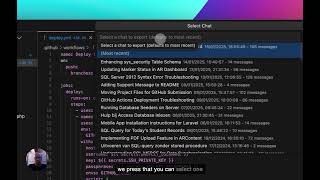
- Select a specific chat from conversation history, defaults to most recent
- Preserves conversation timestamps and structure
- Quick pick to choose between new tab or timestamped file
- Exported chat opens directly in VS Code
- Install by dropping cursor-convo-export.vsix onto Cursor's extension list
- No additional dependencies required
- Local export with no cloud dependency
- Command-not-found bug fixed for Windows and Mac in v1.0.2 (2025-01-24)
About Cursor Convo Export
Cursor Convo Export is a single-purpose Cursor AI extension that solves one recurring problem: losing a long AI chat. Cursor's chat panel occasionally stops responding mid-session, and copying a long thread out of the IDE by hand comes out garbled. The extension gives you a proper export path instead. Trigger it from the Command Palette (Ctrl+Shift+P on Windows and Linux, Cmd+Shift+P on Mac) or from the Export Chat button in the status bar, then choose whether to open the conversation in a new window or write it to a timestamped file. You can pick which chat from your history to export, and the most recent one is selected by default. Output preserves conversation timestamps and structure, so the result reads as an archive rather than a paste dump. Markdown was the original format; HTML export arrived on 2025-02-06 via the 'Cursor: Export Cursor Chat History as HTML' command. A 2025-01-24 release (v1.0.2) fixed the 'cursor-convo-export.exportChat not found' error on both Windows and Mac. Installation is a single .vsix file dropped onto Cursor's extension list — no extra dependencies. It sells as a one-time €7 license through the author's Gumroad store and runs entirely locally, which also means it only helps in the Cursor editor, not VS Code. The author notes two buyer-reported gaps: there is no bulk export across a project's chats, and exporting from a remote SSH session into a remote Ubuntu host fails with a 'state.vscdb not found' error because the extension cannot reach the remote global storage.
Behind the Verdict
The value here is small, specific, and real. Cursor's chat panel is where a lot of people do their actual thinking — deployment steps, architectural reasoning, trade-off discussions — and when that thread freezes, the work is stranded. Copy-pasting out of the IDE chat window is genuinely unreliable, which the author says outright on the store listing. This extension replaces that copy-paste with a command: 'Cursor: Export Chat History' opens the thread in a new window or writes a timestamped .md or .html file, timestamps and structure intact. That last detail is what separates it from a manual dump — you can re-read the archive months later and still follow the back-and-forth. Strengths: one-command operation, status-bar shortcut for repeat use, choice of most-recent or a specific chat from history, Markdown and HTML output, and a lightweight install (drop the .vsix onto the extension list; no dependencies). Weaknesses are documented by buyers on the listing itself. One reviewer wanted bulk export — everything in a given project or workspace — which the extension does not do. Another reported that on Windows 11 with a remote Ubuntu host over SSH, the export fails outright with 'state.vscdb not found in global storage'. Because the tool reads Cursor's local global storage, remote sessions are a genuine dead end rather than a config problem. It is also Cursor-only by design; the author flags that it does not work in VS Code. Where it fits: individual Cursor users who want a durable record of important AI conversations, and anyone who needs to restart a jammed thread by carrying context into a fresh one. Where it doesn't: teams wanting shared archives, anyone needing cloud sync, and remote-SSH-first workflows. Pricing is a one-time €7 purchase through Gumroad (listed at €7+, with the storefront showing the product is not currently for sale at the time of this scrape).
Researching Cursor Convo Export? Get your full AI stack in 60 seconds.
Free, no signup — tell us your goal and get tools matched to your budget & existing stack.
Real-world workflow fit
Concrete scenarios for the personas Cursor Convo Export actually fits — and what changes day-one when you adopt it.
After a long Cursor session produces deployment steps and architectural reasoning worth keeping, they hit the status bar 'Export Chat' button and save the thread to a timestamped Markdown file, keeping the newest chat as the default selection.
Outcome: They end the session with a readable .md archive of the AI's instructions on their local machine instead of a fragile copy-paste.
The chat panel freezes mid-task. They run 'Cursor: Export Chat History' from the Command Palette, open the conversation in a new window, and paste it into a fresh chat to carry context forward.
Outcome: Work continues in a new chat without re-explaining the task, and the original thread is preserved as a file.
They export a walkthrough or doc-draft conversation as HTML using 'Cursor: Export Cursor Chat History as HTML' so the structure and timestamps survive into their reference library.
Outcome: The conversation becomes a browsable HTML reference rather than a lost chat thread.
Use Cases
- Archive a long Cursor debugging session to Markdown so you can retrace the trail later.
- Save AI-generated deployment steps and architectural reasoning as a timestamped document.
- Restart a jammed Cursor chat by exporting the thread and carrying its context into a fresh one.
- Share an AI-generated solution with a colleague by exporting it to a new window.
- Keep HTML copies of code walkthroughs or documentation drafts generated in chat.
Limitations
- Scope is deliberately narrow.
- It runs inside Cursor AI only — the author states plainly that it does not work with VS Code.
- Export is one conversation at a time, and a buyer review asks specifically for bulk export of all chats in a project/workspace, which is not offered.
- Remote SSH sessions are a hard blocker: a buyer on Windows 11 connecting to a remote Ubuntu host reported the export command failing with 'Error accessing global storage: state.vscdb not found', because the extension reads Cursor's local global storage.
- Output formatting is limited to standard Markdown or HTML, with no advanced formatting beyond that.
- Files land locally, so there is no cloud sync or shared team archive.
as of 2026-09-27
Verification history
We have re-verified Cursor Convo Export 7 times since . Each pass re-reads the vendor's own pages and re-checks every listed field against that evidence; passes where nothing had changed are marked as such.
- — re-verified summary, description, our verdict, our analysis, pricing model, pricing tiers, features, integrations, who it suits, who should skip it
- — re-verified summary, description, our verdict, our analysis, pricing model, pricing tiers, features, integrations, who it suits, who should skip it
- — re-verified summary, description, our verdict, our analysis, pricing model, pricing tiers, features, integrations, who it suits, who should skip it
- — re-checked, vendor evidence unchanged
- — re-verified summary, description, our verdict, our analysis, pricing model, pricing tiers, features, integrations, who it suits, who should skip it
- — re-checked, vendor evidence unchanged
Showing the 6 most recent of 7 verification passes.
Free to cite with attribution — this page re-verifies continuously.
12-month cost
Project the real annual outlay, including the implied monthly cost when only an annual tier is published.
Vendor list price only. Add-on usage, seat overages, and contract minimums are surfaced under Hidden costs & gotchas.
Plans compared
For each published Cursor Convo Export tier: who it actually fits, and what it adds vs. the previous tier. Cross-reference the cost calculator above for projected annual outlay.
Single License
€7+ (one-time)
Ideal for
An individual Cursor user who wants a permanent way to save important AI chats to local Markdown or HTML files.
What this tier adds
Starting tier — a one-time €7 purchase covering the Cursor Convo Export extension, with no seat or usage tiers above it.
Where the pricing makes sense
The company stage and team size where Cursor Convo Export's pricing actually pencils out — and where peers do it cheaper.
A one-time €7 license (listed at €7+ on the author's Gumroad store, where the product showed as not currently for sale at the time of this scrape). That is a small add-on cost compared with the subscription editors Cursor users already pay for, but it buys a single-purpose utility — no team seats, no shared archives, and no bulk export, so larger teams will outgrow it quickly.
Setup time & first value
How long it actually takes to get something useful out of Cursor Convo Export — broken out by persona, not the marketing-page minute.
Fastest path is for existing Cursor users: download the .vsix from the Gumroad listing, drop it onto Cursor's extension list, then run 'Cursor: Export Chat History' from the Command Palette — typically a few minutes end to end. Remote-SSH users should budget time for troubleshooting, since export currently fails with a global-storage error on remote hosts.
Switching to or from Cursor Convo Export
How to bring data in from common predecessors and how to get it back out — written for the switcher, not the buyer.
- →From manual copy-paste out of the Cursor chat panel: install the .vsix and use 'Cursor: Export Chat History' to get clean, timestamped Markdown or HTML instead of a garbled dump.
- ↗To a bulk or team archiving tool: export individual chats to Markdown/HTML first, then upload those files to a system that handles many conversations and shared access.
Resources & Guides
Tutorials & Learning
YouTube returned 6 videos for “Cursor Convo Export”, and we withheld 5: 5 did not mention Cursor Convo Export. Showing the 1 we can prove is about Cursor Convo Export.
Official links
Featured Head-to-Head Comparisons
Cursor Convo Export vs Guesty
These tools serve entirely different purposes. Guesty is for vacation rental professionals who need AI-driven automation across booking channels; Cursor Convo Export is a niche utility for developers using Cursor AI. Choose Guesty if you manage properties; choose Cursor Convo Export if you need to backup Cursor chats. There is no direct competition.
Cursor Convo Export vs Poke Interaction Co
Choose Cursor Convo Export if you exclusively need to archive Cursor AI chats as markdown files; it's cheap and laser-focused. Pick Poke if you want a full AI assistant that manages your email, calendar, tasks, and health data from a messaging app — its free tier is generous, and recent integrations (Apple Messages, Notion) make it far more versatile.
Cursor Convo Export vs Gem
Gem and Cursor Convo Export serve entirely different purposes and are not direct competitors. Gem is a full-scale AI recruiting platform for talent acquisition teams, while Cursor Convo Export is a simple utility for Cursor AI users to save chats. Choose based on your need: hire better with AI (Gem) or archive AI conversations (Cursor Convo Export).
Popular in Code & Development

Bito
Bito's Governor is an AI model router and code context engine that cuts coding agent spend by grounding every request in your codebase.

Poolside AI
Open-weight agentic coding models — Laguna XS 2.1 and Laguna S 2.1 — built for secure on-prem and air-gapped enterprise AI.

Frequently Asked Questions
Categories
Best-of guides
Topics
Used Cursor Convo Export? Help shape our editorial sentiment research.