
Kapi Cam
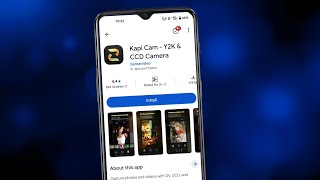
Kapi Cam shoots retro DV, CCD, and film-look video on your phone in one tap.
If the early-2000s camcorder look is the entire point of your clip, Kapi Cam is faster than grading DV artifacts by hand. It's a one-trick app, and that's fine, because the trick is the one you came for. Decide in the app store, not on a blog — we found nothing published this run about what the paid tier unlocks.
Verified 3d ago · liveness 62/100 · cite: rightaichoice.com/tools/kapi-cam
- Mobile creators who want retro DV or CCD looks without opening an editing suite
- Vloggers and travel shooters chasing early-2000s camcorder vibes for social feeds
- Nostalgia-driven users recording daily moments with a vintage twist
- Short-form creators who need a moody clip shot and posted in one sitting
- Videographers who need high-resolution output or pro-grade manual controls
- Anyone who needs desktop or web access to manage and re-edit footage
- Teams wanting an API or an automated retro-filter pipeline
We scan live Reddit threads, YouTube comments, X posts, G2 reviews and other communities — and hand you an honest verdict in under a minute.
- Honest verdict, not marketing
- Real pros & cons from real users
- Attributed quotes with receipts
3 free scans · no card needed
Skip Kapi Cam if you need high-resolution output, advanced manual controls, desktop editing, or transparent pricing and an active development history.
Since pricing tiers are not publicly disclosed, you may encounter in-app purchases for additional filters or features after download, with no clear upfront cost.
Freemium model with undisclosed pricing tiers; likely cheaper than professional editing suites but with less control, comparable to other retro filter apps like VHS Cam.
In short
Kapi Cam — Kapi Cam shoots retro DV, CCD, and film-look video on your phone in one tap. Best for Mobile creators who want retro DV or CCD looks without opening an editing suite, Vloggers and travel shooters chasing early-2000s camcorder vibes for social feeds, Nostalgia-driven users recording daily moments with a vintage twist. Free to use.
What people actually say about Kapi Cam — is it worth it?
We ran a structured research pass across product reviews, community discussions, and post-purchase forum threads to surface the patterns vendors won't publish themselves. Below: the recurring strengths, the hidden costs people mention most, and the cohort that consistently regrets adopting this tool.
42 mentions across 4 sources (YouTube, App Store, Bluesky, Lemmy) · researched Jul 16, 2026.
Average across the 4 sources that answered — each source counts once, not each post.
- +Filters are highly realistic, recreating authentic DV, CCD, and film looks.
- +Selfie settings boost user confidence with flattering vintage effects.
- +Free tier still offers a decent selection of usable cameras and filters.
- +One-tap shooting makes it easy for beginners to get retro aesthetics.
- +App provides a wide variety of visual styles beyond simple generic filters.
- −Popular filters like Nokia and 5S moved from free to paid unexpectedly.
- −Landscape video recording removed in a recent update.
- −Subscription auto-charge after free trial without clear warning.
- −One-time purchase option removed, leaving only expensive subscriptions.
- −Screenshot blocking popup interferes with normal app usage.
- • Auto-charge after free trial without clear warning
- • One-time purchase option removed; subscription only
- • Previously free filters now require payment
Viability Score
How well maintained and how widely used is Kapi Cam? Built from what the vendor actually publishes (docs, changelog, tutorials, integrations, pricing), whether the site is live, and how much real users discuss it. How we calculate this
Last calculated: October 2026
How we score →Key Features
- Real DV effect simulation for early-2000s camcorder footage
- Real CCD effect simulation with period-accurate color shift and grain
- Film effect simulation for analog-looking stills and clips
- Retro style filters applied in one tap while shooting
- Special effects for visual variety across clips
- Vintage picture texture and atmosphere baked in at capture
- One-tap shooting with no manual editing step
- Mobile app for iOS
- Mobile app for Android
- Capture retro videos and photos from the same camera interface
About Kapi Cam
Kapi Cam is a mobile camera app that recreates the look of early-2000s camcorders and film cameras. The effect is baked in at capture rather than assembled in an editing suite: you point your phone, shoot, and get the color shift, grain, and artifacts that made old DV and CCD footage instantly recognizable. It targets social-first creators, vloggers, and nostalgia chasers who want that atmosphere without a color-grading session. The product is built around simulation, not preset stickers. It advertises real DV effect simulation, real CCD effect simulation, and film effect simulation, plus retro style filters and special effects for variety. Vintage picture texture and atmosphere are the point of the app, not a bonus layer on top of a normal camera. The interaction model is deliberately small. One-tap shooting is the pitch, so there is very little between deciding to record and having a finished retro clip, and photos and video come out of the same camera interface. It ships as a mobile app for iOS and Android; nothing in our sources documents a desktop or web version, and no public API is named. Against a general-purpose camera app with a retro filter pack or a dedicated color-grading workflow, Kapi Cam narrows the job to one thing and does it at the moment of capture. That makes it a poor substitute for a real editing tool, but a fast one when the early-digital look is the whole idea.
Behind the Verdict
We'd reach for Kapi Cam when the retro look is the creative premise, not a filter choice made after the fact. Shoot a party, a drive, a walk through town and the DV or CCD texture is already there when the clip lands in your camera roll. No timeline, no LUT hunting, no render. Where it bites is the same place a lot of one-purpose capture apps bite: control. You're buying the look, not the dials. If you shoot anything where you need to fix exposure later, reframe, or re-grade the footage, capture-time effects are a liability rather than a shortcut. The closest alternative isn't another camera app with a retro pack bolted on — it's the editing route. Drop a modern clip into a grading tool and rebuild DV artifacts by hand, and you get more control and far more time spent. Kapi Cam trades that control for speed, and for short-form social work that's usually the right trade. In practice, treat it as a content app, not a camera replacement. Photos and video share one interface, shooting is one tap, and the delivery format is your phone's camera roll. That's the whole workflow, which is good news if you post from the phone and bad news if anything downstream needs a desktop. Two honest caveats. First, none of the sources we could reach this run — the vendor site didn't load and the pricing endpoint returned an error — publish a tier list, so we can't tell you what the paid version unlocks or what it costs. Check inside the app before committing. Second, the community signal we pulled this cycle (Kagi's paywall filter, OneCLI, Speko, Hoplite, SpinWin) says nothing about Kapi Cam, so we have no independent release news to report here. Everything above rests on the product's own description of its simulation features. Verify in the app store before you install.
Researching Kapi Cam? Get your full AI stack in 60 seconds.
Free, no signup — tell us your goal and get tools matched to your budget & existing stack.
Real-world workflow fit
Concrete scenarios for the personas Kapi Cam actually fits — and what changes day-one when you adopt it.
You want to capture a quick moment for your Instagram feed with a vintage DV look and then post it.
Outcome: Launch the app, point at your subject, tap the shutter, and apply a DV filter to get a retro clip ready to post.
You're recording a daily vlog and want the grainy, early-2000s camcorder vibe throughout.
Outcome: Use the app's one-tap shooting with a film effect to capture your vlog, giving it an authentic nostalgic feel without editing.
Use Cases
- Record short nostalgic clips with DV-style artifacts
- Capture daily moments with a vintage film look
- Create social media content with retro aesthetics
- Apply old-school CCD color profiles to video
- Shoot casual vlogs with vintage camera simulation
Limitations
- The app appears to be mobile-only with no disclosed API or desktop version.
- No information on pricing tiers, feature restrictions, or update history is available from the provided scrape.
- Limited to basic filters and effects; no manual controls or editing capabilities.
- Output resolution and format are unknown.
as of 2026-08-26
Verification history
We have re-verified Kapi Cam 12 times since . Each pass re-reads the vendor's own pages and re-checks every listed field against that evidence; passes where nothing had changed are marked as such.
- — re-verified summary, description, our verdict, our analysis, pricing model, pricing tiers, features, integrations, who it suits, who should skip it
- — re-verified summary, description, our verdict, our analysis, pricing model, pricing tiers, features, integrations, who it suits, who should skip it
- — re-verified summary, description, our verdict, our analysis, pricing model, pricing tiers, features, integrations, who it suits, who should skip it
- — re-verified summary, description, our verdict, our analysis, pricing model, pricing tiers, features, integrations, who it suits, who should skip it
- — re-verified summary, description, our verdict, our analysis, pricing model, pricing tiers, features, integrations, who it suits, who should skip it
- — re-verified summary, description, our verdict, our analysis, pricing model, pricing tiers, features, integrations, who it suits, who should skip it
Showing the 6 most recent of 12 verification passes.
Free to cite with attribution — this page re-verifies continuously.
Where the pricing makes sense
The company stage and team size where Kapi Cam's pricing actually pencils out — and where peers do it cheaper.
Freemium model with undisclosed pricing tiers; likely cheaper than professional editing suites but with less control, comparable to other retro filter apps like VHS Cam.
Setup time & first value
How long it actually takes to get something useful out of Kapi Cam — broken out by persona, not the marketing-page minute.
For casual creators, you can download the app and be shooting with retro filters in under 5 minutes. There are no account setups or complex settings, just tap and shoot.
Resources & Guides
Tutorials & Learning


Official links
Tools that pair well with Kapi Cam
Common stack mates teams adopt alongside Kapi Cam, with the specific reason each pairing earns its keep.

Glam AI
Glam AI turns one selfie into AI photoshoots, talking avatars, hairstyle try-ons, and trend-based short videos.

Toonapp
ToonApp turns a selfie into a cartoon or anime character and a still photo into a short video on iPhone and Android.

Face Filters
Face Filters is 360 Co's mobile app for one-tap AI selfie and video filters, built around whatever look is trending right now.
Featured Head-to-Head Comparisons
Kapi Cam vs Splice
If you produce music and need a vast library of royalty-free samples plus a way to own premium plugins like Serum 2 without upfront cost, Splice is the clear choice. If you're a mobile content creator wanting to add authentic vintage DV/CCD filters to your videos, Kapi Cam is a free, specialized tool. They serve completely different needs.
Kapi Cam vs Storyfile
If you need to preserve authentic human stories with interactive AI (like museum exhibits or family legacies), StoryFile is the only choice despite its enterprise pricing. If you want to add retro DV/CCD vibes to casual mobile videos for social media, Kapi Cam is free and easy. These tools serve completely different needs—choose based on whether you prioritize authenticity or aesthetics.
Kapi Cam vs Landr Mastering
If you need professional AI music mastering with album coherence and streaming optimization, LANDR Mastering is the clear choice. Kapi Cam is for casual social media creators who want quick retro video effects. They overlap only if you need both audio mastering and vintage video filters—otherwise, pick based on your primary need.
Alternatives to Kapi Cam
View all
Glam AI
Glam AI turns one selfie into AI photoshoots, talking avatars, hairstyle try-ons, and trend-based short videos.

Toonapp
ToonApp turns a selfie into a cartoon or anime character and a still photo into a short video on iPhone and Android.

Face Filters
Face Filters is 360 Co's mobile app for one-tap AI selfie and video filters, built around whatever look is trending right now.
Frequently Asked Questions
Categories
Used Kapi Cam? Help shape our editorial sentiment research.