Opendataloader Pdf is live · free plan; paid plans on request · last verified 30 Oct 2026 · viability monitor

Opendataloader Pdf
Open-source PDF parsing for RAG with bounding boxes, tables, and Markdown output
For teams building RAG on their own hardware, OpenDataLoader PDF earns its keep: deterministic CPU parsing at 0.015 s/page, page-level citations via bounding boxes, and a LangChain loader you can drop in. Watch the table score gap — 0.928 TEDS in hybrid mode versus 0.489 plain, so messy financial tables may justify the slower LLM pass. If you're not writing code, this isn't the tool.
Verdict generatedVerified 3h ago · liveness 61/100 · cite: rightaichoice.com/tools/opendataloader-pdf
- RAG developers who need page-level citations via bounding boxes
- Privacy-sensitive data teams that must keep PDFs on local infrastructure
- Accessibility teams working toward EAA, ADA, or Section 508 compliance
- Engineers who want deterministic CPU-only parsing instead of GPU clusters
- Teams that need a GUI-based document parsing tool
- Buyers expecting a managed cloud API with zero self-hosting
- Projects that require real-time streaming output
We scan live Reddit threads, YouTube comments, X posts, G2 reviews and other communities — and hand you an honest verdict in under a minute.
- Honest verdict, not marketing
- Real pros & cons from real users
- Attributed quotes with receipts
3 free scans · no card needed
Skip OpenDataLoader PDF if you need a visual interface or a managed cloud parsing endpoint rather than a library you call from Python, Node.js, Java, or CLI code.
Hybrid mode is much slower than the default path (0.463 s/page vs 0.015 s/page), so enabling LLM-assisted OCR and complex-table handling means more CPU-hours for the same document volume.
The parsing library is Apache-2.0 and free, which undercuts per-page cloud parsers entirely for teams with their own compute. Hybrid OCR and complex-table handling cost you CPU time rather than license fees. The paid surface is the accessibility track — free audit and free auto-tagging, with PDF/UA export and the Accessibility Workspace on an Enterprise tier. Compare Docling and Marker, which are also open source, on throughput and table accuracy before you commit engineering time.
In short
Opendataloader Pdf — Open-source PDF parsing for RAG with bounding boxes, tables, and Markdown output. Best for RAG developers who need page-level citations via bounding boxes, Privacy-sensitive data teams that must keep PDFs on local infrastructure, Accessibility teams working toward EAA, ADA, or Section 508 compliance. Free to start; it also has paid plans whose price we could not confirm — see the pricing table.
What is Opendataloader Pdf?
Opendataloader Pdf — Open-source PDF parsing for RAG with bounding boxes, tables, and Markdown output. Best for RAG developers who need page-level citations via bounding boxes, Privacy-sensitive data teams that must keep PDFs on local infrastructure, Accessibility teams working toward EAA, ADA, or Section 508 compliance. Free to start; it also has paid plans whose price we could not confirm — see the pricing table.
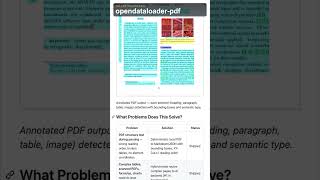
OpenDataLoader PDF is an Apache-2.0 library and CLI that turns raw PDFs into structured JSON, HTML, Markdown, or tagged PDF ready for AI ingestion and accessibility remediation. It attaches a semantic type (heading, paragraph, table, list, image, caption), a page number, and [x1, y1, x2, y2] bounding-box coordinates to every element, so you can cite sources and highlight answers back in the original document. The XY-Cut++ sequence model keeps multi-column layouts in human reading order, and the table extractor detects borders, clusters text into rows and columns, and handles merged cells.
Key features
- XY-Cut++ reading order sequencing for multi-column PDF layouts
- Bounding box coordinates ([x1, y1, x2, y2]) on every extracted element
- 1-indexed page number attached to each element for citations
- Table extraction with border detection, row/column clustering, merged cells
- Hybrid OCR supporting 80+ languages
- Optional LLM enhancement for OCR and complex tables (hybrid mode)
- JSON output with semantic element types (heading, paragraph, table, list, image, caption)
- Markdown and HTML output for LLM ingestion
- PDF accessibility auto-tagging to screen-reader-ready Tagged PDF
- Free audit to detect untagged PDFs
- AI safety filters: hidden text, off-page content, prompt injection detection
- Noise filtering for headers, footers, and watermarks
- Deterministic output on repeated runs
- Local CPU processing with no cloud dependency and no GPU
- Python, Node.js, Java, and Docker SDKs plus CLI
Behind the verdict
Where OpenDataLoader PDF earns its place is the citation layer. Bounding boxes plus page numbers on every element mean your RAG answers can link straight back into the source PDF, which most open-source parsers treat as an afterthought. If audit trails or user verification matter to your product, that alone is worth the install. The split between the two parsing modes is the decision that actually matters. Plain mode runs at 0.015 s/page on CPU and is fine for clean, well-structured documents. Hybrid mode drops to 0.463 s/page but lifts table accuracy from 0.489 to 0.928 TEDS in the vendor's benchmarks. For invoices, financial statements, or spec sheets, we'd reach for hybrid every time. For a million-page backfill of straightforward text, hybrid is a waste of compute. Against the closest alternatives, the tradeoff is visible in the published numbers. Docling actually edges OpenDataLoader on heading detection (0.824 vs 0.821 hybrid). Nutrient is faster at 0.008 s/page. Marker trails badly on speed in this benchmark at 53.9 s/page. None of those numbers come from a neutral third party, so treat the ordering as directional and run your own corpus through two or three before committing. The accessibility pipeline is a second product hiding inside the first. Tagged PDF generation developed with Hancom and Dual Lab, validated with veraPDF, targets the EAA deadline that hit in June 2025 along with ADA and Section 508. Free audit and free auto-tagging cover a lot of ground; PDF/UA export and the visual editing workspace sit behind the Enterprise tier. In practice, the friction is setup. There's no hosted endpoint, so you own the runtime, the OCR language packs, and the failure modes. Prompt-injection filtering and hidden-text stripping are built in, which is more than
Limitations
- OpenDataLoader PDF is a local, rule-based CPU parser, so you integrate it through its Python, Node.js, or Java SDKs or the CLI rather than through a managed web service.
- There is no GUI — the Accessibility Workspace for visual tag review is part of the Enterprise accessibility track, not the parsing library.
- Hybrid mode is optional and materially slower than the default path (0.463 s/page vs 0.015 s/page in the published benchmarks), so enabling it changes your throughput budget.
- The project documents no SLA and no support details for the Apache-2.0 core.
- If you need a hosted endpoint or a no-code workflow, this is the wrong shape of tool.
as of 2026-10-10
Researching Opendataloader Pdf? Get your full AI stack in 60 seconds.
Free, no signup — tell us your goal and get tools matched to your budget & existing stack.
Is Opendataloader Pdf still active?
Opendataloader Pdf is live · free plan; paid plans on request · last verified 30 Oct 2026 · viability monitor.
Viability score
How well maintained and how widely used is Opendataloader Pdf? Built from what the vendor actually publishes (docs, changelog, tutorials, integrations, pricing), whether the site is live, and how much real users discuss it. How we calculate this
Last calculated: October 2026
How we score →What do users say about Opendataloader Pdf?
What people actually say about Opendataloader Pdf — is it worth it?
Our community sentiment research written Jul 3, 2026 is more than 90 days old, so it is being re-reviewed against current data and is not shown.
How we verified this
Every listed fact about Opendataloader Pdf— pricing, features, links, status — is re-read from the vendor's own pages by our verification pipeline and each change is logged with a date; the last pass ran on 30 Oct 2026. Pages mix model-assisted synthesis with human review; see how we verify.
Verification history
We have re-verified Opendataloader Pdf 12 times since . Each pass re-reads the vendor's own pages and re-checks every listed field against that evidence; passes where nothing had changed are marked as such.
- — changed description, pricing tiers, who should skip it, who it suits, features, summary, our verdict
- — changed features, pricing fit, switching out, description, use cases, summary, our verdict, who should skip it, setup time, hidden costs, limitations, switching in
- — changed summary, pricing tiers, description, our verdict
- — changed limitations
- — changed our verdict, setup time, switching in, description, limitations, switching out, summary, who should skip it, features, pricing fit, hidden costs, pricing tiers
- — changed domain expiry
Showing the 6 most recent of 12 verification passes.
Free to cite with attribution — this page re-verifies continuously.
How much does Opendataloader Pdf cost in 2026?
Opendataloader Pdf: Free to start; it also has paid plans whose price we could not confirm — see the pricing table. Pricing last verified 30 Oct 2026.
Plans compared
Every published Opendataloader Pdf tier, its price as the vendor publishes it, who it fits, and what it adds over the tier below. The 12-month cost projection follows.
| Plan | Price | Billing | Who it's for |
|---|---|---|---|
| Open Source (Apache-2.0) | Free | — | Developers and RAG teams that have their own compute and want full PDF parsing, OCR, and structured output without paying per page.Adds: Starting tier — PDF parsing to JSON, Markdown, and HTML with bounding boxes, table extraction, hybrid OCR, and the LangChain integration at no cost. |
| Auto-Tag (Free, Apache 2.0) | Free | — | — |
| Enterprise | Custom | quote | Organizations that must ship PDF/UA-conformant documents and need visual tag review rather than raw auto-tag output.Adds: Adds export to PDF/UA-1 or PDF/UA-2 compliant files and the Accessibility Workspace for visual editing and tag review. |
12-month cost
Project the real annual outlay, including the implied monthly cost when only an annual tier is published.
Vendor list price only. Add-on usage, seat overages, and contract minimums are surfaced under Hidden costs & gotchas.
Where the pricing makes sense
The company stage and team size where Opendataloader Pdf's pricing actually pencils out — and where peers do it cheaper.
The parsing library is Apache-2.0 and free, which undercuts per-page cloud parsers entirely for teams with their own compute. Hybrid OCR and complex-table handling cost you CPU time rather than license fees. The paid surface is the accessibility track — free audit and free auto-tagging, with PDF/UA export and the Accessibility Workspace on an Enterprise tier. Compare Docling and Marker, which are also open source, on throughput and table accuracy before you commit engineering time.
Has Opendataloader Pdf's pricing changed?
No plan price for Opendataloader Pdf has moved since we began logging in Aug 2026; the pricing page is re-read on every verification pass.
Who should pick Opendataloader Pdf?
Pick Opendataloader Pdf if you are RAG developers who need page-level citations via bounding boxes, Privacy-sensitive data teams that must keep PDFs on local infrastructure, Accessibility teams working toward EAA, ADA, or Section 508 compliance, Engineers who want deterministic CPU-only parsing instead of GPU clusters.
Look elsewhere if you are Teams that need a GUI-based document parsing tool, Buyers expecting a managed cloud API with zero self-hosting, Projects that require real-time streaming output, Non-coders wanting a no-code document converter.
Skip it if Skip OpenDataLoader PDF if you need a visual interface or a managed cloud parsing endpoint rather than a library you call from Python, Node.js, Java, or CLI code.
GeneratedReal-world workflow fit
Concrete scenarios for the personas Opendataloader Pdf actually fits — and what changes day-one when you adopt it.
You pip install opendataloader-pdf and run convert() over a folder of financial PDFs, outputting JSON with semantic types, page numbers, and bounding boxes; then load the output through the official langchain-opendataloader-pdf document loader.
Outcome: A citation-anchored corpus where every retrieved chunk points back to an exact page and [x1, y1, x2, y2] region of the source PDF.
You point the free audit at your existing PDF library to detect untagged files, run the Apache-2.0 auto-tag generator on them, and validate output against PDF Association specifications with veraPDF.
Outcome: Untagged PDFs become screen-reader-ready Tagged PDFs, so you can scope manual remediation to the files that actually need it.
You run PDF-to-Markdown at 100+ pages/sec with batch parallelism on CPU, using XY-Cut++ reading order and the noise filters to strip headers, footers, and watermarks before output.
Outcome: Clean multi-column Markdown training data at high throughput without renting GPU time.
Use cases
- Extract structured JSON from financial PDFs for RAG-based question answering.
- Auto-tag legal documents for Section 508 accessibility compliance.
- Build citation-anchored knowledge bases with bounding box coordinates.
- Parse multi-column scientific articles into clean Markdown for LLM fine-tuning.
- Filter and sanitize PDF content for AI safety (remove hidden text, injection attempts).
- Transform scanned invoices into structured data using hybrid OCR and table detection.
- Feed PDF-to-Markdown conversions into a LangChain document loader at 100+ pages/sec.
Setup time & first value
How long it actually takes to get something useful out of Opendataloader Pdf — broken out by persona, not the marketing-page minute.
Python developers: roughly one minute — pip install -U opendataloader-pdf, then a convert() call with input_path, output_dir, and format. Node.js, Java, and Docker users: equivalent to a package or image install plus an SDK call. LangChain users: add langchain-opendataloader-pdf and wire the document loader. Teams working the accessibility track start with the free audit before any tagging work.
Switching to or from Opendataloader Pdf
How to bring data in from common predecessors and how to get it back out — written for the switcher, not the buyer.
- →From PyMuPDF4LLM: swap the conversion call for opendataloader_pdf.convert() to gain XY-Cut++ reading order and per-element bounding boxes.
- →From MarkItDown: replace the extractor with the OpenDataLoader SDK when you need table structure and citation coordinates, not just plain text.
- →From Unstructured: move to the local CPU path for deterministic output and no cloud transmission.
- →From a cloud PDF API: run opendataloader-pdf locally so documents never leave your machine.
- →From manual PDF remediation: start with the free audit to identify which PDFs are untagged.
- ↗To Docling: switch if you want a Python library that leans on GPU acceleration instead of CPU-only heuristics.
- ↗To Marker: switch if GPU-assisted conversion fits your infrastructure better than the CPU-first path.
- ↗To Nutrient: move if you need a GUI workflow or a managed service rather than a library.
- ↗To a cloud PDF parser: move if you want a hosted endpoint instead of self-hosting.
Integrations
Resources & guides
- Documentationopendataloader.org
Docs · Opendataloader Pdf
Full product docs from opendataloader.org
- Quickstartopendataloader.org
Quick Start Python · Opendataloader Pdf
Get up and running fast from opendataloader.org
- Quickstartopendataloader.org
Quick Start Java · Opendataloader Pdf
Get up and running fast from opendataloader.org
- Quickstartopendataloader.org
Quick Start Nodejs · Opendataloader Pdf
Get up and running fast from opendataloader.org
- Documentationopendataloader.org
Rag Integration · Opendataloader Pdf
Full product docs from opendataloader.org
- Documentationopendataloader.org
Ai Safety · Opendataloader Pdf
Full product docs from opendataloader.org
Tutorials & Learning

PDF資料で悩むことがもう無くなる?OpenDataLoader PDFというツールの実力!
勉強中のYui丸
OpenDataLoader-PDFでPDFからすべてを抽出 #opensource #ai #github #ocr
Build Things With AI
OpenDataLoader PDF:RAGパイプライン向けオープンソースPDFパーサー(ローカル環境、GPU不要)
Fahd Mirza
YouTube returned 6 videos for “Opendataloader Pdf”, and we withheld 1: 1 did not mention Opendataloader Pdf. Showing the 5 we can prove are about Opendataloader Pdf.
Official links
What are the best Opendataloader Pdf alternatives?
The closest alternatives to Opendataloader Pdf we list are LlamaParse, Xberg and Sieves. Ranked by direct product-type match, not category overlap.
| Alternative | Pricing | Starts at | Last verified |
|---|---|---|---|
| LlamaParse | Freemium | Pricing not published | — |
| Xberg | Freemium | Pricing not published | — |
| Sieves | Free | Free | — |
Alternatives to Opendataloader Pdf
View all
LlamaParse
LlamaParse is a document parsing API that turns scanned PDFs, dense tables, and handwriting into AI-ready markdown or schema-bound JSON.


Tools that pair well with Opendataloader Pdf
Common stack mates teams adopt alongside Opendataloader Pdf, with the specific reason each pairing earns its keep.

LlamaParse
LlamaParse is a document parsing API that turns scanned PDFs, dense tables, and handwriting into AI-ready markdown or schema-bound JSON.

Xberg
Xberg is an open-source content intelligence engine that turns 107 document, web, code, image and audio formats into clean Markdown and

Sieves
Open-source Python library for zero-shot document AI, chaining NLP tasks into validated, schema-conformant output without training data.
Opendataloader Pdf vs its closest rival
Opendataloader Pdf's closest head-to-head is with Spider Cloud — For RAG pipelines needing fresh web content, Spider Cloud is your go-to; for offline PDF extraction at blazing speed with top accuracy and privacy, Opendataloader Pdf wins. Choose based on data source: live web vs. local PDF. Verdict generated
Head-to-head comparisons
Opendataloader Pdf vs Spider Cloud
For RAG pipelines needing fresh web content, Spider Cloud is your go-to; for offline PDF extraction at blazing speed with top accuracy and privacy, Opendataloader Pdf wins. Choose based on data source: live web vs. local PDF.
GeneratedOpendataloader Pdf vs Temporal Ai
These tools solve completely different problems. Temporal AI is a durable execution engine for orchestrating AI agents and microservices with reliability, while Opendataloader Pdf is a high-speed PDF parser for RAG pipelines. Choose Temporal if you need robust workflow recovery and human-in-the-loop for complex tasks; choose Opendataloader if you need fast, local, deterministic PDF extraction for LLM ingestion.
GeneratedOpendataloader Pdf vs Screenplayiq
If you're a screenwriter or producer needing data-driven script analysis and box office predictions, ScreenplayIQ is the dedicated choice. For developers building RAG pipelines or needing high-speed, privacy-preserving PDF parsing, Opendataloader Pdf is free, deterministic, and top-performing. They serve entirely different verticals—choose based on your domain.
GeneratedFrequently asked questions
Used Opendataloader Pdf? Help shape our editorial sentiment research.