PDF Pals
Chat with PDFs on Mac using your own AI API key, with answers cited back to source pages.
For Mac users whose PDFs shouldn't leave the machine, PDF Pals makes a lot of sense — the no-upload architecture and Keychain-stored keys are the real draw, not marketing decoration. Budget for your own API usage, since the app gives you zero bundled credits, and accept that it's a solo desktop tool with no Windows build and no team workspaces. If either of those is a dealbreaker, ChatPDF or Acrobat AI Assistant will fit better.
Verified 20h ago · liveness 81/100 · cite: rightaichoice.com/tools/pdf-pals
- Security-conscious Mac users handling sensitive PDFs in legal, healthcare, or finance
- Academic researchers comparing papers and checking math-heavy LaTeX rendering
- Legal professionals reviewing contracts and case files with scanned pages
- Developers reading technical documentation and specifications
- Windows or Linux users — this is macOS Ventura 13+ only
- Teams needing cloud collaboration or shared workspaces
- Anyone wanting bundled AI credits — you supply your own API key
We scan live Reddit threads, YouTube comments, X posts, G2 reviews and other communities — and hand you an honest verdict in under a minute.
- Honest verdict, not marketing
- Real pros & cons from real users
- Attributed quotes with receipts
3 free scans · no card needed
Skip PDF Pals if you're on Windows or Linux, need a shared cloud workspace, or want built-in AI credits included — it's a Mac-only app that requires your own API key.
The $49 license doesn't include any AI usage — you pay your provider separately for every token, and heavy PDF indexing can add up quickly.
At $49 one-time, PDF Pals sits well below subscription rivals like ChatPDF or Acrobat AI Assistant, which charge monthly. It fits individual professionals and small firms comfortable bringing their own API key. Teams needing bundled credits or shared seats should expect to pay more elsewhere — PDF Pals has no team or enterprise tier.
In short
PDF Pals — Chat with PDFs on Mac using your own AI API key, with answers cited back to source pages. Best for Security-conscious Mac users handling sensitive PDFs in legal, healthcare, or finance, Academic researchers comparing papers and checking math-heavy LaTeX rendering, Legal professionals reviewing contracts and case files with scanned pages. Free to start; paid plans from $49.
What's new in PDF Pals
Checked todayAcross the latest 4 updates: 4 feature updates.
v1.7.0: Auto-fetch models, Anthropic Claude 3 vision support, new chat UI
Adds automatic model fetching from OpenAI, OpenRouter, Groq, Mistral, and Perplexity, plus Anthropic Claude 3 support with vision, a faster chat message list, and improved LaTeX rendering.
v1.6.0: Prompt Library, local models via Ollama, Groq support
Introduces a Prompt Library, native local AI models through Ollama, Groq integration, configurable parallel indexing tasks, and custom user instructions.
v1.5.0: GPT-4 Vision, ShotSolve, Mistral/Perplexity/Together AI support
Adds GPT-4 Vision and ShotSolve screenshot querying, support for Mistral AI, Perplexity, and Together AI, plus custom OpenAI-compatible server support via LocalAI and LM Studio.
v1.4.0: Text-to-speech, speech-to-text, PDF search, chat export
Adds text-to-speech and speech-to-text via OpenAI API, PDF search and navigation, a workspace switcher, highlighted-text prompting, and export to HTML, Markdown, or JSON.
What people actually say about PDF Pals — is it worth it?
We scanned public community sources for PDF Pals on Aug 14, 2026 and could not establish that the discussion we found is about this tool rather than something else sharing its name. Our own analysis of that scan says the posts were off-subject. Rather than publish a sentiment score built on the wrong subject, we publish nothing here and re-run the scan.
Viability Score
How well maintained and how widely used is PDF Pals? Built from what the vendor actually publishes (docs, changelog, tutorials, integrations, pricing), whether the site is live, and how much real users discuss it. How we calculate this
Last calculated: October 2026
How we score →Key Features
- Chat with multiple PDFs simultaneously
- Answers with citations back to source pages
- No file size limit on PDFs
- OCR for scanned PDFs and complex PDF forms
- Local storage with no cloud vector database
- Bring your own API key from OpenAI, Azure OpenAI Service, or OpenRouter
- Anthropic Claude 3 support with vision
- Auto-fetch models from OpenAI, OpenRouter, Groq, Mistral, and Perplexity
- GPT-4 Vision and ShotSolve screenshot querying
- Text-to-speech and speech-to-text via OpenAI API
- Local AI models via Ollama, LocalAI, and LM Studio Inference Server
- PDF search and page navigation
- Highlighted text and PDF page content prompting
- Export chat to HTML, Markdown, or JSON (OpenAI finetuning compatible)
- Prompt Library with custom user instructions
About PDF Pals
PDF Pals is a native macOS app for chatting with PDFs without uploading them anywhere. Open one or several documents, ask questions in plain language, and get answers that link back to the specific source pages behind them. It's built in Swift (the vendor jokingly notes it is not another 500MB Electron app), carries no file size limit, and needs no account to start. A built-in OCR engine handles scanned PDFs and complex forms so image-heavy files become searchable and chat-ready. You bring your own API key or rent one. Supported providers include OpenAI, Azure OpenAI Service, OpenRouter, Anthropic, Mistral, Groq, Perplexity, and Together AI, plus fully local models via Ollama, LocalAI, or an LM Studio inference server. Version 1.7.0 added automatic model fetching from OpenAI, OpenRouter, Groq, Mistral, and Perplexity, Anthropic Claude 3 support with vision, a faster chat UI, and improved LaTeX rendering — handy for math-heavy research papers. Privacy is the pitch: documents stay on your Mac, there's no cloud vector database, your API key lives in the Apple Keychain, and the app ships with no in-app analytics. All training data sits in a local SQLite database you can back up yourself. Extras include a Prompt Library with custom instructions, configurable model parameters, PDF search and navigation, highlighted-text prompting, and export to HTML, Markdown, or JSON. It targets professionals who handle sensitive or very large PDFs — legal, healthcare, finance, research, and developers working through technical docs. Against cloud-first options like ChatPDF or Acrobat AI Assistant, the trade is clear: you give up browser access, cross-platform reach, and bundled AI credits in exchange for local processing and multi-provider flexibility.
Behind the Verdict
Where PDF Pals wins is the combination of local storage and provider freedom. Your files never transit a vendor server, there's no cloud vector database to leak, and you can point it at OpenAI, Anthropic, Groq, or a local Ollama model depending on how much you trust the cloud that day. That flexibility matters if you already pay for one provider and don't want a second subscription stacked on top. Pick this if you're on macOS Ventura 13+ and regularly wrangle long documents — contracts, case files, papers, spec sheets. The cited source pages are the feature I'd actually use daily; jumping straight to the paragraph that produced an answer beats scrolling 200 pages hunting for context. OCR for scans and the absence of a file size cap make it viable for the messy, oversized PDFs that break browser tools. Pass if you need to work across Windows, Linux, or a browser tab, or if "no account required" sounds less appealing than a shared team library. There's no cloud collaboration, no shared workspace, and no cross-device sync in anything the vendor documents. Everything lives on the one Mac it's installed on. The test I'd run before paying is the same for any bring-your-own-key tool: your real cost is your API bill, not the license. A long legal PDF or a dense research paper can burn tokens fast, and the vendor says as much about processing large documents. Estimate your usage on a couple of representative files first. The closest alternative depends on what you'd give up. ChatPDF and Acrobat AI Assistant trade privacy and provider choice for convenience, bundled AI, and multi-platform access. Local-first Mac apps like BoltAI (same maker) live in a similar orbit but serve different workflows — PDF Pals is the one purpose-built for reading and interrogating documents.
Researching PDF Pals? Get your full AI stack in 60 seconds.
Free, no signup — tell us your goal and get tools matched to your budget & existing stack.
Real-world workflow fit
Concrete scenarios for the personas PDF Pals actually fits — and what changes day-one when you adopt it.
You open a folder of scanned contracts and deposition PDFs in PDF Pals, run OCR on the ones that need it, and ask the app to pull every clause mentioning indemnification across all files at once.
Outcome: You get a cross-document answer with page references in minutes, without any client document ever leaving your Mac, and export the result as Markdown for the case file.
You load five paywalled papers into a single chat, set a custom system prompt asking for methodology comparisons, and use LaTeX rendering to read equations cleanly.
Outcome: You walk away with a synthesized comparison and a reusable Prompt Library entry you can rerun on the next batch of papers.
You drop a 900-page framework spec and several API docs into PDF Pals, point it at your own OpenAI key, and ask targeted questions about specific methods.
Outcome: You get code snippets and page references without context-switching to a browser tab, and export the session as JSON to keep alongside your project notes.
Use Cases
- Summarize a 200-page research report in minutes.
- Extract key clauses from multiple contracts simultaneously.
- Query technical documentation for code snippets.
- Compare findings across several PDFs for due diligence.
- Ask questions about scanned textbooks or handwritten forms.
- Export chat summaries for team sharing or record-keeping.
- Use voice input to ask questions hands-free with speech-to-text.
Models Under the Hood
as of 2026-09-23
Limitations
- PDF Pals is a native macOS app requiring macOS Ventura 13 or later, so Windows and Linux users can't run it.
- You must bring your own API key from a supported provider (OpenAI, Azure OpenAI Service, OpenRouter, Anthropic, Mistral, Groq, Perplexity, Together AI) or rent one; there is no built-in free tier of AI credits.
- All documents and chat history are stored locally in a SQLite database, so there is no cloud sync or shared team workspace.
- There is no file size limit for PDFs.
as of 2026-09-14
Verification history
We have re-verified PDF Pals 8 times since . Each pass re-reads the vendor's own pages and re-checks every listed field against that evidence; passes where nothing had changed are marked as such.
- — re-verified summary, description, our verdict, our analysis, pricing model, pricing tiers, features, integrations, who it suits, who should skip it
- — re-verified summary, description, our verdict, our analysis, pricing model, pricing tiers, features, integrations, who it suits, who should skip it
- — re-verified summary, description, our verdict, our analysis, pricing model, pricing tiers, features, integrations, who it suits, who should skip it
- — re-verified summary, description, our verdict, our analysis, pricing model, pricing tiers, features, integrations, who it suits, who should skip it
- — re-verified summary, description, our verdict, our analysis, pricing model, pricing tiers, features, integrations, who it suits, who should skip it
- — re-verified summary, description, our verdict, our analysis, pricing model, pricing tiers, features, integrations, who it suits, who should skip it
Showing the 6 most recent of 8 verification passes.
Free to cite with attribution — this page re-verifies continuously.
12-month cost
Project the real annual outlay, including the implied monthly cost when only an annual tier is published.
Vendor list price only. Add-on usage, seat overages, and contract minimums are surfaced under Hidden costs & gotchas.
Plans compared
For each published PDF Pals tier: who it actually fits, and what it adds vs. the previous tier. Cross-reference the cost calculator above for projected annual outlay.
Free Trial
Free
Lifetime License
$49 one-time
Ideal for
Individual Mac users who handle sensitive or very large PDFs and want a one-time purchase instead of a subscription.
What this tier adds
One-time $49 purchase with chat across multiple PDFs, no file size limit, OCR, multi-provider API support, Prompt Library, and export options.
Where the pricing makes sense
The company stage and team size where PDF Pals's pricing actually pencils out — and where peers do it cheaper.
At $49 one-time, PDF Pals sits well below subscription rivals like ChatPDF or Acrobat AI Assistant, which charge monthly. It fits individual professionals and small firms comfortable bringing their own API key. Teams needing bundled credits or shared seats should expect to pay more elsewhere — PDF Pals has no team or enterprise tier.
Setup time & first value
How long it actually takes to get something useful out of PDF Pals — broken out by persona, not the marketing-page minute.
For most users, setup is under 10 minutes: download the app, paste in your API key, and start chatting — no account required. If you opt for local models via Ollama or LM Studio, budget closer to 30–60 minutes for installing and configuring the inference server. Teams evaluating indexing strategy options should allow an extra session to tune accuracy versus speed.
Switching to or from PDF Pals
How to bring data in from common predecessors and how to get it back out — written for the switcher, not the buyer.
- →From ChatPDF: download PDF Pals, add your API key, and open the same PDFs locally — no re-upload to a cloud service required.
- →From Acrobat AI Assistant: export your reference PDFs, open them in PDF Pals, and use the Prompt Library to recreate recurring prompts.
- →From a manual PDF workflow: drag existing PDFs into PDF Pals and use OCR for scanned files to make them chat-ready.
- ↗To ChatPDF: upload your PDFs to the browser service and rebuild prompts manually — PDF Pals chat history exports as Markdown or JSON for reference.
- ↗To Acrobat AI Assistant: open the same PDFs in Acrobat and re-ask questions; exported PDF Pals sessions can serve as a record.
- ↗To a local LLM stack: point an Ollama or LM Studio server at your documents directly if you want to leave the app but keep local processing.
Integrations
Resources & Guides
Tutorials & Learning
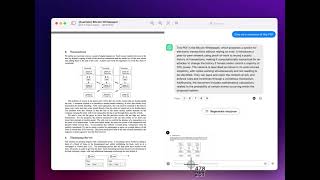
YouTube returned 6 videos for “PDF Pals”, and we withheld 4: 4 did not mention PDF Pals. Showing the 2 we can prove are about PDF Pals.
Official links
Tools that pair well with PDF Pals
Common stack mates teams adopt alongside PDF Pals, with the specific reason each pairing earns its keep.

Humata AI
Humata AI reads your PDFs and answers questions with highlighted citations back to the exact source section.

ChatPDF
ChatPDF turns any PDF into a chat partner: ask questions, get cited answers, summaries, and translations in seconds.

AskYourPdf
Chat with PDFs in plain language, auto-fill any PDF form from your own documents, and embed a website AI agent trained on your content.
Featured Head-to-Head Comparisons
Pdf Pals vs Surge Ai
Surge AI and PDF Pals serve entirely different needs. Surge AI is a high-end human feedback platform for training frontier models, used by Microsoft and AI labs—pricing is custom and high. PDF Pals is a cheap, self-serve macOS app for chatting with PDFs locally. Buy Surge if you need expert RLHF data; buy PDF Pals if you need to analyze documents on your Mac.
Pdf Pals vs Praktika
If you're a language learner focused on speaking fluency, Praktika's AI tutors offer immersive conversation practice with instant feedback. For professionals needing secure document analysis, PDF Pals provides local, private chat with any PDF and supports a wide range of AI models. Choose based on your core need: language practice vs. document interrogation.
Alternatives to PDF Pals
View all
Humata AI
Humata AI reads your PDFs and answers questions with highlighted citations back to the exact source section.

ChatPDF
ChatPDF turns any PDF into a chat partner: ask questions, get cited answers, summaries, and translations in seconds.

AskYourPdf
Chat with PDFs in plain language, auto-fill any PDF form from your own documents, and embed a website AI agent trained on your content.
Frequently Asked Questions
Best-of guides
Topics
Used PDF Pals? Help shape our editorial sentiment research.