
Anything World
Text-to-3D generation and auto-rigging that turns prompts or uploaded models into animated Unity assets.
If you build in Unity and need animated 3D assets fast, Everything Universe is one of the more direct routes there. The free Individual tier and the $50/month Micro plan undercut most AI-3D services, and unlimited models and animations on every tier means you're never counting generations. Go in knowing two things: the output is prototype-grade rather than final-polish, and the SDK story is Unity-first with Blender as the other documented destination. Pick it when speed to a playable scene matters more than frame-by-frame control. If you need Unreal or Godot, or hero-scene deformation fidelity, budget elsewhere.
Verified 14d ago · liveness 63/100 · cite: rightaichoice.com/tools/anything-world
- Indie Unity developers who need animated 3D assets quickly for prototyping and grey-boxing
- Students and hobbyists who want a free entry point to AI-generated 3D models
- Small studios (under $200K) needing five seats of unlimited 3D generation at $50/month
- Creators generating 3D models from text prompts without a 3D artist on the team
- Developers building in Unreal, Godot, or other non-Unity engines
- Artists who need frame-by-frame manual animation control and precise deformation
- Workflows requiring offline or local processing — generation runs in the cloud
We scan live Reddit threads, YouTube comments, X posts, G2 reviews and other communities — and hand you an honest verdict in under a minute.
- Honest verdict, not marketing
- Real pros & cons from real users
- Attributed quotes with receipts
3 free scans · no card needed
Skip Everything Universe if your project targets Unreal or Godot rather than Unity, or if you need offline generation or frame-by-frame manual animation control for final-polish assets.
Tiers are gated by revenue or funding, not seats — crossing $200K pushes you from $50/month Micro to $250/month Pro even if you still only need five seats.
For a one-person Unity project the $0 Individual tier is genuinely free, and a five-person studio pays $50/month on Micro — cheaper than most AI-3D services. Pro at $250/month for ten seats is aimed at studios under $4M in revenue or funding. Above that, Enterprise is custom, so larger organisations should compare against engine-native or freelance rigging pipelines on a per-asset basis.
In short
Anything World — Text-to-3D generation and auto-rigging that turns prompts or uploaded models into animated Unity assets. Best for Indie Unity developers who need animated 3D assets quickly for prototyping and grey-boxing, Students and hobbyists who want a free entry point to AI-generated 3D models, Small studios (under $200K) needing five seats of unlimited 3D generation at $50/month. Free to start; paid plans from $50/mo.
What people actually say about Anything World — is it worth it?
We scanned public community sources for Anything World on Jul 27, 2026 and could not establish that the discussion we found is about this tool rather than something else sharing its name. Our own analysis of that scan says the posts were off-subject. Rather than publish a sentiment score built on the wrong subject, we publish nothing here and re-run the scan.
Viability Score
How well maintained and how widely used is Anything World? Built from what the vendor actually publishes (docs, changelog, tutorials, integrations, pricing), whether the site is live, and how much real users discuss it. How we calculate this
Last calculated: October 2026
How we score →Key Features
- Generate Anything: text-to-3D model generation
- Animate Anything: automatic rigging of uploaded 3D models
- Automatic animation assignment to rigged models
- Game Ready SDKs for Unity
- Blender add-on for 3D asset animation
- Open-source Python package for custom pipeline integration
- 3D Model Library of ready-to-use assets
- Cloud-based 3D generation and animation processing
- Unlimited 3D models on every tier including free
- Unlimited animations on every tier including free
- Multi-seat plans (1, 5, 10, unlimited seats by tier)
- Free Individual tier for students and personal projects
- Ethical AI promise: trains only on data it has rights to
- Browser-based workflow with dashboard and My World view
- Discord community with challenges
About Anything World
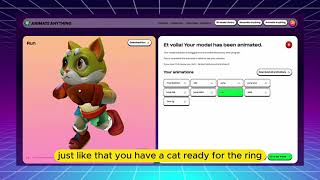
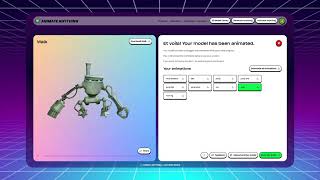
Everything Universe (formerly Anything World) is a cloud platform that builds 3D models from text prompts and auto-rigs models you already own so they're ready to animate. Its two main tools are Generate Anything for text-to-3D creation and Animate Anything for automatic rigging and animation. Alongside them sit a 3D Model Library, Game Ready SDKs for Unity, a Blender add-on, and an open-source Python package for custom pipelines. The workflow is browser-based: type a prompt or drop in a model, pick an animation style, and export into your Unity project. It is built for indie Unity developers, students, and small studios who need passable, game-ready assets without a rigging specialist. The company leans on an ethical AI promise, stating its models train only on data it has rights to rather than scraped copyrighted material — relevant if you're weighing legal exposure on shipped assets. The trade-off is scope: Unity is the primary engine target, so cross-engine teams will find the fit narrower than the pricing suggests.
Behind the Verdict
Everything Universe's pitch is narrow and honest: get animated 3D into a Unity project quickly. Generate Anything handles text-to-3D, Animate Anything handles rigging and animation of models you already own, and the 3D Model Library gives you pre-built assets when you don't want to generate at all. The supporting cast — Game Ready SDKs for Unity, a Blender add-on, and an open-source Python package — covers the three paths most small teams actually take: in-engine, in-DCC, and scripted batch work. Strengths. Unlimited 3D models and unlimited animations are listed on every tier, including the $0 Individual plan, so experimentation isn't metered. Pricing is structured by organisation size rather than generation volume: Individual is free for students and personal projects under $100K in revenue or funding with one seat, Micro is $50/month for studios under $200K with five seats, Pro is $250/month for studios under $4M with ten seats, and Enterprise is custom for organisations above $4M with unlimited seats. That's a legible ladder — you can predict your bill from headcount and company stage. The ethical AI promise, that models train only on data the company has rights to, is a real differentiator for creators who have to answer for where their shipped assets came from. Weaknesses. Unity is the engine the platform leads with, and Blender is the other named destination; teams building in Unreal or Godot won't get the same first-class path. Generation and animation run in the cloud, so an offline or fully local pipeline isn't on the table. The animations are serviceable for gameplay testing and grey-boxing rather than hero-scene deformation work — if your art direction needs precise frame-by-frame control, this is not the tool for that stage of production. Where it fits. Indie Unity developers prototyping mechanics, students who want a free entry point, and small studios that need several seats of unlimited generation without hiring a rigger. Where it doesn't: cross-engine teams, and anyone whose final assets demand hand-tuned animation fidelity. On the wrapper question: this is not a thin chat UI over someone else's model. Auto-rigging, animation retargeting, engine SDKs, a Blender add-on, and a Python package represent real pipeline engineering, and the stated training-data position implies proprietary data work rather than pure prompting.
Researching Anything World? Get your full AI stack in 60 seconds.
Free, no signup — tell us your goal and get tools matched to your budget & existing stack.
Real-world workflow fit
Concrete scenarios for the personas Anything World actually fits — and what changes day-one when you adopt it.
Signs up on the free Individual tier, opens Generate Anything, types a prompt for a character, then runs it through Animate Anything to get a walk cycle before dragging the result into a Unity scene.
Outcome: A playable, animated character in the prototype within the same session, at no cost and without a rigger.
Upgrades to Micro for five seats, uploads existing static meshes to Animate Anything, and uses the open-source Python package to batch-animate the whole set rather than doing them one at a time in the browser.
Outcome: Dozens of models rigged and animated in an automated pass, freeing the team to work on gameplay instead of rigging.
Installs the Blender add-on, animates assets inside the DCC, and exports into the Unity project via the Game Ready SDKs.
Outcome: Animated assets flow into the engine without leaving the artist's existing Blender workflow.
Use Cases
- Generate a 3D character from a text prompt and auto-animate it for a Unity game prototype.
- Upload a static 3D model and get a walking animation within minutes using Animate Anything.
- Use the Python package to batch-animate dozens of models in an automated pipeline.
- Build a winter-themed 3D scene for a holiday game or AR experience using Generate Anything.
- Integrate the Game Ready SDK into Unity to animate characters dynamically during gameplay.
- Pull ready-made assets from the 3D Model Library to grey-box a level without generating anything.
- Animate models inside Blender via the add-on before exporting to an engine.
- Give a five-seat small studio unlimited generation and animation for $50/month.
Limitations
- Unity is the engine the platform leads with, and Blender is the other named destination, so Unreal and Godot teams won't get the same first-class path.
- Generation and animation run in the cloud, which rules out an offline or fully local pipeline.
- Animations are serviceable for prototyping and gameplay testing rather than hero-scene deformation fidelity.
- The free Individual tier is capped at one seat and is tied to student/personal use or revenue and funding under $100K in the last 12 months.
- Paid tiers are gated by organisation size rather than usage: Micro requires under $200K and Pro under $4M in revenue or funding, so a growing studio can be pushed up a tier by its financials rather than its seat count.
as of 2026-09-24
Verification history
We have re-verified Anything World 9 times since . Each pass re-reads the vendor's own pages and re-checks every listed field against that evidence; passes where nothing had changed are marked as such.
- — re-verified summary, description, our verdict, our analysis, pricing model, pricing tiers, features, integrations, who it suits, who should skip it
- — re-verified summary, description, our verdict, our analysis, pricing model, pricing tiers, features, integrations, who it suits, who should skip it
- — re-checked, vendor evidence unchanged
- — re-checked, vendor evidence unchanged
- — re-verified summary, description, our verdict, our analysis, pricing model, pricing tiers, features, integrations, who it suits, who should skip it
- — re-verified summary, description, our verdict, our analysis, pricing model, pricing tiers, features, integrations, who it suits, who should skip it
Showing the 6 most recent of 9 verification passes.
Free to cite with attribution — this page re-verifies continuously.
12-month cost
Project the real annual outlay, including the implied monthly cost when only an annual tier is published.
Vendor list price only. Add-on usage, seat overages, and contract minimums are surfaced under Hidden costs & gotchas.
Plans compared
For each published Anything World tier: who it actually fits, and what it adds vs. the previous tier. Cross-reference the cost calculator above for projected annual outlay.
Individual
$0/mo
Ideal for
Students, hobbyists, and solo developers on personal projects with under $100K in revenue or funding in the last 12 months.
What this tier adds
Free entry point: one seat with unlimited 3D models and unlimited animations, working with Unity.
Micro
$50/mo
Ideal for
Small and micro studios under $200K in revenue or funding that need a handful of collaborators generating assets together.
What this tier adds
Adds four more seats over Individual (five total) for $50/month, and lifts the student/personal-use restriction.
Pro
$250/mo
Ideal for
Medium and larger studios under $4M in revenue or funding running several parallel asset pipelines in Unity.
What this tier adds
Doubles the seat count to ten versus Micro, at $250/month, for organisations under $4M in revenue or funding.
Enterprise
Custom
Ideal for
Organisations above $4M in revenue or funding that need the whole team on the platform without a seat ceiling.
What this tier adds
Replaces the fixed ten-seat cap with unlimited seats at custom pricing, for organisations over $4M in revenue or funding.
Where the pricing makes sense
The company stage and team size where Anything World's pricing actually pencils out — and where peers do it cheaper.
For a one-person Unity project the $0 Individual tier is genuinely free, and a five-person studio pays $50/month on Micro — cheaper than most AI-3D services. Pro at $250/month for ten seats is aimed at studios under $4M in revenue or funding. Above that, Enterprise is custom, so larger organisations should compare against engine-native or freelance rigging pipelines on a per-asset basis.
Setup time & first value
How long it actually takes to get something useful out of Anything World — broken out by persona, not the marketing-page minute.
Individual developers can sign up and generate a first model in minutes since everything runs in the browser. Small studios should budget a short session to invite five seats and wire up the Unity SDK or Blender add-on before the team is productive. Teams batching work through the open-source Python package will need a little longer to script their pipeline, but the browser path stays available
Switching to or from Anything World
How to bring data in from common predecessors and how to get it back out — written for the switcher, not the buyer.
- →From manual rigging in Blender or Maya: install the Blender add-on or use Animate Anything to auto-rig models you already own instead of building skeletons by hand.
- →From freelance 3D asset commissions: use Generate Anything and the 3D Model Library to produce prototype assets in-house before commissioning final art.
- →From a Unity Asset Store animation pack: run your models through Animate Anything and import via the Game Ready SDKs for animations tailored to your own meshes.
- →From an automated script pipeline: replace it with the open-source Python package to batch-animate models in the cloud.
- ↗To Unreal Engine: there is no first-class SDK path documented, so plan to export models and animations and rebuild the integration manually.
- ↗To Godot: same constraint — you'll be exporting assets rather than using a supported engine SDK.
- ↗To a manual animation pipeline: export your rigged models and continue in Blender or Maya when you need frame-by-frame control.
- ↗To a freelance rigging service: use it when a project graduates from prototype-grade animation to hero-scene fidelity.
Integrations
Resources & Guides
Tutorials & Learning

Official links
Tools that pair well with Anything World
Common stack mates teams adopt alongside Anything World, with the specific reason each pairing earns its keep.

Rodin
Rodin turns text prompts and reference images into textured 3D models with bounding-box, voxel, and point-cloud ControlNet plus per-region Partial Edit.

Tripo AI
Tripo AI turns text prompts, images, or sketches into engine-ready 3D models — quad-mesh game assets, print-ready STLs, and textured characters in minutes.

Opus
Opus converts text prompts into playable 2D and 3D game worlds, with AI co-pilots and multi-platform export.
Featured Head-to-Head Comparisons
Anything World vs Cognition Ai
Choose Anything World if you need instant, affordable 3D animation for game prototypes and don't mind limited engine support. Choose Cognition AI if you run a large engineering team that could benefit from an autonomous AI that handles bug fixes, PRs, and legacy code—backed by a $10M guarantee. The tools are so different that your decision hinges entirely on whether your bottleneck is 3D assets or production code.
Anything World vs Bito
If you're a game developer or 3D creator needing quick, animated 3D assets without manual rigging, Anything World is a solid, affordable choice. If you lead an engineering team using AI coding agents across multiple repos and need system-wide context, cross-repo impact analysis, and automated scoping, Bito's AI Architect is a game-changer. Choose based on whether your priority is 3D asset automation or intelligent codebase navigation.
Anything World vs The New Black
Choose Anything World if you're a game developer needing quick 3D animations; choose The New Black if you're in fashion design seeking AI-generated apparel concepts. They serve non-overlapping verticals, so your industry dictates the winner.
Alternatives to Anything World
View all
Rodin
Rodin turns text prompts and reference images into textured 3D models with bounding-box, voxel, and point-cloud ControlNet plus per-region Partial Edit.


Frequently Asked Questions
Used Anything World? Help shape our editorial sentiment research.