
Brief My Meeting
AI meeting prep that emails you a research brief four hours before each external meeting.
If your week is full of external calls and your prep time goes to scrolling email, this is one of the few AI tools with a genuinely narrow, useful job. The 4-hour delivery window is the smart part — early enough to act on, late enough that the context is current. It won't replace a CRM like HubSpot or Salesforce and it ignores internal meetings entirely, so buy it for revenue-facing calendars only. At $25/mo month-to-month, or $18/mo billed annually, the math works if you would otherwise spend 20 minutes prepping a handful of calls a month.
Verified 1h ago · liveness 78/100 · cite: rightaichoice.com/tools/brief-my-meeting
- Sales reps preparing for back-to-back client calls without digging through email threads
- Account managers who need attendee role and company context before status meetings
- Executives with a packed external calendar who want a one-email prep summary
- Consultants meeting new stakeholders who need quick background before the first call
- Teams whose calendars are mostly internal meetings — the tool only covers external ones
- Users of Apple Calendar, Zoho, or other non-Google/Outlook calendars
- Anyone wanting live note-taking, transcription, or in-call assistance
We scan live Reddit threads, YouTube comments, X posts, G2 reviews and other communities — and hand you an honest verdict in under a minute.
- Honest verdict, not marketing
- Real pros & cons from real users
- Attributed quotes with receipts
3 free scans · no card needed
Skip Brief My Meeting if nearly all your meetings are internal, you use Apple Calendar or another non-Google/Outlook provider, or you need in-call transcription and CRM deal data in the prep email.
The 28% annual saving only applies if you commit to a year up front — month-to-month is $25/mo, so the effective annual discount is roughly $7 per month and you don't get it unless you pre-pay.
One plan, roughly $25/mo month-to-month or $18/mo billed annually — a fit for individual reps, AEs, and consultants rather than whole revenue orgs. Cheaper than a dedicated sales-intelligence seat at most mid-market vendors; more expensive than adding a research module to an existing CRM if you already pay for one.
In short
Brief My Meeting — AI meeting prep that emails you a research brief four hours before each external meeting. Best for Sales reps preparing for back-to-back client calls without digging through email threads, Account managers who need attendee role and company context before status meetings, Executives with a packed external calendar who want a one-email prep summary. Plans from $18/mo.
No head-to-head comparison for Brief My Meeting yet — the alternatives below are the closest matches we list.
What people actually say about Brief My Meeting — is it worth it?
We ran a structured research pass across product reviews, community discussions, and post-purchase forum threads to surface the patterns vendors won't publish themselves. Below: the recurring strengths, the hidden costs people mention most, and the cohort that consistently regrets adopting this tool.
18 mentions across 3 sources (YouTube, Product Hunt, Lemmy) · researched Oct 13, 2026.
Weighted by the 47 posts each of 3 sources contributed.
- +Saves 20+ minutes of manual pre-call research per external meeting
- +Open-source code reassures users about privacy and data handling
- +Set-once OAuth setup requires no per-meeting action
- +Aggregates LinkedIn, email history, calendar events, and attachments in one email
- +Unlimited briefings included on the paid plan, no per-meeting fees
- −No CRM integration (Salesforce, HubSpot) limits sales team context
- −Unclear how it disambiguates attendees with common names
- −Only supports external meetings, ignoring internal coordination needs
- −No free tier, only a 7-day trial before $25/month commitment
- −Privacy concerns raised by users about full email/calendar access
- • No hidden fees, but no free tier means $25/month after 7-day trial
Viability Score
How well maintained and how widely used is Brief My Meeting? Built from what the vendor actually publishes (docs, changelog, tutorials, integrations, pricing), whether the site is live, and how much real users discuss it. How we calculate this
Last calculated: October 2026
How we score →Key Features
- Automated briefing email sent 4 hours before every external meeting
- LinkedIn attendee research with role and company context
- Email history aggregation across all meeting participants
- Calendar event aggregation for meeting attendees
- Action item extraction from past email threads
- Surfaces previous meeting notes and shared attachments
- Google Calendar integration via OAuth
- Gmail integration via OAuth
- Outlook Calendar integration via OAuth
- Outlook Email integration via OAuth
- SOC 2 Type 2 compliance
- Unlimited meeting briefings on the paid plan
- 7-day free trial with cancel anytime
- Set-once setup with no per-meeting action required
About Brief My Meeting
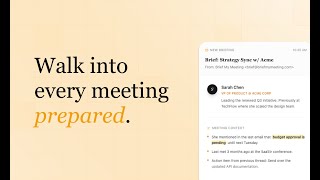
Brief My Meeting is an AI meeting preparation tool that sends a briefing email to your inbox four hours before every external meeting. It's built for sales reps, account managers, executives, and consultants who walk into client and stakeholder calls and need to know who is in the room without reconstructing history from their inbox. You connect Google or Outlook email and calendar over OAuth, and the tool aggregates the rest: LinkedIn profiles with role and company context for every attendee, every past email thread involving those people, related calendar events, and attachments surfaced automatically. The vendor's own sample brief shows the format: a VP of Product described as leading a renewed Q3 initiative, a note that budget approval is pending until next Tuesday, and an action item to send updated API documentation, all in one email. The company says it is trusted by 18,000+ professionals, is SOC 2 Type 2 compliant, and comes from the team behind Inbox Zero. Setup is a one-time connection; after that, briefings run on their own with no per-meeting action from you. Unlimited briefings are included on the paid plan. Pricing is one tier: $25/mo month-to-month, or $18/mo billed annually (a 28% saving), with a 7-day free trial and cancel-anytime terms. The scope is deliberately narrow — external meetings only.
Behind the Verdict
Brief My Meeting is a single-purpose tool in the best sense. It does one thing — lands a pre-meeting brief in your inbox four hours before an external meeting — and does it without asking you to change where you work. The brief itself combines three data sources the vendor documents on its homepage: LinkedIn attendee research (role, company, and context like 'VP of Product @ Acme Corp, leading the renewed Q3 initiative'), email history with those attendees including quoted snippets, and calendar events with attachments surfaced automatically. That combination is what makes it useful: you get the who, the where-we-left-off, and the file you promised to send, in one email. Setup is a one-time OAuth connection to Google or Outlook email and calendar; after that there is no per-meeting action. The vendor's site states it is trusted by 18,000+ professionals and SOC 2 Type 2 compliant, and the company is from the team behind Inbox Zero. The weaknesses are structural, not bugs. First, the scope is external meetings only — internal team syncs are not briefed, so the value depends on how much of your calendar is client-facing. Second, briefings arrive as email; there is no live note-taking, transcription, or in-call assistant, and no CRM deal data such as pipeline stage or opportunity value appears in the brief. Third, you need Google or Outlook accounts — the integrations list is Gmail, Google Calendar, Outlook Email, and Outlook Calendar. Where it fits: revenue-facing calendars (sales, account management, consulting, executive external meetings) where the cost of walking in cold is high. Where it doesn't: teams whose calendars are mostly internal, users on Apple Calendar or other non-Google/Outlook providers, and anyone looking for a meeting recorder or CRM replacement.
Researching Brief My Meeting? Get your full AI stack in 60 seconds.
Free, no signup — tell us your goal and get tools matched to your budget & existing stack.
Real-world workflow fit
Concrete scenarios for the personas Brief My Meeting actually fits — and what changes day-one when you adopt it.
You wake up, and by 10:45 a briefing email for the 2:45 client call has arrived with attendee LinkedIn profiles, the last email thread from three months ago, and the API documentation you promised to send.
Outcome: You walk into the call with the last-conversation context and the promised attachment already in hand, instead of spending 15–20 minutes scrolling your inbox.
Four hours before the first call, the brief arrives with the stakeholder's LinkedIn role and company context, any prior emails between your firm and their team, and related attachments.
Outcome: You open with the right framing on the first call instead of asking them to re-explain their role and prior history.
Each external meeting in the day generates its own 4-hour-preceding brief, so by mid-afternoon you have a stack of pre-meeting summaries covering who is in each room and what was last discussed.
Outcome: You stop alt-tabbing to email before each call and spend that time on the content of the conversation instead.
Use Cases
- Preparing for client calls with full context on previous conversations
- Onboarding new team members by briefing them before external meetings
- Sales professionals researching prospects before discovery calls
- Consultants reviewing meeting history before check-ins with clients
- Account managers getting attendee context before status meetings
- Executives with back-to-back external meetings wanting a prep summary
Limitations
- Brief My Meeting works with Google and Outlook calendars and email.
- Briefings are delivered via email only, four hours before each external meeting.
- The service relies on LinkedIn research, email history, and calendar context to generate pre-meeting briefs.
- There is no live note-taking, transcription, or in-call assistance.
- There is no CRM data such as pipeline stage or opportunity value.
- Internal meetings are not briefed.
as of 2026-10-18
Verification history
We have re-verified Brief My Meeting 22 times since . Each pass re-reads the vendor's own pages and re-checks every listed field against that evidence; passes where nothing had changed are marked as such.
- — re-checked, vendor evidence unchanged
- — re-checked, vendor evidence unchanged
- — re-checked, vendor evidence unchanged
- — re-verified summary, description, our verdict, our analysis, pricing model, pricing tiers, features, integrations, who it suits, who should skip it
- — re-verified summary, description, our verdict, our analysis, pricing model, pricing tiers, features, integrations, who it suits, who should skip it
- — re-checked, vendor evidence unchanged
Showing the 6 most recent of 22 verification passes.
Free to cite with attribution — this page re-verifies continuously.
12-month cost
Project the real annual outlay, including the implied monthly cost when only an annual tier is published.
Vendor list price only. Add-on usage, seat overages, and contract minimums are surfaced under Hidden costs & gotchas.
Plans compared
For each published Brief My Meeting tier: who it actually fits, and what it adds vs. the previous tier. Cross-reference the cost calculator above for projected annual outlay.
All in One Monthly
$25/mo
Ideal for
Individual sales reps, AEs, consultants, or executives with a client-facing external calendar who want to try it without an annual commitment.
What this tier adds
Starting tier: $25/mo month-to-month, unlimited briefings, Google and Outlook integration, 7-day free trial, cancel anytime.
All in One Annual
$18/mo billed annually
Ideal for
Same individual buyer who has already validated the briefs and is willing to commit to a year to save 28%.
What this tier adds
Same features as monthly at $18/mo billed annually — the difference is the 28% annual discount and the 12-month commitment.
Where the pricing makes sense
The company stage and team size where Brief My Meeting's pricing actually pencils out — and where peers do it cheaper.
One plan, roughly $25/mo month-to-month or $18/mo billed annually — a fit for individual reps, AEs, and consultants rather than whole revenue orgs. Cheaper than a dedicated sales-intelligence seat at most mid-market vendors; more expensive than adding a research module to an existing CRM if you already pay for one.
Setup time & first value
How long it actually takes to get something useful out of Brief My Meeting — broken out by persona, not the marketing-page minute.
One-time OAuth connection to Google or Outlook email and calendar — roughly five minutes. First value arrives with the next external meeting on your calendar that falls four hours or more after setup.
Switching to or from Brief My Meeting
How to bring data in from common predecessors and how to get it back out — written for the switcher, not the buyer.
- →From manual inbox prep: connect Google or Outlook via OAuth once, and the next external meeting gets a brief automatically.
- →From a generic AI meeting recorder: keep the recorder for in-call notes and use Brief My Meeting for pre-call context, since Brief My Meeting does not do live transcription.
- →From a CRM-only research flow: use Brief My Meeting as the pre-call layer; the CRM stays your system of record for pipeline stage and opportunity value.
- ↗To a CRM-plus-research stack (HubSpot, Salesforce): use the CRM as the system of record and keep Brief My Meeting only for pre-call briefs.
- ↗To a meeting recorder/transcription tool: exporters are not documented on the site; assume re-setup is a reconnect and re-authorize.
Integrations
Resources & Guides
- Resourcebriefmymeeting.com
Walk Into Every Meeting Prepared
Walk into every meeting already knowing what matters. Get personalized AI-powered briefings before every meeting with context from your email and calendar.
- Resourcebriefmymeeting.com
Walk Into Every Meeting Prepared
Walk into every meeting already knowing what matters. Get personalized AI-powered briefings before every meeting with context from your email and calendar.
Tutorials & Learning
YouTube returned 6 videos for “Brief My Meeting”, and we withheld 5: 5 did not mention Brief My Meeting. Showing the 1 we can prove is about Brief My Meeting.
Official links
Tools that pair well with Brief My Meeting
Common stack mates teams adopt alongside Brief My Meeting, with the specific reason each pairing earns its keep.

Komo
Komo turns LinkedIn and web buyer signals into scored B2B pipeline, with cited research behind every answer.

ColdReach
Coldreach is an AI SDR that researches every matched account before writing personalized email and LinkedIn outreach.
Lindy
Lindy is an AI employee that plugs into your tools and takes real work off your Slack thread.
Alternatives to Brief My Meeting
View all
Frequently Asked Questions
Best-of guides
Used Brief My Meeting? Help shape our editorial sentiment research.