
Buzz Mail
Buzz Mail drafts professional Gmail replies from a one-click add-on, billed by pay-per-use word credits you share across a family or small team.
Buzz Mail is worth testing if you're on free Gmail and want AI reply drafting without a monthly bill — the shareable license key and pay-per-use word credits are genuinely flexible for light or bursty senders. But the listing hasn't been updated since September 18, 2023, and a reviewer reports the "Get License Key" link missing from the sidebar across two Gmail accounts, so treat the free trial as a real test rather than a formality. If you already pay for Google Workspace, Gemini in Gmail is included on every plan including Starter, so paying per-word for reply drafting is hard to justify unless you specifically want the shared-credit model.
Verified 15d ago · liveness 58/100 · cite: rightaichoice.com/tools/buzz-mail
- Light Gmail users who want AI reply drafting without a monthly subscription
- Sales and support staff answering customer email from their phone
- Small teams or families pooling one shared word-credit balance
- Free-Gmail users outside a paid Google Workspace plan
- Teams needing automated email sequences or outbound campaigns
- Enterprises requiring admin-managed licensing and centralized billing
- Buyers who want predictable flat-rate pricing instead of usage-based credits
We scan live Reddit threads, YouTube comments, X posts, G2 reviews and other communities — and hand you an honest verdict in under a minute.
- Honest verdict, not marketing
- Real pros & cons from real users
- Attributed quotes with receipts
3 free scans · no card needed
Skip Buzz Mail if you already pay for Google Workspace — Gemini in Gmail is included on Starter and above at no extra cost, so per-word credits only make sense on free Gmail or if the shared-balance model is specifically what you want.
Credits are consumed per drafted response, so a heavy reply week drains the balance faster than a light month and you top up again sooner than expected.
Usage-based credits suit solo senders and small teams who draft intermittently — you pay only when you generate a reply. But if you already pay for Google Workspace, Gemini reply assistance is bundled from the Starter tier (around ¥800/user/month before tax, monthly billing), so the marginal value of adding per-word credits depends entirely on whether you're on free Gmail.
In short
Buzz Mail — Buzz Mail drafts professional Gmail replies from a one-click add-on, billed by pay-per-use word credits you share across a family or small team. Best for Light Gmail users who want AI reply drafting without a monthly subscription, Sales and support staff answering customer email from their phone, Small teams or families pooling one shared word-credit balance. Free to use.
What's new in Buzz Mail
Checked 4 days agoAcross the latest 7 updates: 4 feature updates, 1 launch and 2 changelog entries.
Google Pics: pro-level AI image creation and editing comes to Workspace
Google Pics brings professional AI image generation and editing directly into Workspace applications.
Workspace Intelligence: 6 ways it offers personalized help
Google details six capabilities of Workspace Intelligence aimed at cutting time spent on writing prompts, enhancing productivity.
Google Workspace launches Workspace Intelligence, a personalized AI assistant
Workspace Intelligence introduced as new AI layer for Google Workspace, offering personalized help to reduce prompt engineering.
Google Workspace Studio adds multi-layered defenses against agentic risks
Workspace Studio introduces multi-layered security protections to counter agentic AI risks.
August Workspace Drops: meeting artifacts, quiz generation, custom workflows
August update adds meeting artifact organization, quiz generation, and scalable custom workflow features to Workspace.
Gemini in Google Slides: create on-brand presentations in minutes
Gemini integration in Slides enables rapid creation of on-brand presentations.
July Workspace Drops: engaging presentations, faster doc drafting, on-the-go work
July update rolls out features for creating engaging presentations, faster document drafting, and improved mobile work.
What people actually say about Buzz Mail — is it worth it?
We ran a structured research pass across product reviews, community discussions, and post-purchase forum threads to surface the patterns vendors won't publish themselves. Below: the recurring strengths, the hidden costs people mention most, and the cohort that consistently regrets adopting this tool.
29 mentions across 2 sources (Product Hunt, Lemmy) · researched Jul 3, 2026.
Average across the 2 sources that answered — each source counts once, not each post.
- +Generates professional, human-like replies fast.
- +Works seamlessly in Gmail on desktop and mobile.
- +One-click reply generation from compose window.
- +Pay-per-use model avoids monthly subscription lock-in.
- +License key shareable with family or small team.
- −Very few reviews beyond launch-day hype.
- −No detailed feature documentation or roadmap available.
- −License key setup may cause installation headaches.
- −Pricing structure and word credit costs are unclear.
- −Lemmy data is entirely off-topic, showing noise.
- • Cost per word credit not disclosed publicly
- • No cap hints at potential high costs for heavy users
Viability Score
How well maintained and how widely used is Buzz Mail? Built from what the vendor actually publishes (docs, changelog, tutorials, integrations, pricing), whether the site is live, and how much real users discuss it. How we calculate this
Last calculated: October 2026
How we score →Key Features
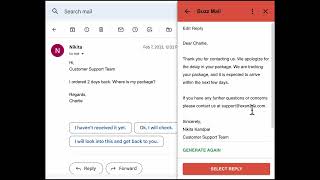
- One-click AI reply drafting inside Gmail
- Reads the incoming message and generates a contextual draft
- Draft appears directly in Gmail's compose window, editable before send
- Works in Gmail on desktop and mobile
- Pay-per-use word credits instead of a recurring subscription
- Shareable license key across a family or small team
- Only one person needs to recharge the shared word balance
- Free trial code available at install
- Supports managing multiple Gmail accounts
- Connects to an external service for AI processing
- Requests permission to manage drafts and send emails
- Views your email messages while the add-on is running
- Runs as a Gmail add-on
About Buzz Mail
Buzz Mail is a Gmail add-on from Buzzing AI that writes a professional reply to an incoming email with a single click. It reads the message you're answering, drops an editable draft straight into Gmail's compose window, and lets you polish and send without leaving your inbox. It's aimed at people buried in customer email — sales reps, support staff, founders fielding queries — who want faster turnaround without funding another monthly AI subscription. The billing model is the differentiator. Instead of a recurring seat fee, you top up a balance of word credits and spend them only when you draft, and a single license key can be shared so one balance covers a family or a small team. That suits light and bursty senders who don't want to pay for a seat they barely use. The Marketplace listing shows 1K+ installs and offers a free trial code to test drafting before you buy credits, and it works from Gmail on desktop and mobile, including multiple Gmail accounts. Be clear-eyed about the trade-offs. The listing was last updated September 18, 2023, and a public review from October 2023 reports that the "Get License Key" link never appeared in the sidebar across two separate Gmail accounts. The add-on also asks for broad permissions: managing drafts and sending emails, viewing your messages while it runs, running as a Gmail add-on, connecting to an external service, and reading your primary Google Account address and profile info. None of that is unusual for an inbox assistant, but it's real access. Compare before you commit. Google's own Gemini is bundled into every Workspace plan — Starter includes the Gemini AI assistant in Gmail, and Workspace Intelligence (announced September 2026) layers a personalized assistant across the suite. If you already pay for Workspace, that covers basic reply help at no extra cost. Buzz Mail's real case is free Gmail users, or anyone who specifically wants zero recurring commitment and a shared, usage-based balance. It wins on commitment level and flexibility, not on feature depth.
Behind the Verdict
Buzz Mail does one narrow thing: it turns an incoming email into a professional reply draft inside Gmail with one click. If that's the job you need done, the workflow is about as short as it gets — the draft lands in Gmail's compose window, you edit it, you send. It runs on Gmail for desktop and mobile, supports multiple Gmail accounts, and the October 2023 review from Scott Stewart confirms the multi-account path exists (though his experience was the install snag, not a success story). Nikita's February 2023 review highlights the three things Buzzing AI built the product around: pay-per-use billing, phone usage, and a license key shared with family where only one person recharges. Sarabjeet Kaur's review from the same month describes it as effective across conversation types, not just one narrow template. Where it stands out is commitment level. You're not signing up for a seat. You top up word credits and spend them per drafted response, and one license key covers a family or small team, so the shared balance model genuinely lowers cost for light senders. That is the whole pitch, and for a solo founder or a two-person support desk answering bursts of email, it's a reasonable one. Where it falls short is depth and freshness. The listing was last updated September 18, 2023. The permissions are broad — manage drafts and send emails, view your email messages while the add-on runs, connect to an external service, read your Google profile — which is expected for an inbox tool but worth knowing before you install. And the install friction is real: Scott Stewart's October 2023 review documents the missing "Get License Key" link in the sidebar on two separate Gmail accounts, and the listing page still shows only three reviews, so there isn't a large body of user signal to offset a bad setup experience. The bigger context is Google itself. Gemini is now bundled into Workspace at every tier — Starter includes the Gemini AI assistant in Gmail, Standard and up extend it to Docs, Meet and more, and Workspace Intelligence (September 2026) adds a personalized assistant layer across the suite. If you pay for Workspace, you already own a competent reply helper at no additional cost, which shrinks Buzz Mail's addressable buyer to free-Gmail users and people who deliberately want usage-based billing rather than another subscription. Against subscription AI email writers, Buzz Mail competes on how you pay, not on what it can do. Buy it if you want zero recurring commitment, shared credits, and mobile Gmail drafting. Don't buy it expecting sequences, outbound campaigns, admin-managed licensing, or centralized team billing — none of that is here, and the seed data explicitly rules those buyers out.
Researching Buzz Mail? Get your full AI stack in 60 seconds.
Free, no signup — tell us your goal and get tools matched to your budget & existing stack.
Real-world workflow fit
Concrete scenarios for the personas Buzz Mail actually fits — and what changes day-one when you adopt it.
A pricing question lands in the inbox during a call. You open the message in the Gmail mobile app, hit Buzz Mail, and get a contextual draft in the compose window.
Outcome: You tweak one sentence and send in under a minute, spending a few word credits instead of a monthly seat fee.
Both agents answer customer email from separate Gmail accounts but share one Buzz Mail license key and one word balance.
Outcome: Only one person recharges when the balance runs low, and the shared pool covers both queues without a per-seat subscription.
Twenty lead emails arrive in an afternoon. You draft each reply with one click in Gmail on desktop, editing tone and specifics before sending.
Outcome: Consistent professional wording across all twenty replies, with credits consumed only for the drafts you actually generate.
Use Cases
- Generate a professional reply to a customer inquiry in a few seconds from inside Gmail.
- Answer sales leads with consistent, polished wording without drafting from scratch.
- Reply to routine email from the Gmail mobile app while away from a desk.
- Cover several personal or work Gmail accounts from one shared word-credit balance.
- Give a small team or family AI reply drafting while only one person tops up the credits.
Limitations
- Buzz Mail is a Gmail add-on that generates AI replies under a pay-per-use word-credit model; specific word limits and per-credit rates are not published in the sources reviewed.
- The permissions request is broad: manage drafts and send emails, view your email messages while the add-on runs, run as a Gmail add-on, connect to an external service, and read your primary Google Account address and profile information.
- The Marketplace listing was last updated September 18, 2023, and a public review from October 2023 reports the "Get License Key" link was missing from the sidebar on two separate Gmail accounts, so installation can fail before you ever draft a reply.
- There is no support for outbound sequences, campaign automation, or centralized admin billing.
as of 2026-09-24
Verification history
We have re-verified Buzz Mail 9 times since . Each pass re-reads the vendor's own pages and re-checks every listed field against that evidence; passes where nothing had changed are marked as such.
- — re-verified summary, description, our verdict, our analysis, pricing model, pricing tiers, features, integrations, who it suits, who should skip it
- — re-verified summary, description, our verdict, our analysis, pricing model, pricing tiers, features, integrations, who it suits, who should skip it
- — re-verified summary, description, our verdict, our analysis, pricing model, pricing tiers, features, integrations, who it suits, who should skip it
- — re-verified summary, description, our verdict, our analysis, pricing model, pricing tiers, features, integrations, who it suits, who should skip it
- — re-verified summary, description, our verdict, our analysis, pricing model, pricing tiers, features, integrations, who it suits, who should skip it
- — re-verified summary, description, our verdict, our analysis, pricing model, pricing tiers, features, integrations, who it suits, who should skip it
Showing the 6 most recent of 9 verification passes.
Free to cite with attribution — this page re-verifies continuously.
12-month cost
Project the real annual outlay, including the implied monthly cost when only an annual tier is published.
Vendor list price only. Add-on usage, seat overages, and contract minimums are surfaced under Hidden costs & gotchas.
Plans compared
For each published Buzz Mail tier: who it actually fits, and what it adds vs. the previous tier. Cross-reference the cost calculator above for projected annual outlay.
Free trial
$0
Ideal for
Anyone on free Gmail who wants to check draft quality and the install flow before committing to a word-credit balance.
What this tier adds
Starting tier — free trial code from the Marketplace listing; no credit purchase needed to test AI reply drafting.
Pay-per-use word credits
Pay-per-use word credits
Ideal for
Light or bursty senders, sales and support staff on mobile Gmail, and small teams or families who want one shared balance instead of per-seat subscriptions.
What this tier adds
Replaces a recurring subscription with a top-up word balance; one shareable license key lets a family or small team cover multiple Gmail accounts from a single pool.
Where the pricing makes sense
The company stage and team size where Buzz Mail's pricing actually pencils out — and where peers do it cheaper.
Usage-based credits suit solo senders and small teams who draft intermittently — you pay only when you generate a reply. But if you already pay for Google Workspace, Gemini reply assistance is bundled from the Starter tier (around ¥800/user/month before tax, monthly billing), so the marginal value of adding per-word credits depends entirely on whether you're on free Gmail.
Setup time & first value
How long it actually takes to get something useful out of Buzz Mail — broken out by persona, not the marketing-page minute.
Solo Gmail user: install the add-on from the Marketplace, grant the listed permissions, and enter your free trial code — first draft in roughly five minutes. Small team or family: the same install plus one person obtaining and sharing the license key; budget closer to fifteen to twenty minutes, and be prepared for the license-key link not appearing in the sidebar, which some reviewers hit on
Switching to or from Buzz Mail
How to bring data in from common predecessors and how to get it back out — written for the switcher, not the buyer.
- →From typing replies manually: install the add-on, grant permissions, and start drafting from the Gmail compose window on desktop or mobile.
- →From a subscription AI email writer: run the free trial first to compare draft quality before replacing your paid seat with word credits.
- →From Gemini in Gmail on a paid Workspace plan: only worth it if you're moving to free Gmail or specifically want usage-based, shareable credits.
- ↗To Gemini in Gmail: upgrade to a Google Workspace plan — Starter includes the Gemini AI assistant in Gmail, so drafting is covered without a separate add-on or credit balance.
- ↗To a subscription AI email writer: useful if you need predictable flat-rate billing or outbound sequences, which Buzz Mail's credit model and reply-only scope don't provide.
- ↗To manual drafting: simply uninstall the add-on; there is no data to export because drafts live in Gmail itself.
Integrations
Resources & Guides
Tutorials & Learning


YouTube returned 6 videos for “Buzz Mail”, and we withheld 3: 3 did not mention Buzz Mail. Showing the 3 we can prove are about Buzz Mail.
Official links
Tools that pair well with Buzz Mail
Common stack mates teams adopt alongside Buzz Mail, with the specific reason each pairing earns its keep.

Jetwriter AI
Jetwriter AI is a personalized AI writing assistant extension that drafts email and message replies in your voice across Gmail, Slack, LinkedIn, and other

Spark Mail
Spark Mail is a cross-platform AI email client that sorts, summarizes, and drafts across Gmail, Outlook, Exchange, iCloud, Yahoo, and IMAP.

Ready to Send
AI Gmail add-on that auto-drafts contextual email replies in your voice, ready for your review before sending
Featured Head-to-Head Comparisons
Buzz Mail vs Poke Interaction Co
If your primary need is fast, AI-powered email replies within Gmail and you prefer paying for actual usage, Buzz Mail is a simple, cost-effective choice. But if you want a broader AI assistant that manages email, calendar, tasks, and automations from your favorite messaging app (with deep integrations like Notion and Oura), Poke (Interaction Co.) offers a more versatile, proactive experience. Poke's recent Apple Messages verification makes it uniquely integrated, while Buzz Mail remains laser-focused on Gmail replies.
Buzz Mail vs Guesty
Buzz Mail and Guesty serve completely different needs. Buzz Mail is a lightweight, usage-based email assistant ideal for Gmail users who want fast replies without a subscription. Guesty is a full-fledged vacation rental management platform with AI agents that automate operations across 60+ channels. Choose Buzz Mail for email productivity, Guesty for property management.
Buzz Mail vs Gem
Choose Buzz Mail if you're an individual professional who needs fast AI-generated email replies inside Gmail without a monthly commitment. Opt for Gem if you're a recruiter or talent acquisition team seeking an end-to-end platform with AI agents for sourcing, screening, and fraud detection. They serve entirely different needs—email productivity vs. recruiting orchestration.
Alternatives to Buzz Mail
View all
Jetwriter AI
Jetwriter AI is a personalized AI writing assistant extension that drafts email and message replies in your voice across Gmail, Slack, LinkedIn, and other

Spark Mail
Spark Mail is a cross-platform AI email client that sorts, summarizes, and drafts across Gmail, Outlook, Exchange, iCloud, Yahoo, and IMAP.

Ready to Send
AI Gmail add-on that auto-drafts contextual email replies in your voice, ready for your review before sending
Frequently Asked Questions
Categories
Best-of guides
Used Buzz Mail? Help shape our editorial sentiment research.