
Cookiecutter Data Science
Cookiecutter Data Science scaffolds reproducible Python data science projects with one CLI command
If your team keeps re-litigating folder names and where "final_v3.csv" should live, CCDS v2 ends that argument for free. The `ccds` CLI is genuinely quick, and the options cover the environment and tooling choices most Python teams actually make. It gives you structure only, so pair it with DVC or Kedro if you need pipeline orchestration — otherwise it's just good scaffolding.
Verified 7d ago · liveness 72/100 · cite: rightaichoice.com/tools/cookiecutter-data-science
- Python data scientists starting a new project who want a sane default layout
- Teams that need a shared, standardized project structure to keep repos consistent
- Educators teaching reproducible data science project organization
- Open-source projects wanting a recognized, community-standard directory convention
- Non-Python stacks such as R or Julia, which the template doesn't target
- Anyone wanting a GUI or point-and-click project creator — ccds is terminal-only
- Projects needing built-in pipeline orchestration, scheduling, or experiment tracking
We scan live Reddit threads, YouTube comments, X posts, G2 reviews and other communities — and hand you an honest verdict in under a minute.
- Honest verdict, not marketing
- Real pros & cons from real users
- Attributed quotes with receipts
3 free scans · no card needed
Skip Cookiecutter Data Science if you work in R or Julia, prefer a GUI for project setup, or need built-in pipeline orchestration and experiment tracking—you'll need separate tools like Kedro or DVC.
None—CCDS is free and open-source; you only pay for your own cloud storage or CI/CD services if you use them.
CCDS is completely free, with no tiered pricing. It's a cost-effective option compared to commercial project management platforms. You only pay for your own infrastructure, like cloud storage or CI/CD, if you choose to use them.
In short
Cookiecutter Data Science — Cookiecutter Data Science scaffolds reproducible Python data science projects with one CLI command. Best for Python data scientists starting a new project who want a sane default layout, Teams that need a shared, standardized project structure to keep repos consistent, Educators teaching reproducible data science project organization. Free to use.
What's new in Cookiecutter Data Science
Checked 5 days agoAcross the latest 1 update: 1 launch.
What people actually say about Cookiecutter Data Science — is it worth it?
We scanned public community sources for Cookiecutter Data Science on Sep 22, 2026 and could not establish that the discussion we found is about this tool rather than something else sharing its name. Only 2 of the posts we fetched could be positively tied to Cookiecutter Data Science. Rather than publish a sentiment score built on the wrong subject, we publish nothing here and re-run the scan.
Viability Score
How well maintained and how widely used is Cookiecutter Data Science? Built from what the vendor actually publishes (docs, changelog, tutorials, integrations, pricing), whether the site is live, and how much real users discuss it. How we calculate this
Last calculated: September 2026
How we score →Key Features
- Interactive project setup via the ccds CLI wizard
- Standardized directory structure: data, notebooks, models, reports, src, references, docs
- Separate data folders for raw, interim, processed, and external data
- Environment manager selection: virtualenv, conda, pipenv, uv, pixi, poetry, none
- Dependency file options: requirements.txt, pyproject.toml, environment.yml, Pipfile, pixi.toml
- Dataset storage selection for Azure, AWS S3, or GCS (or none)
- Testing framework selection: pytest, unittest, or none
- Linting and formatting: ruff or flake8+black+isort
- Docs generation with mkdocs or none
- Open-source license choice: MIT, BSD-3-Clause, or no license file
- Configurable Python version number at setup
- Pre-built Makefile with convenience targets like make data and make train
- Optional source code scaffold with dataset, features, modeling, and plots modules
- Notebooks directory with a numbered, initials, description naming convention
- Install as a standalone CLI via pipx, pip, or conda (coming soon)
About Cookiecutter Data Science
Cookiecutter Data Science (CCDS) is a free, open-source template that gives Python data science and machine learning projects a standardized, reproducible directory layout. Instead of every analyst inventing their own folder scheme, you get consistent homes for raw, interim, processed, and external data, plus src code, notebooks, models, reports, figures, references, and docs — so a teammate can open your repo and know where things live. CCDS v2 ships the `ccds` CLI, which turns project setup into an interactive wizard. It walks you through environment manager (virtualenv, conda, pipenv, uv, pixi, poetry, or none), dependency file (requirements.txt, pyproject.toml, environment.yml, Pipfile, pixi.toml), testing framework (pytest, unittest, none), linting and formatting (ruff or flake8+black+isort), docs generator (mkdocs or none), dataset storage (Azure, AWS S3, GCS, or none), Python version, and an open-source license. Install via pipx, pip, or - per the docs, coming soon - conda, then run `ccds` from the parent directory and answer the prompts. What lands on disk is opinionated but transparent: a Makefile with convenience targets like `make data` and `make train`, a numbered Jupyter notebook naming convention (e.g. `1.0-jqp-initial-data-exploration`), an optional source-code scaffold that turns your module into an importable Python package with config, dataset, features, modeling/train, modeling/predict, and plots scripts, and a mkdocs project when you want it. You can also point `ccds` at your own template URL instead of the default. It suits data scientists, analysts, and small teams who want a lightweight, customizable starting point rather than a full platform. CCDS deliberately provides structure, not orchestration — you bring pipeline and versioning tools like DVC or Kedro. Compared with heavyweight MLOps suites or hand-rolled folder conventions, CCDS stays free, readable, and easy to strip down.
Behind the Verdict
We reach for Cookiecutter Data Science at the very start of a Python project, before the first notebook gets saved somewhere regrettable. Running `ccds` takes a minute, and you come out with data/raw, data/interim, data/processed, data/external already separated, a notebooks convention that sorts chronologically, and a Makefile stub for `make data` and `make train`. That structure alone prevents the usual "which CSV is canonical?" Slack thread. Pick CCDS when you want a transparent, hackable layout and you're comfortable choosing your own tooling. The wizard lets you select uv, pixi, or poetry for environments, ruff or flake8+black+isort for linting, pytest or unittest for tests, and mkdocs if you want docs. If your team already standardized on one of those, setup is a matter of answering prompts, not writing config from scratch. Pass on it if you're not on Python. CCDS is Python-shaped top to bottom — an R or Julia shop gets nothing useful here. Also pass if you want a GUI project creator; this is a terminal tool by design. And if you need built-in orchestration, scheduling, or experiment tracking, CCDS won't give you any of that. It's scaffolding, not a platform. The closest alternative for many people is just making folders by hand, which is free but drifts between teammates. Full MLOps platforms solve a bigger problem at a bigger cost; DVC and Kedro pair well with CCDS rather than replacing it. The honest caveat: CCDS has opinions, and if your workflow clashes with them you'll spend time deleting directories rather than using them. Read the opinions page before committing. One practical note — install with pipx so the CLI lives in its own environment, and remember that `ccds` defaults to the official template but accepts your own template URL as the first
Researching Cookiecutter Data Science? Get your full AI stack in 60 seconds.
Free, no signup — tell us your goal and get tools matched to your budget & existing stack.
Real-world workflow fit
Concrete scenarios for the personas Cookiecutter Data Science actually fits — and what changes day-one when you adopt it.
Starting a new analysis project and wants a consistent structure.
Outcome: Runs `ccds`, answers prompts, and gets a ready-to-use project folder with data directories, notebooks, and a Makefile, saving hours of setup.
Standardizing how the team starts projects for better reproducibility.
Outcome: Sets up a shared template with CCDS, ensuring every team member uses the same structure, leading to easier code reviews and onboarding.
Teaching a data science course and wants students to follow best practices.
Outcome: Uses CCDS to scaffold projects for students, teaching them proper data separation, module organization, and reproducible workflows.
Use Cases
- Starting new data science projects with a standard folder structure
- Setting up reproducible environments with conda, pipenv, uv, or poetry
- Scaffolding cloud storage config for Azure, S3, or GCS in a new project
- Adopting testing and linting practices from the start
- Generating documentation with mkdocs automatically
- Collaborating across a team with a consistent project layout
Limitations
- Cookiecutter Data Science v2 requires Python 3.9+ and is installed as the cookiecutter-data-science Python package providing the ccds command-line tool.
- It is a project scaffolding utility that generates standardized data science project structures rather than an AI model or service.
- Users must supply their own data storage (e.g.
- Azure, AWS S3, or GCS buckets) and bring their own data science tooling.
as of 2026-08-31
Verification history
We have re-verified Cookiecutter Data Science 6 times since . Each pass re-reads the vendor's own pages and re-checks every listed field against that evidence; passes where nothing had changed are marked as such.
- — re-verified summary, description, our verdict, our analysis, pricing model, pricing tiers, features, integrations, who it suits, who should skip it
- — re-verified summary, description, our verdict, our analysis, pricing model, pricing tiers, features, integrations, who it suits, who should skip it
- — re-checked, vendor evidence unchanged
- — re-checked, vendor evidence unchanged
- — re-verified summary, description, our verdict, our analysis, pricing model, pricing tiers, features, integrations, who it suits, who should skip it
- — re-verified summary, description, our verdict, our analysis, pricing model, pricing tiers, features, integrations, who it suits, who should skip it
Free to cite with attribution — this page re-verifies continuously.
12-month cost
Project the real annual outlay, including the implied monthly cost when only an annual tier is published.
Vendor list price only. Add-on usage, seat overages, and contract minimums are surfaced under Hidden costs & gotchas.
Plans compared
For each published Cookiecutter Data Science tier: who it actually fits, and what it adds vs. the previous tier. Cross-reference the cost calculator above for projected annual outlay.
Free
$0/mo
Ideal for
Anyone starting a new Python data science project, from solo practitioners to teams, who wants a free, standardized project structure.
What this tier adds
This is the only tier—free, open-source, with all features included, no paywalls.
Where the pricing makes sense
The company stage and team size where Cookiecutter Data Science's pricing actually pencils out — and where peers do it cheaper.
CCDS is completely free, with no tiered pricing. It's a cost-effective option compared to commercial project management platforms. You only pay for your own infrastructure, like cloud storage or CI/CD, if you choose to use them.
Setup time & first value
How long it actually takes to get something useful out of Cookiecutter Data Science — broken out by persona, not the marketing-page minute.
For a solo data scientist: under 10 minutes to install and run `ccds`, generating a ready project. For a team: about 1 hour to decide on options and standardize, then each project takes minutes. For educators: 30 minutes to prepare a demo.
Switching to or from Cookiecutter Data Science
How to bring data in from common predecessors and how to get it back out — written for the switcher, not the buyer.
- →From ad-hoc folders: Use `ccds` to generate the standard structure, then move your existing files into the appropriate directories.
- ↗To Kedro or DVC: CCDS projects can be adapted; keep the folder structure and add pipeline definitions, or use `dvc init` to add versioning.
Integrations
Resources & Guides
- Resourcecookiecutter-data-science.drivendata.org
Home · Cookiecutter Data Science
Helpful link from cookiecutter-data-science.drivendata.org
- Resourcecookiecutter-data-science.drivendata.org
Home · Cookiecutter Data Science
Helpful link from cookiecutter-data-science.drivendata.org
- Resourcecookiecutter-data-science.drivendata.org
Home · Cookiecutter Data Science
Helpful link from cookiecutter-data-science.drivendata.org
Tutorials & Learning
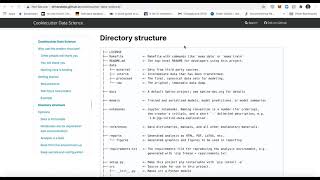
YouTube returned 6 videos for “Cookiecutter Data Science”, and we withheld 5: 5 did not mention Cookiecutter Data Science. Showing the 1 we can prove is about Cookiecutter Data Science.
Official links
Tools that pair well with Cookiecutter Data Science
Common stack mates teams adopt alongside Cookiecutter Data Science, with the specific reason each pairing earns its keep.

Quadratic
Quadratic is the AI spreadsheet that writes Python, SQL, and formulas against live data sources.
Hex
Hex is an AI analytics workspace where SQL and Python teams ask questions, explore data, and ship governed data apps.

Formula Bot
Better Analyst (formerly Formula Bot) turns plain-English questions into AI data analysis, charts, and dashboards.
Featured Head-to-Head Comparisons
Cookiecutter Data Science vs Geologicai
If you're a data scientist starting a Python project and need a free, community-standard structure, Cookiecutter Data Science is a no-brainer. For mining companies seeking to accelerate core analysis from weeks to hours with AI and sensor fusion, GeologicAI's integrated platform (now with LIBS via Lumo Analytics) justifies its enterprise pricing through massive time savings. Choose based on your domain: open-source data science vs. critical minerals.
Cookiecutter Data Science vs Screenplayiq
These tools serve entirely different domains and are not direct competitors. Choose Cookiecutter Data Science if you need a free, standardized project template for Python data science work. Choose ScreenplayIQ if you are a screenwriter or producer seeking AI-driven script analysis and box office predictions.
Cookiecutter Data Science vs Versatile
These tools are not competitors. Choose Cookiecutter Data Science if you're a data scientist wanting a free, standardized project template for reproducibility. Choose Versatile if you're a steel erector needing real-time crane pick tracking and delay identification, but be prepared for proprietary hardware and contact-based pricing.
Alternatives to Cookiecutter Data Science
View all
Quadratic
Quadratic is the AI spreadsheet that writes Python, SQL, and formulas against live data sources.
Hex
Hex is an AI analytics workspace where SQL and Python teams ask questions, explore data, and ship governed data apps.
Formula Bot
Better Analyst (formerly Formula Bot) turns plain-English questions into AI data analysis, charts, and dashboards.
Frequently Asked Questions
Categories
Best-of guides
Used Cookiecutter Data Science? Help shape our editorial sentiment research.