Face Mix is live · free plan, paid from $100/yr · last verified 26 Oct 2026 · viability monitor

Face Mix
No-code AI face mixing: blend up to 4 photos, edit 30+ facial attributes, and render face-morph videos in your browser.
Face Mix is the pick when you need to iterate on a face rather than accept the first output — the 30+ attribute sliders and key-frame morphing are the reason to choose it over a one-prompt generator, and the 3D-export path is unusual at this price. The credit model is the catch: heavy downloading on the $10/mo billed annually Plus tier still costs you, so anyone shipping volume should budget for Pro at $30/mo (or $300/yr) where downloads go free. If your task is putting one face onto an existing photo instead of synthesizing new ones, Playform's own Face Swap is the better sibling.
Verdict generatedVerified 4d ago · liveness 67/100 · cite: rightaichoice.com/tools/face-mix
- Character designers iterating on one face across many variations
- Creators producing face morph videos for social content
- Game and 3D artists prototyping faces for model export
- Photographers making detail-level edits to facial attributes
- Anyone whose main task is swapping a face onto an existing photo (use Playform Face Swap)
- Teams that need unlimited storage but won't move up to Studio
- High-volume downloaders unwilling to move up to Pro, where downloads stop costing credits
We scan live Reddit threads, YouTube comments, X posts, G2 reviews and other communities — and hand you an honest verdict in under a minute.
- Honest verdict, not marketing
- Real pros & cons from real users
- Attributed quotes with receipts
3 free scans · no card needed
Skip Face Mix if you only need to composite one face onto an existing photo — Playform's Face Swap is the purpose-built sibling for that job, and Face Mix is built for synthesizing and iterating on new faces instead.
Everything you generate on Free carries a watermark, and removing it costs 2 credits per download ($1 per extra credit beyond the 10 intro credits).
Face Mix's paid ladder is cheap at the entry point and moderate at the top: Plus is $10/mo (or $100/yr billed annually) and Pro $30/mo (or $300/yr billed annually), which is broadly in line with other browser face tools, while Studio at $50/mo (or $500/yr billed annually) is priced for artists who want unlimited storage and the steepest credit discount. The real cost signal isn't the subscription — it's that Plus still charges 1 credit per download, so volume buyers should treat Pro's $30/mo billed annually as
In short
Face Mix — No-code AI face mixing: blend up to 4 photos, edit 30+ facial attributes, and render face-morph videos in your browser. Best for Character designers iterating on one face across many variations, Creators producing face morph videos for social content, Game and 3D artists prototyping faces for model export. Free to start; paid plans from $100/yr.
What is Face Mix?
Face Mix — No-code AI face mixing: blend up to 4 photos, edit 30+ facial attributes, and render face-morph videos in your browser. Best for Character designers iterating on one face across many variations, Creators producing face morph videos for social content, Game and 3D artists prototyping faces for model export. Free to start; paid plans from $100/yr.
Face Mix (FaceMix) is a browser-based AI face generator from Playform for creatives who want detail-level control instead of one-shot prompts. You import up to four anchor images, the tool blends them into new faces, and you then push individual features around with sliders across 30+ facial attributes covering age, makeup, and expression. The workflow goes past static images. You can select key frames and generate morph videos that transition between faces, mix photorealistic photos with illustrated faces, convert real faces into illustrations, and produce faces intended for export into 3D modeling pipelines. Everything runs no-code in the browser, results default to private unless you explicitly share to the community, and Playform states that images you create are your intellectual property under its terms. It lives inside the FaceCraft suite alongside Face Swap and Re-Face-It, so if your job is swapping one face onto an existing photo rather than synthesizing and iterating on new ones, the sibling tool fits better. Face Mix targets digital artists, character designers, game prototypers, photographers making fine-grained edits, and hobbyists curious what a blended face looks like. Pricing is credit-based rather than a flat cap. Generation is unlimited with a watermark on every tier; you spend credits to download clean. Free gives 100 watermarked generations daily and costs 2 credits per download, Plus ($10/mo, or $100/yr) drops that to 1 credit, and Pro ($30/mo, or $300/yr) and Studio ($50/mo, or $500/yr) make downloads free while bundling 30 and 60 roll-over credits respectively for advanced work like dedicated-GPU training runs.
Key features
- Mix up to 4 anchor face images into one new face
- Slider controls over 30+ facial attributes including age, makeup, and expression
- Generate face morph videos between selected key frames
- Works with both photorealistic photos and illustrated faces
- Turn real face photographs into illustrations
- Generate faces from 3D images for export into 3D models
- Train your own AI model
- Dedicated-GPU generation metered at 6 credits per hour
- Browser-based, no install required
- Free tier with 100 watermarked generations every day
- Credit-based watermark removal at download (2 credits Free, 1 credit Plus)
- Upscale results 2x and 4x (free on Plus and up) and up to 12x on Pro/Studio
- Bulk downloading results (Plus and above)
- Mix and morph videos from your own trained models (Plus and above)
- Results private by default with user-retained copyright
Behind the verdict
Face Mix's pitch is control, and the scraped product surface backs that up. Where most face generators hand you a prompt box and a slot machine, this one hands you anchor images plus a slider rack: import up to four faces as anchors, blend them, then adjust 30+ named attributes including age, makeup, and expression until you get what you were picturing. That iteration loop is the product. The second differentiator is motion. You pick key frames and generate videos that morph between the selected faces — a capability that sits behind the Plus tier and up. The third is the odd one out: Face Mix accepts 3D images and produces faces you can export for 3D models, which is a narrow but genuinely useful path for game and simulation asset work that most web face tools don't touch. It also handles both photoreal and illustrated faces in the same workflow, and can convert a real face photo into an illustration. What you should go in knowing is the pricing shape. Every tier generates without limit but stamps a watermark on output; you pay credits to pull clean files. Free is 100 watermarked generations a day with 2 credits per download and results kept 30 days. Plus at $10/mo (or $100/yr billed annually) cuts downloads to 1 credit and unlocks bulk download, unlimited result history, free 2x/4x upscaling, and FaceMorph video. Pro at $30/mo (or $300/yr billed annually) is the tier where downloads stop costing credits, and it adds 30 roll-over credits monthly plus 30% off extra credits at $0.70 each and upscaling to 12x. Studio at $50/mo (or $500/yr billed annually) doubles roll-over credits to 60, halves extra-credit cost to $0.50, and gives unlimited storage. Two mechanics worth flagging before you commit. Unused subscription credits roll over month to month, but remaining roll-over credits expire if you cancel a Pro or Studio subscription — credits you bought outright don't expire. And dedicated-GPU training runs are metered separately at 6 credits per hour on every tier including Free, so anyone training their own models should model that cost alongside the subscription. On ownership, Playform's terms state images created on the platform are your intellectual property and results default to private unless you explicitly share to the community. That's a meaningful default for client and personal work alike. Where it doesn't fit: it's browser-only with no documented native mobile or desktop app, and we could not reach the developer pages this run, so we're not characterizing API availability either way. Teams that expect unlimited storage without a Studio subscription should look elsewhere, and anyone whose actual task is compositing a face onto an existing photo will be fighting the tool — Face Swap is the right door.
Limitations
- Generation is unlimited on every tier but watermarked; you spend credits to download clean files.
- Free users get 100 watermarked generations a day, pay 2 credits per download, and results are saved for 30 days.
- Plus cuts downloads to 1 credit but still charges them; downloads only become free at Pro ($30/mo).
- Training your own model on dedicated GPU is metered at 6 credits per hour on every tier including Free, so training cost rides on top of the subscription.
- The tool is browser-based with no documented native mobile or desktop app.
as of 2026-10-01
Researching Face Mix? Get your full AI stack in 60 seconds.
Free, no signup — tell us your goal and get tools matched to your budget & existing stack.
Is Face Mix still active?
Face Mix is live · free plan, paid from $100/yr · last verified 26 Oct 2026 · viability monitor.
Viability score
How well maintained and how widely used is Face Mix? Built from what the vendor actually publishes (docs, changelog, tutorials, integrations, pricing), whether the site is live, and how much real users discuss it. How we calculate this
Last calculated: October 2026
How we score →What do users say about Face Mix?
What people actually say about Face Mix — is it worth it?
We ran a structured research pass across product reviews, community discussions, and post-purchase forum threads to surface the patterns vendors won't publish themselves. Below: the recurring strengths, the hidden costs people mention most, and the cohort that consistently regrets adopting this tool.
ResearchedDiscussed by users across 2 sources (YouTube, Lemmy) · researched Oct 24, 2026.
Weighted by the 29 posts each of 2 sources contributed.
- +Genuine slider-level control over 30+ facial attributes, not just one-shot prompts
- +Blend up to four anchor images into one new face
- +Morph videos transition between selected key frames, useful for character work
- +Runs entirely in the browser with no install, lowering the entry bar
- +Bridges photoreal and illustrated faces in both directions
- −No real community reviews exist to confirm output quality or reliability
- −Watermark on every generated image until you pay credits to remove it
- −Credit-based downloads make high-volume use hard to budget
- −Dedicated-GPU training runs metered at 6 credits per hour add up
- −Overlaps with Face Swap and Re-Face-It, so tool choice can confuse newcomers
- • Credits per clean download below Pro tier
- • Dedicated-GPU training metered at 6 credits per hour
- • Annual plans paid in full upfront
How we verified this
Every listed fact about Face Mix— pricing, features, links, status — is re-read from the vendor's own pages by our verification pipeline and each change is logged with a date; the last pass ran on 26 Oct 2026. Pages mix model-assisted synthesis with human review; see how we verify.
Verification history
We have re-verified Face Mix 10 times since . Each pass re-reads the vendor's own pages and re-checks every listed field against that evidence; passes where nothing had changed are marked as such.
- — changed SSL certificate
- — changed limitations
- — changed who it suits, description, our verdict, features, hidden costs, limitations, switching in, switching out, who should skip it, pricing tiers, pricing fit, setup time, summary, use cases
- — changed description, who should skip it, our verdict, who it suits, pricing tiers, summary, features
- — changed limitations
- — changed who should skip it, features, setup time, switching in, switching out, hidden costs, limitations, pricing fit, summary, pricing tiers, description, our verdict, who it suits
Showing the 6 most recent of 10 verification passes.
Free to cite with attribution — this page re-verifies continuously.
How much does Face Mix cost in 2026?
Face Mix: Free to start; paid plans from $100/yr. Pricing last verified 26 Oct 2026.
Plans compared
Every published Face Mix tier, its price as the vendor publishes it, who it fits, and what it adds over the tier below. The 12-month cost projection follows.
| Plan | Price | Billing | Who it's for |
|---|---|---|---|
| Free | Free | — | Hobbyists and first-time testers who want to see what a blended face looks like before spending anything — 100 watermarked generations a day with no card required.Adds: Free entry point: 100 daily watermarked generations, 10 intro credits, 2 credits per clean download, 1 GB storage, results kept 30 days. |
| Plus | $100/yrVendor: “$10/mo (or $100/yr billed annually)” | yearly | Creators producing morph clips and bulk output who don't mind paying 1 credit per clean download — the tier where FaceMorph video, bulk download, and free 2x/4x upscaling unlock.Adds: Adds FaceMorph video, bulk download, unlimited result history, and free 2x/4x upscaling, and cuts clean downloads from 2 credits to 1 credit; $10/mo or $100/yr billed annually. |
| Pro | $300/yrVendor: “$30/mo (or $300/yr billed annually)” | yearly | Anyone shipping volume who's tired of paying per download, plus artists who want granular control over training their own models and 12x upscaling.Adds: Makes watermarked-removed downloads free, adds 30 roll-over credits per month, 30% off extra credits ($0.70 each), granular model training controls, and upscaling up to 12x; $30/mo or $300/yr billed annually. |
| Studio | $500/yrVendor: “$50/mo (or $500/yr billed annually)” | yearly | Professional artists and small studios generating at volume who want unlimited storage and the steepest credit discount, plus eligibility for Studio membership.Adds: Doubles roll-over credits to 60 per month, takes extra credits to $0.50 each (50% off), and adds unlimited storage and Studio membership eligibility; $50/mo or $500/yr billed annually. |
12-month cost
Project the real annual outlay, including the implied monthly cost when only an annual tier is published.
Vendor list price only. Add-on usage, seat overages, and contract minimums are surfaced under Hidden costs & gotchas.
Where the pricing makes sense
The company stage and team size where Face Mix's pricing actually pencils out — and where peers do it cheaper.
Face Mix's paid ladder is cheap at the entry point and moderate at the top: Plus is $10/mo (or $100/yr billed annually) and Pro $30/mo (or $300/yr billed annually), which is broadly in line with other browser face tools, while Studio at $50/mo (or $500/yr billed annually) is priced for artists who want unlimited storage and the steepest credit discount. The real cost signal isn't the subscription — it's that Plus still charges 1 credit per download, so volume buyers should treat Pro's $30/mo billed annually as
Has Face Mix's pricing changed?
No plan price for Face Mix has moved since we began logging in Aug 2026; the pricing page is re-read on every verification pass.
Who should pick Face Mix?
Pick Face Mix if you are Character designers iterating on one face across many variations, Creators producing face morph videos for social content, Game and 3D artists prototyping faces for model export, Photographers making detail-level edits to facial attributes.
Look elsewhere if you are Anyone whose main task is swapping a face onto an existing photo (use Playform Face Swap), Teams that need unlimited storage but won't move up to Studio, High-volume downloaders unwilling to move up to Pro, where downloads stop costing credits, Anyone wanting a native mobile or desktop app instead of a browser tool.
Skip it if Skip Face Mix if you only need to composite one face onto an existing photo — Playform's Face Swap is the purpose-built sibling for that job, and Face Mix is built for synthesizing and iterating on new faces instead.
GeneratedReal-world workflow fit
Concrete scenarios for the personas Face Mix actually fits — and what changes day-one when you adopt it.
You import four reference faces as anchors, blend them, then work the attribute sliders — age, makeup, expression — until the character reads the way your brief wants, downloading clean iterations as you go.
Outcome: A set of consistent character variations you can show a client, with no prompt-guessing and no install.
You pick two faces as key frames in Face Mix, generate a morph video that transitions between them, and use Plus's bulk download to pull the clip plus stills in one go.
Outcome: A face morph clip ready to post, produced in the browser without editing software.
You feed 3D images into Face Mix to synthesize new faces, export them, and use Pro's 12x upscaling plus batch GPU runs (6 credits per hour) when you need a volume of assets.
Outcome: Prototype faces and 3D model inputs lined up without leaving the browser.
Use cases
- Morph between two or more faces to create video transitions for social content.
- Edit specific facial attributes such as age, smile, or makeup in a photo.
- Mix features from multiple reference faces to generate new character portraits.
- Convert real face photos into illustrated avatars for digital use.
- Generate faces from 3D images to export as assets for game or simulation work.
Setup time & first value
How long it actually takes to get something useful out of Face Mix — broken out by persona, not the marketing-page minute.
Face Mix is browser-only, so there's nothing to install — sign up and you're generating on the free tier the same minute. Expect roughly 10–20 minutes to first usable output as a hobbyist, and a session or two to dial in the anchor-image-plus-slider workflow if you're a character designer or photographer. Training your own model, which is metered at 6 credits per hour of GPU time, is the one task
Switching to or from Face Mix
How to bring data in from common predecessors and how to get it back out — written for the switcher, not the buyer.
- →From a one-prompt face generator: import your reference photos as up to 4 anchors in Face Mix, blend, then refine individual attributes with the 30+ sliders instead of re-rolling the prompt.
- →From a desktop face-morph tool: move the key-frame morph step into Face Mix's FaceMorph video feature on Plus or above, keeping the same source faces.
- ↗To Playform Face Swap: if your actual task becomes compositing one face onto an existing photo, switch to the sibling app rather than fighting Face Mix's synthesis-first flow.
- ↗To Re-Face-It: if you need your own face implanted into generated scenarios rather than blended new faces, that FaceCraft sibling covers it.
Resources & guides
Tutorials & Learning
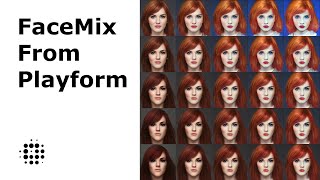
YouTube returned 6 videos for “Face Mix”, and we withheld 5: 5 did not mention Face Mix. Showing the 1 we can prove is about Face Mix.
Official links
What are the best Face Mix alternatives?
The closest alternatives to Face Mix we list are Pixelcut AI Photo Editor, Fotor and Cutout Pro. Ranked by direct product-type match, not category overlap.
| Alternative | Pricing | Starts at | Last verified |
|---|---|---|---|
| Pixelcut AI Photo Editor | Freemium | Pricing not published | — |
| Fotor | Freemium | Pricing not published | — |
| Cutout Pro | Freemium | Pricing not published | — |
Alternatives to Face Mix
View all
Pixelcut AI Photo Editor
AI photo editor for background removal, product photos, batch editing, and UGC ad videos

Fotor
Fotor bundles a full AI photo editor with a multi-model AI image generator and AI video generator in one browser tab

Cutout Pro
Cutout Pro removes image and video backgrounds at batch scale, then generates AI images and video from the same credit balance.
Tools that pair well with Face Mix
Common stack mates teams adopt alongside Face Mix, with the specific reason each pairing earns its keep.

Pixelcut AI Photo Editor
AI photo editor for background removal, product photos, batch editing, and UGC ad videos

Fotor
Fotor bundles a full AI photo editor with a multi-model AI image generator and AI video generator in one browser tab

Cutout Pro
Cutout Pro removes image and video backgrounds at batch scale, then generates AI images and video from the same credit balance.
Face Mix vs its closest rival
Face Mix's closest head-to-head is with Splice — Face Mix and Splice serve entirely different creative domains. Face Mix excels at AI‑driven facial manipulation and character design, while Splice is a powerhouse for music production samples and rent-to-own plugins. Choose Face Mix if you need precise control over faces; choose Splice if you’re a music producer building tracks with royalty‑free sounds. They are not direct competitors. Verdict generated
Head-to-head comparisons
Face Mix vs Splice
Face Mix and Splice serve entirely different creative domains. Face Mix excels at AI‑driven facial manipulation and character design, while Splice is a powerhouse for music production samples and rent-to-own plugins. Choose Face Mix if you need precise control over faces; choose Splice if you’re a music producer building tracks with royalty‑free sounds. They are not direct competitors.
GeneratedFace Mix vs The New Black
If you're a digital artist or game dev mixing faces with precise attribute controls, Face Mix is your tool. If you're a fashion brand generating apparel designs with production-ready exports, The New Black wins. Face Mix's latest browser-based live swap adds real-time capability, but The New Black's dedicated fashion AI offers specialized value for apparel. Choose based on your industry.
GeneratedFace Mix vs Storyfile
Face Mix wins for creators who need fast, affordable, and customizable face generation with granular controls and bulk output. StoryFile is the clear choice for museums, legacy projects, and enterprises that require authentic, interactive video conversations with real people—but at a much higher cost and complexity. Choose Face Mix for creative experimentation; choose StoryFile for historical preservation.
GeneratedFrequently asked questions
Best-of guides
Used Face Mix? Help shape our editorial sentiment research.