
GPTExcel
GPTExcel turns Excel and CSV uploads into formulas, pivot tables, charts and slide decks with AI.
The $9/mo Pro plan covering formulas, pivots, decks, scripts, SQL and regex is unusually good value for anyone who splits their week between spreadsheets and adjacent chores. The free tier is genuine — 50 credits, no card — so test the pivot and deck agents on your own data before committing. It won't replace a BI stack, and credit burn on the Expert model will catch heavy users.
Verified 2h ago · liveness 58/100 · cite: rightaichoice.com/tools/gptexcel
- Accountants and auditors who reconcile exports and want pivots, formulas and summaries without writing syntax
- Financial analysts building forecasts in Excel who need pivot tables and a slide deck from the same file
- Operations and marketing teams turning recurring CSV exports into charts, summaries and reports
- Students and small-business owners who need a working formula explained, not a syntax lesson
- Heavy Expert-model users who will burn 10,000 credits fast, given unused weekly credits don't roll over
- Teams working with workbooks well above the 100 MB Pro Plus file ceiling
- Analytics groups needing warehouse-connected BI dashboards rather than single-file analysis
We scan live Reddit threads, YouTube comments, X posts, G2 reviews and other communities — and hand you an honest verdict in under a minute.
- Honest verdict, not marketing
- Real pros & cons from real users
- Attributed quotes with receipts
3 free scans · no card needed
Skip GPTExcel if you need an offline, desktop or self-hosted spreadsheet assistant, or if your data cannot leave your network for a cloud service.
Free tier allows 10 AI chat messages every 30 days and 4 tool uses every 12 hours, so steady use pushes you onto a paid plan fairly quickly.
At $0 forever for light use, $9/mo monthly or $6.30/mo billed annually for Pro, and $18/mo monthly or $12.60/mo billed annually for Pro Plus, GPTExcel sits at the low end of AI spreadsheet tools — cheaper per month than most single-purpose formula or data-analysis subscriptions, and far cheaper than a BI platform seat. It fits solo professionals through small finance, ops and marketing teams rather than enterprise analytics departments, which need warehouse-connected BI.
In short
GPTExcel — GPTExcel turns Excel and CSV uploads into formulas, pivot tables, charts and slide decks with AI. Best for Accountants and auditors who reconcile exports and want pivots, formulas and summaries without writing syntax, Financial analysts building forecasts in Excel who need pivot tables and a slide deck from the same file, Operations and marketing teams turning recurring CSV exports into charts, summaries and reports. Free to start; paid plans from $9/mo.
What's new in GPTExcel
Checked 7 days agoAcross the latest 2 updates: 2 feature updates.
New Excel functions in 2026: FLATTEN, IMPORTTEXT and GROUPBY
Walkthrough of Excel's newer functions, their syntax, and which versions support them. FLATTEN and IMPORTTEXT remain Beta-only.
FLATTEN in Excel vs Google Sheets: same name, different job
Google Sheets' FLATTEN collapses a range into one column; Excel's new FLATTEN spreads in-cell lists into the grid. Post covers what each does and the Excel alternative.
What people actually say about GPTExcel — is it worth it?
We ran a structured research pass across product reviews, community discussions, and post-purchase forum threads to surface the patterns vendors won't publish themselves. Below: the recurring strengths, the hidden costs people mention most, and the cohort that consistently regrets adopting this tool.
2 mentions across 1 source (Bluesky) · researched Jul 3, 2026.
Average across the 1 source that answered — each source counts once, not each post.
- +Saves time by auto-generating formulas from natural language.
- +Supports multiple spreadsheet platforms: Excel, Sheets, Airtable, Calc.
- +Includes formula explanation for learning and debugging.
- +Free tier available for trial without upfront payment.
- +Covers VBA, Apps Script, SQL, and regex generation.
- −Only 4 free requests per day, limiting exploration.
- −Community feedback is extremely sparse—untrusted at scale.
- −No reviews on Reddit, HN, or app stores for validation.
- −Paid plans may be expensive for what they offer (no pricing details).
- −Accuracy of complex formulas or scripts not user-verified.
- • No pricing transparency: Pro and Enterprise costs not listed publicly.
- • Free tier limits may push users to paid before adequately testing.
Viability Score
How well maintained and how widely used is GPTExcel? Built from what the vendor actually publishes (docs, changelog, tutorials, integrations, pricing), whether the site is live, and how much real users discuss it. How we calculate this
Last calculated: October 2026
How we score →Key Features
- Chat with Excel, CSV, xlsx, xlsm and TSV files in plain English
- Pivot Builder agent generating native Excel pivot tables with slicers
- Pivot charts written into a downloadable workbook
- Slide Deck Builder: up to 40 slides with native charts as PPTX or PDF
- Revise generated decks by asking for new charts or colours in chat
- Formula generator for Excel, Google Sheets, LibreOffice Calc and Airtable
- Formula explainer and optimizer with step-by-step breakdowns
- Script generator for VBA, Google Apps Script, LibreOffice Basic, Airtable and Python
- SQL query generator, explainer and optimizer
- Regex generator, explainer and optimizer
- Chart generation from uploaded data inside the conversation
- Data analysis for trends, anomalies and key insights with explanations
- Data cleaning and transformation: duplicates, spacing, date formats
- Table template generator for Excel and Google Sheets
- Image-to-table conversion from a photo of a table
About GPTExcel
GPTExcel is an AI spreadsheet assistant that runs in the browser and works on the files you already have. Upload an Excel workbook (.xlsx, .xls, .xlsm), a CSV or TSV, or a photo of a table, then describe the outcome you want in plain English. Chat answers with text, tables, charts, formulas and downloadable files rather than code snippets. The vendor says 1.6M+ users have generated 60M+ formulas through it, backed by a 4.9/5 average across 938 reviews. Specialist agents sit alongside the chat box. The Pivot Builder writes native Excel pivot tables with slicers and pivot charts into a workbook you download. The Slide Deck Builder reads your data, builds up to 40 slides with native charts, and hands back editable PowerPoint (.pptx) or PDF — with revisions requested in plain English. Around those sit focused generators for formulas (Excel, Google Sheets, LibreOffice Calc, Airtable), scripts (VBA, Apps Script, Python), SQL, regex and table templates, each able to generate, explain or optimize. One differentiator worth knowing about: when you ask about a newer Excel or Sheets function, chat checks Microsoft's and Google's official docs before answering and flags anything that is still Insider- or Beta-only. Recent vendor write-ups on functions like GROUPBY, FLATTEN and IMPORTTEXT lean on exactly that behaviour, so you find out a formula won't work on your build before you paste it. Audience is broad on paper — accountants, financial analysts, ops and marketing teams, students, owners — but the daily user is someone whose output lands in a workbook and occasionally in a deck. Files are AES-256 encrypted at rest in S3, TLS in transit, never used as training data, and deletable on request. Compare it to formula-only helpers like Excel Formula Bot on one side and warehouse BI tools on the other; GPTExcel deliberately stops before the BI layer.
Behind the Verdict
Where GPTExcel earns its seat is breadth at a low price. One Pro subscription at $9/mo covers formula generation and explanation, pivot tables with slicers, chart building, data cleaning, script generation in VBA and Apps Script, plus SQL and regex helpers. If you currently juggle three or four single-purpose tools for that list, consolidating onto one $9 seat is straightforward arithmetic. We'd pick it when the deliverable is a file. Reconciling a department expense export, turning a quarterly CSV into a pivot with charts, or squeezing a board deck out of a forecast — those are the jobs the agents are actually built for, and the PPTX/PDF output means you aren't retyping anything into PowerPoint. The function-aware chat is the sleeper feature. Getting told that a formula depends on a Beta-only function before you ship it downstream saves an afternoon of debugging a #NAME? error in someone else's workbook. GPTExcel has published walkthroughs on newer functions like GROUPBY and FLATTEN, which lines up with the claim that chat cross-checks Microsoft and Google documentation. Where it bites: credits. Pro gives roughly 3,000 a month, Pro Plus roughly 10,000, and the Expert model costs 10 credits per message against 1 for Fast. Heavy users will feel that. Credits refresh weekly on paid plans, unused weekly credits don't roll over, and bursty usage gets paced over five-hour windows — so a Monday-morning deck marathon may hit a wall. File ceilings are the other practical constraint: 5 MB on Free, 50 MB on Pro, 100 MB on Pro Plus, with 10/20/30 files per chat respectively. If your workbooks routinely run over 100 MB, this isn't the tool. Same answer for anyone who can't send spreadsheets to a cloud service at all. The closest alternatives cut in two directions. Excel
Researching GPTExcel? Get your full AI stack in 60 seconds.
Free, no signup — tell us your goal and get tools matched to your budget & existing stack.
Real-world workflow fit
Concrete scenarios for the personas GPTExcel actually fits — and what changes day-one when you adopt it.
Uploads the quarterly expense workbook, asks for total expenses by department, then requests a pivot table with slicers and a pivot chart in a downloadable file.
Outcome: Gets the department breakdown, a native Excel pivot with slicers and a chart, then pastes or downloads everything into the reporting deck without writing a formula by hand.
Uploads a messy CSV and asks GPTExcel to remove duplicates, trim stray spaces, fix dates stored as text and standardize country spellings, checking each step.
Outcome: Receives a cleaned, transformed dataset with the changes explained, plus a shareable read-only chat link so a colleague can review exactly what was changed.
Describes the repetitive monthly task and asks the script generator for VBA or Google Apps Script, then asks it to explain each step of the generated code.
Outcome: Gets a runnable script plus a plain-English explanation, so the automation can be reviewed, pasted into the workbook and reused each month without a developer.
Use Cases
- Generate a complex Excel formula by describing the calculation in plain English instead of writing syntax.
- Upload a quarterly workbook and ask for total expenses by department, getting a table and chart back.
- Write VBA, Apps Script, LibreOffice Basic, Airtable or Python scripts to automate repetitive spreadsheet steps.
- Build a native Excel pivot table with slicers and pivot charts from a plain-English request.
- Generate and explain SQL queries for pulling data out of a database without hand-writing the join logic.
- Decode or validate a regex pattern for data cleaning and filtering.
- Convert a photo of a printed table into an editable spreadsheet.
- Ask questions about an uploaded CSV and get summary insights, trend detection and anomalies.
Models Under the Hood
as of 2026-10-18
Limitations
- GPTExcel runs in your browser and requires uploading a spreadsheet (Excel, CSV, TSV, or an image of a table); there is no offline mode described.
- Usage is credit-metered on every tier: Free gives 50 credits a month plus 5 free tool runs daily, Pro ≈3,000 credits/month, and Pro Plus ≈10,000 credits/month, with files limited to 5 MB, 50 MB, and 100 MB respectively.
- Paid plans have higher caps but weekly credits do not roll over, and large bursts are paced over 5-hour windows.
- The specific underlying AI models are not named on the site, which only refers to tiers called Fast, Standard and Expert.
as of 2026-10-01
Verification history
We have re-verified GPTExcel 10 times since . Each pass re-reads the vendor's own pages and re-checks every listed field against that evidence; passes where nothing had changed are marked as such.
- — re-verified summary, description, our verdict, our analysis, pricing model, pricing tiers, features, integrations, who it suits, who should skip it
- — re-verified summary, description, our verdict, our analysis, pricing model, pricing tiers, features, integrations, who it suits, who should skip it
- — re-checked, vendor evidence unchanged
- — re-checked, vendor evidence unchanged
- — re-checked, vendor evidence unchanged
- — re-checked, vendor evidence unchanged
Showing the 6 most recent of 10 verification passes.
Free to cite with attribution — this page re-verifies continuously.
12-month cost
Project the real annual outlay, including the implied monthly cost when only an annual tier is published.
Vendor list price only. Add-on usage, seat overages, and contract minimums are surfaced under Hidden costs & gotchas.
Plans compared
For each published GPTExcel tier: who it actually fits, and what it adds vs. the previous tier. Cross-reference the cost calculator above for projected annual outlay.
Free
$0/mo
Ideal for
Solo user evaluating GPTExcel or handling occasional spreadsheet questions, with no credit card required.
What this tier adds
Starting tier: 10 AI chat messages every 30 days, 4 tool uses every 12 hours, files up to 5 MB and 10 per chat, with all formula, script, SQL, regex and pivot tools included.
Pro
$9/mo
Ideal for
Individual analysts, accountants and ops staff who use the assistant most working days.
What this tier adds
Raises limits to 3,000 AI chat messages and 3,000 tool uses every 30 days, with files up to 50 MB and 20 per chat.
Pro Plus
$18/mo
Ideal for
Power users and small finance or ops teams running large or frequent workbook analyses.
What this tier adds
Pushes limits to 10,000 AI chat messages and 10,000 tool uses every 30 days, with files up to 100 MB and 30 per chat.
Where the pricing makes sense
The company stage and team size where GPTExcel's pricing actually pencils out — and where peers do it cheaper.
At $0 forever for light use, $9/mo monthly or $6.30/mo billed annually for Pro, and $18/mo monthly or $12.60/mo billed annually for Pro Plus, GPTExcel sits at the low end of AI spreadsheet tools — cheaper per month than most single-purpose formula or data-analysis subscriptions, and far cheaper than a BI platform seat. It fits solo professionals through small finance, ops and marketing teams rather than enterprise analytics departments, which need warehouse-connected BI.
Setup time & first value
How long it actually takes to get something useful out of GPTExcel — broken out by persona, not the marketing-page minute.
Free tier: sign in with Google, Microsoft or a magic link, upload a spreadsheet, and get your first answer in a few minutes — no credit card required. Pro and Pro Plus: same flow, signing in to upgrade takes under a minute, with bigger file and message limits active immediately. No installation is involved because GPTExcel runs in the browser.
Switching to or from GPTExcel
How to bring data in from common predecessors and how to get it back out — written for the switcher, not the buyer.
- →From manual Excel formula writing: paste your data description into the Formula Generator and get the formula plus an explanation.
- →From Excel Formula Bot: bring the same formula requests to GPTExcel and add chat, pivot and chart work in one subscription.
- →From SheetAI: upload the workbook instead of prompting inside Sheets, and get pivot tables, charts and downloadable files back.
- →From a spreadsheet macro built by a colleague: paste the code into the script generator and ask for an explanation before adapting it.
- →From a raw CSV export: upload it and use the data cleaning and transformation steps before analysis.
- ↗To Excel Formula Bot: export your recurring formula prompts if you only ever need formula generation at a lower feature count.
- ↗To a dedicated BI tool: move cleaned CSV and Excel outputs there when you need warehouse connections and governed dashboards.
- ↗To native Excel or Google Sheets: download the generated workbook, pivot table or formula and keep working directly in the spreadsheet app.
- ↗To a self-hosted or desktop script editor: take the generated VBA, Apps Script, Python or regex code and run it locally.
- ↗To Google Sheets: paste generated formulas and rebuilt tables into Sheets when your team standardizes there.
Resources & Guides
Tutorials & Learning
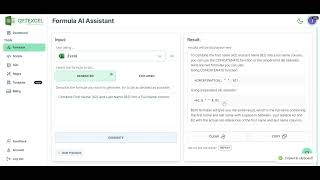
Excel formula Generator AI #ai #gptexcel #gpt_excel #excel
GPTEXCEL

AIでExcelの数式を生成する方法 - GPTEXCELチュートリアル
Umair Butt
YouTube returned 6 videos for “GPTExcel”, and we withheld 4: 4 could not be judged, because “GPTExcel” is a single word that other videos use for other things. Showing the 2 we can prove are about GPTExcel.
Official links
Tools that pair well with GPTExcel
Common stack mates teams adopt alongside GPTExcel, with the specific reason each pairing earns its keep.

Ajelix AI Excel Tools
Ajelix turns plain-English prompts into finished Excel formulas, VBA scripts, dashboards, decks, and shareable web apps.

Formula Bot
Better Analyst (formerly Formula Bot) turns plain-English questions into charts, dashboards, and automated data workflows.

GPT for Sheets and Docs
GPT for Sheets and Docs turns plain-language prompts into bulk AI spreadsheet automation inside Google Sheets and Docs.
Featured Head-to-Head Comparisons
Gptexcel vs Geologicai
If your world is spreadsheets – formulas, scripts, SQL – GPTExcel’s freemium model is a no-brainer. But if you’re in critical-minerals mining and need rapid, multi-sensor core analysis with AI logging, GeologicAI is the only end-to-end choice – now strengthened by its Lumo Analytics acquisition and $44M Series B. Choose based on your domain: spreadsheets vs. drill cores.
Gptexcel vs Versatile
These tools serve completely different domains, so your choice depends on your role. If you work with spreadsheets and want AI to generate formulas, scripts, or SQL, GPTExcel is your pick—and its free tier lets you test. If you're a steel erector or construction PM needing real-time crane data without workflow changes, Versatile is the specialized solution, though pricing requires contact. There's no overlap.
Gptexcel vs Screenplayiq
GPTExcel and ScreenplayIQ serve completely different domains. GPTExcel is a productivity tool for spreadsheet automation, ideal for business professionals and data analysts. ScreenplayIQ is a niche screenwriting analysis tool for film industry professionals. Choose GPTExcel if you need AI assistance with formulas, scripts, or data analysis in spreadsheets. Choose ScreenplayIQ if you are evaluating feature film scripts for market potential. There is no overlap in use cases.
Alternatives to GPTExcel
View all
Ajelix AI Excel Tools
Ajelix turns plain-English prompts into finished Excel formulas, VBA scripts, dashboards, decks, and shareable web apps.
Formula Bot
Better Analyst (formerly Formula Bot) turns plain-English questions into charts, dashboards, and automated data workflows.

GPT for Sheets and Docs
GPT for Sheets and Docs turns plain-language prompts into bulk AI spreadsheet automation inside Google Sheets and Docs.
Frequently Asked Questions
Best-of guides
Used GPTExcel? Help shape our editorial sentiment research.