
Logic Sheet
Google Sheets add-on that runs multi-step AI workflows from triggers like on-edit, form submit, time, or webhook.
Logic Sheet is worth a look if Google Sheets is where your work already lives and the repetitive part is 'something changed in a row, now do three things about it.' The trigger-plus-action model (on-edit, form submit, scheduled, webhook) is genuinely useful and the AI agent step on GPT or Gemini separates it from plain macros and Apps Script. Compared with Zapier or Make, it keeps the logic and the data in the same sheet rather than shuttling rows between apps, which is a real advantage for CRM follow-ups and finance reminders. It is not a general automation platform — stay with Zapier, Make or n8n if you need complex branching across many systems, and skip it entirely if your data lives in
Verified 11d ago · liveness 73/100 · cite: rightaichoice.com/tools/logic-sheet
- Business analysts automating reports and follow-ups in Google Sheets
- Operations teams streamlining task tracking and approvals
- Small and mid-sized businesses managing sales & CRM without developers
- Non-technical professionals who want AI automation inside spreadsheets
- Teams whose data lives in Excel rather than Google Sheets
- Projects needing complex multi-system orchestration with branching logic
- Users who need an offline or mobile-app experience
We scan live Reddit threads, YouTube comments, X posts, G2 reviews and other communities — and hand you an honest verdict in under a minute.
- Honest verdict, not marketing
- Real pros & cons from real users
- Attributed quotes with receipts
3 free scans · no card needed
Skip Logic Sheet if your data lives in Excel or your automation needs branching logic across five different systems — Zapier, Make or n8n handle that shape of work, and Logic Sheet is built to keep the logic in the sheet.
AI agent runs are metered, so a workflow that calls the agent on every edited row burns through your allowance far faster than a once-a-day scheduled job.
No verified pricing page was reachable for this run, so Logic Sheet's tier pricing is not restated here. The tool sits in the low-cost automation bracket alongside spreadsheet-native add-ons rather than the Zapier/Make per-task billing model, which matters most for teams whose automation volume is bursty — a per-run allowance is friendlier than paying per task, but a high-frequency trigger on a large sheet can flip that math the other way.
In short
Logic Sheet — Google Sheets add-on that runs multi-step AI workflows from triggers like on-edit, form submit, time, or webhook. Best for Business analysts automating reports and follow-ups in Google Sheets, Operations teams streamlining task tracking and approvals, Small and mid-sized businesses managing sales & CRM without developers. Free to start; paid plans from $29/mo.
What's new in Logic Sheet
Checked 4 days agoAcross the latest 1 update: 1 launch.
What people actually say about Logic Sheet — is it worth it?
We ran a structured research pass across product reviews, community discussions, and post-purchase forum threads to surface the patterns vendors won't publish themselves. Below: the recurring strengths, the hidden costs people mention most, and the cohort that consistently regrets adopting this tool.
9 mentions across 3 sources (YouTube, Product Hunt, Lemmy) · researched Sep 9, 2026.
Weighted by the 47 posts each of 3 sources contributed.
- +No-code, natural-language AI agents directly inside Google Sheets
- +Multiple triggers: on edit, form submit, scheduled, webhook
- +Ready-made templates for CRM, finance, Ops, and e-commerce
- +Works with GPT and Gemini for data enrichment and classification
- +Sends email, Slack, Google Docs, and Airtable updates automatically
- −Very little independent community feedback to judge long-term reliability
- −No detailed user reviews on Reddit, HN, or app stores to learn from
- −Recent YouTube and Lemmy discussions are mostly off-topic or unrelated
- −Pricing transparency is weak, with unclear free-tier limits
- −No public evidence of support responsiveness or issue resolution
- • Unclear overage charges if you exceed free-tier execution limits
- • Potential upselling for premium templates and priority support
Viability Score
How well maintained and how widely used is Logic Sheet? Built from what the vendor actually publishes (docs, changelog, tutorials, integrations, pricing), whether the site is live, and how much real users discuss it. How we calculate this
Last calculated: October 2026
How we score →Key Features
- No-code workflow builder inside Google Sheets
- AI agent steps powered by GPT and Gemini
- Natural-language prompt configuration for AI actions
- On-edit trigger fires when spreadsheet data changes
- Form submission trigger fires on new form responses
- Time-driven triggers (daily, weekly, custom schedule)
- Webhook trigger for real-time external events
- Send automated emails via Gmail
- Post Slack messages from sheet changes
- Create Google Docs from sheet data (contracts, proposals)
- Send HTTP/API requests as a workflow action
- Update Airtable records from Sheets
- Set and refresh spreadsheet formulas automatically
- Ready-to-use workflow templates for Sales & CRM, Operations, Finance, E-Commerce
- Multi-step action sequences chained after a single trigger
About Logic Sheet
Logic Sheet is a Google Sheets add-on for building automated workflows without writing code. You pick a trigger — on-edit, form submission, time-driven, or webhook — and Logic Sheet runs a sequence of actions: send a Gmail follow-up, post a Slack message, create a Google Doc, fire an HTTP/API request, update an Airtable record, set or refresh formulas, or hand a row to an AI agent running on GPT or Gemini. Prompts are written in plain language, so you describe what you want classified, enriched or summarised rather than coding it. It ships with ready-made workflow templates grouped around Sales & CRM, Operations, Finance, and E-Commerce — for example updating deal stages and firing follow-ups when pipeline data changes, or triggering payment reminders from a finance sheet. It's aimed at analysts, ops teams and non-developers who already run their work inside Google Sheets and want the repetitive parts handled automatically, without hiring a developer or wiring up a separate no-code platform.
Behind the Verdict
The strongest thing about Logic Sheet is that it doesn't ask you to leave Google Sheets. Most automation tools treat the spreadsheet as one endpoint among many; Logic Sheet treats it as the control panel. Triggers are the entry point — on-edit, form submission, time-driven (run every Monday, run daily at 9 AM) and webhook — and actions are the exit: send an email, send a Slack message, send an HTTP/API request, update an Airtable record, update the sheet, or set and refresh formulas. The AI agent action is what makes the pattern interesting, because the step that used to require a developer (enrich this row, classify this text, summarise these survey responses) becomes a natural-language prompt against GPT or Gemini. The template library is the fastest path in. Sales & CRM templates handle deal-stage updates and follow-up emails; Operations templates handle task notifications and overdue reminders; Finance templates cover invoice notifications and payment reminders; E-Commerce templates react to order and stock changes. That's a sensible shape for the tool's actual audience: business analysts, ops coordinators, and small teams running sales or finance admin out of a sheet. Where it bends: heavy or complex workflows inside a spreadsheet get harder to debug than they look, and the whole thing is web-only — it needs a live internet connection and a Google account. If your team is on Excel, or if you need orchestration that spans five systems with branching logic, this is the wrong shape of tool; Zapier, Make or n8n fit that better. Within its lane, though, it removes a genuine hour-a-day of copy-paste for people who never wanted to learn Apps Script.
Researching Logic Sheet? Get your full AI stack in 60 seconds.
Free, no signup — tell us your goal and get tools matched to your budget & existing stack.
Real-world workflow fit
Concrete scenarios for the personas Logic Sheet actually fits — and what changes day-one when you adopt it.
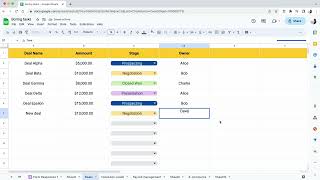
Set an on-edit trigger on the deal-stage column, then chain an AI agent step that drafts a follow-up based on the row's notes, a Gmail send of that draft, and a Slack post to the deal channel.
Outcome: Stage changes update the pipeline, notify the rep, and send the prospect a follow-up without anyone opening Gmail or Slack.
Start from the Finance template: a time-driven trigger runs daily, checks invoice status, sends payment reminder emails for overdue rows and updates the status column.
Outcome: Reminders go out on schedule and payment status stays current in the sheet, cutting manual chasing.
Use a form submission trigger so new requests land as rows, then fire an AI classification step and a Slack message routing the task to the right channel.
Outcome: Requests are triaged and routed the moment the form is submitted instead of waiting for someone to read the sheet.
Use Cases
- Update deal stages and send follow-up emails automatically when CRM rows change
- Enrich and classify rows with AI without leaving the spreadsheet
- Send Slack alerts when specific row conditions are met
- Trigger payment reminders and invoice status notifications from a finance sheet
- Generate contracts or proposals in Google Docs from sheet rows
- React to e-commerce order, stock or threshold changes via webhook
- Summarise survey responses and generate reports on status changes
- Validate and clean imported CSV data before processing
Models Under the Hood
as of 2026-09-09
Limitations
- Logic Sheet is a Google Sheets add-on, so it requires a Google account and constant internet access — there is no offline mode.
- Everything it does happens inside or around a spreadsheet, so complex orchestration across many systems is out of scope.
- Large datasets or long multi-step workflows can slow down, and debugging a failing chain inside a sheet is less transparent than a dedicated automation platform's run log.
- Users working in Excel are not served at all.
- AI agent quality depends on the underlying model and the prompt you write, so results on classification and enrichment need human spot-checks before you trust them in a downstream action.
as of 2026-09-27
Verification history
We have re-verified Logic Sheet 9 times since . Each pass re-reads the vendor's own pages and re-checks every listed field against that evidence; passes where nothing had changed are marked as such.
- — re-checked, vendor evidence unchanged
- — re-checked, vendor evidence unchanged
- — re-checked, vendor evidence unchanged
- — re-checked, vendor evidence unchanged
- — re-checked, vendor evidence unchanged
- — re-checked, vendor evidence unchanged
Showing the 6 most recent of 9 verification passes.
Free to cite with attribution — this page re-verifies continuously.
12-month cost
Project the real annual outlay, including the implied monthly cost when only an annual tier is published.
Vendor list price only. Add-on usage, seat overages, and contract minimums are surfaced under Hidden costs & gotchas.
Where the pricing makes sense
The company stage and team size where Logic Sheet's pricing actually pencils out — and where peers do it cheaper.
No verified pricing page was reachable for this run, so Logic Sheet's tier pricing is not restated here. The tool sits in the low-cost automation bracket alongside spreadsheet-native add-ons rather than the Zapier/Make per-task billing model, which matters most for teams whose automation volume is bursty — a per-run allowance is friendlier than paying per task, but a high-frequency trigger on a large sheet can flip that math the other way.
Setup time & first value
How long it actually takes to get something useful out of Logic Sheet — broken out by persona, not the marketing-page minute.
Installing the add-on and firing a first automation is a minutes-not-hours job if you start from a template — you pick a Sales, Operations, Finance or E-Commerce recipe and connect the trigger to a column. Building something custom from scratch takes longer because you're writing the AI prompt and choosing the action chain yourself. Teams introducing it cold should budget an afternoon to get one
Switching to or from Logic Sheet
How to bring data in from common predecessors and how to get it back out — written for the switcher, not the buyer.
- →From Apps Script: rebuild your script's trigger-and-action logic as a visual workflow with an AI agent step where the script did text processing.
- →From Zapier: move spreadsheet-triggered Zaps in-house so the logic and the data stay in the same sheet instead of round-tripping through Zaps.
- →From Make: replace spreadsheet-centric scenarios with Logic Sheet templates for Sales & CRM, Operations, Finance or E-Commerce.
- →From manual copy-paste routines: start with one template, prove the time saved, then convert the next repetitive task.
- ↗To Zapier: rebuild each workflow as a Zap when you need branching across many apps rather than spreadsheet-centric logic.
- ↗To Make: move to visual multi-branch scenarios when workflows outgrow what a sheet-native chain can express.
- ↗To n8n: self-hosted orchestration for teams that need far more systems in the loop than Sheets plus a handful of actions.
Integrations
Resources & Guides
Tutorials & Learning
YouTube returned 6 videos for “Logic Sheet”, and we withheld 5: 5 did not mention Logic Sheet. Showing the 1 we can prove is about Logic Sheet.
Official links
Tools that pair well with Logic Sheet
Common stack mates teams adopt alongside Logic Sheet, with the specific reason each pairing earns its keep.

SheetAI.app
Bulk AI text, image, video, and music generation that runs inside Google Sheets formulas.

GPT for Sheets and Docs
AI add-on for Google Sheets and Docs that runs ChatGPT, Claude, and Gemini models to automate formulas, cleanup, and bulk row-level work from a plain-language

Formula Bot
Better Analyst — formerly Formula Bot — turns plain-English data questions into charts, dashboards, spreadsheets, and scheduled analytics workflows.
Featured Head-to-Head Comparisons
Logic Sheet vs Presto Voice
Presto Voice and Logic Sheet serve completely different domains. Presto Voice is a specialized voice AI platform for drive-thru operations in QSR chains, offering proven upselling and accuracy gains (e.g., up to 95% non-intervention rate) with major chains like Dairy Queen. Logic Sheet targets spreadsheet automation for non-technical users, enabling multi-step AI workflows without code. Choose Presto if you run a drive-thru chain; choose Logic Sheet for Google Sheets task automation.
Logic Sheet vs Truleo
Pick Truleo if you're in law enforcement and need to connect siloed data sources (RMS, CAD, jail calls) with automated leads and report writing. Choose Logic Sheet for non-law‑enforcement Google Sheets automation — it's affordable, no-code, and great for business workflows. These tools serve completely different markets; the decision hinges on your domain.
Logic Sheet vs Screenplayiq
Logic Sheet and ScreenplayIQ serve completely different domains—spreadsheet automation vs. screenplay analysis. Choose Logic Sheet if you need to automate multi-step data workflows in Google Sheets without coding. Choose ScreenplayIQ if you're a screenwriter or producer seeking data-backed script feedback and box office predictions. They are not competitors, so pick based on your industry and need.
Alternatives to Logic Sheet
View all
SheetAI.app
Bulk AI text, image, video, and music generation that runs inside Google Sheets formulas.

GPT for Sheets and Docs
AI add-on for Google Sheets and Docs that runs ChatGPT, Claude, and Gemini models to automate formulas, cleanup, and bulk row-level work from a plain-language
Formula Bot
Better Analyst — formerly Formula Bot — turns plain-English data questions into charts, dashboards, spreadsheets, and scheduled analytics workflows.
Frequently Asked Questions
Best-of guides
Used Logic Sheet? Help shape our editorial sentiment research.