
Mumble Note
AI voice notetaker for iPhone, Mac, and Apple Watch — talk, and Mumble turns it into notes, tasks, and ideas
If you live on iPhone and Apple Watch and want voice notes to become tasks without babysitting a tool, Mumble Note is one of the cheapest credible options — $3/mo annually for 3000 voice minutes is hard to argue with. The July 30, 2025 Voice Follow-Up and task-sync work fixed the two things that actually annoyed people: starting over every time you had another thought, and to-dos arriving without times. Skip it if you need shared workspaces or Android.
Verified 12h ago · liveness 86/100 · cite: rightaichoice.com/tools/mumble-note
- Solo professionals recording client calls who need summaries and timed follow-ups without a team plan
- Students capturing lecture takeaways and personal to-dos on iPhone
- Creators and bloggers dumping content ideas and letting Mumble organize them into collections
- Apple Watch users who want hands-free voice capture while walking or commuting
- Teams needing shared workspaces, multi-user editing, or admin controls
- Android or Windows users — the app is iOS and Mac only
- Mac users who need a fully released desktop app rather than an open beta
We scan live Reddit threads, YouTube comments, X posts, G2 reviews and other communities — and hand you an honest verdict in under a minute.
- Honest verdict, not marketing
- Real pros & cons from real users
- Attributed quotes with receipts
3 free scans · no card needed
Skip Mumble Note if you need shared team workspaces, Android or Windows support, or native Notion/Linear/Jira/CRM pipelines from your notetaker — this is a solo, Apple-only capture tool.
The $3 Starter and $10 Pro prices are the annual-billing rates (50% and 33% savings shown) — pay month-to-month and your real cost is higher.
Cheaper than Otter.ai and Granola for solo Apple users: $3/mo annual Starter (3000 voice minutes) or $10/mo annual Pro (unlimited AI voice notes and tools) versus the $20+/mo team-oriented plans those tools push. Free tier is a 60-min/month taste. If you need shared workspaces, dedicated admin, or Android, you'll pay for a different tool entirely.
In short
Mumble Note — AI voice notetaker for iPhone, Mac, and Apple Watch — talk, and Mumble turns it into notes, tasks, and ideas. Best for Solo professionals recording client calls who need summaries and timed follow-ups without a team plan, Students capturing lecture takeaways and personal to-dos on iPhone, Creators and bloggers dumping content ideas and letting Mumble organize them into collections. Free to start; paid plans from $3/mo.
No head-to-head comparison for Mumble Note yet — the alternatives below are the closest matches we list.
What's new in Mumble Note
Checked 7 days agoAcross the latest 5 updates: 1 feature update, 1 pricing change and 3 changelog entries.
Mumble Update: Voice Follow-Up, Task Sync & Watch Upgrades
Voice Follow-Up lets you append thoughts to an existing note instead of starting fresh; task sync now pushes action items with exact times into calendar and reminders; Apple Watch recording got upgrades for hands-free capture.
Mumble Note V0.7.15 – Bug fixes for missing note outputs and WhatsApp issues
Fixed missing and duplicate note outputs plus formatting issues when sharing to WhatsApp, with general stability improvements.
Mumble Note V0.7.14 – Apple Reminders sync and default format fixes
Fixed to-do sync with Apple Reminders requiring both permissions, and allowed setting a default voice note format.
Mumble Note V0.7.12 – Faster uploads, action items with time sync
Long audio uploads are faster, and action items now include exact times and sync to calendar and reminders.
Mumble New Release: Starter Plan, Draft AI Notes, and More
Introduced the Starter Plan at $3/mo with 3000 voice minutes, added Draft AI Notes to summarize collections by voice, and added an AI mode for images.
What people actually say about Mumble Note — is it worth it?
We ran a structured research pass across product reviews, community discussions, and post-purchase forum threads to surface the patterns vendors won't publish themselves. Below: the recurring strengths, the hidden costs people mention most, and the cohort that consistently regrets adopting this tool.
12 mentions across 4 sources (YouTube, Product Hunt, App Store, Lemmy) · researched Oct 9, 2026.
Weighted by the 44 posts each of 4 sources contributed.
- +All 10 App Store reviews are 5 stars — cleanest satisfaction signal in the data
- +Voice brain-dump to organized structured notes is the single most praised workflow
- +Task extraction from spoken to-dos works reliably, per multiple reviewers
- +Widely called a lifesaver by users with ADHD who need zero-friction capture
- +Developer ships requested features fast — one user reports next-day turnaround
- −Zero upvotes on Product Hunt launch signals near-invisible public buzz
- −No Reddit, HN, GitHub, or SO threads to independently validate reliability
- −At least one reported crash, with uptime at scale otherwise unproven
- −Mac app still in open beta — desktop experience lags iPhone
- −Pricing page doesn't disclose which AI models power transcription or summaries
- • The pricing page does not name the underlying AI models used, so buyers can't assess cost-passthrough risk if model pricing changes
- • Annual commitment applies to the $3/mo rate — monthly billing may be higher
Viability Score
How well maintained and how widely used is Mumble Note? Built from what the vendor actually publishes (docs, changelog, tutorials, integrations, pricing), whether the site is live, and how much real users discuss it. How we calculate this
Last calculated: October 2026
How we score →Key Features
- AI voice meeting transcription with full transcripts
- Meeting summaries covering decisions and follow-ups
- Automatic task extraction from spoken to-dos
- Task sync with exact times to calendar and reminders
- Voice Follow-Up to append thoughts to an existing note
- Draft AI Notes that summarize collections by voice
- Agent Mode / Collection Auto Mode auto-sorting into collections
- Chat with Mumble AI over your notes, with web browsing
- Image text extraction (OCR) from shared photos
- Translation and transcription in 40+ languages
- Apple Watch voice recording from your wrist
- Mac app in open beta
- Home screen widgets for one-tap recording
- Personal vocabulary for custom terms
- Recordings up to 2 hours per note
About Mumble Note
Mumble Note is an AI voice notetaker built for Apple hardware: iPhone, Mac (open beta), and Apple Watch. You talk, it writes. Record a full conversation and Mumble returns a detailed summary with decisions, follow-ups, and a complete transcript. Say a to-do out loud and it lands in your inbox, then syncs into Apple Calendar, Google Calendar, Apple Reminders, Google Tasks, or Things with the exact time attached — task sync got sharper in the July 30, 2025 update, and the July 15 release sped up long audio uploads. Four capture modes cover most days. Meeting Notes handles conversations and produces transcripts plus summaries. Task Planning pulls spoken to-dos out of rambling. Idea Capture brainstorms with you and files thoughts into collections via Agent Mode / Collection Auto Mode. Quick Notes let you speak, type, or drop in a photo and get it reformatted or rewritten on the spot. Voice Follow-Up, added July 30, lets you append a new thought to an existing note instead of starting a fresh one. Smaller conveniences matter here too: image OCR from shared photos, translation and transcription across 40+ languages, a personal vocabulary so Mumble learns your jargon, home-screen widgets for one-tap recording, dark mode, and single notes up to 2 hours long. Voice notes are processed with names and sensitive details encrypted during transcription. Pricing runs Free ($0), Starter at $3/mo billed annually with 3000 voice minutes and 30 AI tools, and Pro at $10/mo billed annually for unlimited voice notes, unlimited AI tools, Collection Auto Mode, and Chat with Mumble AI. It's a personal tool — solo professionals, students, creators — not a shared team workspace. Against Otter.ai or Granola, Mumble trades collaboration infrastructure for Apple-native capture and a much lower entry price.
Behind the Verdict
Where Mumble Note earns its keep is the gap between thinking out loud and having something usable. Most voice memo apps stop at a transcript. Mumble takes the spoken to-do, attaches a time, and pushes it to Apple Calendar, Google Calendar, Apple Reminders, Google Tasks, or Things — so the capture step and the planning step collapse into one. That's the whole pitch, and at $3/mo billed annually it's cheap enough to test without a budget conversation. Pick it when your workflow already lives in Apple apps and your 'meetings' are one-on-ones, client calls, lectures, or your own head. The Voice Follow-Up release on July 30, 2025 matters more than it sounds — being able to keep talking into an existing note is what makes long-running projects feel coherent instead of a pile of fragments. Chat with Mumble AI is on the Pro tier and does let you ask questions across your notes, including web browsing. Pass on it if you need two people in the same note. There's no shared workspace, no multi-user editing, no admin layer. Teams comparing notetakers for recurring internal meetings should be looking at Otter.ai or Granola, both of which are built around that. Android and Windows users are simply out — this is an iOS and Mac product, and Mac is still in open beta, which tells you where the polish sits today. Also watch the minutes math. Free gives you 60 minutes a month and caps individual notes at 2 minutes, which is fine for testing and useless for real work. Starter's 3000 voice minutes is generous for a solo user recording several calls a week; Pro's unlimited tier only pays off if you're going well past that or leaning hard on AI tools and Collection Auto Mode. The $3 and $10 figures are annual-billing rates — monthly costs more. One caveat we'd flag: Mumble doesn't name
Researching Mumble Note? Get your full AI stack in 60 seconds.
Free, no signup — tell us your goal and get tools matched to your budget & existing stack.
Real-world workflow fit
Concrete scenarios for the personas Mumble Note actually fits — and what changes day-one when you adopt it.
You finish a 45-minute client call and tap record on your iPhone; Mumble transcribes the conversation, produces a summary with decisions and follow-ups, extracts the to-dos, and syncs action items with exact times to Apple Calendar and Reminders.
Outcome: A structured client note with action items in your calendar before you leave the parking lot, no manual typing.
During a lecture you record on Apple Watch; afterwards, Voice Follow-Up lets you append clarifications, and Draft AI Notes summarizes the lecture's collection by voice.
Outcome: Lecture takeaways organized into a collection with a spoken summary you can review before the next class.
You dump three content ideas by voice into Quick Notes, ask Mumble AI to expand them into structured drafts, and let Agent Mode auto-file them into your ideas collection.
Outcome: Three draft outlines and a sorted ideas collection, ready for your post-planning session — all captured by talking.
Use Cases
- Capture meeting notes and get AI summaries and action items synced to your calendar.
- Voice brainstorm content ideas and have Mumble AI expand them into structured drafts.
- Record personal to-dos on the go, with tasks auto-sent to Apple Reminders or Google Tasks.
- Journal daily thoughts by speaking, then use AI to organize entries into collections.
- Translate spoken notes into 40+ languages for multilingual note-taking.
- Use Apple Watch to record notes without pulling out your phone.
- Ask Mumble AI questions about your notes (this week's priorities, last meeting's to-dos).
- Extract text from a shared image and reformat it into a usable note.
Models Under the Hood
as of 2026-10-16
Limitations
- Mumble Note is an iOS-first voice notetaker (download links point to the App Store) with an Apple Watch companion for recording and a Mac app that the site says is currently in open beta.
- Recording limits are plan-dependent: Free allows 60 minutes of voice notes per month with up to 2 minutes per note, Starter allows 3000 minutes per month with up to 2 hours per note, and Pro allows unlimited AI voice notes with a 2-hour per-note cap; Starter also caps usage at 30 AI tools/month.
- The pricing page advertises the $3 (Starter) and $10 (Pro) figures as discounted annual-billing rates, though the page also exposes a Monthly toggle without stating separate monthly prices in the scraped content.
- No underlying AI model names, API documentation, or non-Apple platform details are named anywhere in the provided evidence.
as of 2026-09-30
Verification history
We have re-verified Mumble Note 20 times since . Each pass re-reads the vendor's own pages and re-checks every listed field against that evidence; passes where nothing had changed are marked as such.
- — re-checked, vendor evidence unchanged
- — re-verified summary, description, our verdict, our analysis, pricing model, pricing tiers, features, integrations, who it suits, who should skip it
- — re-verified summary, description, our verdict, our analysis, pricing model, pricing tiers, features, integrations, who it suits, who should skip it
- — re-checked, vendor evidence unchanged
- — re-verified summary, description, our verdict, our analysis, pricing model, pricing tiers, features, integrations, who it suits, who should skip it
- — re-verified summary, description, our verdict, our analysis, pricing model, pricing tiers, features, integrations, who it suits, who should skip it
Showing the 6 most recent of 20 verification passes.
Free to cite with attribution — this page re-verifies continuously.
12-month cost
Project the real annual outlay, including the implied monthly cost when only an annual tier is published.
Vendor list price only. Add-on usage, seat overages, and contract minimums are surfaced under Hidden costs & gotchas.
Plans compared
For each published Mumble Note tier: who it actually fits, and what it adds vs. the previous tier. Cross-reference the cost calculator above for projected annual outlay.
Free
$0/mo
Ideal for
Anyone testing whether voice-to-notes fits their routine — a student trying one lecture or a commuter testing Apple Watch capture.
What this tier adds
Starting tier: unlimited text notes, but only 60 minutes of voice notes/month and a 2-minute-per-note cap.
Starter
$3/mo billed annually (Save 50%)
Ideal for
Solo professional, student, or creator who records real meetings and ideas weekly — the value tier for most individuals.
What this tier adds
Adds 3000 voice minutes/month, up to 2 hours per note, 30 AI tools/month, and access to the most advanced AI models (50% off with annual billing).
Pro
$10/mo billed annually (Save 33%)
Ideal for
Heavy AI-tool users and people who record long or numerous sessions — anyone who needs unlimited AI voice notes and unlimited rewriting/summarization.
What this tier adds
Adds unlimited AI voice notes and unlimited AI tools, plus Collection Auto Mode, Chat with Mumble AI, and early access to beta features (33% off with annual billing).
Where the pricing makes sense
The company stage and team size where Mumble Note's pricing actually pencils out — and where peers do it cheaper.
Cheaper than Otter.ai and Granola for solo Apple users: $3/mo annual Starter (3000 voice minutes) or $10/mo annual Pro (unlimited AI voice notes and tools) versus the $20+/mo team-oriented plans those tools push. Free tier is a 60-min/month taste. If you need shared workspaces, dedicated admin, or Android, you'll pay for a different tool entirely.
Setup time & first value
How long it actually takes to get something useful out of Mumble Note — broken out by persona, not the marketing-page minute.
iOS: download and you can record your first voice note in under 5 minutes; Dashboard and widget setup take another few minutes. Mac (open beta): expect a beta-install friction step. Apple Watch: pair and it's hands-free within minutes. First real value — a transcribed, summarized, task-synced note — lands on your first meaningful recording, typically day one.
Switching to or from Mumble Note
How to bring data in from common predecessors and how to get it back out — written for the switcher, not the buyer.
- →From Apple Notes voice memos: export or re-record key items into Mumble collections, then let Agent Mode sort them.
- →From Otter.ai (solo plan): bring your meeting recordings into Mumble for transcription and summary, and rebuild recurring to-dos as spoken quick notes.
- →From a generic voice recorder app: keep the workflow, add Mumble's AI summary, task extraction, and calendar/reminders sync.
- →From paper/notebook to-dos: speak them into Mumble and let the to-do extractor push them to Apple Reminders or Google Tasks.
- ↗To Otter.ai: export transcripts and rebuild to-dos there if you need shared team workspaces and admin controls.
- ↗To Granola: move meeting-heavy notes if you need stronger team-oriented meeting intelligence.
- ↗To Notion / Obsidian: copy note text out for a linked knowledge base if you need backlinks and long-term structure Mumble doesn't provide natively.
- ↗To Apple Notes: keep simple captures there if AI summary, task extraction, and translation are no longer worth the subscription.
Integrations
Resources & Guides
Tutorials & Learning
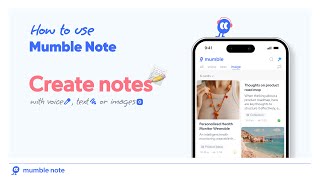
Take Notes with Voice, Text, and Images in Mumble Note
Mumble AI
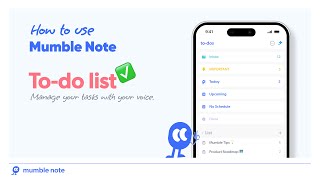
Manage Your To Dos with Mumble Note | Voice Powered Task Lists
Mumble AI
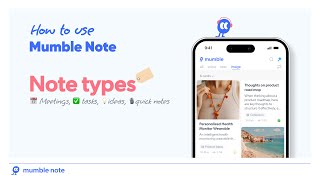
How to Use Note Types in Mumble Note: Meetings, Ideas, Tasks, Quick Note
Mumble AI
YouTube returned 6 videos for “Mumble Note”, and we withheld 1: 1 did not mention Mumble Note. Showing the 5 we can prove are about Mumble Note.
Official links
Tools that pair well with Mumble Note
Common stack mates teams adopt alongside Mumble Note, with the specific reason each pairing earns its keep.

Monologue
Monologue is Apple-only voice dictation that writes what you meant in any app, then turns notes into context your AI agents can use.

Voicenotes
Voicenotes is a bot-free AI notetaker that records meetings on your own device and hands you the summary before you hang up.

Notability
Notability turns handwritten notes, audio, and PDFs into AI summaries, quizzes, and flashcards across Apple, Android, and web.
Alternatives to Mumble Note
View all
Monologue
Monologue is Apple-only voice dictation that writes what you meant in any app, then turns notes into context your AI agents can use.

Voicenotes
Voicenotes is a bot-free AI notetaker that records meetings on your own device and hands you the summary before you hang up.

Notability
Notability turns handwritten notes, audio, and PDFs into AI summaries, quizzes, and flashcards across Apple, Android, and web.
Frequently Asked Questions
Best-of guides
Used Mumble Note? Help shape our editorial sentiment research.