
Screentell
Screentell is a browser-based screen recorder and video editor that adds Focus Zoom and 3D motion to product demos, with no install and
If you make demo videos alone and want 3D camera motion without buying Screen Studio or learning After Effects, Screentell is the browser option worth your afternoon. The $99 lifetime deal is unusually cheap for watermark-free, unlimited-length exports — but it is a single-player tool by design. Teams that live in Loom for cloud links and comments will find nothing to grab onto here.
Verified 19m ago · liveness 76/100 · cite: rightaichoice.com/tools/screentell
- Product marketers producing polished feature walkthroughs and demo videos for launch pages
- Tutorial and course creators who want zoom, 3D motion, and annotations in one browser tab
- Solo founders on Windows who want Screen-Studio-style motion without buying a Mac or desktop editor
- Privacy-sensitive teams recording internal software or client systems that cannot be uploaded
- Teams that need shared project folders, cloud backup, or threaded timeline comments
- Editors requiring multi-track audio work: per-track EQ, ducking, or audio buses
- Firefox and Safari users — the vendor recommends a Chromium browser for the optimal experience
We scan live Reddit threads, YouTube comments, X posts, G2 reviews and other communities — and hand you an honest verdict in under a minute.
- Honest verdict, not marketing
- Real pros & cons from real users
- Attributed quotes with receipts
3 free scans · no card needed
Skip Screentell if your team needs cloud-shared projects, threaded comments, or multi-track audio mixing, or if you work primarily in Firefox or Safari rather than a Chromium browser.
Free exports carry a watermark and are capped at 3 minutes per video, so any real production output pushes you to Pro.
At $0 free, $49.99/year Pro (~$4.16/mo), or $99 one-time Lifetime (list $199.99), Screentell undercuts desktop editors like Camtasia and ScreenFlow and sits below Screen Studio's Mac-only pricing. Loom's free tier offers more sharing and collaboration, but no 3D motion. It fits solo creators and small teams producing demos; teams needing cloud collaboration should budget for Loom or a desktop editor instead.
In short
Screentell — Screentell is a browser-based screen recorder and video editor that adds Focus Zoom and 3D motion to product demos, with no install and. Best for Product marketers producing polished feature walkthroughs and demo videos for launch pages, Tutorial and course creators who want zoom, 3D motion, and annotations in one browser tab, Solo founders on Windows who want Screen-Studio-style motion without buying a Mac or desktop editor. Free to start; paid plans from $49.99/mo.
What's new in Screentell
Checked todayAcross the latest 4 updates: 3 feature updates and 1 changelog entry.
OPFS chunk streaming for large and 4K exports plus export success modal
Screentell added OPFS chunk streaming so large and 4K 60FPS exports write to browser-native private storage, avoiding memory spikes. Also fixed camera stalling and added an export success modal.
Scenes and Sections with ripple-edit timeline controls
Screen recordings can be split into scenes or sections with custom backgrounds and text. Adjusting a scene duration now ripples all later clips, stickers and animations to keep alignment.
Inline text editing, mask stickers and doubled export bitrate
Double-click stickers to edit text inline, blur or pixelate sensitive areas with Mask stickers, and get native mic noise suppression. Export bitrate presets doubled to 20 Mbps at 1080p and 53 Mbps at 4K.
Crop Screen adds locked aspect-ratio presets
Crop Screen now offers Free, 16:9, 4:3, 1:1 and 9:16 presets that create a centered crop frame holding the chosen ratio while resizing. The switcher moved into the bottom crop controls.
What people actually say about Screentell — is it worth it?
We ran a structured research pass across product reviews, community discussions, and post-purchase forum threads to surface the patterns vendors won't publish themselves. Below: the recurring strengths, the hidden costs people mention most, and the cohort that consistently regrets adopting this tool.
30 mentions across 3 sources (Hacker News, YouTube, Product Hunt) · researched Aug 15, 2026.
Average across the 3 sources that answered — each source counts once, not each post.
- +Cinematic 3D transforms look stunning and are a key differentiator.
- +Zero-install, browser-based workflow fits perfectly into a single tab.
- +Local processing keeps recordings private and secure.
- +Saves time by eliminating the usual multi-tool setup hassle.
- +Free tier allows unlimited recordings before watermarked exports.
- −Export sometimes fails or gets stuck at 0% for some users.
- −Local processing can overheat machines during long exports.
- −Lacks post-record voiceover recording option.
- −Sticker customization is limited—can't adjust brand colors easily.
- −No template library yet, so users set up everything manually.
- • Watermark on free exports forces upgrade for professional use
- • Potential higher CPU usage may require a better machine
Viability Score
How well maintained and how widely used is Screentell? Built from what the vendor actually publishes (docs, changelog, tutorials, integrations, pricing), whether the site is live, and how much real users discuss it. How we calculate this
Last calculated: October 2026
How we score →Key Features
- Dual-stream capture: record screen and webcam simultaneously
- Screen-only, camera-only, and screen+camera recording modes
- System audio and microphone captured at the same time
- Native microphone noise and echo suppression
- Focus Zoom (2D): keyframed pans and zooms to guide attention
- Cinematic 3D Transforms: rotate, scale, skew, and tilt footage
- 3D joystick for controlling camera movement in 3D space
- Scenes & Sections: split recordings into slides with adjustable durations
- Automatic ripple edits keep clips, stickers, and keyframes aligned across scenes
- Inline text editing: double-click any text or shape sticker
- Mask stickers to blur or pixelate sensitive on-screen content
- Annotation stickers: arrows, bubbles, shapes, hand-drawn lines, uploaded images
- Face cam layer you can move, resize, reshape, or hide after recording
- Clip cutting, splitting, and per-segment playback speed control
- Locked aspect-ratio crop presets: Free, 16:9, 4:3, 1:1, 9:16
About Screentell
Screentell is an online screen recorder and video editor that runs entirely inside a Chromium browser — Chrome, Edge, Brave, or Arc — with nothing to install. It captures your screen and webcam as separate tracks alongside system audio and microphone, then hands you the edit timeline in the same tab. Recording and rendering happen locally: the vendor states recordings are processed and stored on your machine and never uploaded to external servers. The editing layer is why people look at it instead of a plain browser recorder. Focus Zoom (2D) keyframes pans and zooms to steer the viewer's eye, and Cinematic 3D Transforms use a 3D joystick to rotate, scale, skew, and tilt flat screen footage for depth. A face cam layer can be moved, resized, reshaped, or hidden after recording, and annotation stickers cover arrows, bubbles, shapes, hand-drawn lines, and uploaded images. Mask stickers blur or pixelate sensitive content, and you can double-click any text or shape sticker to edit it inline. Recent changelog work has moved fast: Scenes & Sections split a recording into slides with adjustable durations where changes ripple through later clips, stickers, and keyframes; Crop Screen gained locked presets for Free, 16:9, 4:3, 1:1, and 9:16; mic noise and echo suppression are now native; and OPFS chunk streaming lets large 4K 60FPS exports write to browser-native private storage without memory spikes. Export is MP4, WebM, or GIF, and you can also import an existing video file to edit. It suits solo creators, product marketers, and tutorial makers who want Screen-Studio-style motion without a Mac or a desktop editor. Alternatives like Screen Studio and FocuSee are desktop apps, while Loom and Tella lean toward cloud sharing — Screentell trades collaborative cloud projects for local privacy and a $49.99/year or $99 lifetime price.
Behind the Verdict
We'd reach for Screentell when the job is one person, one machine, one polished demo. The pitch is narrow and it holds up: record in the browser, add motion, export. Because everything renders locally, there is no upload wait on a 4K export and no question about where your client's internal UI ends up. The reason to pick it over a plain browser recorder is the motion kit. Focus Zoom and the 3D transforms are the parts that make footage look produced rather than captured, and the 3D joystick keeps you out of keyframe math. Scenes & Sections with ripple edits is the other one that matters — restructure a walkthrough after the fact and the stickers and animations stay aligned instead of drifting out of sync. The recent OPFS chunk streaming work is a quiet but real improvement. 4K 60FPS exports used to be the place browser editors fell over; streaming chunks to browser-native private storage instead of holding the render in memory is the correct fix, and 53 Mbps at 4K gives you headroom for YouTube uploads. Where it bites: this is a local-first architecture, so there are no shared project folders, no cloud backup, and no threaded comments. If your team reviews videos by dropping a Loom link in Slack, Screentell is the wrong shape for that workflow — not broken, just built for someone else. Multi-track audio post is also out of scope; there is no per-track EQ, ducking, or bus routing. Browser choice matters more than the marketing lets on. Chromium only — Firefox and Safari users are told to switch. That is a real constraint if you're on a locked-down machine. Closest alternative: Screen Studio, which owns this aesthetic on macOS. Screentell's answer is Windows support and a browser tab, at a fraction of the price. Versus Loom, it's the opposite trade — you give up
Researching Screentell? Get your full AI stack in 60 seconds.
Free, no signup — tell us your goal and get tools matched to your budget & existing stack.
Real-world workflow fit
Concrete scenarios for the personas Screentell actually fits — and what changes day-one when you adopt it.
Record a screen-only walkthrough plus webcam in Chromium, then trim the clip, add Focus Zoom on the key feature, apply a 3D transform to add depth, and drop in an arrow sticker pointing at the CTA.
Outcome: A polished 16:9 demo exported via the locked aspect-ratio preset, ready for a launch page without touching a desktop editor.
Record a step-by-step session with microphone and system audio, split the timeline into Scenes & Sections for each step, and use mask stickers to hide account details on screen.
Outcome: A chaptered tutorial with ripple-shifted scenes and blurred sensitive data, exported as MP4 with boosted bitrate presets.
Import an existing MP4 into the editor, crop it to the 9:16 preset, and add hand-drawn annotations plus a resized face cam layer.
Outcome: A vertical Reels or TikTok cut produced from existing footage using the crop preset and the same editing tools.
Use Cases
- Record a product demo with screen and camera overlay, then add 3D motion effects to highlight features.
- Create step-by-step tutorials with focus zooms and annotation stickers to guide viewers.
- Cut and speed-control clips to remove mistakes or emphasize key moments in a recording.
- Export one recording in 16:9 for YouTube and 9:16 for TikTok or Reels using locked crop presets.
- Add a face cam layer that you can move, reshape, or hide after recording for a professional touch.
- Import an existing video file to apply 3D transforms and stickers without re-recording.
- Record a long software walkthrough safely with progressive saving and crash recovery.
Limitations
- Screentell processes video locally in your browser, so performance depends on your device hardware; large or 4K exports rely on OPFS chunk streaming to avoid memory spikes and crashes.
- Cross-platform use is via the web only — there is no native mobile or desktop app, and no API is documented.
- Recordings are stored in browser local storage and are automatically deleted after 30 days, so anything you want to keep must be exported (or uploaded to a Projects page).
- Collaboration features like shared folders, cloud backup, and comment threads are absent.
- The free tier watermarks exports and caps each video at 3 minutes.
as of 2026-09-14
Verification history
We have re-verified Screentell 8 times since . Each pass re-reads the vendor's own pages and re-checks every listed field against that evidence; passes where nothing had changed are marked as such.
- — re-verified summary, description, our verdict, our analysis, pricing model, pricing tiers, features, integrations, who it suits, who should skip it
- — re-verified summary, description, our verdict, our analysis, pricing model, pricing tiers, features, integrations, who it suits, who should skip it
- — re-verified summary, description, our verdict, our analysis, pricing model, pricing tiers, features, integrations, who it suits, who should skip it
- — re-verified summary, description, our verdict, our analysis, pricing model, pricing tiers, features, integrations, who it suits, who should skip it
- — re-verified summary, description, our verdict, our analysis, pricing model, pricing tiers, features, integrations, who it suits, who should skip it
- — re-verified summary, description, our verdict, our analysis, pricing model, pricing tiers, features, integrations, who it suits, who should skip it
Showing the 6 most recent of 8 verification passes.
Free to cite with attribution — this page re-verifies continuously.
12-month cost
Project the real annual outlay, including the implied monthly cost when only an annual tier is published.
Vendor list price only. Add-on usage, seat overages, and contract minimums are surfaced under Hidden costs & gotchas.
Plans compared
For each published Screentell tier: who it actually fits, and what it adds vs. the previous tier. Cross-reference the cost calculator above for projected annual outlay.
Free
$0
Ideal for
Solo creators testing Screentell's motion and sticker tools before committing, or anyone recording short clips under 3 minutes.
What this tier adds
Free entry point: unlimited recordings and edits, HD export quality, and basic editing tools, but exports are watermarked and capped at 3 minutes.
Pro Plan (Yearly)
$49.99/year (~$4.16/mo)
Lifetime Plan
$99 one-time (list $199.99)
Ideal for
Creators who know they will keep producing demos and want to avoid recurring subscriptions entirely.
What this tier adds
Everything in Pro plus permanent access and updates with no recurring payments; $99 one-time against a $199.99 list price, with a portion of each sale going to Stripe Climate.
Where the pricing makes sense
The company stage and team size where Screentell's pricing actually pencils out — and where peers do it cheaper.
At $0 free, $49.99/year Pro (~$4.16/mo), or $99 one-time Lifetime (list $199.99), Screentell undercuts desktop editors like Camtasia and ScreenFlow and sits below Screen Studio's Mac-only pricing. Loom's free tier offers more sharing and collaboration, but no 3D motion. It fits solo creators and small teams producing demos; teams needing cloud collaboration should budget for Loom or a desktop editor instead.
Setup time & first value
How long it actually takes to get something useful out of Screentell — broken out by persona, not the marketing-page minute.
For solo creators, first value lands in minutes: open Screentell in Chrome, Edge, Brave, or Arc, click Start Recording, and the browser captures screen and camera with no install. Product marketers producing a polished demo should budget under an hour for the first edit once they learn Focus Zoom and 3D transforms. Tutorial creators with multi-scene videos should plan a couple of hours to get
Switching to or from Screentell
How to bring data in from common predecessors and how to get it back out — written for the switcher, not the buyer.
- →From Loom: download your Loom recordings as MP4, then import them into Screentell projects and re-apply 3D transforms and stickers, accepting the loss of cloud sharing and comment threads.
- →From ScreenFlow or Camtasia: export finished or raw MP4s from the desktop editor and import them into Screentell to use the 3D motion and annotation toolset in the browser.
- →From Screen Studio (Mac): move the same demo workflow into Screentell on Windows or any Chromium browser, trading the Mac app for browser-based editing.
- ↗To Loom: export Screentell MP4s and re-upload to Loom when you need cloud sharing and threaded comments rather than local-only processing.
- ↗To Camtasia or ScreenFlow: export MP4 or WebM from Screentell and bring it into a desktop editor once you need multi-track audio (EQ, ducking, buses) or heavier post-production.
Resources & Guides
Tutorials & Learning
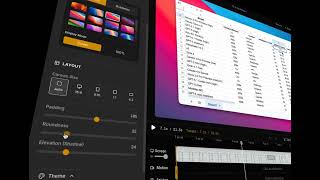
YouTube returned 6 videos for “Screentell”, and we withheld 5: 5 could not be judged, because “Screentell” is a single word that other videos use for other things. Showing the 1 we can prove is about Screentell.
Official links
Tools that pair well with Screentell
Common stack mates teams adopt alongside Screentell, with the specific reason each pairing earns its keep.

FocuSee
Auto-editing screen recorder for Windows and Mac that turns raw captures into polished demos with auto-zoom, cursor effects, and AI subtitles.

CursorClip
Native Mac screen recorder that auto-zooms on your cursor and clicks so demos look guided without editing.

Clideo
Browser-based video editor with 40+ single-purpose tools for compressing, subtitling, converting, and resizing clips.
Featured Head-to-Head Comparisons
Screentell vs Splice
Splice and Screentell serve entirely different creative needs: Splice is essential for music producers seeking a massive royalty-free sample library and rent-to-own premium plugins, while Screentell is ideal for product demo creators who want a no-install screen recorder with cinematic 3D effects. Choose Splice if you produce music and need samples/plugins; choose Screentell if you make polished video demos or tutorials in your browser.
Screentell vs Landr Mastering
If you're a musician wanting release-ready masters with album cohesion and streaming optimization, LANDR Mastering is your go-to at $10/track or via subscription. If you're a product demo or tutorial creator needing a no-install screen recorder with cinematic 3D transforms and local privacy, Screentell delivers. They serve completely different needs—choose based on whether you're mastering audio or recording video.
Screentell vs Storyfile
If your goal is preserving real human stories through interactive AI conversations—for museums, legacies, or media—StoryFile is unmatched. If you need to create polished product demos or tutorials quickly with cinematic 3D effects right in your browser, Screentell is the better choice. They solve fundamentally different problems, so pick based on whether you need authenticity of real people or production speed.
Alternatives to Screentell
View all
FocuSee
Auto-editing screen recorder for Windows and Mac that turns raw captures into polished demos with auto-zoom, cursor effects, and AI subtitles.

CursorClip
Native Mac screen recorder that auto-zooms on your cursor and clicks so demos look guided without editing.

Frequently Asked Questions
Categories
Topics
Used Screentell? Help shape our editorial sentiment research.