
2-b.ai
A browser extension that turns selected text on any web page into an AI-managed to-do list.
2-b.ai does one job well: turning what you're already reading into a task without leaving the browser. The drag-to-create gesture and AI Chat for creating, deleting, and refining tasks are the whole product, and for Gmail-and-Docs-heavy days they're genuinely lower friction than alt-tabbing into a task manager. The ceiling is real, though. Google Calendar import is the only published external connection, there's no desktop app, it won't fire on the Google main search page, and the free plan caps you at 50 calls on a basic AI model. Advanced models and smarter breakdown are still marked coming soon, so you're paying Pro ($5.99/mo Founder's or $10.99/mo Standard as listed) mainly for
Verified 1d ago · liveness 55/100 · cite: rightaichoice.com/tools/2-b-ai
- Knowledge workers whose day happens inside a browser
- Students pulling assignments and reading from online sources
- Lightweight-capture users who don't want a full task manager
- People who want AI task breakdown without a separate OpenAI account
- People who need offline task access
- Teams needing integrations beyond Google Calendar
- Users who work primarily inside desktop apps rather than the browser
We scan live Reddit threads, YouTube comments, X posts, G2 reviews and other communities — and hand you an honest verdict in under a minute.
- Honest verdict, not marketing
- Real pros & cons from real users
- Attributed quotes with receipts
3 free scans · no card needed
Skip 2-b.ai if you need offline access, a native desktop app, or task sync with more than Google Calendar — it captures from browser pages only, and the free plan's 50 calls run out if you capture heavily.
The free plan's 50 AI calls are a hard cap on a basic AI model — anything past that requires moving to Pro.
Listed pricing runs $5.99/mo for the Pro Founder's Membership and $10.99/mo for Pro Standard, with a free plan capped at 50 calls on a basic AI model. That places it below fuller task managers such as Todoist, whose paid tiers cost more, and roughly level with lightweight capture tools. It's a cheap layer on top of a browser workflow rather than a replacement for a paid project management seat.
In short
2-b.ai — A browser extension that turns selected text on any web page into an AI-managed to-do list. Best for Knowledge workers whose day happens inside a browser, Students pulling assignments and reading from online sources, Lightweight-capture users who don't want a full task manager. Free to start; paid plans from $5.99/mo.
Viability Score
How well maintained and how widely used is 2-b.ai? Built from what the vendor actually publishes (docs, changelog, tutorials, integrations, pricing), whether the site is live, and how much real users discuss it. How we calculate this
Last calculated: September 2026
How we score →Key Features
- Drag-to-create tasks from text selected on any web page
- AI Chat for creating, deleting, refining, and linking tasks
- AI subtask breakdown (Pro)
- Unlimited AI-powered to-do creation (Pro)
- Import Google Calendar schedule (Pro)
- No separate GPT or OpenAI account required
- Runs on GPAI-compliant AI models with copyright protection
- EU AI regulation compliance stated for AI agents
- Works on most web pages including Gmail, Google Docs, and Notion web
- Browser extension compatible with most browsers
- Free plan with limited access to a basic AI model (50 calls)
- Advanced AI models listed as coming soon
- Smarter task breakdown and reasoning listed as coming soon
- Priority support (Pro)
- Founding Member Community access (Pro)
About 2-b.ai
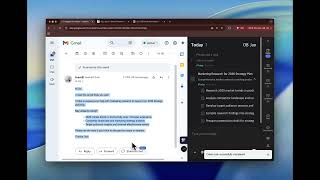
2-b.ai is a browser extension that turns any web page into an AI-assisted to-do list. You select text on a page or email and drag it into the extension, and the AI turns that context into a managed task, optionally broken into subtasks. A built-in AI Chat lets you create, delete, refine, and link tasks by talking to it, and you don't need a separate GPT or OpenAI account to use it. It works on most web pages, including Gmail, Google Docs, and Notion (web version), though not on the Google main search page or inside desktop apps because of Chrome extension limitations; a desktop app is said to be in development. AI runs on GPAI-compliant models with copyright protection, and the vendor states its AI agents are built in compliance with EU AI regulations. Google Calendar import is the only published external connection today, with more productivity-tool integrations described as expanding. The free plan gives limited access to a basic AI model (50 calls); Pro adds unlimited AI-powered to-do creation, unlimited basic-model access, Google Calendar schedule import, priority support, and Founding Member Community access, with advanced AI models and smarter task breakdown listed as coming soon. It is a lightweight capture layer for browser-heavy work rather than a full task manager.
Behind the Verdict
The pitch for 2-b.ai is narrow and honest: you're reading something — an email, a Google Doc, a Notion page — and an action item falls out of it. Normally that means copying text, opening a task app, pasting, editing, and setting a date. 2-b.ai collapses that into one drag. Select the text, drag it into the extension, and it becomes a task; on Pro the AI will break it into subtasks rather than one lump. That's the entire value proposition, and if your day is browser-shaped, it's a good one. The AI Chat is the second half. It handles create, delete, refine, and link operations conversationally, which means you can reshape a messy capture into something usable without clicking through a form. Notably, you don't need a separate GPT or OpenAI account — AI features are included — which removes the most common friction point for extensions that assume you'll bring your own key. The constraints are structural, not cosmetic. Coverage depends on what the Chrome extension can read: the vendor states it works on most web pages including Gmail, Google Docs, and Notion web, but not on the Google main search page or inside desktop apps, and some sites block extensions from accessing content at all. A desktop app is described as in development, so as of today your task list lives in a browser. Google Calendar import is the only published integration, with the vendor saying more are being added. On privacy, the claims are specific enough to check: only GPAI-compliant models with copyright protection, and AI agents built in compliance with EU AI regulations. Model names aren't published, so you can't tell which underlying model you're getting on the free tier versus what the promised advanced models will be. Where it fits: knowledge workers, students, and researchers who already live in a browser and want capture to be instantaneous. Where it doesn't: anyone who needs offline access, a native desktop app, deep two-way sync with a project management stack, or who regularly blows past the free plan's 50 calls. Pro's real justification is unlimited capture plus unlimited basic-model access — the advanced-model and smarter-reasoning features are listed as coming soon, so don't buy Pro for those specifically today.
Researching 2-b.ai? Get your full AI stack in 60 seconds.
Free, no signup — tell us your goal and get tools matched to your budget & existing stack.
Real-world workflow fit
Concrete scenarios for the personas 2-b.ai actually fits — and what changes day-one when you adopt it.
While triaging email, they select the sentence in a client thread that contains the actual ask and drag it into the 2-b.ai extension, which creates a task without a form or a new tab.
Outcome: Inbox triage and task capture happen in one motion, and nothing gets lost between checking mail and writing things down.
They read a Google Doc or a Notion page, select the paragraphs that imply follow-up work, and drag each one across; on Pro the AI breaks a broad item into concrete subtasks.
Outcome: A reading session ends with a structured assignment list instead of a pile of highlights.
They import their Google Calendar schedule into 2-b.ai and use AI Chat to add, refine, and link the tasks that need to fit around those commitments.
Outcome: Calendar events and captured tasks sit in the same view, so the day gets planned in one place.
Use Cases
- Capture action items from Gmail emails as to-dos without leaving the inbox
- Turn requirements or notes in a Google Doc into a task list with subtasks
- Save research notes from articles as tasks while you read
- Break a complex project into subtasks using AI Chat instead of manual entry
- Capture tasks from Notion web pages as you review them
- Import your Google Calendar schedule so the day's commitments sit alongside captured tasks
Models Under the Hood
as of 2026-09-22
Limitations
- Coverage depends on what a browser extension can read.
- 2-b.ai works on most web pages including Gmail, Google Docs, and Notion (web version) but does not work on the Google main search page or inside desktop apps due to Chrome extension limitations; the vendor says a desktop app is in development.
- Some sites restrict extensions from accessing page content at all, which the vendor describes as a browser limitation rather than a bug.
- The free plan gives limited access to a basic AI model (50 calls).
- Advanced AI models and smarter task breakdown and reasoning are listed as coming soon rather than available.
- Google Calendar import is the only published external connection, with more productivity-tool integrations described as expanding.
as of 2026-09-28
Verification history
We have re-verified 2-b.ai 19 times since . Each pass re-reads the vendor's own pages and re-checks every listed field against that evidence; passes where nothing had changed are marked as such.
- — re-checked, vendor evidence unchanged
- — re-checked, vendor evidence unchanged
- — re-checked, vendor evidence unchanged
- — re-checked, vendor evidence unchanged
- — re-checked, vendor evidence unchanged
- — re-verified summary, description, our verdict, our analysis, pricing model, pricing tiers, features, integrations, who it suits, who should skip it
Showing the 6 most recent of 19 verification passes.
Free to cite with attribution — this page re-verifies continuously.
12-month cost
Project the real annual outlay, including the implied monthly cost when only an annual tier is published.
Vendor list price only. Add-on usage, seat overages, and contract minimums are surfaced under Hidden costs & gotchas.
Plans compared
For each published 2-b.ai tier: who it actually fits, and what it adds vs. the previous tier. Cross-reference the cost calculator above for projected annual outlay.
Free
$0/mo
Ideal for
Individual trying 2-b.ai for browser-side capture before paying — a student or knowledge worker who wants to see whether dragging tasks out of Gmail and Docs fits their day
What this tier adds
Starting tier: limited access to a basic AI model (50 calls), basic task creation, and drag-to-create from web pages.
Pro Founder's Membership
$5.99/mo
Ideal for
Early adopter who has already hit the free plan's 50 calls and wants unlimited capture, unlimited basic-model use, and the Founding Member Community
What this tier adds
Adds unlimited AI-powered to-do creation, Google Calendar schedule import, unlimited basic-model access, priority support, and community access over Free.
Pro Standard
$10.99/mo
Ideal for
Buyer who wants the full Pro feature set at the standard published rate rather than the promotional Founders' rate
What this tier adds
Carries all Pro Founder's features — unlimited task creation, Google Calendar import, priority support, community access — at $10.99/mo instead of $5.99/mo.
Where the pricing makes sense
The company stage and team size where 2-b.ai's pricing actually pencils out — and where peers do it cheaper.
Listed pricing runs $5.99/mo for the Pro Founder's Membership and $10.99/mo for Pro Standard, with a free plan capped at 50 calls on a basic AI model. That places it below fuller task managers such as Todoist, whose paid tiers cost more, and roughly level with lightweight capture tools. It's a cheap layer on top of a browser workflow rather than a replacement for a paid project management seat.
Setup time & first value
How long it actually takes to get something useful out of 2-b.ai — broken out by persona, not the marketing-page minute.
For a browser-based user, setup is install-and-go: add the extension to your browser, log in, and drag your first selection across — typically under five minutes to first captured task. There is no configuration step, and no separate GPT or OpenAI account to create. Importing a Google Calendar schedule (Pro) adds a couple more minutes. Expect longer if you want to reshape an existing task backlog
Switching to or from 2-b.ai
How to bring data in from common predecessors and how to get it back out — written for the switcher, not the buyer.
- →From browser bookmarks and notes: drag the passages you saved as tasks directly out of the pages instead of filing them for later.
- →From Google Calendar: import your schedule on Pro so calendar commitments sit alongside captured tasks.
- →From manual copy-paste into a task app: replace the paste step with a single drag from the source page.
- ↗To Todoist or TickTick: export or re-enter your task list in the fuller manager when you need integrations beyond Google Calendar and offline access.
Integrations
Resources & Guides
Tutorials & Learning

YouTube returned 6 videos for “2-b.ai”, and we withheld 4: 4 could not be judged, because “2-b.ai” is a single word that other videos use for other things. Showing the 2 we can prove are about 2-b.ai.
Official links
Popular in Productivity

Genspark
Genspark is an AI search workspace that turns cited Sparkpage research into slides, sheets, dashboards, and no-code agents.

Poke (Interaction Co.)
Poke is an AI personal assistant that lives in your texts on Apple Messages, WhatsApp, Telegram and RCS

Mindful Memo
Premium domain name MindfulMemo.com for sale — a brand asset, not a software tool.
Frequently Asked Questions
Categories
Best-of guides
Topics
Used 2-b.ai? Help shape our editorial sentiment research.