Teachable Machine is live · free · last verified 26 Oct 2026 · viability healthy

Teachable Machine
Free browser tool from Google for training image, sound, and pose classifiers with no code and no account.
Teachable Machine is the fastest way to get a custom classifier working in front of an audience — you train in the browser, test instantly, and export a TensorFlow.js model that drops into Glitch, p5.js, or Node.js. For a classroom lesson on bias, a museum pose exhibit, or a hackathon demo, nothing else is this frictionless: no sign-up and no GPU. It is not a production tool. If you need large datasets, multi-object detection, or accuracy you can defend in a report, pair a real pipeline (TensorFlow or a managed vision API) with the same export step. Treat it as the on-ramp, not the destination.
Verdict generatedVerified 4d ago · liveness 82/100 · cite: rightaichoice.com/tools/teachable-machine
- Educators teaching ML concepts without code
- Artists and creatives building interactive installations
- Students prototyping ideas for class projects
- Non-programmers testing a quick ML proof of concept
- Teams shipping production models that need high accuracy on large datasets
- Projects requiring multi-label or multi-object detection
- Real-time systems with strict latency and optimization requirements
We scan live Reddit threads, YouTube comments, X posts, G2 reviews and other communities — and hand you an honest verdict in under a minute.
- Honest verdict, not marketing
- Real pros & cons from real users
- Attributed quotes with receipts
3 free scans · no card needed
Skip Teachable Machine if you need production-grade accuracy, large training datasets, multi-object detection, or team collaboration — it is built for single-label demos and teaching, not shipped products.
Exporting as TensorFlow Lite and hosting it on edge hardware like Coral or Arduino is free on Google's side, but you pay for the device and any hosting you set up yourself — there is no included deployment service.
Teachable Machine is free with no paid tier, which makes it cheaper than Google Cloud AutoML Vision, Roboflow, or Lobe for anyone whose need stops at a prototype. It is not a substitute for those paid services once you need volume, managed training, or production inference — at that point you are buying a different product, not upgrading this one.
In short
Teachable Machine — Free browser tool from Google for training image, sound, and pose classifiers with no code and no account. Best for Educators teaching ML concepts without code, Artists and creatives building interactive installations, Students prototyping ideas for class projects. Free to use.
No head-to-head comparison for Teachable Machine yet — the alternatives below are the closest matches we list.
What is Teachable Machine?
Teachable Machine — Free browser tool from Google for training image, sound, and pose classifiers with no code and no account. Best for Educators teaching ML concepts without code, Artists and creatives building interactive installations, Students prototyping ideas for class projects. Free to use.
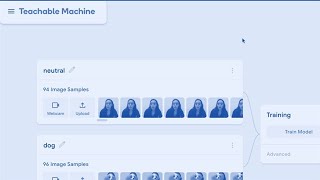
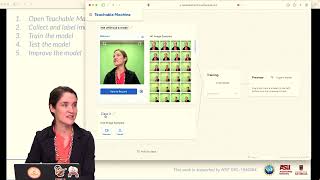
Teachable Machine is a free, browser-based tool from Google for training simple machine learning classifiers on your own images, sounds, and body poses. You gather examples into classes, train in-browser with live feedback, then test against new examples immediately. Data collection works with uploaded files or a live webcam and microphone, and the tool can run entirely on-device so your camera and mic data never leave your computer. Finished models export as real TensorFlow.js models that run anywhere JavaScript runs, or convert to TensorFlow Lite for edge hardware like Coral and Arduino. It is built for teachers demonstrating classification and algorithmic bias, artists building gesture- or sound-triggered installations, students making class projects, and non-programmers who want a working proof of concept in an afternoon rather than a semester. Google's own published tutorials (Bananameter, Snap Clap Whistle, Head Tilt) and the documented constraint of desktop Chrome or Safari define the honest scope: fast prototyping and teaching, not production ML.
Key features
- Train image classification models from uploaded files or a live webcam
- Train audio classification models from short recorded sound samples
- Train pose classification models using webcam body positions
- Gather / Train / Export three-step workflow with live classification preview
- On-device training option so webcam and microphone data stays on your computer
- Export models as TensorFlow.js that run in any JavaScript environment
- Export models to TensorFlow Lite for edge devices
- Download models or host them online
- Share trained models via URL
- No account or login required
- Documented image, sound, and pose tutorials (Bananameter, Snap Clap Whistle, Head Tilt)
- Works with Glitch, p5.js, Node.js, Coral, and Arduino
- Desktop browser support for Chrome and Safari
- Educational lesson plans published for K-8 and K-12 (AI + Ethics, Dancing with AI, Ready AI)
Our long-form take written Jul 23, 2026 is more than 90 days old, so it is being re-reviewed against current data and is not shown.
Models under the hood
as of 2026-10-23
Limitations
- Teachable Machine's own site shows an unsupported-browser message for anyone not on desktop Chrome or Safari, so mobile and other browsers cannot run it.
- The seed data caps models at 10 classes, and there is no dataset management, version control, or multi-user collaboration.
- It handles single-label classification only, with no multi-object or multi-label detection, and no account system means projects live as URLs or downloaded files rather than saved workspace items.
as of 2026-09-28
Researching Teachable Machine? Get your full AI stack in 60 seconds.
Free, no signup — tell us your goal and get tools matched to your budget & existing stack.
Is Teachable Machine still active?
Teachable Machine is live · free · last verified 26 Oct 2026 · viability healthy.
Viability score
How well maintained and how widely used is Teachable Machine? Built from what the vendor actually publishes (docs, changelog, tutorials, integrations, pricing), whether the site is live, and how much real users discuss it. How we calculate this
Last calculated: October 2026
How we score →What do users say about Teachable Machine?
What people actually say about Teachable Machine — is it worth it?
We ran a structured research pass across product reviews, community discussions, and post-purchase forum threads to surface the patterns vendors won't publish themselves. Below: the recurring strengths, the hidden costs people mention most, and the cohort that consistently regrets adopting this tool.
ResearchedDiscussed by users across 5 sources (Hacker News, YouTube, Product Hunt, Stack Overflow, Lemmy) · researched Oct 13, 2026.
Weighted by the 25 posts each of 5 sources contributed.
- +Zero cost, no account, no login — open the browser and start training immediately
- +Genuinely no-code workflow that non-programmers ship working demos with in an afternoon
- +On-device training option keeps webcam and microphone data off Google's servers
- +Exports real TensorFlow.js models that run anywhere JavaScript executes
- +Covers image, audio, and pose classification — three modalities in one tool
- −TensorFlow Lite to embedded hardware conversions (STM32, Arduino) frequently break in practice
- −Desktop Chrome and Safari only — no documented mobile or tablet support
- −No official support channel, ticketing, or paid escalation when things go wrong
- −tmImage API lacks basics like camera device selection without custom workarounds
- −Model quality and accuracy plateau quickly, unsuitable for anything beyond simple classifiers
- • No monetary cost, but deployment engineering time is real — embedded integrations often require significant custom code
- • No paid support tier exists, so troubleshooting time falls entirely on the user
How we verified this
Every listed fact about Teachable Machine— pricing, features, links, status — is re-read from the vendor's own pages by our verification pipeline and each change is logged with a date; the last pass ran on 26 Oct 2026. Pages mix model-assisted synthesis with human review; see how we verify.
Verification history
We have re-verified Teachable Machine 22 times since . Each pass re-reads the vendor's own pages and re-checks every listed field against that evidence; passes where nothing had changed are marked as such.
- — changed domain expiry, SSL certificate
- — changed SSL certificate
- — changed SSL certificate
- — changed hidden costs, limitations, use cases, description, our verdict, features, switching in, switching out, who should skip it, pricing tiers, pricing fit, setup time, summary, who it suits
- — changed SSL certificate
- — changed domain expiry, SSL certificate
Showing the 6 most recent of 22 verification passes.
Free to cite with attribution — this page re-verifies continuously.
How much does Teachable Machine cost in 2026?
Teachable Machine: Free to use. Pricing last verified 26 Oct 2026.
Plans compared
Every published Teachable Machine tier, its price as the vendor publishes it, who it fits, and what it adds over the tier below. The 12-month cost projection follows.
| Plan | Price | Billing | Who it's for |
|---|---|---|---|
| Free | Free | — | Teachers, students, artists, and non-programmers who need a working image, sound, or pose classifier without a budget line.Adds: Starting tier — $0 with no account required, browser-based training, and TensorFlow.js / TensorFlow Lite export. |
12-month cost
Project the real annual outlay, including the implied monthly cost when only an annual tier is published.
Vendor list price only. Add-on usage, seat overages, and contract minimums are surfaced under Hidden costs & gotchas.
Where the pricing makes sense
The company stage and team size where Teachable Machine's pricing actually pencils out — and where peers do it cheaper.
Teachable Machine is free with no paid tier, which makes it cheaper than Google Cloud AutoML Vision, Roboflow, or Lobe for anyone whose need stops at a prototype. It is not a substitute for those paid services once you need volume, managed training, or production inference — at that point you are buying a different product, not upgrading this one.
Has Teachable Machine's pricing changed?
No plan price for Teachable Machine has moved since we began logging in Aug 2026; the pricing page is re-read on every verification pass.
Who should pick Teachable Machine?
Pick Teachable Machine if you are Educators teaching ML concepts without code, Artists and creatives building interactive installations, Students prototyping ideas for class projects, Non-programmers testing a quick ML proof of concept.
Look elsewhere if you are Teams shipping production models that need high accuracy on large datasets, Projects requiring multi-label or multi-object detection, Real-time systems with strict latency and optimization requirements, Groups that need collaboration, version control, or dataset management.
Skip it if Skip Teachable Machine if you need production-grade accuracy, large training datasets, multi-object detection, or team collaboration — it is built for single-label demos and teaching, not shipped products.
GeneratedReal-world workflow fit
Concrete scenarios for the personas Teachable Machine actually fits — and what changes day-one when you adopt it.
Open Teachable Machine in Chrome on a classroom laptop, have students capture 30 photos each of two object categories with the webcam, train, then test by holding up new objects.
Outcome: Students see classification confidence change in real time and leave with a working model plus a concrete discussion of why bias in the training images matters.
Train a pose model on three body positions with the webcam, export as TensorFlow.js, and load it into a p5.js sketch driving projection visuals.
Outcome: A responsive installation running entirely in the browser, with no server and no camera data leaving the gallery machine.
Record a few hundred sound samples across three classes with the microphone, train in the browser, export the TensorFlow Lite model, and test it on an Arduino rig.
Outcome: A same-day answer on whether the classification idea is separable at all, before any engineering budget is committed.
Use cases
- Teach classification, bias, and ML fundamentals in a K-12 or university classroom without code
- Build a gesture-controlled game using pose classification driven by a webcam
- Create a sound-triggered light or art installation for a gallery or school project
- Prototype a quick image sorter that classifies objects on a live webcam feed
- Run a hands-on ML demo at a workshop or hackathon in under an hour
- Let non-technical team members test whether a classification idea is even viable
- Design a museum exhibit that responds to visitor poses
- Support accessibility experiments such as triggering sounds with facial gestures
Setup time & first value
How long it actually takes to get something useful out of Teachable Machine — broken out by persona, not the marketing-page minute.
Educators run a first full lesson demo in roughly 15–30 minutes including student data collection. Artists exporting to p5.js or Glitch typically reach a working sketch in under an hour. For a feasibility test with file uploads, expect 10–20 minutes to a first trained model, longer if you need clean labeled samples.
Switching to or from Teachable Machine
How to bring data in from common predecessors and how to get it back out — written for the switcher, not the buyer.
- →From ml5.js imageClassifier: retrain your classes in Teachable Machine and export a TensorFlow.js model, then load it from ml5.js with the exported model URL.
- ↗To TensorFlow or Keras: use the exported TensorFlow.js model as a baseline, then rebuild the same classes on your full dataset with a standard training pipeline.
- ↗To a managed vision service (AutoML-style): reuse your labeled class folders as the training dataset and replace the browser training step with managed training.
- ↗To TensorFlow Lite on edge hardware: keep the exported .tflite model and move inference to your Coral or Arduino deployment, leaving training behind.
Integrations
Tutorials & Learning

Official links
What are the best Teachable Machine alternatives?
The closest alternatives to Teachable Machine we list are Label Sleuth, Universal Data Tool and Potato. Ranked by direct product-type match, not category overlap.
| Alternative | Pricing | Starts at | Last verified |
|---|---|---|---|
| Label Sleuth | Free | Free | — |
| Universal Data Tool | Freemium | Pricing not published | — |
| Potato | Free | Free | — |
Alternatives to Teachable Machine
View all
Label Sleuth
Open-source, no-code system from IBM Research for labeling text and training custom text classifiers without AI expertise.

Universal Data Tool
Browser and offline desktop data labeling for image, text, document, and video annotation.

Tools that pair well with Teachable Machine
Common stack mates teams adopt alongside Teachable Machine, with the specific reason each pairing earns its keep.

Label Sleuth
Open-source, no-code system from IBM Research for labeling text and training custom text classifiers without AI expertise.

Universal Data Tool
Browser and offline desktop data labeling for image, text, document, and video annotation.

Potato
Open-source data annotation for text, image, audio, video, 3D, and AI agent traces — built in YAML, self-hosted free.
Frequently asked questions
Topics
Used Teachable Machine? Help shape our editorial sentiment research.