Tindlo is live · free plan, paid from $7/mo · last verified 2 Nov 2026 · viability monitor

Tindlo
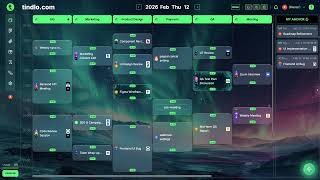
Tindlo layers your Google Calendar, tasks, and docs onto one multi-layer timeline so small teams can see execution in a single view.
If your small team keeps losing context between Google Calendar, a task tool, and scattered docs, Tindlo's multi-layer timeline is a cheap, low-friction fix — Standard is $7/month and the free tier is genuinely usable, not a demo. New Kanban thumbnails, Branch, and Snapspace give you more than a calendar skin, and the one-click Google Calendar sync plus Asana and Notion task import means you don't have to migrate your stack. It stays browser-based, and heavier trackers like Asana or ClickUp still win on Gantt and resource management.
Verdict generatedVerified 3d ago · liveness 55/100 · cite: rightaichoice.com/tools/tindlo
- Startups under 20 people wanting unified calendar, tasks, and docs
- Remote teams needing async coordination and execution visibility
- Product teams focused on execution over documentation
- Small marketing and operations teams
- Large enterprises requiring SSO or advanced permissions
- Teams that plan with Gantt charts or resource management
- Users who want a pure task manager with no calendar layer
We scan live Reddit threads, YouTube comments, X posts, G2 reviews and other communities — and hand you an honest verdict in under a minute.
- Honest verdict, not marketing
- Real pros & cons from real users
- Attributed quotes with receipts
3 free scans · no card needed
Skip Tindlo if your team plans with Gantt dependencies or resource capacity across dozens of people, or if a native iOS/Android app is a requirement — Asana or ClickUp cover that ground and Tindlo deliberately doesn't.
Free caps calendar history at 50 days, so anything older than that stops being visible until you move to Standard at $7/month.
At $7/month Standard, Tindlo undercuts Asana, ClickUp, Notion, and Monday.com per-seat pricing by a wide margin, and the free tier is a real working plan rather than a trial. That price fits bootstrapped startups, agencies, and freelancers. Teams that need capacity planning or Gantt scheduling will end up paying more elsewhere anyway; teams that mostly need execution visibility get the cheapest credible option here.
In short
Tindlo — Tindlo layers your Google Calendar, tasks, and docs onto one multi-layer timeline so small teams can see execution in a single view. Best for Startups under 20 people wanting unified calendar, tasks, and docs, Remote teams needing async coordination and execution visibility, Product teams focused on execution over documentation. Free to start; paid plans from $7/mo.
What is Tindlo?
Tindlo — Tindlo layers your Google Calendar, tasks, and docs onto one multi-layer timeline so small teams can see execution in a single view. Best for Startups under 20 people wanting unified calendar, tasks, and docs, Remote teams needing async coordination and execution visibility, Product teams focused on execution over documentation. Free to start; paid plans from $7/mo.
Tindlo is a time-driven workflow OS for small teams that keeps losing context between a calendar, a task tool, and scattered documents. It works by stacking layers: you link Google Calendar in one click so meetings become the first layer, import tasks from Asana or Notion (or create them directly) as the second layer, then attach documents to time blocks. The Timeline view — filterable by hour, day, or week — shows your tasks, your teammates' tasks, comments, and Google Calendar events together. Around that core sit four extra tools: New Kanban, which shows related tasks as visual thumbnails rather than plain cards; Branch, for hierarchical text documents with unlimited depth; Snapspace, a shared team whiteboard; and FileFlow, which keeps share links, video calls, emails, and PDF previews in one thread. Roadmaps handle blocks and milestones. The vendor positions it as low-migration — no import of your whole stack required, you just add the multi-layer view on top. It is browser-based, aimed at startups, remote teams, agencies, and freelancers; larger organisations needing SSO and deep permissions are out of scope. Free covers 50 days of calendar history, 500MB storage, 100 day-view tasks, 10 roadmap blocks and 10 milestones, 50 days of Kanban and Branch history, 50 Snapspace bricks, and one file per task. Standard at $7/month removes those caps and raises storage to 10GB.
Key features
- Multi-layer timeline combining calendar, tasks, and documents
- Timeline filtering by hour, day, or week
- One-click Google Calendar sync
- Import tasks from Asana
- Import tasks from Notion
- Attach documents to time blocks
- New Kanban with related tasks shown as visual thumbnails
- Branch: hierarchical text documents with unlimited depth
- Snapspace: shared team whiteboard
- FileFlow: share links, video calls, emails, and PDF previews in one thread
- Roadmaps with blocks and milestones
- Team-wide visibility of schedules, tasks, and comments
- Commenting and collaboration on tasks
- Team billing support on Standard
- Browser-based web app (no native desktop or mobile app)
Behind the verdict
Tindlo's pitch is narrow and honest: your team's work already has a time dimension, but it's spread across a calendar app, a task app, and a docs app. The product's answer is a single Timeline view you can filter by hour, day, or week, showing your tasks, your team's tasks, comments, and Google Calendar events as parallel layers. That is the whole thesis, and it's the reason to look at it — not the feature count. **Strengths.** The onboarding is unusually cheap: one-click Google Calendar link, task import from Asana or Notion, and you're running. The vendor explicitly says no migration is required — Tindlo layers on top of what you already use instead of asking you to abandon it. The free tier is real (50 days of calendar history, 500MB storage, 100 day-view tasks, 10 roadmap blocks and 10 milestones, 50 Snapspace bricks, one file per task), and Standard at $7/month lifts every one of those caps plus 10GB storage and team billing. For a team of five, that's the price of a couple of coffees. FileFlow — share links, video calls, emails and PDF previews in one thread — is the kind of small thing that saves a lot of tab-switching. Branch's hierarchical documents with unlimited depth and Snapspace's shared whiteboard are distinctive rather than checkbox features. **Weaknesses.** It's browser-only. If part of your team lives on phones, that's a daily friction you need to weigh before you commit. Storage at 10GB on Standard is modest if you're attaching media. The documented integration list is short — Google Calendar, Asana, Notion — so if your stack is Jira or Linear, the import path isn't described. And the tool deliberately doesn't do Gantt charts or resource management, which means it doesn't replace a serious project tracker for a 50-person programme. **Where it fits.** Teams under 20 that already run on Google Calendar and want execution visibility without buying another heavyweight platform. Agencies juggling client schedules, remote teams that need async coordination, and freelancers who want tasks and docs pinned to actual time blocks. **Where it doesn't.** Large organisations needing SSO and granular permissions, teams that plan with Gantt dependencies, and anyone for whom a native mobile app is non-negotiable. If you need to see workload across 40 people by capacity, this isn't that tool — Asana or ClickUp are the named alternatives for that job.
Limitations
- Tindlo is web-based and offers no native mobile apps, so anyone who needs iOS or Android should look elsewhere.
- It doesn't provide the deep permissions and SSO controls large enterprises require, and it isn't built for Gantt charts or resource management.
- The free plan carries hard ceilings: 50 days of calendar history, 500MB storage, 100 day-view tasks, 10 roadmap blocks and 10 milestones, 50 days of Kanban and Branch history, 50 Snapspace bricks, and one file upload per task.
- Standard at $7/month removes those limits and raises storage to 10GB, which is still modest for teams storing large media.
- Documented integrations cover Google Calendar, Asana, and Notion.
as of 2026-11-02
Researching Tindlo? Get your full AI stack in 60 seconds.
Free, no signup — tell us your goal and get tools matched to your budget & existing stack.
Is Tindlo still active?
Tindlo is live · free plan, paid from $7/mo · last verified 2 Nov 2026 · viability monitor.
Viability score
How well maintained and how widely used is Tindlo? Built from what the vendor actually publishes (docs, changelog, tutorials, integrations, pricing), whether the site is live, and how much real users discuss it. How we calculate this
Last calculated: November 2026
How we score →What do users say about Tindlo?
What people actually say about Tindlo — is it worth it?
We scanned public community sources for Tindlo on Nov 2, 2026 and could not establish that the discussion we found is about this tool rather than something else sharing its name. Only 1 of the posts we fetched could be positively tied to Tindlo. Rather than publish a sentiment score built on the wrong subject, we publish nothing here and re-run the scan.
How we verified this
Every listed fact about Tindlo — pricing, features, links, status — is re-read from the vendor's own pages by our verification pipeline and each change is logged with a date; the last pass ran on 2 Nov 2026. Analysis is drafted with AI models and checked against our editorial standards before publishing; see how we verify.
Verification history
We have re-verified Tindlo 11 times since . Each pass re-reads the vendor's own pages and re-checks every listed field against that evidence; passes where nothing had changed are marked as such.
- — changed description, setup time, switching in, use cases, pricing fit, switching out, features, pricing tiers, who should skip it, who it suits, summary, hidden costs, our verdict, limitations
- — changed SSL certificate
- — changed use cases, who it suits, description, our verdict, features, hidden costs, limitations, switching in, switching out, who should skip it, pricing tiers, pricing fit, setup time, summary
- — changed limitations
- — changed domain expiry
- — changed our verdict, pricing tiers
Showing the 6 most recent of 11 verification passes.
Free to cite with attribution — this page re-verifies continuously.
How much does Tindlo cost in 2026?
Tindlo: Free to start; paid plans from $7/mo. Pricing last verified 2 Nov 2026.
Plans compared
Every published Tindlo tier, its price as the vendor publishes it, who it fits, and what it adds over the tier below. The 12-month cost projection follows.
| Plan | Price | Billing | Who it's for |
|---|---|---|---|
| Free | Free | — | A solo founder or small team testing whether a timeline view actually reduces their status meetings, before spending anything.Adds: Free entry point: 50 days of calendar history, 500MB storage, 100 day-view tasks, 10 roadmap blocks and 10 milestones, 50 days of Kanban and Branch history, 50 Snapspace bricks, one file per task. |
| Standard | $7/mo | monthly | Startups and remote teams of a handful to twenty people who have hit the free caps and run their week from the timeline.Adds: Removes every Free limit — unlimited calendar, tasks, blocks, milestones, New Kanban, Branch, and Snapspace — and raises storage from 500MB to 10GB with team billing support, for $7/month. |
12-month cost
Project the real annual outlay, including the implied monthly cost when only an annual tier is published.
Vendor list price only. Add-on usage, seat overages, and contract minimums are surfaced under Hidden costs & gotchas.
Where the pricing makes sense
The company stage and team size where Tindlo's pricing actually pencils out — and where peers do it cheaper.
At $7/month Standard, Tindlo undercuts Asana, ClickUp, Notion, and Monday.com per-seat pricing by a wide margin, and the free tier is a real working plan rather than a trial. That price fits bootstrapped startups, agencies, and freelancers. Teams that need capacity planning or Gantt scheduling will end up paying more elsewhere anyway; teams that mostly need execution visibility get the cheapest credible option here.
Has Tindlo's pricing changed?
No plan price for Tindlo has moved since we began logging in Aug 2026; the pricing page is re-read on every verification pass.
Who should pick Tindlo?
Pick Tindlo if you are Startups under 20 people wanting unified calendar, tasks, and docs, Remote teams needing async coordination and execution visibility, Product teams focused on execution over documentation, Small marketing and operations teams.
Look elsewhere if you are Large enterprises requiring SSO or advanced permissions, Teams that plan with Gantt charts or resource management, Users who want a pure task manager with no calendar layer, Teams that require native iOS or Android apps.
Skip it if Skip Tindlo if your team plans with Gantt dependencies or resource capacity across dozens of people, or if a native iOS/Android app is a requirement — Asana or ClickUp cover that ground and Tindlo deliberately doesn't.
GeneratedReal-world workflow fit
Concrete scenarios for the personas Tindlo actually fits — and what changes day-one when you adopt it.
Links Google Calendar on day one, imports the sprint backlog from Asana, and attaches the product spec to Thursday's build block.
Outcome: Standup shrinks because everyone reads the day view instead — the vendor's own claim is 40% fewer status meetings.
Uses the week filter to see every teammate's tasks, comments, and calendar events on one timeline, then posts notes against the blocks that are slipping.
Outcome: Async coordination replaces chasing people in DMs, and new hires see the full picture from their first day.
Sketches the campaign on the Snapspace whiteboard, breaks it into roadmap blocks and milestones, and runs the weekly execution from New Kanban thumbnails and the timeline.
Outcome: One campaign lives in one place from brainstorm to ship, with FileFlow holding the brief links and PDF previews.
Use cases
- Put your team's meetings, tasks, and documents on one multi-layer timeline instead of checking five apps.
- Onboard a new remote hire with a shared view of schedules, files, and assignments.
- Plan a small-team sprint using the multi-layer timeline plus New Kanban thumbnails.
- Brainstorm campaign ideas together on the Snapspace whiteboard.
- Tie roadmaps to daily execution so blocks and milestones show up against real dates.
- Replace a recurring status meeting with day-view visibility into tasks and deadlines.
Setup time & first value
How long it actually takes to get something useful out of Tindlo — broken out by persona, not the marketing-page minute.
Four documented steps: link Google Calendar (about a minute), import tasks from Asana or Notion, attach docs to time blocks, then work from the shared timeline. A solo user reaches a usable timeline in well under an hour; a team adds another 15–30 minutes to invite people and assign blocks. No data migration is required because Tindlo sits on top of your existing tools.
Switching to or from Tindlo
How to bring data in from common predecessors and how to get it back out — written for the switcher, not the buyer.
- →From Google Calendar: one-click link turns your existing events into the first timeline layer, no export needed.
- →From Asana: import your tasks directly and they become the second layer alongside your calendar events.
- →From Notion: import task items from Notion pages; docs are then attached to time blocks rather than living in a page tree.
- ↗To Asana: no documented bulk export path — recreate roadmap blocks and milestones as projects and tasks.
- ↗To Notion: rebuild Branch documents as nested Notion pages, since hierarchy depth doesn't map one-to-one.
- ↗To ClickUp or Monday.com: re-enter milestones as Gantt dependencies if you need scheduling views Tindlo doesn't provide.
Resources & guides
Tutorials & Learning
YouTube returned 4 videos for “Tindlo”, and we withheld 3: 3 could not be judged, because “Tindlo” is a single word that other videos use for other things. Showing the 1 we can prove is about Tindlo.
Official links
What are the best Tindlo alternatives?
The closest alternatives to Tindlo we list are ClickUp, Monday.com and Asana. Ranked by direct product-type match, not category overlap.
| Alternative | Pricing | Starts at | Last verified |
|---|---|---|---|
| ClickUp | Freemium | Pricing not published | — |
| Monday.com | Freemium | Pricing not published | — |
| Asana | Freemium | Pricing not published | — |
Alternatives to Tindlo
View allClickUp
One workspace for projects, docs, chat, and AI agents that keep context on your team's work.

Monday.com
monday.com is an AI work platform where named agents run campaigns, ticket triage and project reporting on boards your team already uses
Tools that pair well with Tindlo
Common stack mates teams adopt alongside Tindlo, with the specific reason each pairing earns its keep.
ClickUp
One workspace for projects, docs, chat, and AI agents that keep context on your team's work.

Monday.com
monday.com is an AI work platform where named agents run campaigns, ticket triage and project reporting on boards your team already uses
Asana
Work management platform where prebuilt AI Teammates run projects alongside your people, governed from one console.
Tindlo vs its closest rival
Tindlo's closest head-to-head is with Gem.
Our Tindlo vs Gem verdict written Jul 3, 2026 is more than 90 days old, so it is being re-reviewed against current data and is not shown.
Frequently asked questions
Best-of guides
Topics
For makers of Tindlo
- Get a Verified Listing for Tindlo ($39): a written decision within 1 working day.
- Free listing for another tool: Free reviews are decided in order, within 3 weeks.
Used Tindlo? Help shape our editorial sentiment research.