
AI Perfect Assistant
AI chat and 60+ prompt tools built natively into Word, Excel, PowerPoint, Outlook, Teams and OneNote.
A practical buy if your working day happens inside Microsoft 365. The 60+ prompt templates plus on-the-fly switching between ChatGPT, DeepSeek, Gemini, Claude, and Perplexity do more than Grammarly or QuillBot ever will, and the coverage reaches Excel, PowerPoint, Teams, and OneNote, not just Word. Two caveats before you pay: the free tier's 10 monthly tokens won't accomplish real work, and all sales are final — there are no refunds.
Verified 1h ago · liveness 67/100 · cite: rightaichoice.com/tools/ai-perfect-assistant
- Office professionals who spend the day in Word, Excel, Outlook, and Teams
- Marketers and content creators who need fast drafts, SEO copy, and social posts
- Teams standardized on Microsoft 365 that want one AI subscription across apps
- Anyone who wants AI drafting, summarizing, and document Q&A without a separate chat app
- Developers who need a programmable API to embed AI in their own products
- Teams requiring on-premise deployment or complete data sovereignty
- Users whose main need is deep code generation rather than documents and email
We scan live Reddit threads, YouTube comments, X posts, G2 reviews and other communities — and hand you an honest verdict in under a minute.
- Honest verdict, not marketing
- Real pros & cons from real users
- Attributed quotes with receipts
3 free scans · no card needed
Skip AI Perfect Assistant if you don't work inside Microsoft 365 or Gmail and need a standalone app or an API you can call from your own code.
Prices on the pricing page exclude local taxes, so your final bill will be higher than the $16.99 or $25.99 headline depending on where you are billed.
One flat Premium subscription covers every Microsoft 365 integration plus Gmail, Telegram, and Chrome, which means a solo professional or small team pays $16.99/mo (annual) and gets more surface area than a single-seat Grammarly or QuillBot plan. Teams under roughly 10 seats get the best value here; larger orgs that need SSO, audit logs, and seat administration will likely outgrow the flat plan and should compare against enterprise Copilot seats priced per user.
In short
AI Perfect Assistant — AI chat and 60+ prompt tools built natively into Word, Excel, PowerPoint, Outlook, Teams and OneNote. Best for Office professionals who spend the day in Word, Excel, Outlook, and Teams, Marketers and content creators who need fast drafts, SEO copy, and social posts, Teams standardized on Microsoft 365 that want one AI subscription across apps. Free to start; paid plans from $16.99/mo.
What's new in AI Perfect Assistant
Checked 9 days agoAcross the latest 2 updates: 1 feature update and 1 news mention.
AI Perfect Assistant trending as top app in Microsoft Teams Productivity Tools
Vendor reports the Microsoft Teams app is trending among Teams Productivity Tools.
AI Perfect Assistant adds model selection: ChatGPT, DeepSeek, Gemini, Claude, Perplexity
Users can now switch the AI model behind AI Perfect Assistant. ChatGPT remains the default; DeepSeek, Gemini, Claude and Perplexity are selectable.
What people actually say about AI Perfect Assistant — is it worth it?
We ran a structured research pass across product reviews, community discussions, and post-purchase forum threads to surface the patterns vendors won't publish themselves. Below: the recurring strengths, the hidden costs people mention most, and the cohort that consistently regrets adopting this tool.
29 mentions across 2 sources (YouTube, Lemmy) · researched Aug 30, 2026.
Average across the 2 sources that answered — each source counts once, not each post.
- +Native integration across all six Microsoft 365 apps.
- +Multi-model support lets you switch between five AI providers.
- +Over 60 prompt templates cover a wide range of tasks.
- +Chat-with-document feature enables contextual Q&A.
- +Free tier offers basic functionality to try the tool.
- −Community feedback is almost nonexistent, making reputation unverified.
- −Free tier gives only 10 tokens per month, barely enough.
- −Privacy concerns with LLM-powered assistants are a recurring fear.
- −Potential integration hiccups, like Copilot failing to read OneDrive files.
- −No direct user anecdotes confirm the tool's effectiveness.
- • No clear cost per token after free tier; premium is flat but may be more than alternatives
Viability Score
How well maintained and how widely used is AI Perfect Assistant? Built from what the vendor actually publishes (docs, changelog, tutorials, integrations, pricing), whether the site is live, and how much real users discuss it. How we calculate this
Last calculated: October 2026
How we score →Key Features
- Chat with your documents: ask questions about Word, OneNote, or other content and get answers
- 60+ pre-built prompt templates across email, content, marketing, and productivity
- Multi-model switching: ChatGPT, DeepSeek, Gemini, Claude, Perplexity (added Jan 2026)
- Native add-ins for Word, Excel, PowerPoint, Outlook, Teams, and OneNote
- AI email replies including positive, negative, and angry-customer templates
- Grammar, spelling, and typo fixing
- Summarization, simplification, and paraphrasing
- Translation into multiple languages
- Excel formula generation and step-by-step formula explanation
- OCR text extraction from images and scanned documents
- Presentation outline generation and text-to-slide conversion
- SEO title and meta description creation
- Humanize AI text to make AI-generated copy read more naturally
- Blog post generator plus intros and content briefs
- Social media tools: Instagram captions, TikTok/Reel ideas and scripts, tweet ideas
About AI Perfect Assistant
AI Perfect Assistant is a Microsoft 365 add-in suite that drops ChatGPT-style AI chat and more than 60 pre-built prompt tools into the apps you already work in: Word, Excel, PowerPoint, Outlook, Teams, and OneNote. Rather than alt-tabbing to a browser, you summarize a document, generate a report, draft an email reply, translate text, or ask questions about content where you're already typing. Outside Office it reaches Gmail, Telegram, and Chrome, so the same prompt library follows you onto the web and into messaging. The prompt library is the substance here. Email workflows get positive, negative, and angry-customer reply templates plus a subject-line creator. Writing and documents get summarization, paraphrasing, grammar fixes, CV and cover letter drafting, blog intros, briefs, and a full blog post generator. Excel gets formula generation and step-by-step formula explanation. Marketing teams get SEO titles and meta descriptions, Facebook and Google ad copy, market research, content calendars, and TikTok/Reel scripts. There's OCR for pulling text out of images and scanned documents, a meeting minutes generator, and a humanize-AI-text tool for making generated copy read less machine-written. Model choice is flexible: since January 2026 users can switch between ChatGPT (the default), DeepSeek, Gemini, Claude, and Perplexity on the fly, so one subscription isn't locked to a single provider. One Premium subscription unlocks every Microsoft 365 integration at once. Positioning matters. Compared with grammar-first tools like Grammarly or QuillBot, this covers far more ground and spans Excel, PowerPoint, Teams, and OneNote rather than Word alone. It's for people whose job lives inside Office, not developers who need an API to embed AI in their own products.
Behind the Verdict
Where this earns its keep is the context switch it removes. If you write emails in Outlook, build decks in PowerPoint, and clean up spreadsheets in Excel, having summarization, translation, and draft generation one click away inside each app is genuinely different from keeping a ChatGPT tab open on a second monitor. We'd reach for it on days stacked with client replies and report writing. The prompt library is broader than the typical 'AI writing assistant' pitch. Excel formula generation and explanation alone justifies a look for anyone who touches spreadsheets but isn't a formula person. OCR for scanned documents and meeting-minutes generation are the sleeper tools — unglamorous, but they show up weekly in most office jobs. Model switching is the feature worth watching. Being able to pick DeepSeek for a cheap bulk task and Claude for a nuanced draft, without paying four separate subscriptions, is a real cost argument. It also means the tool isn't hostage to one provider's pricing or outages. Pick it if you're an Office-heavy professional, marketer, or team already standardized on Microsoft 365. Pass if you need a programmable API to embed AI into your own product — this is an end-user add-in, not a developer platform. Teams with strict on-premise or full data-sovereignty requirements should also look elsewhere; this is a cloud add-in. Caveats worth knowing before checkout. The free tier gives you 10 tokens per month on the default model only — treat it as a demo, not a working plan. And there are no refunds: all sales are final, which the vendor attributes to AI processing costs incurred immediately. Test on the free tier first if you're unsure. Compared to Grammarly, the overlap is only the grammar fixer. Grammarly is a proofreading layer; this is a drafting
Researching AI Perfect Assistant? Get your full AI stack in 60 seconds.
Free, no signup — tell us your goal and get tools matched to your budget & existing stack.
Real-world workflow fit
Concrete scenarios for the personas AI Perfect Assistant actually fits — and what changes day-one when you adopt it.
Installs the Outlook and Word add-ins, opens a customer complaint email, and runs the 'Angry Customer Email Reply' template to draft a first response, then uses 'Improve Draft' on the same copy.
Outcome: Sends a polished reply in minutes instead of drafting from scratch, without leaving Outlook.
Uses the 'Blog Post Brief', 'Blog Post Intro', and 'SEO Title & Meta Description' templates in Word, then switches to the Chrome extension for quick Instagram caption and TikTok script generation.
Outcome: Produces a full content package — brief, intro, SEO metadata, and social variants — from one subscription rather than stitching together separate tools.
Uses 'Generate Excel Formula' and 'Explain Excel Formula' to build and document a lookup formula, then pulls a Teams chat transcript into the 'meeting minutes' workflow.
Outcome: Ships the spreadsheet with an explanation the rest of the team can follow, and turns a messy chat into shared minutes.
Use Cases
- Draft a professional reply to an angry customer email in Outlook using the angry-customer template.
- Summarize a long Word document into key bullet points for quick review.
- Generate an Excel formula and have the tool explain what each part does.
- Turn rough OneNote meeting notes into a polished client-ready write-up.
- Create a presentation outline in Word and convert the text into slides in PowerPoint.
- Write SEO-optimized titles and meta descriptions for a blog post.
- Generate Instagram captions, TikTok scripts, and Facebook ad copy for a campaign.
- Extract text from a screenshot or scanned image using the OCR prompt.
Models Under the Hood
as of 2026-09-24
Limitations
- The free tier caps you at 10 tokens per month and restricts you to the default model only, so real work effectively requires the Premium plan ($16.99/month billed annually).
- DeepSeek, Gemini, ChatGPT, Claude, and Perplexity model switching is a Premium feature.
- The product is delivered as add-ins/plugins for Microsoft 365 apps (Word, Excel, PowerPoint, Outlook, Teams, OneNote) plus Gmail, Telegram, and Chrome; the scraped pages describe no standalone developer API.
- Prices exclude local taxes, and the 30% discount is a limited-time offer.
as of 2026-09-22
Verification history
We have re-verified AI Perfect Assistant 8 times since . Each pass re-reads the vendor's own pages and re-checks every listed field against that evidence; passes where nothing had changed are marked as such.
- — re-verified summary, description, our verdict, our analysis, pricing model, pricing tiers, features, integrations, who it suits, who should skip it
- — re-checked, vendor evidence unchanged
- — re-checked, vendor evidence unchanged
- — re-verified summary, description, our verdict, our analysis, pricing model, pricing tiers, features, integrations, who it suits, who should skip it
- — re-verified summary, description, our verdict, our analysis, pricing model, pricing tiers, features, integrations, who it suits, who should skip it
- — re-verified summary, description, our verdict, our analysis, pricing model, pricing tiers, features, integrations, who it suits, who should skip it
Showing the 6 most recent of 8 verification passes.
Free to cite with attribution — this page re-verifies continuously.
12-month cost
Project the real annual outlay, including the implied monthly cost when only an annual tier is published.
Vendor list price only. Add-on usage, seat overages, and contract minimums are surfaced under Hidden costs & gotchas.
Plans compared
For each published AI Perfect Assistant tier: who it actually fits, and what it adds vs. the previous tier. Cross-reference the cost calculator above for projected annual outlay.
Free
$0/mo
Ideal for
A single user who wants to test the add-in installation and try a handful of prompts before committing.
What this tier adds
Starting tier and free entry point: 10 tokens per month on the default AI model only, with integration access but no model switching.
Premium (Monthly)
$25.99/mo
Ideal for
Solo professionals or small teams who want to test at full volume month-to-month before committing to an annual contract.
What this tier adds
Removes the 10-token cap, unlocks DeepSeek, Gemini, ChatGPT, Claude, and Perplexity, and opens all Microsoft 365, Telegram, and Chrome integrations plus professional support.
Premium (Annual)
$16.99/mo billed annually
Ideal for
Office workers and marketing teams who have validated the tool and want the same feature set at the lowest per-month rate.
What this tier adds
Same unlimited tokens, full model selection, and all integrations as Premium Monthly, billed annually at $16.99/mo instead of $25.99/mo.
Where the pricing makes sense
The company stage and team size where AI Perfect Assistant's pricing actually pencils out — and where peers do it cheaper.
One flat Premium subscription covers every Microsoft 365 integration plus Gmail, Telegram, and Chrome, which means a solo professional or small team pays $16.99/mo (annual) and gets more surface area than a single-seat Grammarly or QuillBot plan. Teams under roughly 10 seats get the best value here; larger orgs that need SSO, audit logs, and seat administration will likely outgrow the flat plan and should compare against enterprise Copilot seats priced per user.
Setup time & first value
How long it actually takes to get something useful out of AI Perfect Assistant — broken out by persona, not the marketing-page minute.
Installation takes a few minutes per app: sign in with your email, then click 'Install Add-In' for each of Word, Excel, PowerPoint, Outlook, Teams, OneNote, Gmail, Telegram, or Chrome that you want. Most users are producing output within 10–15 minutes of the first add-in install; rolling it out across a small team is typically same-day. If an add-in fails to install, the vendor routes you to
Switching to or from AI Perfect Assistant
How to bring data in from common predecessors and how to get it back out — written for the switcher, not the buyer.
- →From Grammarly: keep the grammar workflow but add document chat, Excel formulas, slide generation, and marketing copy in the same subscription.
- →From QuillBot: replace paraphrasing-only usage with the paraphrase + summarize + translate + rewrite prompts across Office apps.
- →From ChatGPT in a browser tab: install the Office add-ins so you no longer copy-paste between the chat window and the document you're editing.
- →From Copilot in Microsoft 365: use the multi-model picker to route tasks to ChatGPT, Claude, Gemini, DeepSeek, or Perplexity within the same add-in.
- ↗To ChatGPT (standalone): move to the browser or desktop app if you no longer need in-document drafting or Excel/slide tooling.
- ↗To Grammarly: leave if your only real need is grammar and tone checking inside Word.
- ↗To Microsoft Copilot: switch if your organization wants a single-vendor Microsoft-bundled AI rather than a third-party multi-model add-in.
Integrations
Resources & Guides
Tutorials & Learning

How to Use ChatGPT in Excel with AI Perfect Assistant
Perfect Wiki
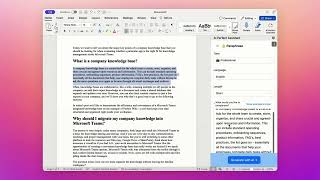
AI Perfect Assistant for Microsoft Word
AI Perfect Assistant
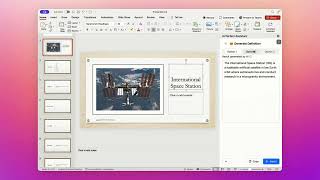
AI Perfect Assistant for Microsoft PowerPoint
AI Perfect Assistant
YouTube returned 6 videos for “AI Perfect Assistant”, and we withheld 1: 1 did not mention AI Perfect Assistant. Showing the 5 we can prove are about AI Perfect Assistant.
Official links
Tools that pair well with AI Perfect Assistant
Common stack mates teams adopt alongside AI Perfect Assistant, with the specific reason each pairing earns its keep.

Twistly
AI presentation maker that turns topics, PDFs, and Word docs into editable PowerPoint slides inside PowerPoint itself.

Tenorshare AI
Tenorshare AI humanizes AI-written text and checks it with a built-in AI detector before you submit
Quillbot
AI paraphrasing tool and writing suite for rewriting, grammar checks, and originality scans.
Featured Head-to-Head Comparisons
Ai Perfect Assistant vs Letterhead
For individual professionals seeking AI-powered writing assistance inside Microsoft Office and Google Workspace, AI Perfect Assistant is the clear choice with its freemium model and multi-model support. For teams managing multiple newsletters at scale, Letterhead's portfolio management and AI agent capabilities justify its enterprise pricing. Choose based on your primary workflow: document productivity vs email newsletter operations.
Ai Perfect Assistant vs Gem
Choose Gem if your recruiting team needs an all-in-one ATS/CRM with AI agents for sourcing, screening, and fraud detection, and you're willing to invest in a paid platform. Choose AI Perfect Assistant if your daily work revolves around Microsoft 365 and you want affordable AI assistance inside Word, Excel, and Outlook—especially with a free tier and multi-model support.
Ai Perfect Assistant vs Poke Interaction Co
Choose Poke if you want an AI assistant that lives in your messaging apps and proactively manages email, calendar, and automations with integrations like Notion and Oura. Choose AI Perfect Assistant if you need AI embedded directly inside Microsoft Office apps for document generation, rewriting, and summarization without leaving your workflow.
Ai Perfect Assistant vs Kagi
If you need a private, ad-free search engine with a powerful AI assistant and value zero tracking, Kagi is the clear winner. If your daily work is deeply embedded in Microsoft 365 and you want AI help directly inside Word, Excel, or Outlook, AI Perfect Assistant is the practical choice. Kagi has broader AI model access (GPT-5.5, Claude 4.8) and a richer ecosystem, while AI Perfect Assistant offers deep Office integration and over 60 templates.
Alternatives to AI Perfect Assistant
View all
Twistly
AI presentation maker that turns topics, PDFs, and Word docs into editable PowerPoint slides inside PowerPoint itself.

Tenorshare AI
Tenorshare AI humanizes AI-written text and checks it with a built-in AI detector before you submit
Frequently Asked Questions
Best-of guides
Used AI Perfect Assistant? Help shape our editorial sentiment research.