
LockIn MCP
Block distracting sites at the system level by asking Claude, ChatGPT, or Poke — LockIn MCP turns your AI assistant into a focus enforcer.
If Claude or ChatGPT is already open on your desktop all day, LockIn MCP is the cheapest way to make that assistant enforce focus instead of just discussing it. Hosts-file blocking survives private windows and restarts in a way browser extensions never did, and $29.99/year (billed yearly at $2.50/mo) is about the cost of one takeout lunch a month. Against Freedom (~$40/year, syncs phone and desktop, no AI integration) and Cold Turkey ($39 once, maximum lockdown, fully manual), LockIn's angle is the starting problem rather than raw block strength. The catch is scope: desktop only, no phone blocking, no cross-device sync — budget for iOS Screen Time alongside it.
Verified 2d ago · liveness 79/100 · cite: rightaichoice.com/tools/lockin-mcp
- AI power users who want focus enforcement delegated to Claude, ChatGPT, or Poke via MCP
- Students, remote workers, developers, and people with ADHD who lose afternoons to doomscrolling
- Anyone whose browser extensions get bypassed through private windows, new profiles, or a second browser
- Buyers who'd rather pay $59.99 once than keep a focus subscription running
- Users who need mobile (iOS/Android) blocking — LockIn is desktop-only, pair it with Screen Time
- Teams needing multi-device management, admin controls, or shared blocking policy
- People who want to block one browser but not another — hosts-file blocking is all or nothing
We scan live Reddit threads, YouTube comments, X posts, G2 reviews and other communities — and hand you an honest verdict in under a minute.
- Honest verdict, not marketing
- Real pros & cons from real users
- Attributed quotes with receipts
3 free scans · no card needed
Skip LockIn MCP if you need blocking on your phone or a single shared policy across several machines — it is desktop-only with no mobile app and no cross-device sync, so pair it with iOS Screen Time instead.
Both subscriptions open with a 3-day free trial, after which the yearly plan bills at $29.99 in one charge rather than the $2.50/mo it displays.
At $2.99/mo, or $29.99/year billed yearly at $2.50/mo, or $59.99 once, LockIn MCP sits below Freedom (~$40/year) and Cold Turkey ($39 once), and well below multi-device focus suites. It fits an individual buyer — student, remote worker, developer — better than a team, since there is no admin tier or per-seat plan to buy.
In short
LockIn MCP — Block distracting sites at the system level by asking Claude, ChatGPT, or Poke — LockIn MCP turns your AI assistant into a focus enforcer. Best for AI power users who want focus enforcement delegated to Claude, ChatGPT, or Poke via MCP, Students, remote workers, developers, and people with ADHD who lose afternoons to doomscrolling, Anyone whose browser extensions get bypassed through private windows, new profiles, or a second browser. Free to start; paid plans from $2.99/mo.
What's new in LockIn MCP
Checked todayAcross the latest 10 updates: 10 community discussions.
Best Apps for Maintaining Work Concentration in 2026
LockIn MCP blog compares concentration apps, listing itself alongside Freedom, Forest and ambient-sound tools. Editorial roundup, not a product change.
Best Distraction Blocker for Writers: Stop Interruptions in 2026
LockIn MCP blog post pitches distraction blockers for writers. Comparison content, no new product capability disclosed.
Best Cheap Distraction Blockers Under $10/Month (2026)
LockIn MCP blog rounds up sub-$10/month distraction blockers. No pricing change announced for LockIn MCP itself.
Best Productivity Apps for Freelancers in 2026: Tools That Actually Help You Get Paid
LockIn MCP blog curates productivity apps for freelancers. Roundup post; no feature or pricing news.
Best Mac Productivity Apps in 2026: Essential Tools for Focus & Work
LockIn MCP blog lists Mac focus and productivity apps. Editorial content with no release or roadmap detail.
Best Website Blocker for Linux in 2026 (System-Level + AI Options)
LockIn MCP blog covers Linux website blockers, including system-level and AI options. No platform support change stated.
StayFocusd vs Freedom: Best Distraction Blocker in 2026
LockIn MCP blog compares StayFocusd and Freedom. Competitor comparison post, not a LockIn MCP product update.
Best Alternative to Freedom: Top Distraction Blockers for 2026
LockIn MCP blog positions itself among Freedom alternatives. No new features, pricing or partnerships announced.
Windows Focus Apps: 7 Best Tools to Block Distractions (2026)
LockIn MCP blog lists seven Windows distraction blockers. Roundup content only.
Best AI Productivity Extensions in 2026
LockIn MCP blog rounds up AI productivity extensions. Editorial piece; no product or pricing change disclosed.
What people actually say about LockIn MCP — is it worth it?
We ran a structured research pass across product reviews, community discussions, and post-purchase forum threads to surface the patterns vendors won't publish themselves. Below: the recurring strengths, the hidden costs people mention most, and the cohort that consistently regrets adopting this tool.
30 mentions across 4 sources (Hacker News, Product Hunt, Bluesky, Lemmy) · researched Jul 4, 2026.
Average across the 3 sources that answered — each source counts once, not each post.
- +System-level hosts blocking is truly cheat-resistant—no browser extension to disable.
- +MCP-native: works with Claude, ChatGPT, Perplexity, Gemini, and any MCP client.
- +One-command installer (npx -y lockin-mcp install) sets up the daemon fast.
- +AI-controlled focus sessions feel natural and reduce friction.
- +Temporary unblocks with automatic expiry prevent accidental perma-unblock.
- −No clear recovery path if the MCP session dies mid-session.
- −Blocks are machine-wide—cannot whitelist specific browsers.
- −Config appears local-only; no sync across machines yet.
- −Very small user base means limited community support.
- −Session continuity across MCP restarts is unclear.
- • None identified; one-time payment with no subscription
- • Potential future costs for sync features or cloud services (not announced)
Viability Score
How well maintained and how widely used is LockIn MCP? Built from what the vendor actually publishes (docs, changelog, tutorials, integrations, pricing), whether the site is live, and how much real users discuss it. How we calculate this
Last calculated: October 2026
How we score →Key Features
- System-level website blocking written to the hosts file (127.0.0.1 youtube.com)
- MCP-native AI control: block_domains, enter_focus_mode, timed unblocks
- Start and manage focus sessions by asking Claude, ChatGPT, Perplexity, Gemini, or Poke
- One-command install: npx -y lockin-mcp install
- Blocks hold through restarts, new browser profiles, and private windows
- Temporary unblocking with automatic expiry
- Cross-platform daemon for macOS, Windows, and Linux with platform-specific DNS flush
- Chrome extension with task-aware blocking for Pro subscribers
- Task relevance check blocks pages that don't match the current focus task
- Focus dashboard logging sessions and distraction attempts
- Does not upload full browsing or search history to connected AI agents
- OAuth sign-in for Poke, Claude (claude.ai), and ChatGPT
- API key route for Claude Desktop
- Relay MCP URL works with any MCP-compatible client
- Disconnect agents via Dashboard → Agents (OAuth token revocation)
About LockIn MCP
LockIn MCP is a desktop distraction blocker you drive from an AI chat window. Instead of opening a separate focus app, you install once with npx -y lockin-mcp install (about a minute), connect an MCP-compatible assistant, and then type something like "block YouTube for 90 min" into Claude, ChatGPT, Perplexity, Gemini, Cursor, Hermes, OpenClaw, or Poke. The tool exposes MCP tools — block_domains, enter_focus_mode, and timed unblocks — so the assistant writes 127.0.0.1 youtube.com into your hosts file. Because the block lives at the system level rather than in a browser extension, it holds through restarts, new profiles, private windows, and a different browser. A background daemon keeps MCP running and temp-unblock timers alive across macOS, Windows, and Linux, with platform-specific DNS flush on Windows and Linux. An optional Chrome extension adds task-aware blocking for Pro subscribers: while a focus task is active it checks pages against that task, passes through docs that match, and blocks rabbit holes before they load. Only distraction attempts reach your dashboard — LockIn states it does not upload full browsing or search history to connected agents, and another agent is disconnected by revoking OAuth under Dashboard → Agents. Pricing is deliberately small: $2.99/mo, $29.99/year (billed yearly, $2.50/mo), or $59.99 once for a lifetime license, with a 3-day free trial on both subscriptions. It suits students, remote workers, developers, and people with ADHD who already keep an AI chat open all day. The tradeoff is desktop-only: no mobile app, no cross-device sync, and hosts-file blocking applies to the whole computer rather than one browser.
Behind the Verdict
LockIn MCP's whole pitch is that blocking was never the hard part; starting the block was. That is a real distinction. Most focus tools lose to friction: you have to notice you're drifting, quit the browser, open the app, pick a profile, and start a session. LockIn deletes those steps by living inside the chat window you're already staring at. You type a sentence, the assistant calls enter_focus_mode or block_domains, and the entry lands in your hosts file. Because the block is written at the OS level as 127.0.0.1, opening a second browser, a private window, or a fresh profile doesn't get you around it — the usual escape hatches from extension-based blockers are closed. The background daemon keeps MCP alive and timed unblocks ticking across restarts, and macOS, Windows, and Linux are all covered, with platform-specific DNS flush on the latter two. Installation is genuinely short: one terminal command, then per-agent configuration. Where it gets interesting is the optional Chrome extension, which is where task-aware blocking lives. While a focus task is active, the extension can check a page against that task, let the documentation you need through, and block the rabbit holes before they load. In its own example, youtube.com is blocked because it doesn't relate to the current task while tiktok.com and gmail.com are not. That is a meaningfully different mechanic from a static blocklist. The privacy design is also more restrained than it could have been: only distraction attempts reach the dashboard, LockIn states it does not upload your full browsing or search history, and task checks may send a page URL and short excerpt to LockIn's server for a relevance check that it says stays on its side. Disconnecting an agent is OAuth revocation under Dashboard → Agents, though you may still need to remove the connector inside Claude, ChatGPT, or Poke separately. The honest limitations. Blocking is desktop-only — there is no iOS or Android app, so your phone is untouched and you will want Screen Time or similar alongside it. There is no cross-device sync and no team management layer: no admin console, no shared blocking policy across machines. Hosts-file blocking is all-or-nothing per domain, so you can't block one browser and leave another alone. And the task-aware part depends on letting the extension send a page URL and excerpt for a relevance check — if that crosses a line for you, you're down to static domain blocks. Pricing options are narrow but cheap: $2.99/mo, $29.99/year (billed yearly at $2.50/mo), or $59.99 lifetime, each with a 3-day free trial on the subscriptions. Where it fits: AI power users who already run an MCP client, students and remote workers fighting afternoon doomscrolling, developers who want an enforced deep-work block that survives a restart, and people with ADHD who do better when the boundary is drawn by something other than willpower. Where it doesn't: anyone who needs phone blocking, teams needing multi-device policy
Researching LockIn MCP? Get your full AI stack in 60 seconds.
Free, no signup — tell us your goal and get tools matched to your budget & existing stack.
Real-world workflow fit
Concrete scenarios for the personas LockIn MCP actually fits — and what changes day-one when you adopt it.
Installs LockIn with one terminal command, connects Claude via the dashboard Agents page, then types "block Reddit and X for 2 hours" into the same chat window where the writing happens.
Outcome: Both domains resolve to 127.0.0.1 across every browser on the laptop, and the blocks survive a restart or a private window until the timer expires.
Starts a focus session from ChatGPT that blocks YouTube, X, and news sites, then leaves the task-aware Chrome extension on so documentation pages matching the task still load while rabbit holes are cut off.
Outcome: Docs pass through, distraction attempts land in Dashboard → Sessions, and the morning runs without a manual blocklist edit.
Pastes the relay MCP URL into Poke, chooses OAuth, signs in on lockinmcp.com, and adds the vendor's recipe to create a recurring deep work block.
Outcome: The focus session is started from the assistant each day rather than from a separate app, and a timed unblock can be requested mid-session when a site is genuinely needed.
Use Cases
- Tell Claude to block Reddit for 2 hours while you write your thesis.
- Start a focus session via ChatGPT that blocks YouTube, X, and news sites at once.
- Use Poke's recommended focus recipe to build a daily deep work routine.
- Temporarily unblock a site for 10 minutes with automatic re-blocking via your AI assistant.
- Let the Chrome extension pass through docs that match your task while blocking rabbit holes.
- Install LockIn on a team computer for enforced distraction-free coding sessions.
Models Under the Hood
as of 2026-10-18
Limitations
- LockIn MCP blocks at the system level via hosts-file entries, so blocks apply across the whole computer and persist through restarts, new profiles, and private windows.
- Setup requires a one-command installer plus per-agent MCP connector configuration, with separate guides for each client (e.g.
- Claude Desktop uses its own connect-agent command).
- Task-aware blocking is delivered through the Chrome extension, and focus sessions are driven by an AI assistant over MCP.
- Pricing is a 3-day free trial then $2.50/mo billed yearly ($29.99) or a $59.99 one-time lifetime license.
as of 2026-10-10
Verification history
We have re-verified LockIn MCP 9 times since . Each pass re-reads the vendor's own pages and re-checks every listed field against that evidence; passes where nothing had changed are marked as such.
- — re-checked, vendor evidence unchanged
- — re-verified summary, description, our verdict, our analysis, pricing model, pricing tiers, features, integrations, who it suits, who should skip it
- — re-verified summary, description, our verdict, our analysis, pricing model, pricing tiers, features, integrations, who it suits, who should skip it
- — re-verified summary, description, our verdict, our analysis, pricing model, pricing tiers, features, integrations, who it suits, who should skip it
- — re-verified summary, description, our verdict, our analysis, pricing model, pricing tiers, features, integrations, who it suits, who should skip it
- — re-verified summary, description, our verdict, our analysis, pricing model, pricing tiers, features, integrations, who it suits, who should skip it
Showing the 6 most recent of 9 verification passes.
Free to cite with attribution — this page re-verifies continuously.
12-month cost
Project the real annual outlay, including the implied monthly cost when only an annual tier is published.
Vendor list price only. Add-on usage, seat overages, and contract minimums are surfaced under Hidden costs & gotchas.
Plans compared
For each published LockIn MCP tier: who it actually fits, and what it adds vs. the previous tier. Cross-reference the cost calculator above for projected annual outlay.
Monthly
$2.99/mo
Ideal for
Someone who wants to test AI-started blocking for a month before committing, or who needs phone-friendly budget but desktop focus only.
What this tier adds
Starting tier: $2.99/mo with a 3-day free trial, cancel anytime, and the full feature set rather than a cut-down plan.
Yearly
$29.99/year (billed at $2.50/mo)
Ideal for
A student, remote worker, or developer who already knows the block-when-you-ask workflow fits and wants the lowest recurring cost.
What this tier adds
Saves 16% versus monthly at $29.99 billed yearly ($2.50/mo), with the same features plus a 3-day free trial.
Lifetime
$59.99 once
Ideal for
A buyer who knows they'll keep the tool and would rather pay once than keep a focus subscription running indefinitely.
What this tier adds
One payment of $59.99 replaces all recurring charges, with the same blocking, extension, and cross-platform coverage.
Where the pricing makes sense
The company stage and team size where LockIn MCP's pricing actually pencils out — and where peers do it cheaper.
At $2.99/mo, or $29.99/year billed yearly at $2.50/mo, or $59.99 once, LockIn MCP sits below Freedom (~$40/year) and Cold Turkey ($39 once), and well below multi-device focus suites. It fits an individual buyer — student, remote worker, developer — better than a team, since there is no admin tier or per-seat plan to buy.
Setup time & first value
How long it actually takes to get something useful out of LockIn MCP — broken out by persona, not the marketing-page minute.
Terminal install is one command (npx -y lockin-mcp install) and the vendor says about a minute, once. Connecting an agent is the real step: Poke, Claude (claude.ai), ChatGPT, Cursor, Hermes, and OpenClaw each have a connector guide, and Claude Desktop needs its own connect-agent command. Budget a few minutes for the first agent, seconds for the next.
Switching to or from LockIn MCP
How to bring data in from common predecessors and how to get it back out — written for the switcher, not the buyer.
- →From Freedom: keep Freedom for phone blocking, install LockIn on the desktop, and move deep-work sessions to your AI chat via MCP.
- →From Cold Turkey: export your block list mentally, install LockIn, and re-create the same domains as focus sessions your assistant can start.
- →From browser extensions like StayFocusd: the hosts-file layer replaces extension-level blocks, so you stop needing a separate extension per browser.
- →From manual hosts-file editing: run npx -y lockin-mcp install and let enter_focus_mode and block_domains manage the entries.
- ↗To Cold Turkey: if you need maximum manual lockdown (~$39 once) and don't want AI-driven sessions, Cold Turkey is the heavier lock.
- ↗To Freedom: if phone-plus-desktop sync matters more than AI control, Freedom covers both for around $40/year.
- ↗To iOS Screen Time: if your distraction problem is on an iPhone rather than a laptop, LockIn has no mobile app and Screen Time is the native answer.
Integrations
Resources & Guides
Tutorials & Learning
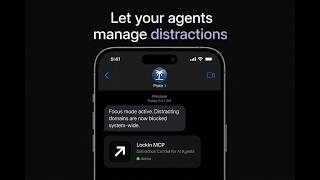
YouTube returned 6 videos for “LockIn MCP”, and we withheld 5: 5 did not mention LockIn MCP. Showing the 1 we can prove is about LockIn MCP.
Official links
Featured Head-to-Head Comparisons
Lockin Mcp vs Poke Interaction Co
LockIn MCP is ideal if you need unbypassable, AI-controlled focus on desktop, with a one-time payment. Poke is better if you want an AI assistant that manages your email, calendar, and health from your messaging apps, but requires a subscription for advanced features. Choose based on whether you need distraction blocking (LockIn) or life admin automation (Poke).
Lockin Mcp vs Gem
If you're a recruiter or talent team drowning in manual sourcing and screening, Gem is a powerhouse all-in-one platform that combines ATS, CRM, and AI agents to boost productivity. If you're a developer or AI power user who wants to let your AI assistant enforce focus by blocking distractions at the system level, LockIn MCP is a unique, lifetime-licensed tool. These products serve entirely different purposes—choose based on whether your problem is recruiting or distraction.
Lockin Mcp vs Guesty
Buyer direction is clear: if you run vacation rentals and want AI to automate guest communication, pricing, and reconciliation, Guesty is the right choice (especially with its June 2026 bank reconciliation launch). If instead you need to stop doomscrolling and let your AI assistant enforce focus at the system level, LockIn MCP is a unique, no-compromise tool. They solve entirely different problems—there's no overlap.
Popular in Productivity

Genspark
Genspark is an agentic AI workspace that turns one prompt into cited answers, slide decks, dashboards and live web apps.

Poke (Interaction Co.)
Poke is an AI personal assistant that lives in your texts on Apple Messages, WhatsApp, Telegram and RCS
Frequently Asked Questions
Categories
Best-of guides
Topics
Used LockIn MCP? Help shape our editorial sentiment research.